
几种content-type提交以及$_POST 和php://input
在表单提交数据时,需要告诉服务端自己的content-type,好让服务端处理。
默认表单提交是x-www-form-urlencoded,还有一种常见的 multipart/form-data。那这俩的区别是啥呢?
在postman工具中,很容易看出来二者的区别。
x-www-form-urlencoded:

查看http请求:
POST /hi.php HTTP/1.1

Host: localhost

Content-Type: application/x-www-form-urlencoded

Cache-Control: no-cache

Postman-Token: a1054dd4-5f58-038c--326721c85a7a

id=%2B1&val=
在 x-www-form-urlencoded中,body体中是key=value&key=xx形式,并且是urlencode后的。
multipart/form-data:

查看http请求:
POST /hi.php HTTP/1.1

Host: localhost

Content-Type: multipart/form-data; boundary=----WebKitFormBoundary7MA4YWxkTrZu0gW

Cache-Control: no-cache

Postman-Token: dddb1f15-348b-5e3f-244c-aa0d8680bd3d

------WebKitFormBoundary7MA4YWxkTrZu0gW

Content-Disposition: form-data; name="id"

+

------WebKitFormBoundary7MA4YWxkTrZu0gW

Content-Disposition: form-data; name="val"

------WebKitFormBoundary7MA4YWxkTrZu0gW--
form-data中含有boundary=----***
常见的content-type还有一种json形式:
Content-Type: application/json
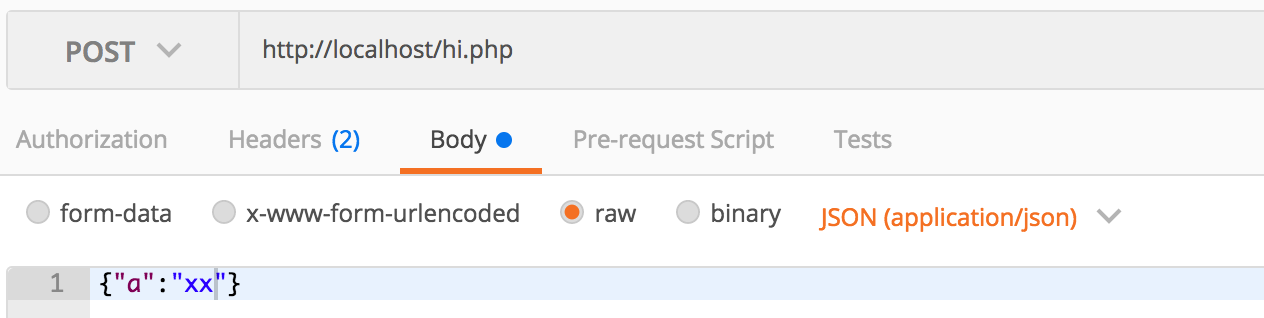
查看http请求:
POST /hi.php HTTP/1.1

Host: localhost

Content-Type: application/json

Cache-Control: no-cache

Postman-Token: 38f8844e-bd9f-a892-5107-a3f4e6b81a41

{"a":"xx"}
再看下$_POST和php://input的区别联系
利用一段测试代码:
<?php

$arr = $_POST;

$raw_post_data = file_get_contents('php://input', 'r');

file_put_contents('hsd.log', "\$_POST\r\n".print_r($arr,true)."\r\n", FILE_APPEND);

file_put_contents('hsd.log', "php://input\r\n".print_r($raw_post_data,true)."\r\n", FILE_APPEND);

file_put_contents('hsd.log', "content_type: ".print_r($_SERVER['HTTP_CONTENT_TYPE'],true)."\r\n", FILE_APPEND);

file_put_contents('hsd.log', print_r("====================",true)."\r\n", FILE_APPEND);
在几种content-type表现如下:(php version 5.5.3)
1. 当是x-www-form-urlencoded时,
$_POST

Array

(

    [id] => 1+1

    [val] => 44753

)

php://input

id=1%2B1&val=44753

content_type: application/x-www-form-urlencoded
php://input中的形式和body体中是一样的,同样是urlencode过的。
2. 当是 multipart/form-data时,
$_POST

Array

(

    [id] => 1+111

    [val] => 44753

)

php://input

content_type: multipart/form-data; boundary=----WebKitFormBoundaryUUacTtaG65hX7g6y
发现$_POST依然可以获取到参数。此时php://input 获取不到值。
(测试在hhvm HipHop VM 3.0.1;baidu version:1.0.6.4 php://input可以获取到multipart/form-data 提交参数)如下:
$_POST

Array

(

    [id] => 1+111

    [val] => 44753

)

php://input

------WebKitFormBoundaryxHArWQUlukzFfZAb

Content-Disposition: form-data; name="id"

1+111

------WebKitFormBoundaryxHArWQUlukzFfZAb

Content-Disposition: form-data; name="val"

44753

------WebKitFormBoundaryxHArWQUlukzFfZAb--

content_type: multipart/form-data; boundary=----WebKitFormBoundaryxHArWQUlukzFfZAb
3. 当是application/json时,
$_POST

Array

(

)

php://input

{"a":"xx"}

content_type: application/json
此时,$_POST获取不到提交参数。php://input 可以获取到。这种json提交数据,php接收参数需要使用 file_get_contents('php://input', 'r')。
总结:
$_POST只能获取到form提交的数据,而php://input获取不到 multipart/form-data提交的数据。
这里顺便提下,如何提交给php获取$_POST的key=>value是数组形式。
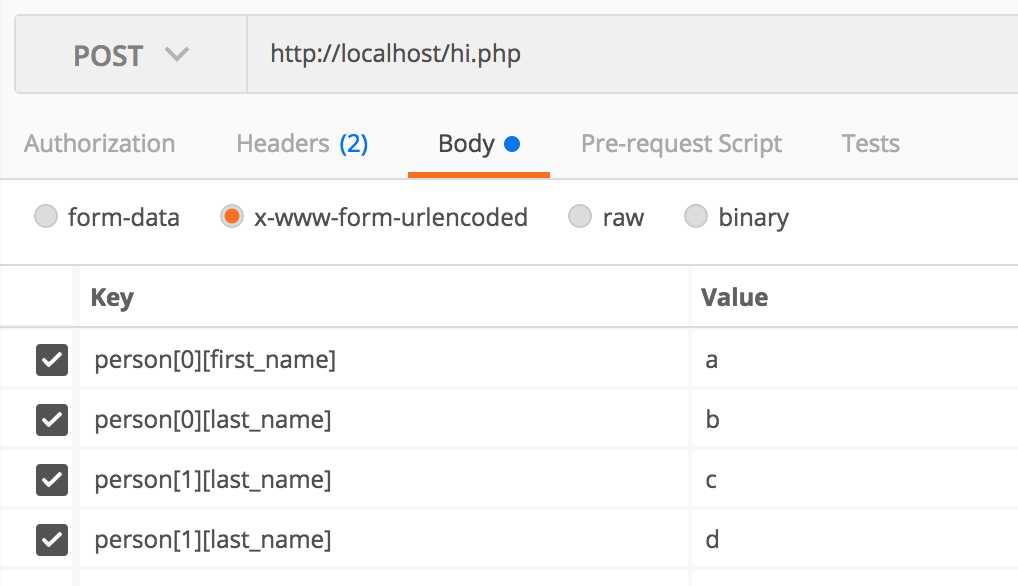
$arrParams = array(

            'person[0][first_name]' => 1,

            'person[0][last_name]' => 1,

            'person[1][first_name]' => 111,

            'person[1][last_name]' => 222,

        );
这样$_POST['person'] 就是个二维数组了。
$_POST

Array

(

    [person] => Array

        (

            [0] => Array

                (

                    [first_name] => a

                    [last_name] => b

                )

            [1] => Array

                (

                    [last_name] => d

                )

        )

)

php://input

person%5B0%5D%5Bfirst_name%5D=a&person%5B0%5D%5Blast_name%5D=b&person%5B1%5D%5Blast_name%5D=c&person%5B1%5D%5Blast_name%5D=d

content_type: application/x-www-form-urlencoded
几种content-type提交以及$_POST 和php://input的更多相关文章
- 转载 SharePoint【Site Definition 系列】– 创建Content Type
转载原地址: http://www.cnblogs.com/wsdj-ITtech/archive/2012/09/01/2470274.html Sharepoint本身就是一个丰富的大容器,里面 ...
- the request doesn't contain a multipart/form-data or multipart/form-data stream, content type header
the request doesn't contain a multipart/form-data or multipart/form-data stream, content type header ...
- php表单提交 图片、音乐、视频、文字,四种类型共同提交到数据库
这个问题一直困扰了我好几天,终于在今天让我给解决了,难以掩饰的激动. 其实在之前没有接触到这种问题,只是表单提交数据而已,再就是图片,四种类型同时提交还真是没遇到过,做了一个系统,其中有一个功能就是提 ...
- 今天在研究jquery用ajax提交form表单中得数据时,学习到了一种新的提交方式
今天在研究jquery用ajax提交form表单中得数据时,学习到了一种新的提交方式 jquery中的serialize() 方法 该方法通过序列化表单值,创建 URL 编码文本字符串 序列化的值可在 ...
- Springs Element 'beans' cannot have character [children], because the type's content type is element-only
Springs Element 'beans' cannot have character [children], because the type's content type is element ...
- .NET获取文件的MIME类型(Content Type)
第一种:这种获取MIME类型(Content Type)的方法需要在.NET 4.5之后才能够支持,但是非常简单. 优点:方便快捷 缺点:只能在.NET 4.5之后使用 public FileResu ...
- org.springframework.web.HttpMediaTypeNotSupportedException: Content type 'application/json;charset=UTF-8' not supported或其他Content type不支持处理
很久没从头到尾搭框架,今天搭的过程中,springmvc controller方法入参用@RequestBody自动绑定参数时一直提示各种 not supported 排查问题有两个解决路径: 1)使 ...
- jmeter报"msg":"Content type 'application/x-www-form-urlencoded;charset=UTF-8' not supported"的解决方法
1.报"msg":"Content type 'application/x-www-form-urlencoded;charset=UTF-8' not supporte ...
- Java之POI读取Excel的Package should contain a content type part [M1.13]] with root cause异常问题解决
Java之POI读取Excel的Package should contain a content type part [M1.13]] with root cause异常问题解决 引言: 在Java中 ...
随机推荐
- java基础(五) String性质深入解析
引言 本文将讲解String的几个性质. 一.String的不可变性 对于初学者来说,很容易误认为String对象是可以改变的,特别是+链接时,对象似乎真的改变了.然而,String对象一经创 ...
- git 入门教程之忽略文件
忽略文件 "并不是所有的牛奶都叫特仑苏",在版本控制系统中也有相似的表达,那就是"并不是所有的文件都需要提交". 有的是因为没必要提交,比如日志文件,系统缓存文 ...
- PQA组织的设置与运作
文/共创力咨询资深顾问 杨学明 PQA(Process Quality Assurance)是过程质量保证的意思,有的公司也把它称为PPQA(Product Process Quality Assu ...
- CSS之精灵图(雪碧图)与字体图标
本文内容: 精灵图 字体图标 首发日期:2018-05-01 精灵图: 在以前,每个图片资源都是独立的一张张图片,浏览器访问网站中的不同网页时是重复获取这一张张图片的,这代表需要访问很多次资源. 为了 ...
- virtualbbox centos7 NAT模式外网 Host-only Adapter模式联网 双网卡
1.下载oracle VM virtualbox centos7 1.1. 下载地址:https://www.virtualbox.org/wiki/Downloads https://www.ce ...
- 记一次坑爹的ORA-01152&ORA-01110错误
最近做RMAN还原时遇到了一次非常坑爹的ORA-01152&ORA-01110错误.遇到的具体错误信息如下所示: RMAN> alter database open resetlogs; ...
- SQL Server中sp_spaceused统计数据使用的空间总量不正确的原因
很多时候,我们经常使用sp_spaceused来查看表的空间使用情况,上个月群里有个网友说他使用DELETE删除了数据后,使用sp_spaceused查看,发现该表的分配的空间总量(reserved) ...
- AFURLSessionManager 上传下载使用
1.下载 Creating a Download Task NSURLSessionConfiguration *configuration = [NSURLSessionConfiguration ...
- mysql文件
MySQL的每个数据库都对应存放在一个与数据库同名的文件夹中,MySQL数据库文件包括MySQL(server)所建数据库文件和MySQL(server)所用存储引擎创建的数据库文件. .frm文件: ...
- Ubuntu下 MySQL的“ERROR 1045 (28000): Access denied for user 'root'@'localhost' (using password: NO)”
今天闲来无事,在Ubuntu上掏鼓一下mysql.但尴尬的是,当我输入mysql -u root -p的时候,抛出了一个错误:ERROR 1045 (28000): Access denied for ...