
EF_简单的增删改查
EF分为三种code_first,model_first,dabase_first这三种模式,网上的例子有好多,但是用了之后感觉实际中都不是这么用的,此处记录写下来日后用的着了可以快速应用,记录如下:
新建项目添加EF6.2
需要四个东西:
1.表对应的model实例,此例中为: shop_test
2.EF连接数据的对象类,此例中为: EF_DATA_DBCONTEXT
3.数据操作的接口类,此例中为: IRepository
4.数据实际操作类,实现接口IRespository的类,此例中为: DataAccessObject
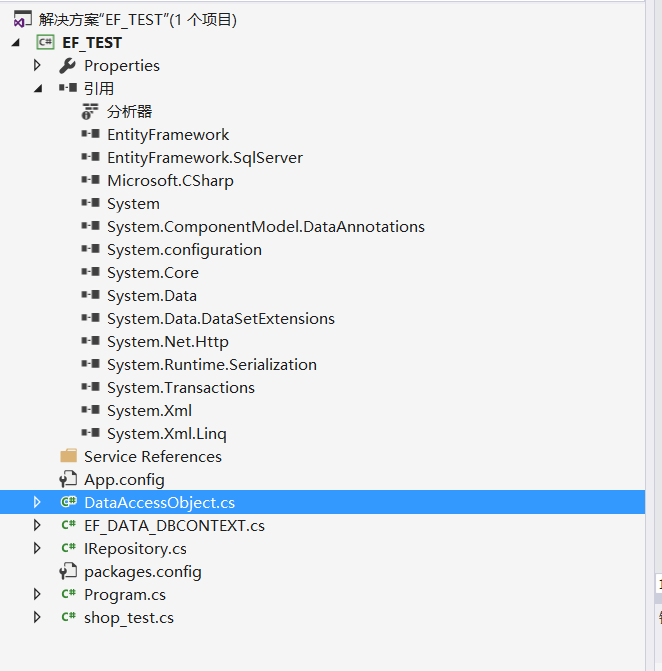
1.shop_test
using System;
using System.Collections.Generic;
using System.Linq;
using System.Text;
using System.Threading.Tasks;
using System.ComponentModel.DataAnnotations.Schema;
using System.ComponentModel.DataAnnotations;
using System.Runtime.Serialization;
namespace EF_TEST
{
[DataContract]
[Serializable]
[Table("shop_test")]
public partial class shop_test
{
[DataMember(Name ="id")]
[Key]
[DatabaseGenerated(DatabaseGeneratedOption.Identity)]
public int id { get; set; }
[DataMember(Name ="shopname")]
public string shopname { get; set; }
[DataMember(Name ="create_time")]
public DateTime create_time { get; set; }
[DataMember(Name ="test_msg")]
public string test_msg { get; set; }
}
}
2.EF_DATA_DBCONTEXT
using System;
using System.Collections.Generic;
using System.Linq;
using System.Text;
using System.Threading.Tasks;
using System.Data.Entity;
namespace EF_TEST
{
//用EF进行连接时需要指定的连接数据库的
class EF_DATA_DBCONTEXT:DbContext
{
public EF_DATA_DBCONTEXT(string contr) : base(contr)
{
}
protected override void OnModelCreating(DbModelBuilder modelBuilder)
{
//base.OnModelCreating(modelBuilder);
}
public DbSet<shop_test> shoptests { get; set; }
}
}
3.IRepository
using System;
using System.Collections.Generic;
using System.Linq;
using System.Text;
using System.Threading.Tasks;
using System.Linq.Expressions;
using System.Data.Entity;
using System.Data.Entity.Infrastructure;
namespace EF_TEST
{
interface IRepository
{
DbContext CurrentDbContext
{
get;
}
DbEntityEntry<T> Attach<T>(T entity) where T : class;
T Insert<T>(T entity) where T : class;
T Insert<T>(T entity, bool isCommit) where T : class;
void InsertRange<T>(IEnumerable<T> entities) where T : class;
void InsertRange<T>(IEnumerable<T> entities, bool isCommit) where T : class;
void Update<T>(T entity) where T : class;
void Update<T>(T entity, bool isCommit) where T : class;
void UpdateRange<T>(IEnumerable<T> entities) where T : class;
void UpdateRange<T>(IEnumerable<T> entities, bool isCommit) where T : class;
void Delete<T>(T entity) where T : class;
void Delete<T>(T entity, bool isCommit) where T : class;
void DeleteRange<T>(IEnumerable<T> entities) where T : class;
void DeleteRange<T>(IEnumerable<T> entities, bool isCommit) where T : class;
T Find<T>(params object[] keyValues) where T : class;
T Find<T>(object keyValue) where T : class;
List<T> FindAll<T>(Expression<Func<T, bool>> conditions = null) where T : class;
List<T> FindAllByPage<T, S>(Expression<Func<T, bool>> conditions, Expression<Func<T, S>> orderBy, int pageSize, int pageIndex) where T : class;
int SaveChanges();
}
}
4.DataAccessObject
using System;
using System.Collections.Generic;
using System.Linq;
using System.Text;
using System.Threading.Tasks;
using System.Data.Entity;
using System.Linq.Expressions;
using System.Data.Entity.Infrastructure;
using System.Data;
namespace EF_TEST
{
class DataAccessObject:IRepository,IDisposable
{
private DbContext _currentDbContext = null;
public DbContext CurrentDbContext
{
get
{
return this._currentDbContext;
}
}
public DataAccessObject(DbContext dbContext)
{
this._currentDbContext = dbContext;
}
public DbEntityEntry<T> Attach<T>(T entity) where T : class
{
DbSet<T> dbSet = this._currentDbContext.Set<T>();
dbSet.Attach(entity);
return this._currentDbContext.Entry<T>(entity);
}
public T Insert<T>(T entity) where T : class
{
return this.Insert<T>(entity, true);
}
public T Insert<T>(T entity, bool isCommit) where T : class
{
this._currentDbContext.Set<T>().Add(entity);
if (isCommit)
{
this._currentDbContext.SaveChanges();
}
return entity;
}
public void InsertRange<T>(IEnumerable<T> entities) where T : class
{
this.InsertRange<T>(entities, true);
}
public void InsertRange<T>(IEnumerable<T> entities, bool isCommit) where T : class
{
this._currentDbContext.Set<T>().AddRange(entities);
if (isCommit)
{
this._currentDbContext.SaveChanges();
}
}
public void Update<T>(T entity) where T : class
{
this.Update<T>(entity, true);
}
public void Update<T>(T entity, bool isCommit) where T : class
{
this._currentDbContext.Set<T>().Attach(entity);
//this._currentDbContext.Entry<T>(entity).set_State(16);
this._currentDbContext.Entry<T>(entity).State = EntityState.Modified;
if (isCommit)
{
this._currentDbContext.SaveChanges();
}
}
public void UpdateRange<T>(IEnumerable<T> entities) where T : class
{
this.UpdateRange<T>(entities, true);
}
public void UpdateRange<T>(IEnumerable<T> entities, bool isCommit) where T : class
{
foreach (T current in entities)
{
this._currentDbContext.Set<T>().Attach(current);
// this._currentDbContext.Entry<T>(current).set_State(16);
this._currentDbContext.Entry<T>(current).State = EntityState.Modified;
}
if (isCommit)
{
this._currentDbContext.SaveChanges();
}
}
public void Delete<T>(T entity) where T : class
{
this.Delete<T>(entity, true);
}
public void Delete<T>(T entity, bool isCommit) where T : class
{
this._currentDbContext.Set<T>().Remove(entity);
if (isCommit)
{
this._currentDbContext.SaveChanges();
}
}
public void DeleteRange<T>(IEnumerable<T> entities) where T : class
{
this.DeleteRange<T>(entities, true);
}
public void DeleteRange<T>(IEnumerable<T> entities, bool isCommit) where T : class
{
this._currentDbContext.Set<T>().RemoveRange(entities);
if (isCommit)
{
this._currentDbContext.SaveChanges();
}
}
public int SaveChanges()
{
return this._currentDbContext.SaveChanges();
}
public T Find<T>(params object[] keyValues) where T : class
{
return this._currentDbContext.Set<T>().Find(keyValues);
}
public T Find<T>(object keyValue) where T : class
{
object[] array = new object[]
{
keyValue
};
return this._currentDbContext.Set<T>().Find(array);
}
public List<T> FindAll<T>(Expression<Func<T, bool>> conditions = null) where T : class
{
List<T> result;
if (conditions == null)
{
result = this._currentDbContext.Set<T>().ToList<T>();
}
else
{
result = this._currentDbContext.Set<T>().Where(conditions).ToList<T>();
}
return result;
}
public List<T> FindAllByPage<T, S>(Expression<Func<T, bool>> conditions, Expression<Func<T, S>> orderBy, int pageSize, int pageIndex) where T : class
{
IQueryable<T> source = (conditions == null) ? this._currentDbContext.Set<T>() : this._currentDbContext.Set<T>().Where(conditions);
return source.OrderByDescending(orderBy).Skip((pageIndex - 1) * pageSize).Take(pageSize).ToList<T>();
}
public void Dispose()
{
this._currentDbContext.Dispose();
}
}
}
控制台程序:
using System;
using System.Collections.Generic;
using System.Linq;
using System.Text;
using System.Threading.Tasks;
using System.Data.Entity;
using System.Transactions;
namespace EF_TEST
{
class Program
{
static void Main(string[] args)
{
//config中的数据库的连接字符串
string CONSTR = System.Configuration.ConfigurationManager.ConnectionStrings["CONSTR"].ConnectionString;
//EF的DB连接对象
EF_DATA_DBCONTEXT db = new EF_DATA_DBCONTEXT(CONSTR);
//实现的的具体方法
IRepository DB_LINK = new DataAccessObject(db);
//进行的查询操作
List<shop_test> msg = DB_LINK.FindAll<shop_test>(p => p.id >= 0);
Console.WriteLine("查询ID大于0的所有数据");
Console.WriteLine("共查询到的信息行数:{0}--最后一个数据的时间:{1}", msg.Count, msg.Max(u => u.create_time).ToString());
//插入操作
shop_test insert_shop = new shop_test() { shopname="test", test_msg="ss", create_time =DateTime.Now };
using (TransactionScope scope =new TransactionScope() )
{
DB_LINK.Insert<shop_test>(insert_shop,false);
shop_test insert_second = new shop_test() { shopname=insert_shop.shopname, test_msg=insert_shop.test_msg, create_time=DateTime.Now };
DB_LINK.Insert<shop_test>(insert_second, false);
DB_LINK.SaveChanges();
scope.Complete();
}
Console.WriteLine("插入的id:{0}--shopname {1}---test_msg:{2} ---create_time:{2}", insert_shop.id, insert_shop.shopname, insert_shop.test_msg, insert_shop.create_time);
//更新操作
msg = DB_LINK.FindAll<shop_test>(u => u.id > 0);
Console.WriteLine("查询ID大于0的所有数据");
Console.WriteLine("共查询到的信息行数:{0}--最后一个数据的时间:{1}", msg.Count, msg.Max(u => u.create_time));
//更新操作,更新最大时间为当前时间
shop_test update_shop = (from i in msg
let max_time = msg.Max(u => u.create_time)
where i.create_time == max_time
select i
).FirstOrDefault();
update_shop.create_time = DateTime.Now;
DB_LINK.Update<shop_test>(update_shop);
Console.WriteLine("更新的id:{0}--shopname {1}---test_msg:{2} ---create_time:{2}", insert_shop.id, insert_shop.shopname, insert_shop.test_msg, insert_shop.create_time);
//删除操作;
Console.WriteLine("查询ID大于0的所有数据");
Console.WriteLine("共查询到的信息行数:{0}--最后一个数据的时间:{1}", msg.Count, msg.Max(u => u.create_time));
//删除操作 删除时间最早的数据
msg = DB_LINK.FindAll<shop_test>(u => u.id > 0);
shop_test delete_shop = (from i in msg
let max_time = msg.Max(u => u.create_time)
where i.create_time == max_time
select i
).FirstOrDefault();
DB_LINK.Delete<shop_test>(delete_shop);
Console.WriteLine("删除的id:{0}--shopname {1}---test_msg:{2} ---create_time:{2}", insert_shop.id, insert_shop.shopname, insert_shop.test_msg, insert_shop.create_time);
Console.WriteLine("查询ID大于0的所有数据");
Console.WriteLine("共查询到的信息行数:{0}--最后一个数据的时间:{1}", msg.Count, msg.Max(u=>u.create_time));
Console.ReadKey();
}
}
}
配置文件,及其数据库的表结构:
<connectionStrings>
<!--<add name="CONSTR" connectionString="DATA SOURCE=127.0.0.1;INITIAL CATALOG=TEST;USER ID=SA;PASSWORD=123"/>-->
<add name="CONSTR" connectionString="Data Source=127.0.0.1;Database=TEST;UID=sa;PWD=123;" providerName="System.Data.SqlClient"/>
</connectionStrings>
CREATE TABLE [dbo].[shop_test](
[id] [INT] IDENTITY(1,1) NOT NULL,
[shopname] [VARCHAR](50) NULL,
[create_time] [DATETIME] NULL,
CONSTRAINT [PK_shop_test] PRIMARY KEY NONCLUSTERED
(
[id] ASC
)WITH (PAD_INDEX = OFF, STATISTICS_NORECOMPUTE = OFF, IGNORE_DUP_KEY = OFF, ALLOW_ROW_LOCKS = ON, ALLOW_PAGE_LOCKS = ON) ON [PRIMARY]
)
EF_简单的增删改查的更多相关文章
- salesforce 零基础学习(五十一)使用 Salesforce.com SOAP API 实现用户登录以及简单的增删改查(JAVA访问salesforce)
此篇请参看:https://resources.docs.salesforce.com/202/latest/en-us/sfdc/pdf/salesforce_developer_environme ...
- MyBatis学习--简单的增删改查
jdbc程序 在学习MyBatis的时候先简单了解下JDBC编程的方式,我们以一个简单的查询为例,使用JDBC编程,如下: Public static void main(String[] args) ...
- 通过JDBC进行简单的增删改查
通过JDBC进行简单的增删改查(以MySQL为例) 目录 前言:什么是JDBC 一.准备工作(一):MySQL安装配置和基础学习 二.准备工作(二):下载数据库对应的jar包并导入 三.JDBC基本操 ...
- MyBatis简单的增删改查以及简单的分页查询实现
MyBatis简单的增删改查以及简单的分页查询实现 <? xml version="1.0" encoding="UTF-8"? > <!DO ...
- 初试KONCKOUT+WEBAPI简单实现增删改查
初试KONCKOUT+WEBAPI简单实现增删改查 前言 konckout.js本人也是刚刚接触,也是初学,本文的目的是使用ko和asp.net mvc4 webapi来实现一个简单增删改查操作.Kn ...
- MVC3.0+knockout.js+Ajax 实现简单的增删改查
MVC3.0+knockout.js+Ajax 实现简单的增删改查 自从到北京入职以来就再也没有接触MVC,很多都已经淡忘了,最近一直在看knockout.js 和webAPI,本来打算采用MVC+k ...
- SpringMVC之简单的增删改查示例(SSM整合)
本篇文章主要介绍了SpringMVC之简单的增删改查示例(SSM整合),这个例子是基于SpringMVC+Spring+Mybatis实现的.有兴趣的可以了解一下. 虽然已经在做关于SpringMVC ...
- python3.6 使用 pymysql 连接 Mysql 数据库及 简单的增删改查操作
1.通过 pip 安装 pymysql 进入 cmd 输入 pip install pymysql 回车等待安装完成: 安装完成后出现如图相关信息,表示安装成功. 2.测试连接 import ...
- 通过flask实现web页面简单的增删改查bootstrap美化版
通过flask实现web页面简单的增删改查bootstrap美化版 项目目录结构 [root@node1 python]# tree -L 2 . ├── animate.css ├── fileut ...
随机推荐
- scipy 的K-means
#导入相应的包 import scipy import scipy.cluster.hierarchy as sch from scipy.cluster.vq import vq,kmeans,wh ...
- MySQL和MySQL的注释方式
MySQL的注释方式 mysql 服务器支持如下几种注释方式: (1) # 到该行结束 # 这个注释直到该行结束 mysql> SELECT 1+1; (2)-- 到该行结束 ...
- 关于mysql 的 autoCommit 参数
首先描述一下这个参数的作用. 这个参数 默认是开启的. 开启以后再命令敲的sql 会自动提交.如果关闭,就必须手动 commit. 查看 这个 自动提交状态. SELECT @@autocommit; ...
- netty原理解析
netty主要采用的是reactor模式(事件)驱动模型,以下主要对reactor进行总结: C/S架构可以抽象为如下模型: C就是Client(客户端),上面的B是Browser(浏览器) S就是S ...
- ajax高级操作
$('#ajax_submit').click(function () { $.ajax({ 'url':'/app_ajax', 'type':'post', 'data':$("#f1& ...
- vue 路由配置
1.不带参数的路由配置 及 跳转 //路由配置: { name: "a", path: "/a", component: a } 页面跳转: this.$r ...
- js通过查看屏幕大小,更改其他css属性
首先,我们要知道如何得到屏幕的相关数据. <html><head><title>获取当前对象大小以及屏幕分辨率等</title><body> ...
- 函数中不能对全局变量进行修改,想要修改全局变量需要在变量前面加global
# def change_name(name):# global school # school = "Mage Linux"# print(&quo ...
- DLL简单分析与调用方法
最近为了分析一个没有代码的DLL有哪些函数,找了各种方法. 把结果分享一下:三个方法都没法得到函数的参数,有点让我失望. DLL Export Viewer NikPEViewer Dumpbin 配 ...
- LAB1 partIV
PartIV 实现 处理worker 失败情况. worker 处理失败,master 应该重新分配该任务给其他的worker 处理. rpc 失败情况复杂,可能worker 结果回应丢失了,也有可能 ...