
ORACLE等待事件:read by other session
read by other session简介
官方关于read by other session的介绍如下:
When information is requested from the database, Oracle will first read the data from disk into the database buffer cache. If two or more sessions request the same information, the first session will read the data into the buffer cache while other sessions wait. In previous versions this wait was classified under the "buffer busy waits" event. However, in Oracle 10.1 and higher this wait time is now broken out into the "read by other session" wait event. Excessive waits for this event are typically due to several processes repeatedly reading the same blocks, e.g. many sessions scanning the same index or performing full table scans on the same table. Tuning this issue is a matter of finding and eliminating this contention.
当从数据库请求信息时,Oracle将首先将数据从磁盘读入数据库缓冲区缓存。如果两个或多个会话请求相同的信息时,则第一个会话将数据读入buffer cache的过程中,而其他会话出现等待。在之前的数据库版本中,此等待事件被归类为“buffer busy waits”等待事件。 但是,在Oracle 10.1及更高版本中,此等待时间现在划分为“read by other session”等待事件。 该等待事件的大量等待通常是由于一些进程重复读取相同的数据块,例如, 许多会话扫描同一索引或在同一个表上执行全表扫描。 调优此问题是找到并消除这种竞争。
C.3.114 read by other session的介绍
This event occurs when a session requests a buffer that is currently being read into the buffer cache by another session. Prior to release 10.1, waits for this event were grouped with the other reasons for waiting for buffers under the 'buffer busy waits' event
Wait Time: Time waited for the buffer to be read by the other session (in microseconds)
read by other session的分析
read by other session等待的出现也说明数据库存在读的竞争,等待事件read by other session 通常与等待事件db file scattered read 和db file sequential read同时出现。有时候甚至与等待事件enq: TX - row lock contention同时出现(特殊情况,一个特殊案例中遇到的,等待read by other session的会话阻塞其它会话),如下截图所示。
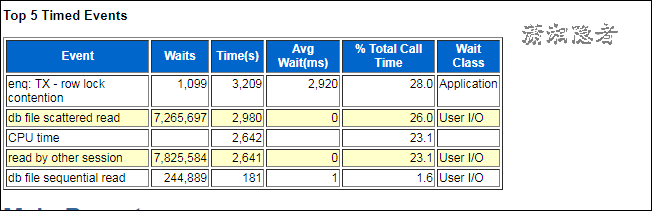
db file scattered read通常显示与全表扫描相关的等待。当数据库进行全表扫时,基于性能的考虑,数据会分散(scattered)读入Buffer Cache。如果这个等待事件比较显著,可能说明对于某些全表扫描的表,没有创建索引或者没有创建合适的索引。
db file sequential read通常显示与单个数据块相关的读取操作(如索引读取)。如果这个等待事件比较显著,可能表示在多表连接中,表的连接顺序存在问题,可能没有正确的使用驱动表;或者可能说明不加选择地进行索引。
read by other session解决
如何查看当前会话处于等待read by other session:
使用下面SQL找到当前处于read by other session等待的SQL语句,然后分析SQL,优化SQL
SELECT s.username,
s.sid,
s.serial#,
s.osuser,
s.machine,
s.terminal,
s.program,
s.last_call_et,
s.event,
s.seconds_in_wait,
s.blocking_session,
t.sql_text
--,t.SQL_FULLTEXT
FROM v$session s,
v$sqlarea t
WHERE s.sql_address = t.address
AND S.sid IN (SELECT sid
FROM v$session_wait
WHERE event IN ( 'read by other session' ));
或
select sql_fulltext from v$sql a,v$session b where a.sql_id=b.sql_id and b.event='read by other session';
也可以通过下面SQL,获取产生read by other session等待事件的SQL的实际执行计划,研究执行计划后,对相关SQL进行调优,例如,对于全表扫描的添加合适索引。
SELECT DISTINCT SQL_ID
FROM V$SESSION
WHERE EVENT IN('read by other session', 'db file sequential read');
SELECT * FROM TABLE(DBMS_XPLAN.DISPLAY_AWR('xxxxx'));
对于非当前会话的read by other session等待事件,我们可以通过AWR报告和ASH结合,找到发生read by other session等待的SQL语句。
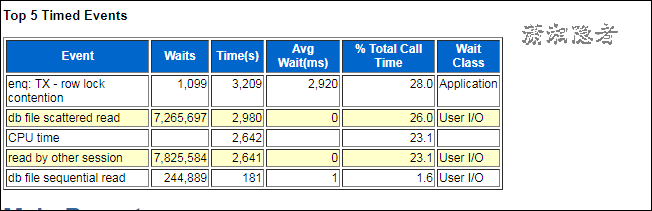
1:首先分析Top 5 Timed Events,分析read by other session、db file scattered read、db file sequential read等待事件
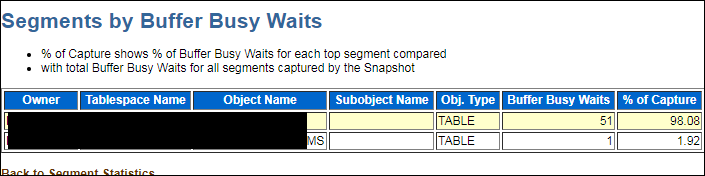
2:AWR报告中分析Segments by Buffer Busy Waits部分内容
如下截图所示,基本上可以判断第一个表xxx就是出现
3:首先使用下面脚本找到产生了'read by other session'等待事件的SQL,然后生成指定SQL语句的统计报表(awrsqrpt.sql)以及接近采样点附近的ASH报告
SELECT
a.sql_id,
sql_fulltext
FROM
v$sql a,
dba_hist_active_sess_history b
WHERE
a.sql_id = b.sql_id
AND b.event = 'read by other session';
AWR报告里面的SQL ordered by Reads 或SQL ordered by Gets中的TOP SQL找到涉及Segments by Buffer Busy Waits中对象的SQL ,然后结合ASH(细粒度的报告)来判断、分析!。
另外,如果需要查看涉及对象信息,可以通过等待事件的字段p1,p2,p3来获取
SELECT p1 "file#"
, p2 "block#"
, p3 "class#"
FROM v$session_wait WHERE event = 'read by other session';
或
SELECT p1 "file#"
,p2 "block#"
,p3 "class#"
FROM dba_hist_active_sess_history
WHERE event = 'read by other session';
官方文档描述如下:
· P1 = file# Absolute File# (AFN)
· P2 = block#
· P3 = class# Block class
· file# Absolute File Number (AFN)
This is the file number of the data file that contains the block that the waiting session wants.
· block#
This is the block number in the above file# that the waiting session wants access to. See Note:181306.1 to determine the tablespace, filename and object for this file#,block# pair.
· class# Block class#
This is the class of block being waited on. In particular:
class 1 indicates a "data block", which could be table or index
class 4 indicates a "segment header"
class >=15 indicate undo blocks
另外,下面一些SQL来自惜分飞的“Read by other session等待事件”,非常有用。
根据FILE#,BLOCK#查询热块对象
SELECT OWNER, SEGMENT_NAME, SEGMENT_TYPE, TABLESPACE_NAME, A.PARTITION_NAME
FROM DBA_EXTENTS A
WHERE FILE_ID = &FILE_ID
AND &BLOCK_ID BETWEEN BLOCK_ID AND BLOCK_ID + BLOCKS – 1;
直接查找热点块对象语句
SELECT *
FROM (SELECT O.OWNER, O.OBJECT_NAME, O.OBJECT_TYPE, SUM(TCH) TOUCHTIME
FROM X$BH B, DBA_OBJECTS O
WHERE B.OBJ = O.DATA_OBJECT_ID
AND B.TS# > 0
GROUP BY O.OWNER, O.OBJECT_NAME, O.OBJECT_TYPE
ORDER BY SUM(TCH) DESC)
WHERE ROWNUM <= 10
--或者
SELECT E.OWNER, E.SEGMENT_NAME, E.SEGMENT_TYPE
FROM DBA_EXTENTS E,
(SELECT *
FROM (SELECT ADDR, TS#, FILE#, DBARFIL, DBABLK, TCH
FROM X$BH
ORDER BY TCH DESC)
WHERE ROWNUM < 11) B
WHERE E.RELATIVE_FNO = B.DBARFIL
AND E.BLOCK_ID <= B.DBABLK
AND E.BLOCK_ID + E.BLOCKS > B.DBABLK
|
直接查找热点块操作语句 SELECT /*+rule*/
HASH_VALUE, SQL_TEXT
FROM V$SQLTEXT
WHERE (HASH_VALUE, ADDRESS) IN
(SELECT A.HASH_VALUE, A.ADDRESS
FROM V$SQLTEXT A,
(SELECT DISTINCT A.OWNER, A.SEGMENT_NAME, A.SEGMENT_TYPE
FROM DBA_EXTENTS A,
(SELECT DBARFIL, DBABLK
FROM (SELECT DBARFIL, DBABLK
FROM X$BH
ORDER BY TCH DESC)
WHERE ROWNUM < 11) B
WHERE A.RELATIVE_FNO = B.DBARFIL
AND A.BLOCK_ID <= B.DBABLK
AND A.BLOCK_ID + A.BLOCKS > B.DBABLK) B
WHERE A.SQL_TEXT LIKE '%' || B.SEGMENT_NAME || '%'
AND B.SEGMENT_TYPE = 'TABLE')
ORDER BY HASH_VALUE, ADDRESS, PIECE; |
其它一些官方或英文资料:
Solutions
Excessive waits for this event are typically due to several processes repeatedly reading the same blocks, e.g. many sessions scanning the same index or performing full table scans on the same table.
- Tune the SQL statement so that it reads fewer blocks. If the top objects listed in SolarWinds DPA are indexes, determine if there is a more efficient index that can be used more efficiently. If the top objects are tables, a full table scan or index randge scan is being performed. Look for efficient indexing opporunties.
- Increase the buffer cache so that more blocks are already in memory rather having to be read from disk. The query will still need to read the same number of blocks so tuning is the first recommendation, but if you cannot tune the statement, a query reading blocks from memory is much faster than from disk.
- Increase the PCTUSED / PCTFREE for the table storage parameters via ALTER TABLE or rebuild. This will result in less rows per block and possibly reduce contention.
WAITEVENT: "read by other session" Reference Note (文档 ID 732891.1)
Reducing waits typically involves application tuning and/or IO tuning.
Contention does not mean that there is necessarily a problem, but it is more likely that selects against the objects involved are reading more blocks than they have to. These unnecessary reads can then contend. To find such selects, look for the queries that are waiting frequently for 'read by other session'. Active Session History (ASH) reports during the period where contention is seen are a useful source of this sort of information. Alternatively look for those queries that read a lot of buffers when querying these tables; it is possible that these queries are poorly optimized and perhaps a different access path may read fewer buffers and cause less contention.
eg: if lots of sessions scan the same unselective index this can show as "read by other session" waits for "data blocks":
· the first session processes the blocks that are in the buffer cache quickly but then a block has to be read from disk
· the other sessions (scanning the same index) quickly 'catch up' and want the block which is currently being read from disk - they wait for the buffer as someone is already reading the block in.
Since the 'read by other session' wait event is an indicator that the buffers being waited for are popular (and are being "read by another session"), if queries are properly optimized, then an undersized buffer cache may mean that there is insufficient space to retain all the buffers required by queries. Make sure that the buffer cache is adequately sized to keep the buffers required by the current SQL statements from being aged out.
Resolving Issues Where 'read by other session' Waits When I/O is Slow (文档 ID 1477229.1)
Reducing Number of Waits:
- If you are seeing long delays taken to service this wait event then check the amount of I/O being performed on the device identified by the P1 argument of this wait event.
The device and / or the controller may be overloaded. If this is the case then take the standard steps of spreading the file across further devices etc. - Check that the real problem isn't the amount of time that the operating system is taking to service the system call.
- Find out which file numbers are causing the highest average waits and then determine which filesystem contains the file
- Determine why the filesystems are performing poorly. Some common causes are:
- "hot filesystems" - too many active files on the same filesystem exhausting the I/O bandwidth
- hardware problem
- In Parallel Execution (PX) is being used, determine if the I/O subsystem is saturated by having too many slaves in use.
参考资料:
http://www.xifenfei.com/2011/07/read-by-other-session%E7%AD%89%E5%BE%85%E4%BA%8B%E4%BB%B6.html
https://docs.oracle.com/database/121/REFRN/GUID-DCEB3FA4-57A9-4EBE-A349-BBCA1BA49281.htm#REFRN00610
http://www.dbdream.com.cn/2015/01/%E5%85%B3%E4%BA%8Eread-by-other-session%EF%BC%8Cdb-file-scattered-read%EF%BC%8Cdb-file-sequential-read%E7%AD%89%E5%BE%85%E6%97%B6%E9%97%B4%E7%9A%84%E4%BC%98%E5%8C%96/
ORACLE等待事件:read by other session的更多相关文章
- ORACLE等待事件:enq: TX - row lock contention
enq: TX - row lock contention等待事件,这个是数据库里面一个比较常见的等待事件.enq是enqueue的缩写,它是一种保护共享资源的锁定机制,一个排队机制,先进先出(FIF ...
- ORACLE等待事件: log file parallel write
log file parallel write概念介绍 log file parallel write 事件是LGWR进程专属的等待事件,发生在LGWR将日志缓冲区(log_buffer)中的重做日志 ...
- oracle等待事件以及解决方案
我们可以通过视图v$session_wait来查看系统当前的等待事件,以及与等待事件相对应的资源的相关信息,从而可确定出产生瓶颈的类型及其对象. v$session_wait的p1.p2.p3告诉我们 ...
- ORACLE等待事件:SQL*Net message from client & SQL*Net message to client
在ORACLE当中有两个很常见的等待事件"SQL*Net message from client"与"SQL*Net message to client",两者 ...
- oracle等待事件-direct path read/write
转://http://blog.chinaunix.net/uid-23177306-id-2531235.html 一.direct path read1.与直接读取相关联的等待事件.当ORACLE ...
- 全面解析Oracle等待事件的分类、发现及优化
一.等待事件由来 大家可能有些奇怪,为什么说等待事件,先谈到了指标体系.其实,正是因为指标体系的发展,才导致等待事件的引入.总结一下,Oracle的指标体系,大致经历了下面三个阶段: · 以命中率为主 ...
- Oracle等待事件之等待事件详解
一. 等待事件的相关知识:1.1 等待事件主要可以分为两类:即空闲(IDLE)等待事件和非空闲(NON-IDLE)等待事件.1). 空闲等待事件指ORACLE正等待某种工作,在诊断和优化数据库的时候, ...
- Oracle等待事件db file parallel read
SQL> select event#,name,parameter1,parameter2,parameter3 from v$event_name where name = 'db file ...
- Oracle 等待事件 db file sequential read
db file sequential read-数据文件顺序读取 等待事件: "db file sequential read" Reference Note (文档 ID 345 ...
随机推荐
- HTML DOM的创建,删除及替换
创建HTML元素 document.appendChild() 将新元素作为父元素的最后一个子元素进行添加 如需向HTML DOM添加新元素,首先必须创建该元素,然后把它追加到已有的元素上 var n ...
- MySql 更新死锁问题 Deadlock found when trying to get lock; try restarting transaction
文章导航-readme MySql 更新死锁问题 Deadlock found when trying to get lock; try restarting transaction 1.场景 //t ...
- 简单的权限管理php
转发自https://www.cnblogs.com/shenzikun1314/p/6604867.html#4262295 首先,要明白的基础理论是用户,角色,权限之间的关系是一对多,还是多对多. ...
- MSG结构
MSG是Windows程序中的结构体,用于保存windows消息,定义: typedef struct tagMSG { HWND hwnd; //该消息所属的窗口句柄 UINT message; / ...
- cesium 圆圈警戒扫描(附源码下载)
前言 cesium 官网的api文档介绍地址cesium官网api,里面详细的介绍 cesium 各个类的介绍,还有就是在线例子:cesium 官网在线例子,这个也是学习 cesium 的好素材. 内 ...
- Oracle 11g Dataguard参数详解
https://www.jb51.net/article/52269.htm注:本文译自<Oracle Data Guard 11g Handbook> Page 78 – Page 88 ...
- oracle 根据时间戳查询date类型sql
话不多说上sql: select to_char(1574837126879/(1000*60*60*24)+to_date('1970-01-01 08:00:00','YYYY-MM-DD HH2 ...
- 阿里云ECS服务器部署HADOOP集群(五):Pig 安装
本篇将在阿里云ECS服务器部署HADOOP集群(一):Hadoop完全分布式集群环境搭建的基础上搭建. 1 环境介绍 一台阿里云ECS服务器:master 操作系统:CentOS 7.3 Hadoop ...
- js对文中某一处关键字自动检索和全文检索
部分检索: 代码: <%@ page language="java" contentType="text/html; charset=utf-8" pag ...
- SQL Server 索引分析开关
set statistics io onset statistics profile on