
使用AvalonEdit实现WPF的Lua编辑器
原文发布于:https://www.chenxublog.com/2019/07/14/use-avalonedit-make-wpf-lua-editor.html
由于LLCOM里面内置了Lua代码的编辑器,所以我就使用了AvalonEdit这个轮子,不过一开始的Lua语言支持让我一顿好找
不过好在找到了网上的资料,我就把整个实现过程贴在下面
准备
先去nuget安装一下AvalonEdit,以备后面使用:

接着把下面的文件内容,保存为Lua.xshd文件名的文件:
<?xml version="1.0"?>
<SyntaxDefinition name="SharpLua" extensions=".slua;.lua" xmlns="http://icsharpcode.net/sharpdevelop/syntaxdefinition/2008">
<!-- The named colors 'Comment' and 'String' are used in SharpDevelop to detect if a line is inside a multiline string/comment -->
<Color name="Comment" foreground="#ff999999" exampleText="-- comment" />
<Color name="String" foreground="#fff99157" />
<Color name="Punctuation" />
<Color name="MethodCall" foreground="#ffffcc66" fontWeight="bold"/>
<Color name="NumberLiteral" foreground="#ff99cc99"/>
<Color name="NilKeyword" fontWeight="bold"/>
<Color name="Keywords" fontWeight="bold" foreground="#ff6699cc" />
<Color name="GotoKeywords" foreground="#ffcc99cc" />
<Color name="Visibility" fontWeight="bold" foreground="#fff99157"/>
<Color name="TrueFalse" fontWeight="bold" foreground="#ff66cccc" />
<RuleSet name="CommentMarkerSet">
<Keywords fontWeight="bold" foreground="#fff2777a">
<Word>TODO</Word>
<Word>FIXME</Word>
</Keywords>
<Keywords fontWeight="bold" foreground="#fff2777a">
<Word>HACK</Word>
<Word>UNDONE</Word>
</Keywords>
</RuleSet>
<!-- This is the main ruleset. -->
<RuleSet>
<Span color="Comment">
<Begin color="XmlDoc/DocComment">---</Begin>
<RuleSet>
<Import ruleSet="XmlDoc/DocCommentSet"/>
<Import ruleSet="CommentMarkerSet"/>
</RuleSet>
</Span>
<Span color="Comment" ruleSet="CommentMarkerSet" multiline="true">
<Begin>--\[[=]*\[</Begin>
<End>\][=]*]</End>
</Span>
<Span color="Comment" ruleSet="CommentMarkerSet">
<Begin>--</Begin>
</Span>
<Span color="String">
<Begin>"</Begin>
<End>"</End>
<RuleSet>
<!-- span for escape sequences -->
<Span begin="\\" end="."/>
</RuleSet>
</Span>
<Span color="String">
<Begin>'</Begin>
<End>'</End>
<RuleSet>
<!-- span for escape sequences -->
<Span begin="\\" end="."/>
</RuleSet>
</Span>
<Span color="String" multiline="true">
<Begin color="String">\[[=]*\[</Begin>
<End>\][=]*]</End>
</Span>
<Keywords color="TrueFalse">
<Word>true</Word>
<Word>false</Word>
</Keywords>
<Keywords color="Keywords">
<Word>and</Word>
<Word>break</Word>
<Word>do</Word>
<Word>else</Word>
<Word>elseif</Word>
<Word>end</Word>
<Word>false</Word>
<Word>for</Word>
<Word>function</Word>
<Word>if</Word>
<Word>in</Word>
<Word>local</Word>
<!--<Word>nil</Word>-->
<Word>not</Word>
<Word>or</Word>
<Word>repeat</Word>
<Word>return</Word>
<Word>then</Word>
<Word>true</Word>
<Word>until</Word>
<Word>while</Word>
<Word>using</Word>
<Word>continue</Word>
</Keywords>
<Keywords color="GotoKeywords">
<Word>break</Word>
<Word>return</Word>
</Keywords>
<Keywords color="Visibility">
<Word>local</Word>
</Keywords>
<Keywords color="NilKeyword">
<Word>nil</Word>
</Keywords>
<!-- Mark previous rule-->
<Rule color="MethodCall">
\b
[\d\w_]+ # an identifier
(?=\s*\() # followed by (
</Rule>
<Rule color="MethodCall">
\b
[\d\w_]+ # an identifier
(?=\s*\") # followed by "
</Rule>
<Rule color="MethodCall">
\b
[\d\w_]+ # an identifier
(?=\s*\') # followed by '
</Rule>
<Rule color="MethodCall">
\b
[\d\w_]+ # an identifier
(?=\s*\{) # followed by {
</Rule>
<Rule color="MethodCall">
\b
[\d\w_]+ # an identifier
(?=\s*\[) # followed by [
</Rule>
<!-- Digits -->
<Rule color="NumberLiteral">
\b0[xX][0-9a-fA-F]+ # hex number
|
( \b\d+(\.[0-9]+)? #number with optional floating point
| \.[0-9]+ #or just starting with floating point
)
([eE][+-]?[0-9]+)? # optional exponent
</Rule>
<Rule color="Punctuation">
[?,.;()\[\]{}+\-/%*<>^+~!|&]+
</Rule>
</RuleSet>
</SyntaxDefinition>
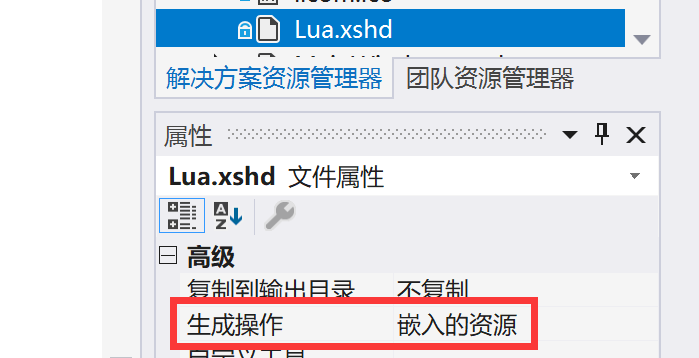
把Lua.xshd放到解决方案资源管理器中,生成操作改为嵌入的资源:
使用
xaml里的代码如下:
<avalonEdit:TextEditor

 Grid.Row="2"

 xmlns:avalonEdit="http://icsharpcode.net/sharpdevelop/avalonedit"

 Name="textEditor"

 FontFamily="Consolas"

 FontSize="10pt"

 ShowLineNumbers="True"

 LostFocus="TextEditor_LostFocus"/>
然后在窗体的loaded事件中运行下面的代码即可:
//快速搜索功能

SearchPanel.Install(textEditor.TextArea);

//设置语法规则

string name = System.Reflection.Assembly.GetExecutingAssembly().GetName().Name + ".Lua.xshd";

System.Reflection.Assembly assembly = System.Reflection.Assembly.GetExecutingAssembly();

using (System.IO.Stream s = assembly.GetManifestResourceStream(name))

{

    using (XmlTextReader reader = new XmlTextReader(s))

    {

        var xshd = HighlightingLoader.LoadXshd(reader);

        textEditor.SyntaxHighlighting = HighlightingLoader.Load(xshd, HighlightingManager.Instance);

    }

}
效果
效果什么的。。。自己去下载一个LLCOM看看就知道了嘛:

使用AvalonEdit实现WPF的Lua编辑器的更多相关文章
- 最好用的lua编辑器--------emmylua使用汇总
最好的lua编辑器Emmylua,欢迎打脸 官方文档 https://emmylua.github.io/zh_CN/ github https://github.com/EmmyLua ...
- 基于WPF&Prism&AvalonEdit的XAML轻量编辑器
1. 写在前面 一直从事WPF的相关开发工作,有时为了尝试或演示某些仅仅基于XAML的效果时,但又不想大动干戈打开VS去创建项目,所以一个轻便简单,集编辑与预览于一身的XAML编辑器就显得格外重要. ...
- Cocos2d-x游戏开发之lua编辑器 Sublime 搭建,集成cocos2dLuaApi和自有类
版权声明:本文为博主原创文章.未经博主同意不得转载. https://blog.csdn.net/wisdom605768292/article/details/34085969 Sublime Te ...
- debian上安装lua编辑器
Debian服务器上安装lua 1)下载压缩包 wget http://www.lua.org/ftp/lua-5.1.4.tar.gz 2)解压文件 tar zxvf lua-5.1.4.tar. ...
- wpf 富文本编辑器richtextbox的简单用法
最近弄得一个小软件,需要用到富文本编辑器,richtextbox,一开始以为是和文本框一样的用法,但是实践起来碰壁之后才知道并不简单. richtextbox 类似于Word,是一个可编辑的控件.结构 ...
- WPF学习笔记(四):AvalonEdit 代码高亮编辑控件专题
AvalonEdit 是一个基于 WPF 的文本编辑器组件.它是由 Daniel Grunwald 为 SharpDevelop 编写的.从 5.0 版开始,AvalonEdit 根据MIT许可证发布 ...
- WPF开发时光之痕日记本(一)——富文本编辑器
本篇给大家推荐一个 WPF 版的富文本编辑器,SmithHtmlEditor,具体网址大家可以找一找,我在这个编辑器的基础上修改了界面,增加了一些功能,模仿了kindeditor 的界面,鉴于自己现在 ...
- Lua------------------改善Unity编辑器对Lua文件的支持
原创 2017年03月10日 18:44:22 标签: Unity / lua / 编辑器 952 当前版本的Unity(截至Unity5.5.x)中TextAsset类不支持后缀为lua的文件,将l ...
- .NET Core/.NET5/.NET6 开源项目汇总12:WPF组件库2
系列目录 [已更新最新开发文章,点击查看详细] WPF(Windows Presentation Foundation)是微软推出的基于Windows 的用户界面框架,属于.NET Frame ...
随机推荐
- java基础(28):数据库、表及表数据、SQL语句
1. 数据库 1.1 数据库概述 什么是数据库 数据库就是存储数据的仓库,其本质是一个文件系统,数据按照特定的格式将数据存储起来,用户可以对数据库中的数据进行增加,修改,删除及查询操作. 什么是数据库 ...
- python xlwt模块简介
一.基础类介绍 1.工作簿类Workbook简介: import xlwt class Workbook(object0): ''' 工作簿类,使用xlwt创建excel文件时,首先要实例化此类的对象 ...
- Sublime设置格式化代码快捷键ctrl+shift+r
1.以管理员身份运行sublime 2.首选项---按键绑定-用户,将以下代码复制即可(这里注意不要忘记在最后一行添加逗号哦) { "keys": ["ctrl+shif ...
- gzip格式分析与识别
" 介绍gzip格式,识别gzip压缩的数据流量." 在协议分析过程中,经常会发现gzip压缩的数据,例如在HTTP协议中,在HTTP头中会标示,内容编码为gzip.DEFLATE ...
- iOS中的GCD线程
一.什么是GCD 全称是Grand Central Dispatch ,纯C语言编写,提供非常多强大的函数,是目前苹果官网推荐的多线程开发方法,NSOperation 便是基于GCD的封装 ...
- ucoreOS_lab7 实验报告
所有的实验报告将会在 Github 同步更新,更多内容请移步至Github:https://github.com/AngelKitty/review_the_national_post-graduat ...
- MongoDB 最近遇到的几个小问题
(1)连接数据库时报错 ERROR Topshelf.Hosts.ConsoleRunHost.Run An exception occurred System.TimeoutException: A ...
- spark streaming整合kafka
版本说明:spark:2.2.0: kafka:0.10.0.0 object StreamingDemo { def main(args: Array[String]): Unit = { Logg ...
- 将select 转为json
CREATE PROCEDURE[dbo].[WXSP_SerializeJSON](@ParameterSQL AS VARCHAR(MAX))ASBEGIN DECLARE @SQL NVARCH ...
- 抓包工具Fiddler的简单使用
HTTP代理 http代理,就是代理客户机的http访问,主要代理浏览器访问页面 代理服务器是介于浏览器和web服务器之间的一台服务器,有了它之后,浏览器不是直接到Web服务器去取回网页而是向代理服务 ...