
nio原理和示例代码
我正在为学习大数据打基础中,为了手撸rpc框架,需要懂得nio的原理,在搞懂nio框架前,我会带着大家手撸一些比较底层的代码,当然今后当我们学会了框架,这些繁琐的代码也就不用写了,但是学一学底层的代码也是有好处的嘛。
java.nio全称java non-blocking IO(实际上是 new io),是指jdk1.4 及以上版本里提供的新api(New IO) ,为所有的原始类型(boolean类型除外)提供缓存支持的数据容器,使用它可以提供非阻塞式的高伸缩性网络。
前面我写的socket的服务端与客户端的通信是线程阻塞的,这在实际应用场景中并不竟如人意,我们更多需要的是异步操作,用户无感知,当我们在操作主线程的时候,一些通信相关的线程不应该阻塞我们的主线程。我们需要传送数据,我们只要将请求发送出去,这时候具体的发送细节就应该交由底层的操作系统帮我们完成,我们应该可以操作主线程继续完成其他事情。nio就为我们解决这些事情提供了很好的办法。
学会nio之前我们需要了解这几个概念:
Channel:
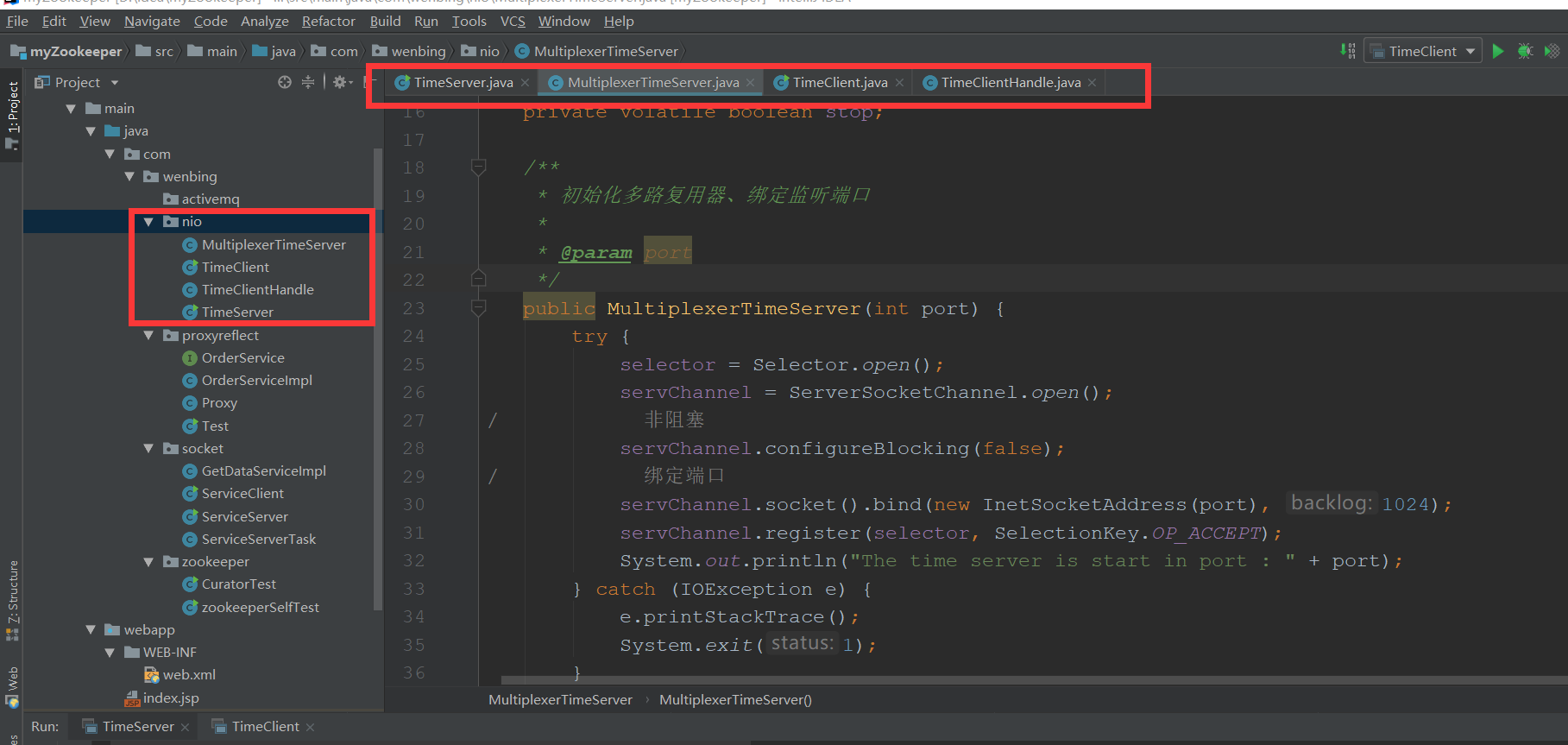
先定义一个TimeServer
package com.wenbing.nio;

public class TimeServer {

    public static void main(String[] args) {

        int port = 8085;

        if (args != null && args.length < 0) {

            port = Integer.valueOf(args[0]);

        }

        MultiplexerTimeServer timeServer = new MultiplexerTimeServer(port);

        new Thread(timeServer,"NIO-MultiplexerTimeServer-001").start();

    }

}
再定义一个MultiplexerTimeServer去实现Runnable接口,每个通信的操作交由这一个线程去完成。
package com.wenbing.nio;

import java.io.IOException;

import java.net.InetSocketAddress;

import java.nio.ByteBuffer;

import java.nio.channels.*;

import java.util.Iterator;

import java.util.Set;

public class MultiplexerTimeServer implements Runnable {

    private Selector selector;

    private ServerSocketChannel servChannel;

    private volatile boolean stop;

    /**

     * 初始化多路复用器、绑定监听端口

     *

     * @param port

     */

    public MultiplexerTimeServer(int port) {

        try {

            selector = Selector.open();

            servChannel = ServerSocketChannel.open();

//            非阻塞

            servChannel.configureBlocking(false);

//            绑定端口

            servChannel.socket().bind(new InetSocketAddress(port), 1024);

            servChannel.register(selector, SelectionKey.OP_ACCEPT);

            System.out.println("The time server is start in port : " + port);

        } catch (IOException e) {

            e.printStackTrace();

            System.exit(1);

        }

    }

    public void stop() {

        this.stop = true;

    }

    @Override

    public void run() {

        while (!stop) {

            try {

                selector.select(1000);

//                查询存在的活跃的key

                Set<SelectionKey> selectedKeys = selector.selectedKeys();

//                迭代所有活跃的key,进行操作

                Iterator<SelectionKey> it = selectedKeys.iterator();

                SelectionKey key = null;

                while (it.hasNext()) {

                    key = it.next();

//                    拿到某个key后,就将其从迭代器里除去

                    it.remove();

                    try {

                        handleInput(key);

                    } catch (Exception e) {

                        if (key != null) {

                            key.cancel();

                            if (key.channel() != null) {

                                key.channel().close();

                            }

                        }

                    }

                }

            } catch (Throwable t) {

                t.printStackTrace();

            }

        }

//        多路复用器关闭后,所有注册在上面的Channel和Pipe等资源都会被自动去注册并关闭,所以不需要单个关闭

        if (selector != null) {

            try {

                selector.close();

            } catch (IOException e) {

                e.printStackTrace();

            }

        }

    }

    private void handleInput(SelectionKey key) throws IOException {

        if (key.isValid()) {

//            处理新接入的请求消息

            if (key.isAcceptable()) {

//                Accept the new connection

                ServerSocketChannel ssc = (ServerSocketChannel) key.channel();

                SocketChannel sc = ssc.accept();

                sc.configureBlocking(false);

//                Add the new connection to the selector

                sc.register(selector, SelectionKey.OP_READ);

            }

            if (key.isReadable()) {

//                Read the data

                SocketChannel sc = (SocketChannel) key.channel();

                ByteBuffer readBuffer = ByteBuffer.allocate(1024);

                int readBytes = sc.read(readBuffer);

                if (readBytes > 0) {

                    readBuffer.flip();

                    byte[] bytes = new byte[readBuffer.remaining()];

                    readBuffer.get(bytes);

                    String body = new String(bytes, "UTF-8");

                    System.out.println("The time server receive order : " + body);

                    //将当前时间发回去

                    String currentTime = "QUERY TIME ORDER"

                            .equalsIgnoreCase(body) ? new java.util.Date(

                            System.currentTimeMillis()).toString() : "BAD ORDER";

                    doWrite(sc, currentTime);

                } else if (readBytes < 0) {

//                    对端链路关闭

                    key.cancel();

                    sc.close();

                } else

                    ; //读到0字节,忽略

            }

        }

    }

    private void doWrite(SocketChannel channel, String response) throws IOException{

        if (response != null && response.trim().length() > 0) {

            byte[] bytes = response.getBytes();

            ByteBuffer writeBuffer = ByteBuffer.allocate(bytes.length);

            writeBuffer.put(bytes);

            writeBuffer.flip();

            channel.write(writeBuffer);

        }

    }

}
定义TimeClient
package com.wenbing.nio;

public class TimeClient {

    /**

     *

     * @param args

     */

    public static void main(String[] args) {

        int port = 8085;

        if (args != null && args.length > 0) {

            try {

                port = Integer.valueOf(args[0]);

            } catch (NumberFormatException e) {

                //采用默认值

            }

        }

        new Thread(new TimeClientHandle("127.0.0.1", port), "TimeClient-001").start();

    }

}
定义TimeClientHandle同样继承Runnable接口,与上面的MultiplexerTimeServer作用类似。
package com.wenbing.nio;

import java.io.IOException;

import java.net.InetSocketAddress;

import java.nio.ByteBuffer;

import java.nio.channels.SelectionKey;

import java.nio.channels.Selector;

import java.nio.channels.SocketChannel;

import java.util.Iterator;

import java.util.Set;

public class TimeClientHandle implements Runnable {

    private String host;

    private int port;

    private Selector selector;

    private SocketChannel socketChannel;

    private volatile boolean stop;

    public TimeClientHandle(String host, int port) {

        this.host = host == null ? "127.0.0.1" : host;

        this.port = port;

        try {

            selector = Selector.open();

            socketChannel = SocketChannel.open();

            socketChannel.configureBlocking(false);

        } catch (IOException e) {

            e.printStackTrace();

            System.exit(1);

        }

    }

    @Override

    public void run() {

        try {

            doConnect();

        } catch (IOException e) {

            e.printStackTrace();

            System.exit(1);

        }

        while (!stop) {

            try {

                selector.select(1000);

                Set<SelectionKey> selectedKeys = selector.selectedKeys();

                Iterator<SelectionKey> it = selectedKeys.iterator();

                SelectionKey key = null;

                while (it.hasNext()) {

                    key = it.next();

                    it.remove();

                    try {

                        handleInput(key);

                    } catch (Exception e) {

                        if (key != null) {

                            key.cancel();

                            if (key.channel() != null) {

                                key.channel().close();

                            }

                        }

                    }

                }

            } catch (IOException e) {

                e.printStackTrace();

                System.exit(1);

            }

        }

    }

    private void doConnect() throws IOException {

        //如果直接连接成功,则注册到多路复用器上,发送请求消息,读应答

        if (socketChannel.connect(new InetSocketAddress(host, port))) {

            socketChannel.register(selector, SelectionKey.OP_READ);

            doWriter(socketChannel);

        } else {

            socketChannel.register(selector, SelectionKey.OP_CONNECT);

        }

    }

    private void doWriter(SocketChannel sc) throws IOException {

        byte[] req = "QUERY TIME ORDER".getBytes();

        ByteBuffer writeBuffer = ByteBuffer.allocate(1024);

        writeBuffer.put(req);

        writeBuffer.flip();

        sc.write(writeBuffer);

        if (!writeBuffer.hasRemaining()) {

            System.out.println("Send order 2 server succeed.");

        }

    }

    private void handleInput(SelectionKey key) throws IOException {

        if (key.isValid()) {

//            判断连接是否成功

            SocketChannel sc = (SocketChannel) key.channel();

            if (key.isConnectable()) {

                if (sc.finishConnect()) {

                    sc.register(selector, SelectionKey.OP_READ);

                    doWriter(sc);

                } else {

                    System.exit(1);//连接失败,进程退出

                }

            }

            if (key.isReadable()) {

                ByteBuffer readBuffer = ByteBuffer.allocate(1024);

                int readBytes = sc.read(readBuffer);

                if (readBytes > 0) {

                    readBuffer.flip();

                    byte[] bytes = new byte[readBuffer.remaining()];

                    readBuffer.get(bytes);

                    String body = new String(bytes, "UTF-8");

                    System.out.println("Now is : " + body);

                    this.stop = true;

                } else if (readBytes < 0) {

                    //对端链路关闭

                    key.cancel();

                    sc.close();

                } else

                    ;//读到0字节,忽略

            }

        }

    }

}
The time server receive order : QUERY TIME ORDER
Now is : Sun Nov 04 00:10:56 CST 2018
nio原理和示例代码的更多相关文章
- Android中悬浮窗口的实现原理和示例代码
用了我一个周末的时间,个中愤懑就不说了,就这个问题,我翻遍全球网络没有一篇像样的资料,现在将实现原理简单叙述如下: 调用WindowManager,并设置WindowManager.LayoutPar ...
- Dom4j工具j解析XML原理和示例代码
import java.io.File; import java.util.ArrayList; import java.util.Iterator; import java.util.List; i ...
- [JavaEE]Java NIO原理图文分析及代码实现
转http://weixiaolu.iteye.com/blog/1479656 目录: 一.java NIO 和阻塞I/O的区别 1. 阻塞I/O通信模型 2. java NIO ...
- Java NIO原理图文分析及代码实现
原文: http://weixiaolu.iteye.com/blog/1479656 目录: 一.java NIO 和阻塞I/O的区别 1. 阻塞I/O通信模型 2. java ...
- Java NIO原理 图文分析及代码实现
Java NIO原理图文分析及代码实现 前言: 最近在分析hadoop的RPC(Remote Procedure Call Protocol ,远程过程调用协议,它是一种通过网络从远程计算机程序上请 ...
- Android视图SurfaceView的实现原理分析(示例,出错代码)
在Android系统中,有一种特殊的视图,称为SurfaceView,它拥有独立的绘图表面,即它不与其宿主窗口共享同一个绘图表面.由于拥有独立的绘图表面,因此SurfaceView的UI就可以在一个独 ...
- Netty实践与NIO原理
一.阻塞IO与非阻塞IO Linux网络IO模型(5种) (1)阻塞IO模型 所有文件操作都是阻塞的,以套接字接口为例,在进程空间中调用recvfrom,系统调用直到数据包到达且被复制到应用进程缓冲区 ...
- Java多线程系列--“JUC锁”11之 Semaphore信号量的原理和示例
概要 本章,我们对JUC包中的信号量Semaphore进行学习.内容包括:Semaphore简介Semaphore数据结构Semaphore源码分析(基于JDK1.7.0_40)Semaphore示例 ...
- Java NIO原理分析
Java IO 在Client/Server模型中,Server往往需要同时处理大量来自Client的访问请求,因此Server端需采用支持高并发访问的架构.一种简单而又直接的解决方案是“one-th ...
随机推荐
- delphi2009(10,xe)下indy10发送utf8字符串
最近实现一个功能,使用delphi2009以TCP调用Java端的接口,接口要求先发送字符串的长度,然后再发送字符串内容,并且字符串要求是utf8格式的 调试了好长时间,才终于发现解决办法,或者说发现 ...
- WPF中的资源(二) - 二进制资源
原文:WPF中的资源(二) - 二进制资源 WPF中的二进制资源,就是类似于MFC中在对话框程序中添加的图片.字符串等资源,程序在运行时将其转换成二进制,以供程序使用. 下面以将字符串转换成二进制为例 ...
- 使用sklearn构建含有标量属性的决策树
网络上使用sklearn生成决策树的资料很多,这里主要说明遇见标量数据的处理. 经查验参考资料,sklearn并非使用了课上以及书上讲的ID3算法,而是选择了CART,该算法生成二叉树:scikit- ...
- ASP.NET MVC 下UpdateModel可空未填写的参数为Null,为何不是空字符串
查了好久,终于收到原因: if (bindingContext.ModelMetadata.ConvertEmptyStringToNull && Object.Equals(valu ...
- 卸载win10内置windows app的方法
原文:卸载win10内置windows app的方法 2015年,微软推出了windows10操作系统,其以漂亮的界面.良好的操作方式.方便的推送升级迅速获得了好多人的好评,因此,好多同学都换了win ...
- MySQL学习-SQL约束
约束分类 主键:PRIMARY KEY用于唯一标识表中的一行,不可重复.e.g.:id INT(10) PRIMARY KEY 默认值:DEFAULT插入时,若没有指定该列的值,则为DEFAULT指定 ...
- MQTT-CN MQTT协议中文版
欢迎任何形式的转载,但请务必注明出处:http://www.cnblogs.com/liangjingyang 项目地址:https://github.com/liangjingyang/MQTT-C ...
- 【图文】[新手]C++ 动态库导出函数名“乱码”及解决
刚接触C++,在尝试从 dll 中导出函数时,发现导出的函数名都"乱码"了. 导出过程如下: 新建一个Win32项目: 新建的解决方案里有几个导出的示例: // 下列 ifdef ...
- Http请求的响应没有Content-Length,只有Transfer-Encoding→chunked
如题:Http请求的响应没有Content-Length,只有Transfer-Encoding→chunked.如图 原因猜测:如果请求的响应返回是某个对象,则不会显示Content-Length, ...
- flask(二)
1.装饰器坑 使用装饰器后,视图函数名字相同问题view function错误问题 1.给装饰器加functiontools 2.反向生成url地址标志,指定endpoint(endpoint必须唯一 ...