
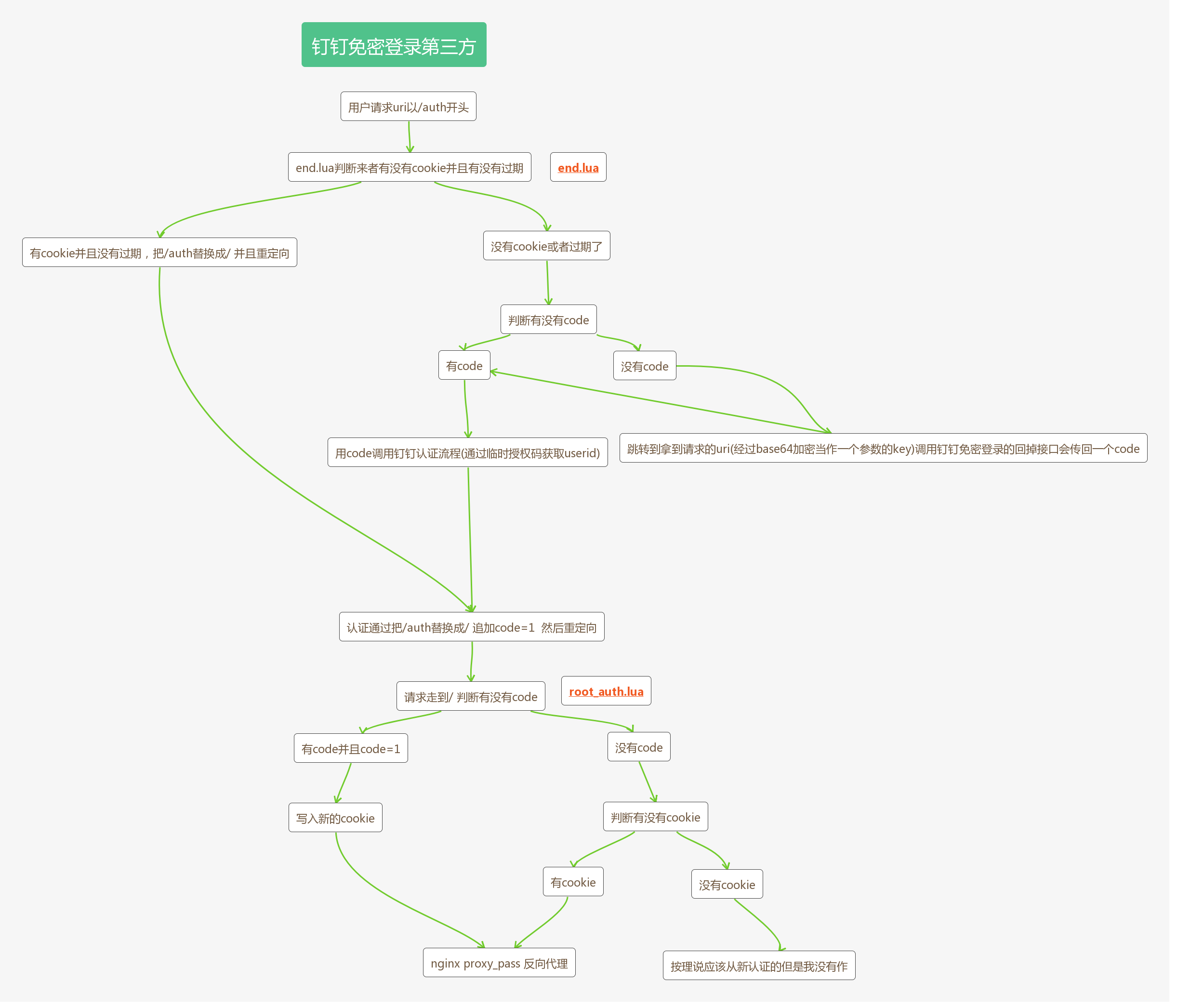
lua脚本之钉钉免密登录
nginx.conf
worker_processes  ;

error_log logs/error.log;

events {

    worker_connections ;

}

http {

    resolver 8.8.8.8;

    server {

        listen ;

        location / {

            default_type text/html;

            charset utf-;

            lua_code_cache on;

            #rewrite_by_lua_file /example/rewrite.lua;

            access_by_lua_file /example/root_auth.lua;

            proxy_pass https://tieba.baidu.com/;

        }

        location /auth {

            default_type text/html;

            charset utf-;

            lua_code_cache on;

            #rewrite_by_lua_file /example/rewrite.lua;

            #access_by_lua_file /example/yidong.lua;

            access_by_lua_file /example/end.lua;

        }

    }

}
end.lua
local http = require "resty.http"

local httpc = http.new()

local mysql = require "resty.mysql"

local cjson = require "cjson"

local b64 = require "base64"

local luaConfig = require("lua_config")

local appid=luaConfig.ding_account.appid

local appsecret=luaConfig.ding_account.appsecret

local AppKey=luaConfig.ding_account.AppKey

local AppSecret=luaConfig.ding_account.AppSecret

local request_uri = ngx.var.request_uri

local request_method = ngx.var.request_method

local dingauth=ngx.var.cookie_dingauth

function isCooike()

    if dingauth ~= nil then

        local dingauth_e=b64.dec(dingauth)

        if cjson.decode(dingauth_e)["cookie_token"]=="3MiOiJuaW5naGFvLm5ldCIsImVE0Mzg5NTU0NDUiLC" then

            ngx.update_time()

            if cjson.decode(dingauth_e)["start_time"] +  > ngx.time() then

                local s,e=string.find(request_uri, "?")

                local n_uri=nil

                if s~=nil then

                    n_uri=string.sub(request_uri,,s-)

                else

                    n_uri=request_uri

                end

                n_uri=string.gsub(n_uri,"/auth","")

                local u_uri=nil

                if n_uri == "" then

                    u_uri=string.gsub(request_uri,"/auth","/")

                else

                    u_uri=string.gsub(request_uri,"/auth","")

                end

                ngx.redirect(u_uri)

            end

        end

    end

end

function isMobile(userAgent)

    local mobile = {

                "phone", "android", "mobile", "itouch", "ipod", "symbian", "htc", "palmos", "blackberry", "opera mini", "windows ce", "nokia", "fennec",

                "hiptop", "kindle", "mot", "webos", "samsung", "sonyericsson", "wap", "avantgo", "eudoraweb", "minimo", "netfront", "teleca"

            }

    userAgent = string.lower(userAgent)

    for i, v in ipairs(mobile) do

        if string.match(userAgent, v) then

            return true

        end

    end

    return false

end

function get(url)

    local res, err = httpc:request_uri(url,

    {

    ssl_verify = false,

    method = "GET",

    body = "",

    headers = {

       ['Content-Type']="application/json;charset=UTF-8"

         }

    })

    return res,err

end

function post(url,body)

    local res, err = httpc:request_uri(url,

    {

    ssl_verify = false,

    method = "POST",

    body = body,

    headers = {

       ['Content-Type']="application/json;charset=UTF-8"

         }

    })

    return res,err

end

function get_tooken()

    local res,err=get(string.format("https://oapi.dingtalk.com/sns/gettoken?appid=%s&appsecret=%s",appid,appsecret))

    return res.body

end

function dingCallBack(scheme,server_ip,port,l_uri,uir_enb64)

    ding_uri=string.format("https://oapi.dingtalk.com/connect/oauth2/sns_authorize?appid=dingoa3fbgkiif8mq9y8jf&response_type=code&scope=snsapi_auth&redirect_uri=%s://%s:%s%s?%s=1",scheme,server_ip,port,l_uri,uir_enb64)

    ngx.redirect(ding_uri)

end

function dingAuth()

tooken_ret=get_tooken()

--{"errcode":0,"access_token":"b7e87fc6cced35ff8f01901c5ae0fa6b","errmsg":"ok","expires_in":7200}

if cjson.decode(tooken_ret)['errcode'] then

    yy_token=cjson.decode(tooken_ret)['access_token']

else

    ngx.say(cjson.encode({status=false,msg="token 获取失败"}))

end

-- 获取用户信息

local user_info_url = string.format("https://oapi.dingtalk.com/sns/get_persistent_code?access_token=%s",yy_token)

local data={tmp_auth_code = code}

local res,err=post(user_info_url,cjson.encode(data))

if cjson.decode(res.body)['errcode']== then

    unionid=cjson.decode(res.body)['unionid']

    --深奎

    A_res,A_err=get(string.format("https://oapi.dingtalk.com/gettoken?appkey=%s&appsecret=%s",AppKey,AppSecret))

    if cjson.decode(A_res.body)["errcode"]== then

        A_tooken=cjson.decode(A_res.body)["access_token"]

        uid_url=string.format("https://oapi.dingtalk.com/user/getUseridByUnionid?access_token=%s&unionid=%s",A_tooken,unionid)

        local res,err=get(uid_url)

        if cjson.decode(res.body)["errcode"]== then

            --u_info_uri=string.format("https://oapi.dingtalk.com/user/get?access_token=%s&userid=%s",A_tooken,cjson.decode(res.body)["userid"])

            --local U_info_res,U_info_err=get(u_info_uri)

            --if cjson.decode(U_info_res.body)["errcode"]==0 then

            --    local mail=cjson.decode(U_info_res.body)["email"]

            --    if mail == nil then

            --        ngx.print("没有权限获取邮箱信息")

            --    elseif mail == "" then

            --        ngx.print("钉钉中没有邮箱信息")

            --    end

            --    ngx.print(mail)

            --else

            --    ngx.print("获取mail失败")

            --end

            local remote_uri=nil

            for k,v in pairs(ngx.req.get_uri_args()) do

                if string.match(k, "DZMSSlIBgrZt6")=="DZMSSlIBgrZt6" then

                    remote_all=b64.dec(string.gsub(k,"DZMSSlIBgrZt6",""))

                    remote_arg=cjson.decode(remote_all)["remote_arg"]

                    remote_uri=cjson.decode(remote_all)["remote_uri"]

                end

            end

            if remote_uri ~= nil then

                remote_uri=string.gsub(remote_uri,"/auth","")

                if remote_uri=="" then

                    remote_uri="/"

                end

                remote_arg_d=cjson.decode(remote_arg)

                remote_arg_d["code"]=""

                local arg_str=""

                local nb=

                for key, value in pairs(remote_arg_d) do

                      if nb== then

                          arg_str=string.format("?%s%s=%s",arg_str,key,value)

                      else

                         arg_str=string.format("%s&%s=%s",arg_str,key,value)

                      end

                      nb=nb+

                end

                --ngx.print(string.format("%s%s",remote_uri,arg_str))

                ngx.redirect(string.format("%s%s",remote_uri,arg_str))

            else

                ngx.print("nil")

            end

        else

           ngx.say(cjson.encode({status=false,msg="企业下未找到该用户"}))

            --return cjson.encode({status=false})

        end

    else

        ngx.say(cjson.encode({status=false,msg="全局tooken获取失败"}))

    end

else

    ngx.say(cjson.encode({status=false,msg="获取用户unionid失败"}))

end

end

isCooike()

local userAgent = ngx.req.get_headers().user_agent

local ismobile = isMobile(userAgent)

if "GET"==request_method then

    code = ngx.req.get_uri_args()["code"] or

    if code ==  then

        if ismobile then

            local port=ngx.var.server_port

            local scheme=ngx.var.scheme

            local server_ip="10.10.80.21"

            local s,e=string.find(request_uri, "?")

            local u_a={}

            remote_uri=nil

            if s~=nil then

                remote_uri=string.sub(request_uri,,s-)

            end

            u_a["remote_uri"]=request_uri

            u_a["remote_arg"]=cjson.encode(ngx.req.get_uri_args())

            local uir_enb64=b64.enc(cjson.encode(u_a))

            uir_enb64=string.format("DZMSSlIBgrZt6%s",uir_enb64)

            dingCallBack(scheme,server_ip,port,"/auth",uir_enb64)

        else

            ngx.print("是PC端")

        end

    else

        --ngx.print("拿到code")

        dingAuth()

    end

end
base64.lua
base64 = {}

local b='ABCDEFGHIJKLMNOPQRSTUVWXYZabcdefghijklmnopqrstuvwxyz0123456789+/'

-- You will need this for encoding/decoding

-- encoding

function base64.enc(data)

    return ((data:gsub('.', function(x)

        local r,b='',x:byte()

        for i=,,- do r=r..(b%^i-b%^(i-)> and '' or '') end

        return r;

    end)..''):gsub('%d%d%d?%d?%d?%d?', function(x)

        if (#x < ) then return '' end

        local c=

        for i=, do c=c+(x:sub(i,i)=='' and ^(-i) or ) end

        return b:sub(c+,c+)

    end)..({ '', '==', '=' })[#data%+])

end

-- decoding

function base64.dec(data)

    data = string.gsub(data, '[^'..b..'=]', '')

    return (data:gsub('.', function(x)

        if (x == '=') then return '' end

        local r,f='',(b:find(x)-)

        for i=,,- do r=r..(f%^i-f%^(i-)> and '' or '') end

        return r;

    end):gsub('%d%d%d?%d?%d?%d?%d?%d?', function(x)

        if (#x ~= ) then return '' end

        local c=

        for i=, do c=c+(x:sub(i,i)=='' and ^(-i) or ) end

            return string.char(c)

    end))

end

return base64
lua_config.lua
local config_table={}

config_table.ip='xxx'

config_table.port=xxx

config_table.password='xxx'

config_table.dingding_site={"xxx","xxx"}

local ding_account={}

ding_account["appid"]="xxx"   --免登的id

ding_account["appsecret"]="xxxx"  --免登的secret

ding_account["AppKey"]="xxx"    --有通讯录权限的应用appkey

ding_account["AppSecret"]="xxx"  --有通讯录权限的应用secret

config_table.ding_account=ding_account

return config_table
root_auth.lua
local http = require "resty.http"

local httpc = http.new()

local cjson = require "cjson"

local b64 = require "base64"

local request_method = ngx.var.request_method

--ngx.header['Set-Cookie'] = 'dingauth=cookie; path=/; Expires=' .. ngx.cookie_time(ngx.time() + 1 * 5)

--ngx.print(ngx.var.http_cookie)

local dingauth=ngx.var.cookie_dingauth

local cookie={}

if "GET"==request_method then

    code = ngx.req.get_uri_args()["code"] or

    if code == "" then

        ngx.update_time()

        cookie["start_time"]=ngx.time()

        cookie["cookie_token"]="3MiOiJuaW5naGFvLm5ldCIsImVE0Mzg5NTU0NDUiLC"

        cookie_str=b64.enc(cjson.encode(cookie))

        ngx.header['Set-Cookie'] = string.format('dingauth=%s; path=/; Expires=',cookie_str) .. ngx.cookie_time(ngx.time() +  * )

    else

        if dingauth == nil then

            ngx.print("没有cookie")

        else

            local dingauth_e=b64.dec(dingauth)

            if cjson.decode(dingauth_e)["cookie_token"]=="3MiOiJuaW5naGFvLm5ldCIsImVE0Mzg5NTU0NDUiLC" then

                local zw="zw"

            end

        end

    end

end
图:
lua脚本之钉钉免密登录的更多相关文章
- Shell脚本实现SSH免密登录及批量配置管理
本节索引 场景分析 ssh免密登录 pssh工具批量管理 SHELL自动化脚本 本篇总结 场景分析 作为一个运维工程师,不是每个人工作的环境都想阿里.腾讯那样,动不动就上亿的PV量,上万台服务器.我们 ...
- ssh登录原理及免密登录配置
ssh登录原理参考: https://www.cnblogs.com/hukey/p/6248468.html ssh登录有两种方式: 1):用户名密码登录 2):基于秘钥的登录 ssh免密登录指的就 ...
- Linux入门——SSH免密登录
SSH免密登录 1.简介 SSH是一种网络协议,用于计算机之间的加密登录. 本文针对的实现是OpenSSH,它是自由软件,应用非常广泛. 2.初始化公钥私钥 有rsa,dsa两种加密方式,生成的公钥私 ...
- 文件同步 单向rsync 双向unison 监控inotifywait 免密登录
1.负载均衡中文件同步必不可少,我这边选择rsync来实现文件同步 rsync同步文件机制更适用于单向文件同步,可配合unison实现双向同步功能. 实现同步的两种方法 一:ssh方法 rsync - ...
- SSH免密登录配置
SSH免密登录配置 本地生成密钥文件: $ ssh-keygen 输出: Generating public/private rsa key pair. Enter file in which to ...
- linux免密登录配置
第一步:安装openssh-clients yum install -y openssh-clients.x86_64第二步:生成密钥 ssh-keygen第三步:拷贝公钥到其他机器 ssh-copy ...
- selenium操作cookies实现免密登录,自动发微博
一直想用selenium实现个小功能,比如发微博之类的,但是有的网站在登录会有验证码,没想到太好的方法解决,于是想到利用cookies来登录网站 第一步:获取一个可用的cookies,获取的cooki ...
- SSH 免密登录服务器
本文详解如何以多种方法实现ssh免密码登陆远程服务器 阅读须知: 1.以下方法操作时请不要随意切换目录. 2.xxx为私钥,xxx.pub是公钥(默认一般文件名为id_rsa和id_rsa.pub,可 ...
- Centos7配置ssh免密登录群发
ssh免密登录是客户端发送自己的公钥到服务器.用公钥进行解密,自己生成的私钥进行加密. 首先在客户端查看sshd服务是否启动 [zhiwei@zhiwei1 ~]$ ps -Af|grep sshd; ...
- 批量实现ssh免密登录
本节索引 场景分析 ssh免密登录 pssh工具批量管理 SHELL自动化脚本 本篇总结 场景分析 作为一个运维工程师,不是每个人工作的环境都想阿里.腾讯那样,动不动就上亿的PV量,上万台服务器.我们 ...
随机推荐
- openresty配置
目录 环境 wsl安装 openresty安装 openssl版本问题 Lua模块安装 openresty使用 nginx常用命令 nginx.conf 配置 lua 的一些坑 OpenResty缓存 ...
- react界面跳转,滚动到顶部
在使用react-router-dom时,我们经常会遇到路由切换时滚动到浏览器顶部的问题. 滚动到顶部 Scroll to top 很多时候我们需要的是滚动到顶部“Scroll to top”,因为发 ...
- django获取某一个字段的列表 values values_list flat=true
1.values() print(Question.objects.values('title')) #得到的是一个字典 <QuestionQuerySet [{'title': '查询优化之s ...
- 【CF280D】k-Maximum Subsequence Sum(大码量多细节线段树)
点此看题面 大致题意: 给你一个序列,让你支持单点修改以及询问给定区间内选出至多\(k\)个不相交子区间和的最大值. 题意转换 这道题看似很不可做,实际上可以通过一个简单转换让其变可做. 考虑每次选出 ...
- MyEclipse清除所有断点的方法
今天调试网站时遇到点奇怪的问题,于是在宠大的代码段里加了N处断点,但从其它项目代码段链接代码加入断点后,关闭标签再次打开时发现断点看不到了,但运行到那段代码时依然会被中断.没有断点标记,不能手动取消怎 ...
- CSP-J&S2019前颓废记
说了是颓废记,就是颓废记,因为真的很颓废...... 2018年12月 我看懂了<啊哈算法>(仅仅是看懂,并没有完全学会,只看得懂,却不会敲) 插曲:八上期末考试 我们老师阻挠我继续学OI ...
- 强大的性能监测工具dstat
强大的性能监测工具dstat 本节分为以下几个部分: dstat介绍: dstat命令是一个用来替换vmstat.iostat.netstat.nfsstat和ifstat这些命令的工具,是一个全能系 ...
- UVA 10790 How Many Points of Intersection? 组合数学
We have two rows. There are a dots on the top row and b dots on the bottom row. We draw line segment ...
- K8S集群集成harbor(1.9.3)服务并配置HTTPS
一.简介 简介请参考:https://www.cnblogs.com/panwenbin-logs/p/10218099.html 二.安装Harbor主机环境及安装要求 主机环境: OS: Cent ...
- LeetCode 1291. Sequential Digits
题目 class Solution { public: int ans[10005]; vector<int> sequentialDigits(int low, int high) { ...