
springboot使用security
springboot使用security
1.结构图
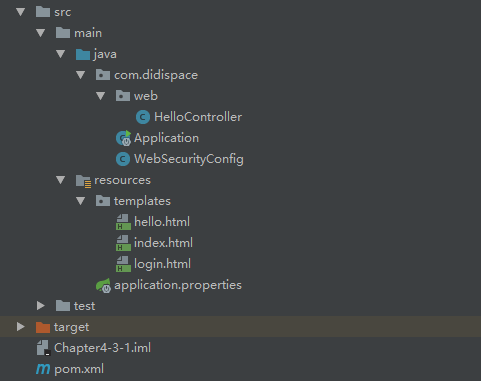
2.pom.xml
<?xml version="1.0" encoding="UTF-8"?>

<project xmlns="http://maven.apache.org/POM/4.0.0" xmlns:xsi="http://www.w3.org/2001/XMLSchema-instance"

    xsi:schemaLocation="http://maven.apache.org/POM/4.0.0 http://maven.apache.org/xsd/maven-4.0.0.xsd">

    <modelVersion>4.0.0</modelVersion>

    <groupId>com.didispace</groupId>

    <artifactId>Chapter4-3-1</artifactId>

    <version>1.0.0</version>

    <packaging>jar</packaging>

    <name>Chapter4-3-1</name>

    <description>Spring Boot with Thymeleaf</description>

    <parent>

        <groupId>org.springframework.boot</groupId>

        <artifactId>spring-boot-starter-parent</artifactId>

        <version>1.3.2.RELEASE</version>

        <relativePath/> <!-- lookup parent from repository -->

    </parent>

    <properties>

        <project.build.sourceEncoding>UTF-8</project.build.sourceEncoding>

        <java.version>1.8</java.version>

    </properties>

    <dependencies>

        <dependency>

            <groupId>org.springframework.boot</groupId>

            <artifactId>spring-boot-starter</artifactId>

        </dependency>

        <dependency>

            <groupId>org.springframework.boot</groupId>

            <artifactId>spring-boot-starter-test</artifactId>

            <scope>test</scope>

        </dependency>

        <dependency>

            <groupId>org.springframework.boot</groupId>

            <artifactId>spring-boot-starter-web</artifactId>

        </dependency>

        <dependency>

            <groupId>org.springframework.boot</groupId>

            <artifactId>spring-boot-starter-thymeleaf</artifactId>

        </dependency>

        <dependency>

            <groupId>org.springframework.boot</groupId>

            <artifactId>spring-boot-starter-security</artifactId>

        </dependency>

    </dependencies>

    <build>

        <plugins>

            <plugin>

                <groupId>org.springframework.boot</groupId>

                <artifactId>spring-boot-maven-plugin</artifactId>

                <configuration>

                    <fork>true</fork>

                </configuration>

            </plugin>

        </plugins>

    </build>

</project>
3.login.html
<!DOCTYPE html>

<html xmlns="http://www.w3.org/1999/xhtml"

      xmlns:th="http://www.thymeleaf.org"

      xmlns:sec="http://www.thymeleaf.org/thymeleaf-extras-springsecurity3">

<head>

    <title>Spring Security Example </title>

</head>

<body>

<div th:if="${param.error}">

    用户名或密码错

</div>

<div th:if="${param.logout}">

    您已注销成功

</div>

<form th:action="@{/login}" method="post">

    <div><label> 用户名 : <input type="text" name="username"/> </label></div>

    <div><label> 密 码 : <input type="password" name="password"/> </label></div>

    <div><input type="submit" value="登录"/></div>

</form>

</body>

</html>
4.index.html
<!DOCTYPE html>

<html xmlns="http://www.w3.org/1999/xhtml" xmlns:th="http://www.thymeleaf.org"

      xmlns:sec="http://www.thymeleaf.org/thymeleaf-extras-springsecurity3">

<head>

    <title>Spring Security入门</title>

</head>

<body>

<h1>欢迎使用Spring Security!</h1>

<p>点击 <a th:href="@{/hello}">这里</a> 打个招呼吧</p>

</body>

</html>
5.hello.html
<!DOCTYPE html>

<html xmlns="http://www.w3.org/1999/xhtml" xmlns:th="http://www.thymeleaf.org"

      xmlns:sec="http://www.thymeleaf.org/thymeleaf-extras-springsecurity3">

<head>

    <title>Hello World!</title>

</head>

<body>

<h1 th:inline="text">Hello [[${#httpServletRequest.remoteUser}]]!</h1>

<form th:action="@{/logout}" method="post">

    <input type="submit" value="注销"/>

</form>

</body>

</html>
6.WebSecurityConfig
package com.didispace;

import org.springframework.beans.factory.annotation.Autowired;

import org.springframework.context.annotation.Configuration;

import org.springframework.security.config.annotation.authentication.builders.AuthenticationManagerBuilder;

import org.springframework.security.config.annotation.web.builders.HttpSecurity;

import org.springframework.security.config.annotation.web.configuration.EnableWebSecurity;

import org.springframework.security.config.annotation.web.configuration.WebSecurityConfigurerAdapter;

@Configuration

@EnableWebSecurity

public class WebSecurityConfig extends WebSecurityConfigurerAdapter {

    @Override

    protected void configure(HttpSecurity http) throws Exception {

        http

            .authorizeRequests()

                .antMatchers("/", "/home").permitAll()

                .anyRequest().authenticated()

                .and()

            .formLogin()

                .loginPage("/login")

                .permitAll()

                .and()

            .logout()

                .permitAll();

    }

    @Autowired

    public void configureGlobal(AuthenticationManagerBuilder auth) throws Exception {

        auth

            .inMemoryAuthentication()

                .withUser("user").password("password").roles("USER");

    }

}
7.HelloController
package com.didispace.web;

import org.springframework.stereotype.Controller;

import org.springframework.ui.ModelMap;

import org.springframework.web.bind.annotation.RequestMapping;

import org.springframework.web.bind.annotation.RequestMethod;

/**

 *

 * @author 程序猿DD

 * @version 1.0.0

 * @blog http://blog.didispace.com

 *

 */

@Controller

public class HelloController {

    @RequestMapping("/")

    public String index() {

        return "index";

    }

    @RequestMapping("/hello")

    public String hello() {

        return "hello";

    }

    @RequestMapping(value = "/login", method = RequestMethod.GET)

    public String login() {

        return "login";

    }

}
8.启动项
package com.didispace;

import org.springframework.boot.SpringApplication;

import org.springframework.boot.autoconfigure.SpringBootApplication;

/**

 *

 * @author 程序猿DD

 * @version 1.0.0

 * @blog http://blog.didispace.com

 *

 */

@SpringBootApplication

public class Application {

    public static void main(String[] args) {

        SpringApplication.run(Application.class, args);

    }

}
springboot使用security的更多相关文章
- SpringBoot集成security
本文就SpringBoot集成Security的使用步骤做出解释说明.
- SpringBoot + Spring Security 学习笔记(五)实现短信验证码+登录功能
在 Spring Security 中基于表单的认证模式,默认就是密码帐号登录认证,那么对于短信验证码+登录的方式,Spring Security 没有现成的接口可以使用,所以需要自己的封装一个类似的 ...
- SpringBoot + Spring Security 学习笔记(三)实现图片验证码认证
整体实现逻辑 前端在登录页面时,自动从后台获取最新的验证码图片 服务器接收获取生成验证码请求,生成验证码和对应的图片,图片响应回前端,验证码保存一份到服务器的 session 中 前端用户登录时携带当 ...
- 基于Springboot集成security、oauth2实现认证鉴权、资源管理
1.Oauth2简介 OAuth(开放授权)是一个开放标准,允许用户授权第三方移动应用访问他们存储在另外的服务提供者上的信息,而不需要将用户名和密码提供给第三方移动应用或分享他们数据的所有内容,OAu ...
- springboot+spring security +oauth2.0 demo搭建(password模式)(认证授权端与资源服务端分离的形式)
项目security_simple(认证授权项目) 1.新建springboot项目 这儿选择springboot版本我选择的是2.0.6 点击finish后完成项目的创建 2.引入maven依赖 ...
- SpringBoot+thymeleaf+security+vue搭建后台框架 基础篇(一)
刚刚接触SpringBoot,说说踩过的坑,主要的还是要记录下来,供以后反省反省! 今天主要讲讲 thymeleaf+security 的搭建,SpringBoot的项目搭建应该比较简单,这里就不多说 ...
- springboot对security的后端配置
一.Spring Security是一个能够为基于Spring的企业应用系统提供声明式的安全访问控制解决方案的安全框架.它提供了一组可以在Spring应用上下文中配置的Bean,充分利用了Spring ...
- SpringBoot + Spring Security 基本使用及个性化登录配置详解
Spring Security 基本介绍 这里就不对Spring Security进行过多的介绍了,具体的可以参考官方文档 我就只说下SpringSecurity核心功能: 认证(你是谁) 授权(你能 ...
- SpringBoot系列——Security + Layui实现一套权限管理后台模板
前言 Spring Security官网:https://spring.io/projects/spring-security Spring Security是一个功能强大且高度可定制的身份验证和访问 ...
随机推荐
- 基于hprose-golang创建RPC微服务
Hprose(High Performance Remote Object Service Engine) 是一款先进的轻量级.跨语言.跨平台.无侵入式.高性能动态远程对象调用引擎库.它不仅简单易用, ...
- Sql Or NoSql,看完这一篇你就懂了
前言 你是否在为系统的数据库来一波大流量就几乎打满CPU,日常CPU居高不下烦恼?你是否在各种NoSql间纠结不定,到底该选用那种最好?今天的你就是昨天的我,这也是写这篇文章的初衷. 这篇文章是我好几 ...
- CSS实现三栏布局(5种)
常见的布局方式: float布局.Position定位.table布局.弹性(flex)布局.网格(grid)布局 那么我们就是用以上5种方式完成三栏布局,不过前提是左右宽度(假如左右宽度为300px ...
- 使用appscan安全扫描问题以及解决办法
最近在做安全扫描,把遇到的一些问题以及一些解决方法记录下,以备后用. 扫描软件: IBM Security AppScan Standard 规则: 17441 1. 已解密的登录请求 (高) - ...
- UWP实现吸顶的Pivot
话不多说,先上效果 这里使用了一个ScrollProgressProvider.cs,我们这篇文章先解析一下整体的动画思路,以后再详细解释这个Provider的实现方式. 结构 整个页面大致结构是 & ...
- python小白手册之字符串的私有方法和公用方法
#字符串方法. name=input('1111') if name.isalnum(): print(是否由数字字母) isdigit isdecimal判断数字 strip去空格或者其他 name ...
- python(自用手册)三
第三章 基础 3.1编码初识 ascii 256字母没有中文 一个字节 8位 gbk 中国 中文2字节 16位 英文1字节8位 unicode 万国码 前期 2字节 8位 后期变成4个字节 32位 u ...
- Springboot源码分析之jar探秘
摘要: 利用IDEA等工具打包会出现springboot-0.0.1-SNAPSHOT.jar,springboot-0.0.1-SNAPSHOT.jar.original,前面说过它们之间的关系了, ...
- 流程控制之while循坏
流程控制之while循坏 一.语法 循环就是一个重复的过程,我们人需要重复干一个活,人岂不是要累死啊,而且还是那么-..的枯燥乏味,向我这样要的小年轻,不骚里骚气的行吗?那岂不是白白流浪了这么多年头, ...
- .NET导出Excel的四种方法及评测
.NET导出Excel的四种方法及评测 导出Excel是.NET的常见需求,开源社区.市场上,都提供了不少各式各样的Excel操作相关包.本文,我将使用NPOI.EPPlus.OpenXML.Aspo ...