
springboot使用security
springboot使用security
1.结构图
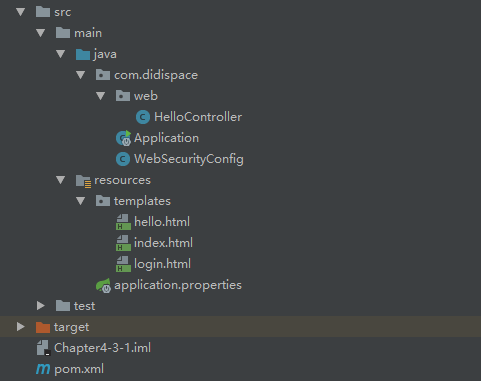
2.pom.xml
<?xml version="1.0" encoding="UTF-8"?>

<project xmlns="http://maven.apache.org/POM/4.0.0" xmlns:xsi="http://www.w3.org/2001/XMLSchema-instance"

    xsi:schemaLocation="http://maven.apache.org/POM/4.0.0 http://maven.apache.org/xsd/maven-4.0.0.xsd">

    <modelVersion>4.0.0</modelVersion>

    <groupId>com.didispace</groupId>

    <artifactId>Chapter4-3-1</artifactId>

    <version>1.0.0</version>

    <packaging>jar</packaging>

    <name>Chapter4-3-1</name>

    <description>Spring Boot with Thymeleaf</description>

    <parent>

        <groupId>org.springframework.boot</groupId>

        <artifactId>spring-boot-starter-parent</artifactId>

        <version>1.3.2.RELEASE</version>

        <relativePath/> <!-- lookup parent from repository -->

    </parent>

    <properties>

        <project.build.sourceEncoding>UTF-8</project.build.sourceEncoding>

        <java.version>1.8</java.version>

    </properties>

    <dependencies>

        <dependency>

            <groupId>org.springframework.boot</groupId>

            <artifactId>spring-boot-starter</artifactId>

        </dependency>

        <dependency>

            <groupId>org.springframework.boot</groupId>

            <artifactId>spring-boot-starter-test</artifactId>

            <scope>test</scope>

        </dependency>

        <dependency>

            <groupId>org.springframework.boot</groupId>

            <artifactId>spring-boot-starter-web</artifactId>

        </dependency>

        <dependency>

            <groupId>org.springframework.boot</groupId>

            <artifactId>spring-boot-starter-thymeleaf</artifactId>

        </dependency>

        <dependency>

            <groupId>org.springframework.boot</groupId>

            <artifactId>spring-boot-starter-security</artifactId>

        </dependency>

    </dependencies>

    <build>

        <plugins>

            <plugin>

                <groupId>org.springframework.boot</groupId>

                <artifactId>spring-boot-maven-plugin</artifactId>

                <configuration>

                    <fork>true</fork>

                </configuration>

            </plugin>

        </plugins>

    </build>

</project>
3.login.html
<!DOCTYPE html>

<html xmlns="http://www.w3.org/1999/xhtml"

      xmlns:th="http://www.thymeleaf.org"

      xmlns:sec="http://www.thymeleaf.org/thymeleaf-extras-springsecurity3">

<head>

    <title>Spring Security Example </title>

</head>

<body>

<div th:if="${param.error}">

    用户名或密码错

</div>

<div th:if="${param.logout}">

    您已注销成功

</div>

<form th:action="@{/login}" method="post">

    <div><label> 用户名 : <input type="text" name="username"/> </label></div>

    <div><label> 密 码 : <input type="password" name="password"/> </label></div>

    <div><input type="submit" value="登录"/></div>

</form>

</body>

</html>
4.index.html
<!DOCTYPE html>

<html xmlns="http://www.w3.org/1999/xhtml" xmlns:th="http://www.thymeleaf.org"

      xmlns:sec="http://www.thymeleaf.org/thymeleaf-extras-springsecurity3">

<head>

    <title>Spring Security入门</title>

</head>

<body>

<h1>欢迎使用Spring Security!</h1>

<p>点击 <a th:href="@{/hello}">这里</a> 打个招呼吧</p>

</body>

</html>
5.hello.html
<!DOCTYPE html>

<html xmlns="http://www.w3.org/1999/xhtml" xmlns:th="http://www.thymeleaf.org"

      xmlns:sec="http://www.thymeleaf.org/thymeleaf-extras-springsecurity3">

<head>

    <title>Hello World!</title>

</head>

<body>

<h1 th:inline="text">Hello [[${#httpServletRequest.remoteUser}]]!</h1>

<form th:action="@{/logout}" method="post">

    <input type="submit" value="注销"/>

</form>

</body>

</html>
6.WebSecurityConfig
package com.didispace;

import org.springframework.beans.factory.annotation.Autowired;

import org.springframework.context.annotation.Configuration;

import org.springframework.security.config.annotation.authentication.builders.AuthenticationManagerBuilder;

import org.springframework.security.config.annotation.web.builders.HttpSecurity;

import org.springframework.security.config.annotation.web.configuration.EnableWebSecurity;

import org.springframework.security.config.annotation.web.configuration.WebSecurityConfigurerAdapter;

@Configuration

@EnableWebSecurity

public class WebSecurityConfig extends WebSecurityConfigurerAdapter {

    @Override

    protected void configure(HttpSecurity http) throws Exception {

        http

            .authorizeRequests()

                .antMatchers("/", "/home").permitAll()

                .anyRequest().authenticated()

                .and()

            .formLogin()

                .loginPage("/login")

                .permitAll()

                .and()

            .logout()

                .permitAll();

    }

    @Autowired

    public void configureGlobal(AuthenticationManagerBuilder auth) throws Exception {

        auth

            .inMemoryAuthentication()

                .withUser("user").password("password").roles("USER");

    }

}
7.HelloController
package com.didispace.web;

import org.springframework.stereotype.Controller;

import org.springframework.ui.ModelMap;

import org.springframework.web.bind.annotation.RequestMapping;

import org.springframework.web.bind.annotation.RequestMethod;

/**

 *

 * @author 程序猿DD

 * @version 1.0.0

 * @blog http://blog.didispace.com

 *

 */

@Controller

public class HelloController {

    @RequestMapping("/")

    public String index() {

        return "index";

    }

    @RequestMapping("/hello")

    public String hello() {

        return "hello";

    }

    @RequestMapping(value = "/login", method = RequestMethod.GET)

    public String login() {

        return "login";

    }

}
8.启动项
package com.didispace;

import org.springframework.boot.SpringApplication;

import org.springframework.boot.autoconfigure.SpringBootApplication;

/**

 *

 * @author 程序猿DD

 * @version 1.0.0

 * @blog http://blog.didispace.com

 *

 */

@SpringBootApplication

public class Application {

    public static void main(String[] args) {

        SpringApplication.run(Application.class, args);

    }

}
springboot使用security的更多相关文章
- SpringBoot集成security
本文就SpringBoot集成Security的使用步骤做出解释说明.
- SpringBoot + Spring Security 学习笔记(五)实现短信验证码+登录功能
在 Spring Security 中基于表单的认证模式,默认就是密码帐号登录认证,那么对于短信验证码+登录的方式,Spring Security 没有现成的接口可以使用,所以需要自己的封装一个类似的 ...
- SpringBoot + Spring Security 学习笔记(三)实现图片验证码认证
整体实现逻辑 前端在登录页面时,自动从后台获取最新的验证码图片 服务器接收获取生成验证码请求,生成验证码和对应的图片,图片响应回前端,验证码保存一份到服务器的 session 中 前端用户登录时携带当 ...
- 基于Springboot集成security、oauth2实现认证鉴权、资源管理
1.Oauth2简介 OAuth(开放授权)是一个开放标准,允许用户授权第三方移动应用访问他们存储在另外的服务提供者上的信息,而不需要将用户名和密码提供给第三方移动应用或分享他们数据的所有内容,OAu ...
- springboot+spring security +oauth2.0 demo搭建(password模式)(认证授权端与资源服务端分离的形式)
项目security_simple(认证授权项目) 1.新建springboot项目 这儿选择springboot版本我选择的是2.0.6 点击finish后完成项目的创建 2.引入maven依赖 ...
- SpringBoot+thymeleaf+security+vue搭建后台框架 基础篇(一)
刚刚接触SpringBoot,说说踩过的坑,主要的还是要记录下来,供以后反省反省! 今天主要讲讲 thymeleaf+security 的搭建,SpringBoot的项目搭建应该比较简单,这里就不多说 ...
- springboot对security的后端配置
一.Spring Security是一个能够为基于Spring的企业应用系统提供声明式的安全访问控制解决方案的安全框架.它提供了一组可以在Spring应用上下文中配置的Bean,充分利用了Spring ...
- SpringBoot + Spring Security 基本使用及个性化登录配置详解
Spring Security 基本介绍 这里就不对Spring Security进行过多的介绍了,具体的可以参考官方文档 我就只说下SpringSecurity核心功能: 认证(你是谁) 授权(你能 ...
- SpringBoot系列——Security + Layui实现一套权限管理后台模板
前言 Spring Security官网:https://spring.io/projects/spring-security Spring Security是一个功能强大且高度可定制的身份验证和访问 ...
随机推荐
- 多态、继承、this、super
先放一下多态的定义: (360词典上的哈) 多态(Polymorphism)按字面的意思就是"多种状态".在面向对象语言中,接口的多种不同的实现方式即为多态.引用Charlie C ...
- 深入理解 linux磁盘顺序写、随机写
一.前言 ● 随机写会导致磁头不停地换道,造成效率的极大降低:顺序写磁头几乎不用换道,或者换道的时间很短 ● 本文来讨论一下两者具体的差别以及相应的内核调用 二.环境准备 组件 版本 OS Ubunt ...
- C#.Net实现AutoCAD块属性提取
https://blog.csdn.net/dengyiyu/article/details/2201175 本文主要给大家介绍一下SmartSoft中用C#.Net实现AutoCAD块属性提取的方法 ...
- C#读取Txt大数据并更新到数据库
环境 Sqlserver 2016 .net 4.5.2 目前测试数据1300万 大约3-4分钟.(限制一次读取条数 和 线程数是 要节省服务器资源,如果调太大服务器其它应用可能就跑不了了), Sql ...
- LoRaWAN stack移植笔记(六)_调试2
前言 调试的过程中碰到的问题基本都是以前没有遇到过的,而且需要对整个协议栈及射频方面的工作流程较熟悉才能找到问题的原因,需要多读SX1276的数据手册以及与射频芯片的物理层通信例程和MAC层通信例程进 ...
- Scrapy框架解读
1. Scrapy组件a. 主体部分i. 引擎(Scrapy):处理整个系统的数据流处理,触发事务(框架核心)ii. 调度器(Scheduler):1) 用来接受引擎发过来的请求, 压入队列中, 并在 ...
- .net core 微服务项目-介绍篇
项目介绍 1.各种方式连接API都会连接到 APIGateway 来进行统一的分发 Ocelot 2.当api需要授权时 需要请求授权服务 IdentityServer4 3.授权服务对请求进行调用u ...
- Kafka到底有几个Offset?——Kafka核心之偏移量机制
Kafka是由LinkIn开源的实时数据处理框架,目前已经更新到2.3版本.不同于一般的消息中间件,Kafka通过数据持久化和磁盘读写获得了极高的吞吐量,并可以不依赖Storm,SparkStre ...
- Gym - 101252H
题意略. 思路:二分.注意当利率高且m比较小的时候,每个月的偿还可能会大于本金,所以我们二分的右边界应该要设为2 * 本金. 详见代码: #include<bits/stdc++.h> # ...
- webrtc笔记(1): 基于coturn项目的stun/turn服务器搭建
webrtc是google推出的基于浏览器的实时语音-视频通讯架构.其典型的应用场景为:浏览器之间端到端(p2p)实时视频对话,但由于网络环境的复杂性(比如:路由器/交换机/防火墙等),浏览器与浏览器 ...