
【翻译】spring-data 之JdbcTemplate 使用
Jdbc的使用
基础的代码结构:
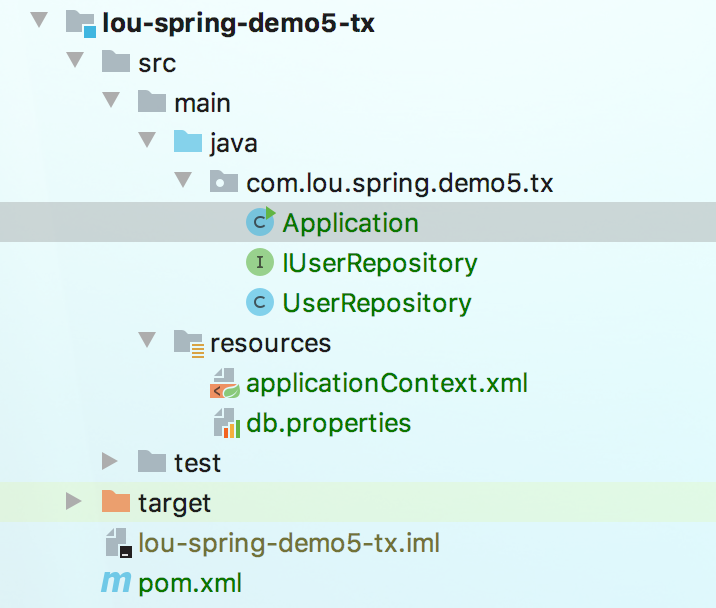
一个Application作为入口。IUserRepository和UserRepository作为具体的实现。applicationContext.xml定义spring的配置。db.properties保存数据库相关的信息。
环境搭建步骤
新建项目
新建一个maven项目,编辑pom.xml文件,如下。除了mysql的驱动,其他是必须的。
<?xml version="1.0" encoding="UTF-8"?>

<project xmlns="http://maven.apache.org/POM/4.0.0"

         xmlns:xsi="http://www.w3.org/2001/XMLSchema-instance"

         xsi:schemaLocation="http://maven.apache.org/POM/4.0.0 http://maven.apache.org/xsd/maven-4.0.0.xsd">

    <modelVersion>4.0.0</modelVersion>

    <groupId>com.lou.spring.demo5.tx</groupId>

    <artifactId>lou-spring-demo5-tx</artifactId>

    <version>1.0-SNAPSHOT</version>

    <dependencies>

        <!--spring的核心-->

        <dependency>

            <groupId>org.springframework</groupId>

            <artifactId>spring-context</artifactId>

            <version>4.3.25.RELEASE</version>

        </dependency>

        <!--orm相关,比如jdbctemplate-->

        <dependency>

            <groupId>org.springframework</groupId>

            <artifactId>spring-orm</artifactId>

            <version>4.3.25.RELEASE</version>

        </dependency>

        <!--mysql数据库驱动-->

        <dependency>

            <groupId>mysql</groupId>

            <artifactId>mysql-connector-java</artifactId>

            <version>6.0.6</version>

        </dependency>

        <!-- datasource 数据源 -->

        <dependency>

            <groupId>org.apache.commons</groupId>

            <artifactId>commons-dbcp2</artifactId>

            <version>2.7.0</version>

        </dependency>

    </dependencies>

</project>
applicationContext.xml
在resources下面添加spring的配置文件applicationContext.xml

内容:
<?xml version="1.0" encoding="UTF-8"?>

<beans xmlns="http://www.springframework.org/schema/beans"

       xmlns:xsi="http://www.w3.org/2001/XMLSchema-instance"

       xmlns:context="http://www.springframework.org/schema/context"

       xsi:schemaLocation="http://www.springframework.org/schema/beans http://www.springframework.org/schema/beans/spring-beans.xsd http://www.springframework.org/schema/context https://www.springframework.org/schema/context/spring-context.xsd">

<!--    1.无需定义repository注解,通过属性设置的方式进行-->

    <bean id="userRepository1" class="com.lou.spring.demo5.tx.UserRepository">

        <property name="jdbcTemplate" ref="dataSource"></property>

    </bean>

<!--    2.使用Component-scan的方式配合@repository注解-->

<!--    <context:component-scan base-package="com.lou.spring.demo5.tx"></context:component-scan>-->

    <bean id="dataSource" class="org.apache.commons.dbcp2.BasicDataSource">

        <property name="driverClassName" value="${jdbc.dirverClassName}"></property>

        <property name="url" value="${jdbc.url}"></property>

        <property name="username" value="${jdbc.username}"></property>

        <property name="password" value="${jdbc.password}"></property>

    </bean>

  <!--    上面datasource用到的属性值来自这个-->

    <context:property-placeholder location="db.properties"></context:property-placeholder>

</beans>
db.properties
在resources下面添加db.properties文件
jdbc.dirverClassName=com.mysql.cj.jdbc.Driver

jdbc.username=root

jdbc.password=123456

jdbc.url=jdbc:mysql://localhost:3306/test1?useSSL=false
Repository
添加IUserRepository和UserRepository用于数据库的访问。
IUserRepository.java
package com.lou.spring.demo5.tx;

public interface IUserRepository {

    //显示总数

    void showCount();

}
UserRepository.java
package com.lou.spring.demo5.tx;

import org.springframework.beans.factory.annotation.Autowired;

import org.springframework.jdbc.core.JdbcTemplate;

import org.springframework.stereotype.Repository;

import javax.sql.DataSource;

@Repository

public class UserRepository implements IUserRepository {

    private JdbcTemplate jdbcTemplate;

    @Autowired

    public void setJdbcTemplate(DataSource dataSource) {

        this.jdbcTemplate = new JdbcTemplate(dataSource);

    }

    @Override

    public void showCount() {

        Integer count = jdbcTemplate.queryForObject("select count(*) from account", Integer.class);

        System.out.println(count);

    }

}
不使用Repository和Autowired注解方式
没有开启Repository和Autowired注解,所以,需要在xml中手动配置。确保set方法的后面部分和applicationContext.xml#userRepository1#property的name字段名字是一样的。然后传入一个DataSource参数,也就是property的ref引用
开启Repository和Autowired注解方式
开启了注解之后就需要定义在applicationContext.xml中定义
component-scan,然后spring自己去扫描查找需要的依赖。
程序入口
新建Application.java 作为程序入口。
package com.lou.spring.demo5.tx;

import org.apache.commons.dbcp2.BasicDataSource;

import org.springframework.context.support.ClassPathXmlApplicationContext;

public class Application {

    public static void main(String[] args) {

        ClassPathXmlApplicationContext classPathXmlApplicationContext = new ClassPathXmlApplicationContext("applicationContext.xml");

        BasicDataSource dataSource = (BasicDataSource) classPathXmlApplicationContext.getBean("dataSource");

        //用来测试数据源是否通

        System.out.println(dataSource);

        //通过id的方式获取

        UserRepository userRepository = (UserRepository) classPathXmlApplicationContext.getBean("userRepository1");

        userRepository.showCount();

        //通过class的方式获取

        UserRepository userRepository1 = classPathXmlApplicationContext.getBean(UserRepository.class);

        userRepository1.showCount();

    }

}
使用demo
先定义一个User对象
User.java
package com.lou.spring.demo5.tx;

public class User {

    private Integer id;

    private String name;

    private Integer age;

    public Integer getId() {

        return id;

    }

    public void setId(Integer id) {

        this.id = id;

    }

    public String getName() {

        return name;

    }

    public void setName(String name) {

        this.name = name;

    }

    public Integer getAge() {

        return age;

    }

    public void setAge(Integer age) {

        this.age = age;

    }

    @Override

    public String toString() {

        return "User{" +

                "id=" + id +

                ", name='" + name + '\'' +

                ", age=" + age +

                '}';

    }

}
查询相关(select)
修改一下IUserRepository,增加如下内容。
public interface IUserRepository {

    //总行数查询

    Integer getTotalCount();

    //带条件的总行数查询

    Integer getTotalCount(String name);

    //查询一个String

    String getName();

    //查询一个对象

    User getUser();

    //查询对象集合

    List<User> getUsers();

}
具体实现:
@Repository

public class UserRepository implements IUserRepository {

    private JdbcTemplate jdbcTemplate;

    @Autowired

    public void setJdbcTemplate111(DataSource dataSource) {

        this.jdbcTemplate = new JdbcTemplate(dataSource);

    }

    @Override

    public Integer getTotalCount() {

        Integer userCount = jdbcTemplate.queryForObject("select count(*) from user", Integer.class);

        return userCount;

    }

    @Override

    public Integer getTotalCount(String name) {

        Integer louCount = jdbcTemplate.queryForObject("select count(*) from user where name like ?", Integer.class, name);

        return louCount;

    }

    @Override

    public String getName() {

        String name = jdbcTemplate.queryForObject("select name from user where id=?", new Object[]{1}, String.class);

        return name;

    }

    @Override

    public User getUser() {

        User user = jdbcTemplate.queryForObject("select * from user where id = ?", new Object[]{1}, new UserMapper());

        return user;

    }

    @Override

    public List<User> getUsers() {

        List<User> users = jdbcTemplate.query("select * from user", new UserMapper());

        return users;

    }

    //抽取公共的RowMapper<User>,内部私有的class,放外面的话是要public,非static

    private static final class UserMapper implements RowMapper<User> {

        @Override

        public User mapRow(ResultSet resultSet, int i) throws SQLException {

            User user = new User();

            user.setId(resultSet.getInt("id"));

            user.setName(resultSet.getString("name"));

            user.setAge(resultSet.getInt("age"));

            return user;

        }

    }

}
使用RowMapper对结果集做映射。UserMapper是一个私有的静态类。使用的时候需要new。
update相关(包括insert,update,delete)
@Override

public Integer insertUser(User u) {

    return jdbcTemplate.update("insert into user (name,age) values(?,?)", u.getName(), u.getAge());

}

@Override

public Integer updateUser(Integer userId, String name) {

    return jdbcTemplate.update("update user set name=? where id=?", name, userId);

}

@Override

public Integer deleteUser(Integer userId) {

    return jdbcTemplate.update("delete from user where id = ?", userId);

}
execute 方法
用来执行create table 或者调用存储过程之类的sql语句。
this.jdbcTemplate.execute("create table mytable (id integer, name varchar(100))");

this.jdbcTemplate.update(

        "call SUPPORT.REFRESH_ACTORS_SUMMARY(?)",

        Long.valueOf(unionId));
JdbcTemplate的最佳实践
JdbcTemplate一旦被配置之后,他的实例就是线程安全的。这一点比较重要,因为这样你就可以把他注入到多个DAO或者Repository中。按照前文先配置DataSource,然后在构造函数里面实例化JdbcTemplate。
总结
新建项目,添加依赖,添加spring的xml配置文件,写repo,写application,获取bean,运行。
【翻译】spring-data 之JdbcTemplate 使用的更多相关文章
- spring data之JDBCTemplate学习笔记
一.spring 数据访问哲学 1.为避免持久化的逻辑分散在程序的各个组件中,数据访问的功能应到放到一个或多个专注于此的组件中,一般称之为数据访问对象(data access object,DAO). ...
- spring boot(五):spring data jpa的使用
在上篇文章springboot(二):web综合开发中简单介绍了一下spring data jpa的基础性使用,这篇文章将更加全面的介绍spring data jpa 常见用法以及注意事项 使用spr ...
- springboot:spring data jpa介绍
转载自:https://www.cnblogs.com/ityouknow/p/5891443.html 在上篇文章springboot(二):web综合开发中简单介绍了一下spring data j ...
- spring boot(五)Spring data jpa介绍
在上篇文章springboot(二):web综合开发中简单介绍了一下spring data jpa的基础性使用,这篇文章将更加全面的介绍spring data jpa 常见用法以及注意事项 使用spr ...
- springboot(五):spring data jpa的使用
在上篇文章springboot(二):web综合开发中简单介绍了一下spring data jpa的基础性使用,这篇文章将更加全面的介绍spring data jpa 常见用法以及注意事项 使用spr ...
- SpringBoot(五) :spring data jpa 的使用
原文出处: 纯洁的微笑 在上篇文章springboot(二):web综合开发中简单介绍了一下spring data jpa的基础性使用,这篇文章将更加全面的介绍spring data jpa 常见用法 ...
- Spring Data JPA教程, 第三部分: Custom Queries with Query Methods(翻译)
在本人的Spring Data JPA教程的第二部分描述了如何用Spring Data JPA创建一个简单的CRUD应用,本博文将描述如何在Spring Data JPA中使用query方法创建自定义 ...
- Spring Data JPA教程, 第二部分: CRUD(翻译)
我的Spring Data Jpa教程的第一部分描述了,如何配置Spring Data JPA,本博文进一步描述怎样使用Spring Data JPA创建一个简单的CRUD应用.该应用要求如下: pe ...
- Spring Data JPA教程,第一部分: Configuration(翻译)
Spring Data JPA项目旨在简化基于仓库的JPA的创建并减少与数据库交互的所需的代码量.本人在自己的工作和个人爱好项目中已经使用一段时间,它却是是事情如此简单和清洗,现在是时候与你分享我的知 ...
- Spring Data JPA 教程(翻译)
写那些数据挖掘之类的博文 写的比较累了,现在翻译一下关于spring data jpa的文章,觉得轻松多了. 翻译正文: 你有木有注意到,使用Java持久化的API的数据访问代码包含了很多不必要的模式 ...
随机推荐
- English: Class Speed
Xx_Introduce https://www.jianshu.com/p/d1c1b84d89e8 Please protection,respect,love,"China's Int ...
- Windows相关操作(备忘)
查看服务端口是否能通:telnet 192.168.1.11 8888 查看端口是否被占用 netstat -ano
- Python里的*args and **kwargs
http://book.pythontips.com/en/latest/args_and_kwargs.html https://stackoverflow.com/questions/339483 ...
- GIL以及协程
GIL以及协程 一.GIL全局解释器锁 演示 ''' python解释器: - Cpython c语言 - Jpython java 1.GIL:全局解释器锁 - 翻译:在同一个进程下开启的多个线程, ...
- Cocos2d-x.3.0开发环境搭建
配置:win7 + VS2012 + Cocos2d-x.3.0 + Cocos Studio v1.4.0.1 前言:本文介绍在上述配置下进行游戏开发的环境搭建.开发语言为C++.如果读者不需要查看 ...
- jenkins实现git自动拉取代码时替换配置文件
jenkins实现从git上自动拉取源代码——>自动编译——>发布到测试服务器——>验证测试,这个大家应该都知道,但是关于源代码里的配置文件,可能就会有点头疼了, 一般测试都会自己的 ...
- 2019年全国高校计算机能力挑战赛 C语言程序设计决赛
2019年全国高校计算机能力挑战赛 C语言程序设计决赛 毕竟这个比赛是第一次举办,能理解.. 希望未来再举办时,能够再完善一下题面表述.数据范围. 话说区域赛获奖名额有点少吧.舍友花60块想混个创新创 ...
- 【linux命令】chgrp改变文件或目录的属组
在lunix系统里,文件或目录的权限的掌控以拥有者及所诉群组来管理.可以使用chgrp指令取变更文件与目录所属群组,这种方式采用群组名称或群组识别码都可以.Chgrp命令就是change group的 ...
- 在windows桌面上创建一个文件夹
用dos命令创建 md [文件路径][文件名] C:\Users\admin>md C:\Users\admin\desktop\test 刷新一下桌面,就可以看见桌面上创建了一个名为test ...
- pip安装插件报错。
报错: Cannot unpack file C:\Windows\TEMP\pip-unpack-4mbfczpj\simple (downloaded from C:\Windows\TEMP\p ...