
Android中相对布局的两个控件
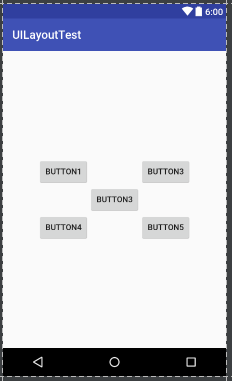
<Button

    android:id="@+id/button3"

    android:layout_width="wrap_content"

    android:layout_height="wrap_content"

    android:layout_centerInParent="true"

    android:text="Button3"

    />

<Button

    android:id="@+id/button1"

    android:layout_width="wrap_content"

    android:layout_height="wrap_content"

    android:layout_above="@id/button3"

    android:layout_toLeftOf="@id/button3"

    android:text="Button1"

    />

<Button

    android:id="@+id/button2"

    android:layout_width="wrap_content"

    android:layout_height="wrap_content"

    android:layout_above="@id/button3"

    android:layout_toRightOf="@id/button3"

    android:text="Button3"

    />

<Button

    android:id="@+id/button4"

    android:layout_width="wrap_content"

    android:layout_height="wrap_content"

    android:layout_below="@id/button3"

    android:layout_toLeftOf="@id/button3"

    android:text="Button4"

    />

<Button

    android:id="@+id/button5"

    android:layout_width="wrap_content"

    android:layout_height="wrap_content"

    android:layout_below="@id/button3"

    android:layout_toRightOf="@id/button3"

    android:text="Button5"

    />
布局结果如下图:
代码更改一下:
<Button

    android:id="@+id/button3"

    android:layout_width="wrap_content"

    android:layout_height="wrap_content"

    android:layout_centerInParent="true"

    android:text="Button3"

    />

<Button

    android:id="@+id/button1"

    android:layout_width="wrap_content"

    android:layout_height="wrap_content"

    android:layout_above="@id/button3"

    android:layout_toLeftOf="@id/button3"

    android:text="Button1"

    />

<Button

    android:id="@+id/button2"

    android:layout_width="wrap_content"

    android:layout_height="wrap_content"

    android:layout_above="@id/button3"

    android:layout_toRightOf="@id/button3"

    android:text="Button3"

    />

<Button

    android:id="@+id/button4"

    android:layout_width="wrap_content"

    android:layout_height="wrap_content"

    android:layout_below="@id/button3"

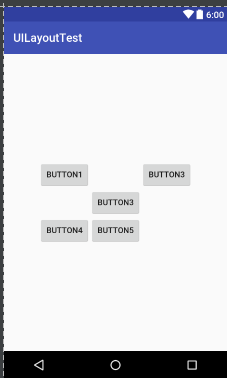
    android:layout_alignRight="@id/button1"

    android:text="Button4"

    />

<Button

    android:id="@+id/button5"

    android:layout_width="wrap_content"

    android:layout_height="wrap_content"

    android:layout_below="@id/button3"

    android:layout_alignRight="@id/button3"

    android:text="Button5"

    />
布局结果如下图:
Android中相对布局的两个控件的更多相关文章
- Android中Chronometer 计时器和震动服务控件
Chronometer 计时器控件 首先在布局文件中添加chronometer控件:然后在mainActivity中获取到该控件 4 然后通过Button时间监听器中开启计时操作 5 chronome ...
- Android中的几个基本常用控件
Android 中常用的几大UI控件 1. TextView : 用于在界面中显示一段文本信息 <TextView android:id="@+id/text_view" / ...
- Android中的布局优化方法
http://blog.csdn.net/rwecho/article/details/8951009 Android开发中的布局很重要吗?那是当然.一切的显示样式都是由这个布局决定的,你说能不重要吗 ...
- Android 布局之LinearLayout 子控件weight权重的作用详析(转)
关于Android开发中的LinearLayout子控件权重android:layout_weigh参数的作用,网上关于其用法有两种截然相反说法: 说法一:值越大,重要性越高,所占用的空间越大: 说法 ...
- Android 布局之LinearLayout 子控件weight权重的作用详析
关于Android开发中的LinearLayout子控件权重android:layout_weigh参数的作用,网上关于其用法有两种截然相反说法: 说法一:值越大,重要性越高,所占用的空间越大: 说法 ...
- 我的Android进阶之旅------>Android中的布局优化 include、merge 、ViewStub
1.如何重用布局文件? 可以使用<include>标签引用其他的布局文件,并用android:id属性覆盖被引用布局文件中顶层节点的android:id属性值.代码如下: <!--引 ...
- Android笔记(七) Android中的布局——线性布局
我们的软件是由好多个界面组成的,而每个界面又由N多个控件组成,Android中借助布局来让各个空间有条不紊的摆放在界面上. 可以把布局看作是一个可以放置很多控件的容器,它可以按照一定的规律调整控件的位 ...
- Android中得到布局文件对象有三种方式
Android中得到布局文件对象有三种方式 第一种,通过Activity对象 View view = Activity对象.getLayoutInflater().inflater(R.layout. ...
- Android笔记(九) Android中的布局——框架布局
框架布局没有任何定位方式,所有的控件都会摆放在布局的左上角. 代码示例: framelayout.xml <?xml version="1.0" encoding=" ...
随机推荐
- GitHub预览网页[2019最新]
GitHub预览网页 1. 创建仓库 2. 设置页面预览 3. 上传html 4. 访问网页 1. 创建仓库 登陆GitHub创建仓库 datamoko 添加基本信息: 仓库名.仓库描述,然后点击创建 ...
- UCOSIII时间片轮转调度
OS_RATE_HZ const OSCfg_TickRate_Hz = (OS_RATE_HZ )OS_CFG_TICK_RATE_HZ; #define OS_CFG_TICK_RATE_HZ 2 ...
- O - Can you find it?(二分查找)
O - Can you find it? Time Limit:3000MS Memory Limit:10000KB 64bit IO Format:%I64d & %I64 ...
- kafka原理与组件
一.什么是kafkakafka的目标是实现一个为处理实时数据提供一个统一.高吞吐.低延迟的平台.是分布式发布-订阅消息系统,是一个分布式的,可划分的,冗余备份的持久性的日志服务.Kafka使用场景:1 ...
- mysql查看当前实时连接数
静态查看: SHOW PROCESSLIST; SHOW FULL PROCESSLIST; SHOW VARIABLES LIKE '%max_connections%'; SHOW STATUS ...
- ssh本机失败(ssh: connect to host localhost port 22: Connection refused)
ssh本机失败(ssh: connect to host localhost port 22: Connection refused) 一. 问题描述 之前一直在服务上使用宝塔面板, 今天突发奇想, ...
- mysql技术内幕--innodb存储引擎图解
1. Innodb存储引擎 2. Innodb文件 3. Innodb表 4. Innodb事务 5. innodb索引与算法 6 ...
- android在主线程下载文件
android在主线程下载文件 加入以下代码即可if (android.os.Build.VERSION.SDK_INT > 9) { StrictMode.ThreadPolicy polic ...
- Linux系统下文件压缩与打包命令
Linux系统下文件压缩与打包命令 常用的压缩文件拓展名 * .Z * .zip * .gz * .bz2 * .xz * .tar * .tar.gz * .tar.bz2 * .tar.xz 压缩 ...
- scp 服务器之间远程复制
从本地服务器复制到远程服务器: (1) 复制文件: 命令格式: scp local_file remote_username@remote_ip:remote_folder 或者 scp local_ ...