
Android中相对布局的两个控件
<Button

    android:id="@+id/button3"

    android:layout_width="wrap_content"

    android:layout_height="wrap_content"

    android:layout_centerInParent="true"

    android:text="Button3"

    />

<Button

    android:id="@+id/button1"

    android:layout_width="wrap_content"

    android:layout_height="wrap_content"

    android:layout_above="@id/button3"

    android:layout_toLeftOf="@id/button3"

    android:text="Button1"

    />

<Button

    android:id="@+id/button2"

    android:layout_width="wrap_content"

    android:layout_height="wrap_content"

    android:layout_above="@id/button3"

    android:layout_toRightOf="@id/button3"

    android:text="Button3"

    />

<Button

    android:id="@+id/button4"

    android:layout_width="wrap_content"

    android:layout_height="wrap_content"

    android:layout_below="@id/button3"

    android:layout_toLeftOf="@id/button3"

    android:text="Button4"

    />

<Button

    android:id="@+id/button5"

    android:layout_width="wrap_content"

    android:layout_height="wrap_content"

    android:layout_below="@id/button3"

    android:layout_toRightOf="@id/button3"

    android:text="Button5"

    />
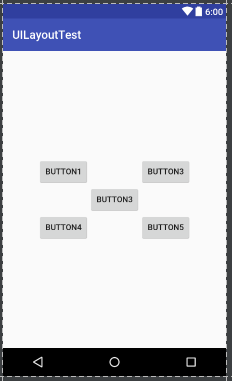
布局结果如下图:
代码更改一下:
<Button

    android:id="@+id/button3"

    android:layout_width="wrap_content"

    android:layout_height="wrap_content"

    android:layout_centerInParent="true"

    android:text="Button3"

    />

<Button

    android:id="@+id/button1"

    android:layout_width="wrap_content"

    android:layout_height="wrap_content"

    android:layout_above="@id/button3"

    android:layout_toLeftOf="@id/button3"

    android:text="Button1"

    />

<Button

    android:id="@+id/button2"

    android:layout_width="wrap_content"

    android:layout_height="wrap_content"

    android:layout_above="@id/button3"

    android:layout_toRightOf="@id/button3"

    android:text="Button3"

    />

<Button

    android:id="@+id/button4"

    android:layout_width="wrap_content"

    android:layout_height="wrap_content"

    android:layout_below="@id/button3"

    android:layout_alignRight="@id/button1"

    android:text="Button4"

    />

<Button

    android:id="@+id/button5"

    android:layout_width="wrap_content"

    android:layout_height="wrap_content"

    android:layout_below="@id/button3"

    android:layout_alignRight="@id/button3"

    android:text="Button5"

    />
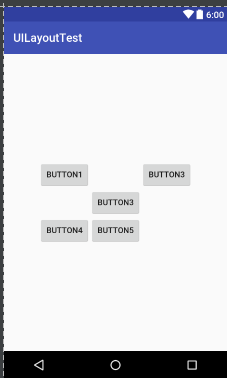
布局结果如下图:
Android中相对布局的两个控件的更多相关文章
- Android中Chronometer 计时器和震动服务控件
Chronometer 计时器控件 首先在布局文件中添加chronometer控件:然后在mainActivity中获取到该控件 4 然后通过Button时间监听器中开启计时操作 5 chronome ...
- Android中的几个基本常用控件
Android 中常用的几大UI控件 1. TextView : 用于在界面中显示一段文本信息 <TextView android:id="@+id/text_view" / ...
- Android中的布局优化方法
http://blog.csdn.net/rwecho/article/details/8951009 Android开发中的布局很重要吗?那是当然.一切的显示样式都是由这个布局决定的,你说能不重要吗 ...
- Android 布局之LinearLayout 子控件weight权重的作用详析(转)
关于Android开发中的LinearLayout子控件权重android:layout_weigh参数的作用,网上关于其用法有两种截然相反说法: 说法一:值越大,重要性越高,所占用的空间越大: 说法 ...
- Android 布局之LinearLayout 子控件weight权重的作用详析
关于Android开发中的LinearLayout子控件权重android:layout_weigh参数的作用,网上关于其用法有两种截然相反说法: 说法一:值越大,重要性越高,所占用的空间越大: 说法 ...
- 我的Android进阶之旅------>Android中的布局优化 include、merge 、ViewStub
1.如何重用布局文件? 可以使用<include>标签引用其他的布局文件,并用android:id属性覆盖被引用布局文件中顶层节点的android:id属性值.代码如下: <!--引 ...
- Android笔记(七) Android中的布局——线性布局
我们的软件是由好多个界面组成的,而每个界面又由N多个控件组成,Android中借助布局来让各个空间有条不紊的摆放在界面上. 可以把布局看作是一个可以放置很多控件的容器,它可以按照一定的规律调整控件的位 ...
- Android中得到布局文件对象有三种方式
Android中得到布局文件对象有三种方式 第一种,通过Activity对象 View view = Activity对象.getLayoutInflater().inflater(R.layout. ...
- Android笔记(九) Android中的布局——框架布局
框架布局没有任何定位方式,所有的控件都会摆放在布局的左上角. 代码示例: framelayout.xml <?xml version="1.0" encoding=" ...
随机推荐
- 【洛谷 SP8093】 JZPGYZ - Sevenk Love Oimaster(后缀自动机)
题目链接 广义sam.. #include <cstdio> #include <cstring> #include <algorithm> using names ...
- flex 布局学习
flex 布局学习 寻根溯源话布局 一切都始于这样一个问题:怎样通过 CSS 简单而优雅的实现水平.垂直同时居中.记得刚开始学习 CSS 的时候,看到 float 属性不由得感觉眼前一亮,顺理成章的联 ...
- 【转载】Javascript使用Math.random()随机数函数生成1至1000的随机数
在Javascript代码编写过程中,有时候我们需要使用Js来生成随机数,清除ajax的get请求缓存的时候我们会带上一个随机数来解决此问题,此外在其他应用中也可能使用到随机数,在Javascript ...
- 如何通过webpack和node来实现多个静态页面html,多个入口,能打包能热加载开发环境调试
demo已经传到了github,地址:https://github.com/13476075014/04.node-vue-project/tree/master/03.singlewebpack: ...
- Linux下使用nextcloud搭建个人网盘
市面上有那么多的网盘服务提供商,为什么还要自己搭建网盘呢?主要有以下原因: 免费的网盘都有种种限制,要么不限速容量小(onedriver,google driver),要么容量大限速(百度云) 付费网 ...
- HTML学习摘要4
DAY 4 text-align 属性规定了元素中文本的水平对齐方式: <html> <body> <h1 style="text-align:center&q ...
- JAVA - 普通类读取WEB-INF里面配置文件
服务器:Tomcat 9 注意问题:配置文件应该放入Tomcat的正式工程目录中测试. 可用代码: package com.daoen.rtis.test; import java.io.FileRe ...
- PHP标记风格,编码规范
PHP标记风格PHP一共支持4种标记风格 <?php echo "这是XML风格的标记"; ?> 脚本风格 <script language="php& ...
- mysql 登录报错
执行命令:mysql -u root -p 错误:error while loading shared libraries: libncurses.so.5: cannot open shared o ...
- Oracle数据库使用游标查询结果集所有数据
--Oracle使用游标查询结果集所有数据 DECLARE myTabelName NVARCHAR2():=''; --表名 myTableRowComment NVARCHAR2():=''; - ...