
spring Securicty入门(一)
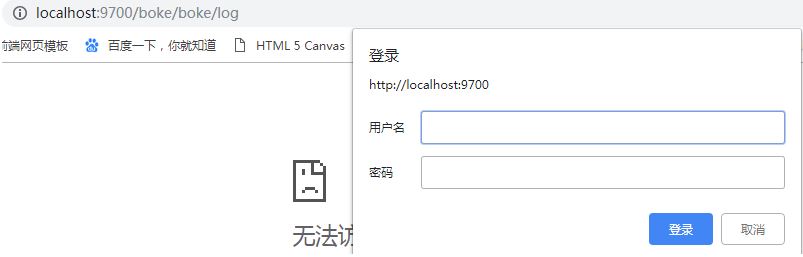
在一次项目中启动测试一个借口,结果提示要登录,如下图。原因是无意中引用了spring Securicty的依赖,别的啥都没干就弹出来这个,懵逼了半天最后注释掉。shiro你引个jar包别的不配置,也不会有效果吧。原来Spring Security是spring的内置安全框架,亲儿子,下面就一个简单的demo对spring Security的使用做一个简单的介绍。
一、pom.xml引入依赖
     <dependency>

            <groupId>org.springframework.security</groupId>

            <artifactId>spring-security-web</artifactId>

            <version>4.1.0.RELEASE</version>

        </dependency>

        <dependency>

            <groupId>org.springframework.security</groupId>

            <artifactId>spring-security-config</artifactId>

            <version>4.1.0.RELEASE</version>

        </dependency>
二、配置文件spring-security.xml
<?xml version="1.0" encoding="UTF-8"?>

<beans:beans xmlns="http://www.springframework.org/schema/security"

    xmlns:beans="http://www.springframework.org/schema/beans" xmlns:xsi="http://www.w3.org/2001/XMLSchema-instance"

    xsi:schemaLocation="http://www.springframework.org/schema/beans http://www.springframework.org/schema/beans/spring-beans.xsd

                        http://www.springframework.org/schema/security http://www.springframework.org/schema/security/spring-security.xsd">

    <!-- 设置页面不登陆也可以访问 -->

    <http pattern="/login.html" security="none"></http>

    <http pattern="/login_error.html" security="none"></http>

    <!-- 页面的拦截规则    use-expressions:是否启动SPEL表达式 默认是true 设置为false下面写法较为简单-->

    <http use-expressions="false">

        <!-- 当前用户必须有ROLE_USER的角色 才可以访问根目录及所属子目录的资源 -->

        <intercept-url pattern="/**" access="ROLE_USER"/> <!--前缀必须带ROLE-->

        <!-- 开启表单登陆功能 -->

        <form-login   login-page="/login.html" default-target-url="/index.html" authentication-failure-url="/login_error.html"/>

        <csrf disabled="true"/>

    </http>

    <!-- 认证管理器 在这里把用户名和密码写死,暂时不实现数据库用户-->

    <authentication-manager>

        <authentication-provider>

            <user-service>

                <user name="admin" password="123456" authorities="ROLE_USER"/>

            </user-service>

        </authentication-provider>

    </authentication-manager>

</beans:beans>
配置说明:
intercept-url 表示拦截页面
/* 表示的是该目录下的资源,只包括本级目录不包括下级目录
/** 表示的是该目录以及该目录下所有级别子目录的资源
form-login 为开启表单登陆
use-expressions 为是否使用使用 Spring 表达式语言( SpEL ),默认为true ,如果开启,则拦截的配置应该写成以下形式
<intercept-urlpattern="/**"access="hasRole('ROLE_USER')"/>
security="none" 设置此资源不被拦截.
login-page:指定登录页面。
authentication-failure-url:指定了身份验证失败时跳转到的页面。
default-target-url:指定了成功进行身份验证和授权后默认呈现给用户的页面。
csrf disabled="true" 关闭csrf ,如果不加会出现错误

CSRF(Cross-site request forgery)跨站请求伪造,也被称为“One Click Attack”或者Session Riding,通常缩写为CSRF或者XSRF,是一种对网站的恶意利用。
三、web.xml
<?xml version="1.0" encoding="UTF-8"?>

<web-app xmlns:xsi="http://www.w3.org/2001/XMLSchema-instance"

    xmlns="http://java.sun.com/xml/ns/javaee"

    xsi:schemaLocation="http://java.sun.com/xml/ns/javaee http://java.sun.com/xml/ns/javaee/web-app_2_5.xsd"

    version="2.5">

       <context-param>

        <param-name>contextConfigLocation</param-name>

        <param-value>classpath:spring-security.xml</param-value>

     </context-param>

     <listener>

        <listener-class>

            org.springframework.web.context.ContextLoaderListener

        </listener-class>

     </listener>

     <filter>

        <filter-name>springSecurityFilterChain</filter-name>

        <filter-class>org.springframework.web.filter.DelegatingFilterProxy</filter-class>

     </filter>

     <filter-mapping>

        <filter-name>springSecurityFilterChain</filter-name>

        <url-pattern>/*</url-pattern>

     </filter-mapping>

</web-app>
spring Securicty入门(一)的更多相关文章
- spring快速入门(四)
一.在spring快速入门(三)的基础上,我们来了解BeanFactory及配置. Client package com.murong.client; import org.springframewo ...
- spring快速入门(三)
一.在spring快速入门(二)的基础上,原先我们是采用构造方法完成对象的注入.这里还有其他的方法可以完成注入,通过set方法来完成. 修改UserActionImpl package com.mur ...
- spring快速入门(二)
一.在spring快速入门(一)的基础上,我们来了解spring是如何解决对象的创建以及对象之间的依赖关系的问题 (比如client中依赖UserAction的具体实现,UserActionImpl中 ...
- Spring快速入门
什么是Spring Spring是分层的JavaSE/EE full-stack(一站式) 轻量级开源框架 分层 SUN提供的EE的三层结构:web层.业务层.数据访问层(持久层/集成层) Strut ...
- 161103、Spring Boot 入门
Spring Boot 入门 spring Boot是Spring社区较新的一个项目.该项目的目的是帮助开发者更容易的创建基于Spring的应用程序和服务,让更多人的人更快的对Spring进行入门体验 ...
- Spring MVC 入门教程示例 (一)
今天和大家分享下 Spring MVC 入门教程 首先还是从 HelloWorld web 工程开始 -------------------------- 1.首先创建一个Maven Web工程 ...
- spring boot 入门操作(二)
spring boot入门操作 使用FastJson解析json数据 pom dependencies里添加fastjson依赖 <dependency> <groupId>c ...
- spring boot 入门操作(三)
spring boot入门操作 devtools热部署 pom dependencies里添加依赖 <dependency> <groupId>org.springframew ...
- Spring Boot入门教程1、使用Spring Boot构建第一个Web应用程序
一.前言 什么是Spring Boot?Spring Boot就是一个让你使用Spring构建应用时减少配置的一个框架.约定优于配置,一定程度上提高了开发效率.https://zhuanlan.zhi ...
随机推荐
- stm32自带的flash分布图
缘由是要用到flash来保存数据,因此查阅了数据手册与参考手册,一般情况下,将要保存的数据存放到比较靠后的地方,page254,page255,4k字节,已经相当多的了,
- python 类 双下划线解析
__getattr__用法:说明:这是python里的一个内建函数,当调用的属性或者方法不存在时,该方法会被调用调用不存在的属性调用不存在的方法
- cube.js 学习(一)简单项目创建
cube.js 是一个很不错的模块化分析框架,基于schema生成sql 同时内置可代码生成,可以快速的搞定 web 分析应用的开发 安装cli 工具 npm install -g cubejs-cl ...
- 2017.10.3 国庆清北 D3T3 解迷游戏
题目描述 LYK进了一家古董店,它很想买其中的一幅画.但它带的钱不够买这幅画. 幸运的是,老板正在研究一个问题,他表示如果LYK能帮他解出这个问题的话,就把这幅画送给它. 老板有一个n*m的矩阵,他想 ...
- AtCoder Grand Contest 006 题解
传送门 \(A\) 咕咕 const int N=105; char s[N],t[N];int n; inline bool eq(R int k){fp(i,1,k)if(s[n-k+i]!=t[ ...
- AtCoder Grand Contest 003题解
传送门 \(A\) 咕咕 const int N=1005; char s[N];int val[N],n; int main(){ scanf("%s",s+1),n=strle ...
- 【一起来烧脑】一步学会HTML体系
[外链图片转存失败(img-zk4xNuy1-1563431241992)(https://upload-images.jianshu.io/upload_images/11158618-4e9cac ...
- Alpha(2/6)
队名:無駄無駄 组长博客 作业博客 组员情况 张越洋 过去两天完成了哪些任务 任务分配.进度监督 提交记录(全组共用) 接下来的计划 沟通前后端成员,监督.提醒他们尽快完成各自的进度 还剩下哪些任务 ...
- layui select多选下拉显示 以及回显
<input type="hidden" id="hiddensheshi" name="hiddensheshi" value=&q ...
- Cisco实验图