
Basic concepts of docker/kubernete/kata-container
Kubereters
An open-source system for automating deployment, scaling, and management of containerized applications;
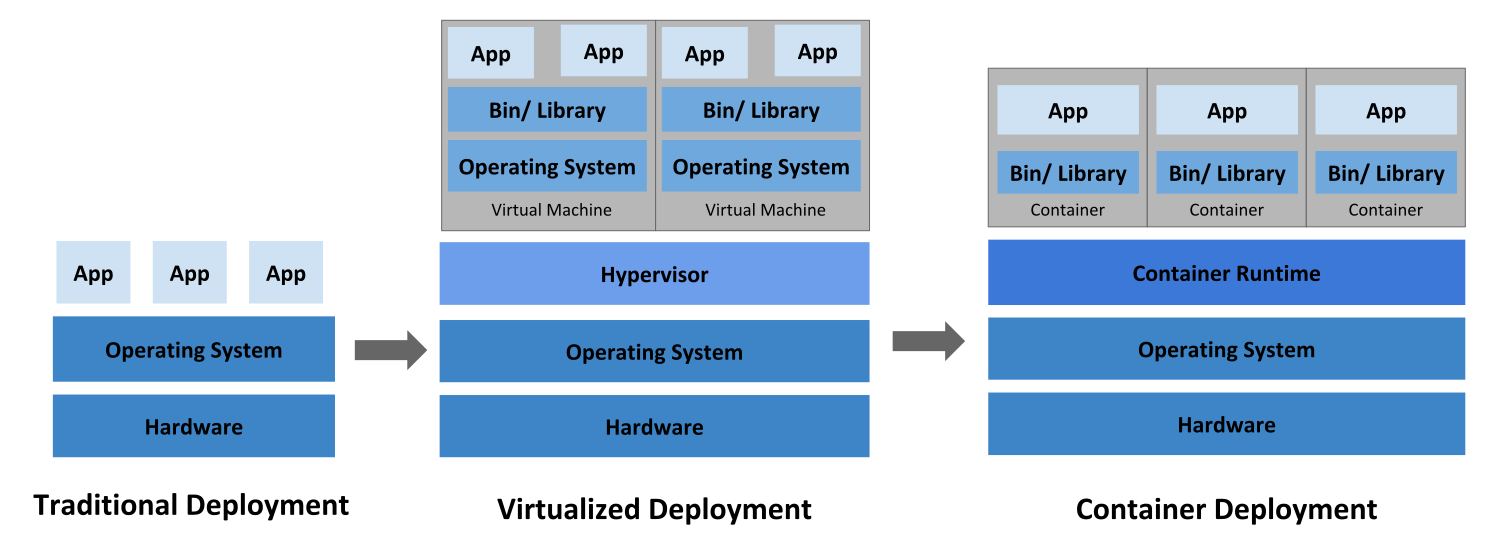
Traditional >> Hypervisor >> Container
Traditional:
No way to define resource boundaries for applications in a physical server before, run each applications on a different physical server;
Hypervisor:
Will run multi VMs on a single physical server's CPU;
Allow applications to be isolated between VMs and provides a level of securiy as the infomation of one application cannot be freely accessed by another application;
Each VM is a full machine running all the components, including its own operating system;
Container:
Have relaxed isolation properties to share the operating system among the applications;
Lightweight;
A container has its own filesytem/CPU/memory/process space/..
Are portable across clouds and OS distributions because they are decoupled from the underlying infrastrucure;
Benifits of containers:
1. Agile application creation and deployment: increased ease and efficiency of container image creation compared to VM image use
2. Continuous development, integrations and deployment:
provide for reliable and frequent container image build and deployment with quick and easy rollbacks;
3. Dev and Ops separation of concerns: create application container images at build/release time rather than deployment time, thereby decoupling applications from infrastructure;
4. Obervability not only surfaces OS-level information and metrics, but also application health and other signals;
5. Environmental consistency across development, testing, and production; Runs the same on a laptop as it does in the cloud;
6. Cloud and OS distribution portabilty: Runs on Ubuntu, RHEL, CoreOS, on-prem, Google Kubernetes Engine, and anywhrere else;
7. Application-centric management;
8. Loosely coupled, distributed;
9. Resource isolation;
10. Resource utilization;
Benefits of Kubernetes:
1. Service discovery and load balancing
kubernetes expose a container using the DNS name or using their own IP address;
if traffic to a container is high, kubernetes is able to load balance and distribute the network traffic so that the deployment is stable;
2. Stroage orchestartion
automatically mount a storage system of local storages/public cloud providers/..
3. Automated rollouts and rollbacks
automake kubernets to create new containers
4. Self-healing
restart fail containers, kill no-respond containers;
5. Automatic bin packing
tell kubernetes how much CPU and RAM each container needs, kubernets can fit containers onto your nodes to make the best use of you resources;
Kubernetes Master
When deploying kubernetes, we wil get a cluster, which is a set of machines (nodes),
that run containerzed applications managed by kubernetes.
A cluster has at least one worker node and at least one master node;
Kubernetes Master is a collection of three processes that run on a single node in your cluster, which is designed as the master node;
Three processes:
Kube-apiserver;
Kube-controller-manager;
Kube-scheduler;
Individual non-master node in cluster run two processes:
which communicates with the Kubernetes Master;
The primary node agent that runs on each node; It can register the node with tha apiserver using one of
the host name;
a flag to override the hostname;
specific logic for a cloud provider;
a network proxy which reflects Kubernetes networking services on each node;
Kubernets network proxy runs on each node, this relects services as defined in the Kubernetes API on each node
and can do simple TCP/UDP and SCTP stream forwarding or round robin TCP/UDP/SCTP forwarding across a set of backends/
Service cluster IPs and ports are currently found through Docker-links-compatible
Kubernetes Objects
Kubernetes contains serveral abstractions representing the state of system;
Basic Kubernetes objects include:
Kata-container
An open-source project and community working to build a standard implement of lightweight VM that feel and perform like containers, but provide the workload isolation and security advantages of VMs;
Kata container Components
- Agent -- The Kata-agent runs inside the virtual machine and sets up the container environment
- KSM throttler -- An optional utility that monitors containers and deduplicates memory to max container density on a host
- Proxy -- A process running on the host and co-ordinates access to the agent running inside the VM
- Runtime -- Be invoked by a container manager and provides high-level verbs to manage containersd
- Shim -- A process that runs on the host, acts as though it is the workload ( which actually runs inside the VM), required to be compliant with th expecations of the OCI runtime sepc
- Hypervisor --
- Kernel -- HV uses a linux kernel to boot the guest image
Docker
Following storage drivers:
- overlay2 is the preferred storage driver, for all currently supported linux distributions, and requires no extra conf
- aufs is the preferred stroage driver for Docker 18.06 or older, when running on Ubuntu 14 on Kernel 3.13 which has no support or ovrlay2
- devicemapper is supported, but requires direct-lvm for production environments, because loopback-lvm, while zero-conf, has very poor performance.
Basic concepts of docker/kubernete/kata-container的更多相关文章
- Kata Container 介绍
docker容器,性能高,不安全:VM虚拟机,安全性好,性能损耗大:Kata Container轻量级虚拟机的容器,即安全,性能也高. 开源容器项目Kata Containers,旨在将虚拟机(VM) ...
- Basic Concepts of Block Media Recovery
Basic Concepts of Block Media Recovery Whenever block corruption has been automatically detected, yo ...
- docker的网络-Container network interface(CNI)与Container network model(CNM)
Overview 目前围绕着docker的网络,目前有两种比较主流的声音,docker主导的Container network model(CNM)和社区主导的Container network in ...
- (二)Basic Concepts 基本概念
Basic Concepts There are a few concepts that are core to Elasticsearch. Understanding these concepts ...
- Docker入门03——Container
1 启动容器 1.1 新建并启动 1.2 启动已终止容器 2 后台运行 3 终止 4 进入容器 5 导入和导出 5.1 导出 5.2 导入 6 删除 1 启动容器 1.1 新建并启动 docker r ...
- CMUSphinx Learn - Basic concepts of speech
Basic concepts of speech Speech is a complex phenomenon. People rarely understand how is it produced ...
- docker Cannot start container [8] System error: exec format error
docker Cannot start container [8] System error: exec format error 学习了:https://www.aliyun.com/jiaoch ...
- Docker 容器(container)
版权所有,未经许可,禁止转载 章节 Docker 介绍 Docker 和虚拟机的区别 Docker 安装 Docker Hub Docker 镜像(image) Docker 容器(container ...
- Docker实现退出container后保持继续运行的解决办法
现象: 运行一个image,例如ubuntu14.04: 1 docker run -it --rm ubuntu:14.04 bash 退出时: 执行Ctrl+D或者执行exit 查看线程: 1 d ...
随机推荐
- Vuecli3
第一步安装 npm install -g @vue/cli 第二步关于项目配置 因为cli3去除了cli2中index.html 转而存到了publi文件中 如果需要配置跨域 页面入口 打包文件路径都 ...
- golang基础学习---log
package main import ( "log" ) func init() { log.SetPrefix("TRACE: ") log.SetFlag ...
- 【1】【leetcode-5】最长回文子串
给定一个字符串 s,找到 s 中最长的回文子串.你可以假设 s 的最大长度为 1000. 示例 1: 输入: "babad"输出: "bab"注意: " ...
- AutoCAD ObjectARX 二次开发(2020版)--3,执行ARX文件--
上一节中我们在initApp()函数中,将helloWorld()函数注册给了CAD主程序,注册指令的字符串为“Hello”. void initApp() { acedRegCmds->add ...
- yii框架无限极分类的做法
用yii框架做了一个无限极分类,主要的数组转换都是粘贴的别人的代码,但还是不要脸的写出来,方便以后自己看 用的是递归,不是path路径 控制器: protected function subtree( ...
- Linux学习笔记之tail命令显示最后n行
tail :输出文件的最后几行. 用于linux查看日志的时候很方便,假如日志文件为:Console.log用法:1. tail Console.log tail # 输出文件最后10行的内容 2. ...
- 3.matplotlib绘制条形图
plt.bar() # coding=utf-8 from matplotlib import pyplot as plt from matplotlib import font_manager my ...
- Matlab观察者模式
要点: 1.服务端(Subject)维护一个观察者的列表,以便能够向所有的观察者(Observer)推送信息 2.观察者可以获取服务端的状态 3.服务端和观察者可抽象,可以有多个不同实现 Subjec ...
- VUE过滤器 基础回顾5
过滤器是一种在模板中处理数据的便捷方式,特别适合对字符串和数组进行简易显示 <div id="app"> <p>商品1花费{{oneCost | froma ...
- ABAP和Java里的单例模式攻击
面向对象编程世界里的单例模式(Singleton)可能是设计模式里最简单的一种,大多数开发人员都觉得可以很容易掌握它的用法.单例模式保证一个类仅有一个实例,并提供一个访问它的全局访问点. 然而在某些场 ...