
解决Spring Boot 从1.x升级到 2.x 后 单点登陆(SSO)问题
解决Spring Boot 从1.x升级到 2.x 后 单点登陆(SSO)问题
在学习Spring Cloud 时,遇到了授权服务oauth 相关内容时,总是一知半解,因此决定先把Spring Security 、Spring Security Oauth2 等权限、认证相关的内容、原理及设计学习并整理一遍。本系列文章就是在学习的过程中加强印象和理解所撰写的,如有侵权请告知。
项目环境:
- JDK1.8
- Spring boot 2.x
- Spring Security 5.x
前期基本上已经将 Spring Security相关的内容写得差不多了,所以最近在整理Spring Sexurity Oauh2 相关的内容,但在进行到单点登陆(OSS)时,有一个问题一直困扰了我很久,由于网上有关于Spring Boot 1.x 升级到Spring Boot 2.x 后单点登陆相关的问题解决资料很少,特此在这里专门列一篇文章来描述升级过程中遇到的一些问题、问题表现现象以及我是如何解决这些问题的。
问题一: spring boot 2 中去除了@EnableOAuth2Sso ?
首先很明确的告诉你,并没有!!但为什么引入了 spring-security-oauth2 maven依赖 IDEA提示 @EnableOAuth2Sso 找不到呢? 首先我们找到官方Spring Boot 2.x 升级文档,我们会发现其中有关于Oauth2 相关的介绍:
OAuth 2.0 Support
Functionality from the Spring Security OAuth project is being migrated to core Spring Security. OAuth 2.0 client support has already been added and additional features will be migrated in due course.
If you depend on Spring Security OAuth features that have not yet been migrated you will need to add org.springframework.security.oauth:spring-security-oauth2 and configure things manually. If you only need OAuth 2.0 client support you can use the auto-configuration provided by Spring Boot 2.0. We’re also continuing to support Spring Boot 1.5 so older applications can continue to use that until an upgrade path is provided.
我们可以大致明白 官方 2.x 正在将 Spring Security OAuth项目的功能迁移到 Spring Security 中。 但最值得注意的是其中有这么一段话 If you only need OAuth 2.0 client support you can use the auto-configuration provided by Spring Boot 2.0.(如果你想要在Spring Boot 2.0(及以上)版本中使用 Oauth2 客户端 相关的功能 需要使用 auto-configuration)。
根据这个提示,我们找到 官方 auto-configuration文档,一进来 就告诉我们需要用到的最小maven依赖:
        <dependency>

            <groupId>org.springframework.boot</groupId>

            <artifactId>spring-boot-starter-security</artifactId>

        </dependency>

        <dependency>

            <groupId>org.springframework.security.oauth.boot</groupId>

            <artifactId>spring-security-oauth2-autoconfigure</artifactId>

            <version>2.1.7.RELEASE</version>

        </dependency>
按照官方文档配置成功引用到了@EnableOAuth2Sso ,至此,该问题得到解决!
问题二: 单点登陆授权过程中回调到客户端却提示401(未授权)问题 ?
一、 SSO 客户端相关配置
ClientSecurityConfig 配置
@Configuration

@EnableOAuth2Sso  // SSo自动配置引用

public class ClientSecurityConfig extends WebSecurityConfigurerAdapter {

    @Override

    public void configure(HttpSecurity http) throws Exception {

        http.authorizeRequests()

                .antMatchers("/").permitAll()

                .anyRequest().authenticated()

                .and()

                .csrf().disable();

    }

}
这个配置是按照 官方 auto-configuration文档 推荐的配置。
application.yml 配置
auth-server: http://localhost:9090 # authorization服务地址

security:

  oauth2:

    client:

      user-authorization-uri: ${auth-server}/oauth/authorize #请求认证的地址

      access-token-uri: ${auth-server}/oauth/token #请求令牌的地址

    resource:

      jwt:

        key-uri: ${auth-server}/oauth/token_key #解析jwt令牌所需要密钥的地址,服务启动时会调用 授权服务该接口获取jwt key,所以务必保证授权服务正常

    sso:

      login-path: /login #指向登录页面的路径,即OAuth2授权服务器触发重定向到客户端的路径 ,默认为 /login

spring:

  profiles:

    active: client1
由于我们要多客户端单点测试,这里使用Spring boot 的多环境配置,这里有关授权服务的配置不在描述,以及默认搭建好了一个可用的授权服务(如果不清楚如何搭建Oauth2的授权服务和资源服务,可以关注我,后续会出相关文章)。
application-client1.yml 配置
    server:

      port: 8091

    security:

      oauth2:

        client:

          client-id: client1

          client-secret: 123456
测试接口
@RestController

@Slf4j

public class TestController {

    @GetMapping("/client/{clientId}")

    public String getClient(@PathVariable String clientId) {

        return clientId;

    }

}
至此问我们完成了一个最基本的SSO客户端,启动项目。
二、 问题描述及现象
浏览器上访问测试接口 localhost:8091/client/1 ,跳转到授权服务登陆界面,登陆成功后,跳转回到客户端的 /login 地址 (即 我们 配置的 spring.security.sso.login-path ),正常情况下会再次跳转到 localhost:8091/client/1(这次已经是认证成功后访问)。这整个流程就是Oauth2 的授权码模式流程。但现在有这么一个问题,在授权服务回调到客户端的 /login 地址时,浏览器显示 HTTP ERROR 401, 如下图:
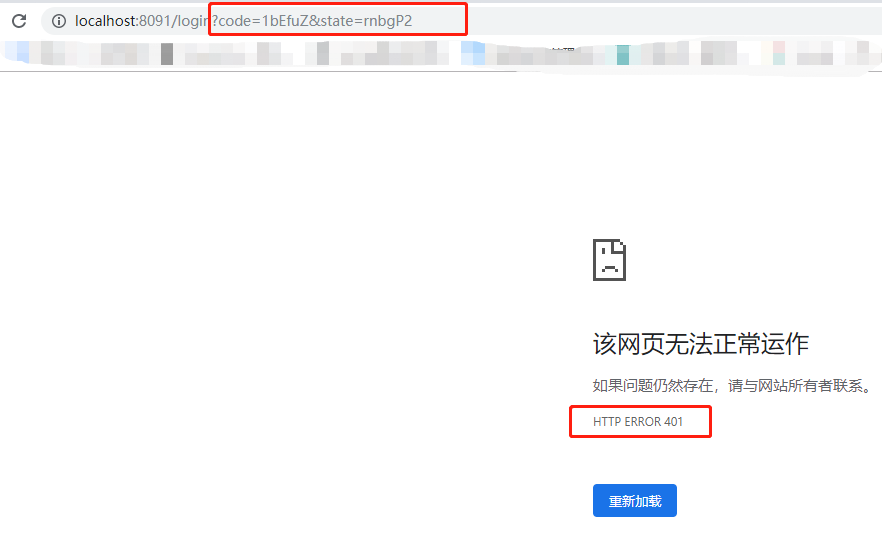
从图中我们可以看到,授权服务成功的返回了授权码,但由于我们客户端存在问题,出现 401 ,导致整个授权码模式流程中断。 在看 官方 auto-configuration文档 过程中,无意间发现
Also note that since all endpoints are secure by default, this includes any default error handling endpoints, for example, the endpoint "/error". This means that if there is some problem during Single Sign On that requires the application to redirect to the "/error" page, then this can cause an infinite redirect between the identity provider and the receiving application.
First, think carefully about making an endpoint insecure as you may find that the behavior is simply evidence of a different problem. However, this behavior can be addressed by configuring the application to permit "/error":
@Configuration

public class WebSecurityConfiguration extends WebSecurityConfigurerAdapter {

    @Override

    protected void configure(HttpSecurity http) throws Exception {

        http

            .authorizeRequests()

                .antMatchers("/error").permitAll()

                .anyRequest().authenticated();

    }

}
大致意思就是:由于默认情况下所有端点都是安全的,因此这包括任何默认错误处理端点,例如端点“/ error”。这意味着如果单点登录期间存在某些问题,需要应用程序重定向到“/ error”页面,则这会导致身份提供程序和接收应用程序之间的无限重定向。
根据这个提示,我开始DEBUG,果然正如文档所说,单点登录期间存在某些问题重定向到了/error,所以我们将 /error 配置成无权限访问,重启再次访问测试接口,这次的错误界面提示就很明显了:
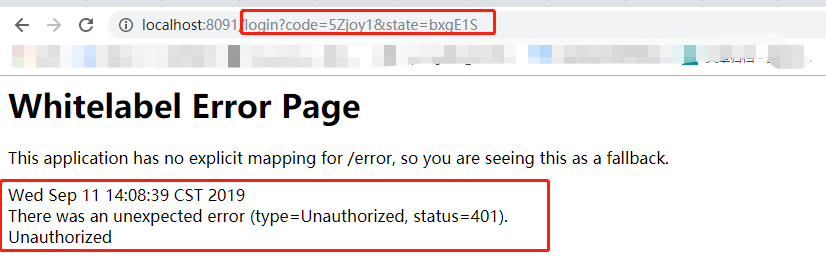
既然明显的提示 Unauthorized 了,那我们就来一步一步的DEBUG 看看单点期间出现的问题点是什么。
三、 问题排查及解决方案
从之前的现象描述我们可以知道问题点在授权码回来后去调用获取token这里出现问题了,那么根据源码查看,获取token这块步骤在 OAuth2ClientAuthenticationProcessingFilter 过滤器内部,其关键代码如下:
    @Override

	public Authentication attemptAuthentication(HttpServletRequest request, HttpServletResponse response)

			throws AuthenticationException, IOException, ServletException {

		OAuth2AccessToken accessToken;

		try {

			accessToken = restTemplate.getAccessToken();  // 1 调用授权服务获取token

		} catch (OAuth2Exception e) {

			BadCredentialsException bad = new BadCredentialsException("Could not obtain access token", e);

			publish(new OAuth2AuthenticationFailureEvent(bad));

			throw bad;

		}

		try {

			OAuth2Authentication result = tokenServices.loadAuthentication(accessToken.getValue());  // 成功后从token中解析  OAuth2Authentication 信息

			if (authenticationDetailsSource!=null) {

				request.setAttribute(OAuth2AuthenticationDetails.ACCESS_TOKEN_VALUE, accessToken.getValue());

				request.setAttribute(OAuth2AuthenticationDetails.ACCESS_TOKEN_TYPE, accessToken.getTokenType());

				result.setDetails(authenticationDetailsSource.buildDetails(request));

			}

			publish(new AuthenticationSuccessEvent(result));

			return result;

		}

		catch (InvalidTokenException e) {

			BadCredentialsException bad = new BadCredentialsException("Could not obtain user details from token", e);

			publish(new OAuth2AuthenticationFailureEvent(bad));

			throw bad;

		}

	}
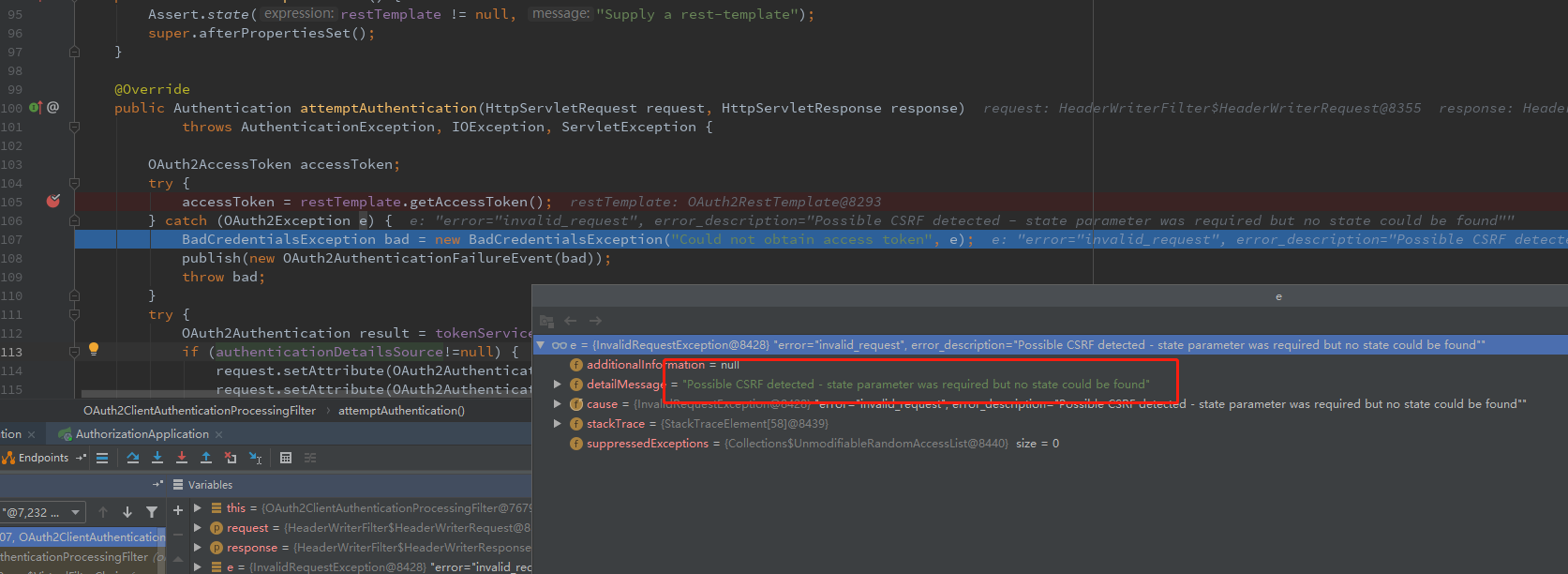
我们把断点打到这里,Debug下,果然不出所料,在获取token时异常了,异常信息为 : Possible CSRF detected - state parameter was required but no state could be found ,debug截图如下:
查阅网上资料有一下说法:
本地开发,auth server与client都是localhost,造成JSESSIONID相互影响问题。可以通过配置client的context-path或者session名称来解决
根据这个描述,我尝试通过修改 session名称来解决:
server:

  servlet:

    session:

      cookie:

        name: OAUTH2CLIENTSESSION  # 解决  Possible CSRF detected - state parameter was required but no state could be found  问题
重启项目,测试SSO,完美解决!!!
本文介绍短信登录开发的代码可以访问代码仓库中的 security 模块 ,项目的github 地址 : https://github.com/BUG9/spring-security
如果您对这些感兴趣,欢迎star、follow、收藏、转发给予支持!
解决Spring Boot 从1.x升级到 2.x 后 单点登陆(SSO)问题的更多相关文章
- 解决spring boot启动报错java.lang.NoClassDefFoundError: ch/qos/logback/classic/Level
解决spring boot启动报错java.lang.NoClassDefFoundError: ch/qos/logback/classic/Level 学习了:https://blog.csdn. ...
- 如何解决spring boot 项目导入依赖后代码报错问题
如何解决spring boot 项目导入依赖后代码报错问题 2020-08-15 14:17:18 代码截图如图所示(由于本人问题已经解决,没来得及截图,所以在网上找了一张图片)
- Spring Security 解析(六) —— 基于JWT的单点登陆(SSO)开发及原理解析
Spring Security 解析(六) -- 基于JWT的单点登陆(SSO)开发及原理解析 在学习Spring Cloud 时,遇到了授权服务oauth 相关内容时,总是一知半解,因此决定先把 ...
- 解决Spring boot中读取属性配置文件出现中文乱码的问题
问题描述: 在配置文件application.properties中写了 server.port=8081 server.servlet.context-path=/boy name=张三 age=2 ...
- 解决Spring Boot集成Shiro,配置类使用Autowired无法注入Bean问题
如题,最近使用spring boot集成shiro,在shiroFilter要使用数据库动态给URL赋权限的时候,发现 @Autowired 注入的bean都是null,无法注入mapper.搜了半天 ...
- spring boot:方法中使用try...catch导致@Transactional事务无效的解决(spring boot 2.3.4)
一,方法中使用try...catch导致@Transactional事务无效的解决方法 1,问题的描述: 如果一个方法添加了@Transactional注解声明事务, 而方法内又使用了try catc ...
- 解决spring boot JavaMailSender部分收件人错误导致发送失败的问题
使用spring boot通常使用spring-boot-starter-mail进行邮件的发送.当进行邮件群发的话,如果一个收件人的地址错误,会导致所有邮件都发送失败.因此我们需要在邮件发送失败的时 ...
- 解决spring boot中rest接口404,500等错误返回统一的json格式
在开发rest接口时,我们往往会定义统一的返回格式,列如: { "status": true, "code": 200, "message" ...
- 解决Spring Boot(2.1.3.RELEASE)整合spring-data-elasticsearch3.1.5.RELEASE报NoNodeAvailableException[None of the configured nodes are available
Spring Boot(2.1.3.RELEASE)整合spring-data-elasticsearch3.1.5.RELEASE报NoNodeAvailableException[None of ...
随机推荐
- 使用WIFI网卡 wpa_supplicant
在上篇文章中,编译了应用程序iw,它使得我们的开发板可以通过usb wifi网卡连接到无线热点,为了方便实验,我们采用了手机设置了无线热点.对手机的热点有4中安全方式:无WEPWPAWPA2使用iw工 ...
- 1.Java介绍
第一章 走进Java 一.Java技术体系 Java技术体系组成部分:Java程序设计语言.Java虚拟机.Class文件格式.Java API类库 JDK:Java程序设计语言 + Java虚拟机 ...
- 某模拟赛C题 树上路径统计 (点分治)
题意 给定一棵有n个节点的无根树,树上的每个点有一个非负整数点权.定义一条路径的价值为路径上的点权和-路径上的点权最大值. 给定参数P,我!=们想知道,有多少不同的树上简单路径,满足它的价值恰好是P的 ...
- ESA2GJK1DH1K基础篇: 移植源码中SmartConfig程序到自己的项目
前言: 说明两个地方 1.点击按钮启动SmartConfig的地方 2.最终跳转的地方 说明 这节说明一下,如何把本人源码里面的SmartConfig程序移植到自己的工程 我要把所有的全部拿出来讲,让 ...
- selenium--加载浏览器配置
前戏 在我们之前写的自动化脚本中,不知道大家有没有发现,每次打开的都是一个新的浏览器(相当于新安装的).但是有时候,我们想打开的是我们配置好的浏览器.我在之前的公司做web自动化的时候,由于我们的网站 ...
- c04--数组
0.展示PTA总分 1.本章学习内容总结 1.1学习内容总结 数组查找: 1.遍历法查找:从头遍历数组找对应数据. 2.二分法查找:适用于按顺序排列的整形数组. 插入数据: 先找到该数据,对数组进行移 ...
- Qt QThread两种方式的使用:1-继承QThread重写run函数; 2- 继承QObject并moveToThread && 消息和槽在线程和依附线程间的传递
2019年08月18日起笔 方式一:继承QThread重写run函数 MyThread.h ----------------------------------- ... class MyThread ...
- const 变量在多个文件共享,如何验证两种不同的方式下,编译器是否会在多个文件下建立多个副本
对于const变量多个文件共享,当我们不希望编译器为每个文件分别生成独立的变量,而是像非常量对象一个,一处定义,多处声明并使用. 解决办法是,对于const变量,不管是声明还是定义都添加extern关 ...
- Oracle_其他人连接不上自己电脑
1. 修改文件G:\app\eric\product\11.2.0\dbhome_1\NETWORK\ADMIN\listener.ora文件,listener中的address中加一个你的ip开头的 ...
- 记C# 调用虹软人脸识别 那些坑
上一个东家是从事安防行业的,致力于人工智能领域,有自主人脸识别.步态识别的算法.C++同事比较称职有什么问题都可以第一时间反馈,并得到合理的处理,封装的DLL 是基于更高性能的GPU算法,可支持更多线 ...