
linux-根目录添加内存
01,添加磁盘到服务器
02, 查看添加的内容

这个是新添加的
03, 创建新分区
[root@oracle01 ~]# fdisk /dev/sdb   --格式化分析

Welcome to fdisk (util-linux 2.23.2).

Changes will remain in memory only, until you decide to write them.

Be careful before using the write command.

Device does not contain a recognized partition table

Building a new DOS disklabel with disk identifier 0x55166394.

Command (m for help): p  ---打印结果

Disk /dev/sdb: 53.7 GB, 53687091200 bytes, 104857600 sectors

Units = sectors of 1 * 512 = 512 bytes

Sector size (logical/physical): 512 bytes / 512 bytes

I/O size (minimum/optimal): 512 bytes / 512 bytes

Disk label type: dos

Disk identifier: 0x55166394

   Device Boot      Start         End      Blocks   Id  System

Command (m for help): n   --新建分区

Partition type:

   p   primary (0 primary, 0 extended, 4 free)

   e   extended

Select (default p): p   主分区

Partition number (1-4, default 1):

First sector (2048-104857599, default 2048):

Using default value 2048

Last sector, +sectors or +size{K,M,G} (2048-104857599, default 104857599):

Using default value 104857599

Partition 1 of type Linux and of size 50 GiB is set

Command (m for help): t   ---设置格式为LVM格式

Selected partition 1

Hex code (type L to list all codes): 8e

Changed type of partition 'Linux' to 'Linux LVM'

Command (m for help): p

Disk /dev/sdb: 53.7 GB, 53687091200 bytes, 104857600 sectors

Units = sectors of 1 * 512 = 512 bytes

Sector size (logical/physical): 512 bytes / 512 bytes

I/O size (minimum/optimal): 512 bytes / 512 bytes

Disk label type: dos

Disk identifier: 0x55166394

 设备           启动   起点     终点   块数       Id    系统

   Device Boot      Start         End      Blocks   Id  System

/dev/sdb1            2048   104857599    52427776   8e  Linux LVM

Command (m for help): w   ---保存信息

The partition table has been altered!

Calling ioctl() to re-read partition table.

Syncing disks.

完成后重启下机器最好
04, 创建pV
[root@oracle01 ~]# pvcreate /dev/sdb1   创建pv

  Physical volume "/dev/sdb1" successfully created.

(这个后面的为格式化的盘符标识)
[root@oracle01 ~]# pvdisplay   ---查看pv物理卷和大小

  --- Physical volume ---

  PV Name               /dev/sda2

  VG Name               centos

  PV Size               <49.00 GiB / not usable 3.00 MiB

  Allocatable           yes (but full)

  PE Size               4.00 MiB

  Total PE              12543

  Free PE               0

  Allocated PE          12543

  PV UUID               VjyFas-6rml-bolo-Jt2V-1Nq9-U5Tm-7W7c1b

  "/dev/sdb1" is a new physical volume of "<50.00 GiB"

  --- NEW Physical volume ---

  PV Name               /dev/sdb1

  VG Name

  PV Size               <50.00 GiB   出现一个新的就是刚刚船舰

  Allocatable           NO

  PE Size               0

  Total PE              0

  Free PE               0

  Allocated PE          0

  PV UUID               xeXK3i-0XLh-WEn3-eTG8-bjGJ-Pq47-RVEgZB
05,查看vg
[root@oracle01 ~]# vgdisplay

  --- Volume group ---

  VG Name               centos

  System ID

  Format                lvm2

  Metadata Areas        1

  Metadata Sequence No  3

  VG Access             read/write

  VG Status             resizable

  MAX LV                0

  Cur LV                2

  Open LV               2

  Max PV                0

  Cur PV                1

  Act PV                1

  VG Size               <49.00 GiB

  PE Size               4.00 MiB

  Total PE              12543

  Alloc PE / Size       12543 / <49.00 GiB

  Free  PE / Size       0 / 0

  VG UUID               igaCVK-95JF-h8OF-4S9E-o4ay-u6Zq-RpCN2v
加入vg
[root@oracle01 ~]# vgextend centos /dev/sdb1
                      名字为上面VG的name

  Volume group "centos" successfully extended
[root@oracle01 ~]# vgdisplay

  --- Volume group ---

  VG Name               centos

  System ID

  Format                lvm2

  Metadata Areas        2

  Metadata Sequence No  4

  VG Access             read/write

  VG Status             resizable

  MAX LV                0

  Cur LV                2

  Open LV               2

  Max PV                0

  Cur PV                2

  Act PV                2

  VG Size               98.99 GiB

  PE Size               4.00 MiB

  Total PE              25342

  Alloc PE / Size       12543 / <49.00 GiB

  Free  PE / Size       12799 / <50.00 GiB         ---这个就是了

  VG UUID               igaCVK-95JF-h8OF-4S9E-o4ay-u6Zq-RpCN2v

发现已经添加进去了
06,增加根目录空间
lvresize -L +11G /dev/mapper/centos-root 添加11G进去
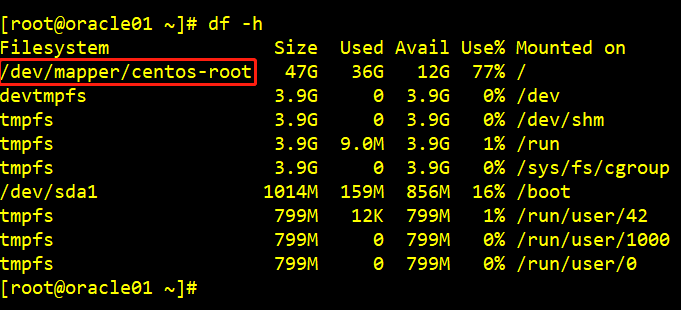
添加所有的话:
lvextend /dev/centos/root /dev/sdb1
linux-根目录添加内存的更多相关文章
- Linux就这个范儿 第15章 七种武器 linux 同步IO: sync、fsync与fdatasync Linux中的内存大页面huge page/large page David Cutler Linux读写内存数据的三种方式
Linux就这个范儿 第15章 七种武器 linux 同步IO: sync.fsync与fdatasync Linux中的内存大页面huge page/large page David Cut ...
- Linux下清理内存和Cache方法 /proc/sys/vm/drop_caches
Linux下清理内存和Cache方法 /proc/sys/vm/drop_caches 频繁的文件访问会导致系统的Cache使用量大增 $ free -m total used free shared ...
- Linux安装时内存如何分区的相关问题
Linux系统安装时内存如何分区:Linux系统必须的分区是根分区(/)和swap交换分区.普通用户一般分三个区,一个根分区(/),一个家目录(home分区),一个交换分区(swap分区),以80G的 ...
- 嵌入式linux驱动开发之给linux系统添加温度传感器模块
忙了几天,终于可以让ds18b20在自己的开发板的linux系统上跑了!虽然ds18b20不是什么新鲜玩意,但是想想知己可以给linux系统添加模块了还是有点小鸡冻呢! 虽然说现在硬件的资源非常丰富而 ...
- Linux驱动设计——内存与IO访问
名词解释 内存空间与IO空间 内存空间是计算机系统里面非系统内存区域的地址空间,现在的通用X86体系提供32位地址,寻址4G字节的内存空间,但一般的计算机只安装256M字节或者更少的内存,剩下的高位内 ...
- 【转】Unable to execute dex: Java heap space 解决方案(如何为eclipse.int 添加内存)
原文网址:http://blog.csdn.net/zengyangtech/article/details/7003379 欢迎转载,转载请注明 http://blog.csdn.net/zengy ...
- Linux Tomcat安装,Linux配置Tomcat,Linux Tomcat修改内存,Linux tomcat修改端口
Linux Tomcat安装,Linux配置Tomcat,Linux Tomcat修改内存,Linux tomcat修改端口 >>>>>>>>>& ...
- 如何在linux下检测内存泄漏
之前的文章应用 Valgrind 发现 Linux 程序的内存问题中介绍了利用Linux系统工具valgrind检测内存泄露的简单用法,本文实现了一个检测内存泄露的工具,包括了原理说明以及实现细节. ...
- linux根目录下的各文件夹含义说明
在早期的 UNIX 系统中,各个厂家各自定义了自己的 UNIX 系统文件目录,比较混乱. Linux 面世不久后,对文件目录进行了标准化,于1994年对根文件目录做了统一的规范, 推出 FHS ( F ...
- Linux下清理内存和Cache方法见下文:
暂时目前的环境处理方法比较简单: 在root用户下添加计划任务: */10 * * * * sync;echo 3 > /proc/sys/vm/drop_caches; 每十分钟执行一次,先将 ...
随机推荐
- 从零到一手写基于Redis的分布式锁框架
1.分布式锁缘由 学习编程初期,我们做的诸如教务系统.成绩管理系统大多是单机架构,单机架构在处理并发的问题上一般是依赖于JDK内置的并发编程类库,如synchronize关键字.Lock类等.随着业务 ...
- 原创的离线版 Redis 教程,给力!
嗯,你没看错,松哥又给大家送干货来了.这次是可以离线阅读的 PDF 版教程哦. 之前一直有小伙伴问我有没有 Redis 的电子书,老实说,有是有,但是公开给大家分享,其实有一点点风险,毕竟这都是有版权 ...
- Django学习笔记(19)——BBS+Blog项目开发(3)细节知识点补充
本文将BBS+Blog项目开发中所需要的细节知识点进行补充,其中内容包括KindEditor编辑器的使用,BeautifulSoup 模块及其防XSS攻击,Django中admin管理工具的使用,me ...
- WPF-介绍一款能够自动格式化XAML界面代码的的插件
因为之前有小伙伴问格式化XAMl的快捷键按钮,所以在这里分享一款格式化XAMl的插件,非常好用. 直接在工具-->扩展和更新里搜索XamlStyler下载安装即可. 安装后按CTRL+S保存后就 ...
- win10 net framework 3.5提示错误代码0x800f081f
重装了win10系统,碰到以下几个问题 1.安装本地iis -启动或关闭windonws功能- 安装net framework 3.5的时候 提示错误代码0x800f081f 2.安装SqlServe ...
- Winform 窗体皮肤美化_IrisSkin
1 先把IrisSkin2.dll文件添加到当前项目引用(解决方案资源管理器->当前项目->引用->右键->添加引用,找到IrisSkin2.dll文件.....之后就不用我说 ...
- centos 7 防火墙相关操作
centos 7 防火墙相关操作 CentOS 7.0默认使用的是firewall作为防火墙,这里改为iptables防火墙. 1.关闭firewall: systemctl stop firewal ...
- 二叉搜索树(BST)基本操作
什么是二叉搜索树? 二叉搜索树也叫做二叉排序树.二叉查找树,它有以下性质: 若任意节点的左子树不空,则左子树上所有节点的值均小于它的根节点的值: 若任意节点的右子树不空,则右子树上所有节点的值均大于它 ...
- Linux强制关掉其他ssh登录的用户
Linux强制关掉其他ssh登录的用户 首先 用who命令查看登录的iproot pts/0 162.16.16.155 14:30 0.00s 0.07s 0.05s wroot pts/1 162 ...
- Django框架(二十一)--Django rest_framework-频率组件
一.作用 为了控制用户对某个url请求的频率,比如,一分钟以内,只能访问三次 二.自定义频率类 # 写一个频率认证类 class MyThrottle: visit_dic = {} visit_ti ...