
【C#】上机实验九
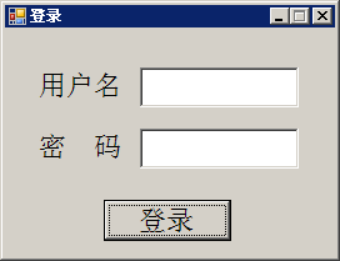
1. 设计一个Windows登陆窗体应用程序,能够实现根据现有表中数据模拟登陆,并设置相关属性,具体界面如下。
可能使用到的类:
(1)SqlConnection
(2)SqlCommand
(3)SqlDataReader
(4)MessageBox
 using System;

 using System.Collections.Generic;

 using System.ComponentModel;

 using System.Data;

 using System.Drawing;

 using System.Linq;

 using System.Text;

 using System.Windows.Forms;

 using System.Data.SqlClient;

 namespace Myform

 {

     public partial class Form1 : Form

     {

         public Form1()

         {

             InitializeComponent();

         }

         private void label1_Click(object sender, EventArgs e)

         {

         }

         private void button1_Click(object sender, EventArgs e)

         {

             string connString = @"Data Source=(LocalDB)\MSSQLLocalDB;AttachDbFilename=D:\C#09J20172202899何海钊\Myform\Myform\Properties\Database1.mdf;Integrated Security=True";

             SqlConnection conn = null;

             SqlCommand cmd = null;

             SqlDataReader reader = null;

             try

             {

                 conn = new SqlConnection(connString);

                 conn.Open();

                 cmd = conn.CreateCommand();

                 cmd.CommandText = "Select username , password From Table1 where username = @username and password = @password ";

                 cmd.Parameters.AddWithValue("@username", textBox1.Text.Trim());

                 cmd.Parameters.AddWithValue("@password", textBox2.Text.Trim());

                 reader = cmd.ExecuteReader();

                 if (reader.Read())

                 {

                     MessageBox.Show("登录成功", "OK", MessageBoxButtons.OK, MessageBoxIcon.Information);

                 }

                 else

                 {

                     MessageBox.Show("用户名密码不正确", "NO", MessageBoxButtons.OK, MessageBoxIcon.Error);

                 }

             }

             catch (Exception ex)

             {

                 MessageBox.Show(ex.Message, "Open Error", MessageBoxButtons.OK);

             }

             finally

             {

                 if (reader != null) reader.Close();

                 if (conn.State == ConnectionState.Open) conn.Close();

             }

         }

     }

 }
Code1
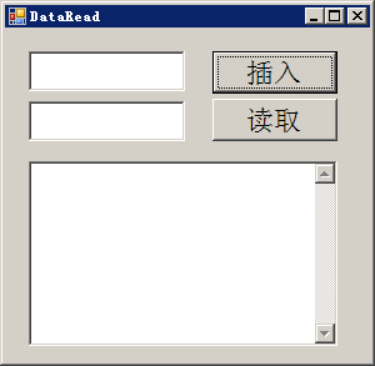
2、设计一个Windows登陆窗体应用程序,根据下图设置相关属性,该程序能够读写现有表中数据,具体界面如下。
 using System;

 using System.Collections.Generic;

 using System.ComponentModel;

 using System.Data;

 using System.Drawing;

 using System.Linq;

 using System.Text;

 using System.Windows.Forms;

 using System.Data.SqlClient;

 namespace Myform2

 {

     public partial class Form1 : Form

     {

         public Form1()

         {

             InitializeComponent();

         }

         private SqlConnection conn = null;

         private SqlCommand cmd = null;

         private SqlDataReader reader = null;

         private SqlDataAdapter adapter = null;

         private DataSet List = null;

         private string connString = @"Data Source=(LocalDB)\MSSQLLocalDB;AttachDbFilename=D:\C#09J20172202899何海钊\db\Database1.mdf;Integrated Security=True;Connect Timeout=30";

         private void button1_Click(object sender, EventArgs e)

         {

             try

             {

                 conn = new SqlConnection(connString);

                 conn.Open();

                 cmd = conn.CreateCommand();

                 cmd.CommandText = "Insert into Table1 ( username , password ) values (@username , @password ) ";

                 cmd.Parameters.AddWithValue("@username", textBox1.Text.Trim());

                 cmd.Parameters.AddWithValue("@password", textBox2.Text.Trim());

                 int n = cmd.ExecuteNonQuery();

                 if ( n >  )

                 {

                     MessageBox.Show("成功插入", "Insert OK ", MessageBoxButtons.OK, MessageBoxIcon.Information);

                 }

                 else

                 {

                     MessageBox.Show("插入失败", "Insert error", MessageBoxButtons.OK, MessageBoxIcon.Error);

                 }

             }

             catch (Exception ex)

             {

                 MessageBox.Show(ex.Message, "Open Error", MessageBoxButtons.OK);

             }

             finally

             {

                 if (reader != null) reader.Close();

                 if (conn.State == ConnectionState.Open) conn.Close();

             }

         }

         private void button2_Click(object sender, EventArgs e)

         {

             try

             {

                 conn = new SqlConnection(connString);

                 conn.Open();

                 cmd = conn.CreateCommand();

                 cmd.CommandText = "Select * From Table1 ";

                 adapter = new SqlDataAdapter(cmd);

                 List = new DataSet();

                 adapter.Fill(List);

                 DataTable table = List.Tables[];

                 DataRowCollection Rows = table.Rows;

                 for (int i = ; i < Rows.Count; i++)

                 {

                     DataRow row = Rows[i];

                     string username = (string)row["username"];

                     string password = (string)row["password"];

                     this.richTextBox1.Text += username + " " + password + "\r\n";

                 }

             }

             catch (Exception ex)

             {

                 MessageBox.Show(ex.Message, "Open Error", MessageBoxButtons.OK);

             }

             finally

             {

                 if (reader != null) reader.Close();

                 if (conn.State == ConnectionState.Open) conn.Close();

             }

         }

     }

 }
Code2
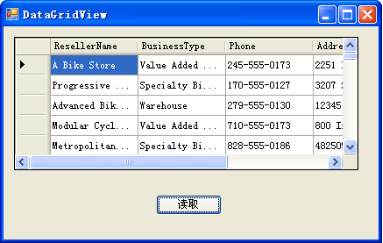
3、设计一个Windows窗体应用程序,根据下图设置相关属性,该程序能够读取AdventureWorksDW_Data.mdf数据库中DimReseller表中数据,具体界面如下。
 using System;

 using System.Collections.Generic;

 using System.ComponentModel;

 using System.Data;

 using System.Drawing;

 using System.Linq;

 using System.Text;

 using System.Threading.Tasks;

 using System.Windows.Forms;

 using System.Data.SqlClient;

 namespace FormPage

 {

     public partial class Form1 : Form

     {

         private SqlConnection conn = null;

         private SqlCommand cmd = null;

         private SqlDataAdapter adapter = null;

         private SqlDataReader reader = null;

         private DataSet ds = null;

         private int pageSize = ;

         private int rowCount = ;

         private int pageNum = ;

         private string connectString = @"Data Source=(LocalDB)\MSSQLLocalDB;AttachDbFilename=D:\C#09J20172202899何海钊\MyForm3\AdventureWorksDW2008\AdventureWorksDW_Data.mdf;Integrated Security=True;Connect Timeout=30";

         public Form1()

         {

             InitializeComponent();

             Count_Row();

             Fill_Data();

         }

         private void btn_FirstPage_Click(object sender, EventArgs e)

         {

             pageNum = ;

             Fill_Data();

         }

         private void btn_LastPage_Click(object sender, EventArgs e)

         {

             pageNum = rowCount/pageSize;

             Fill_Data();

         }

         private void btn_PrePage_Click(object sender, EventArgs e)

         {

             if( pageNum >  )

             {

                 pageNum--;

                 Fill_Data();

             }

         }

         private void btn_NextPage_Click(object sender, EventArgs e)

         {

             if (pageNum < rowCount / pageSize)

             {

                 pageNum++;

                 Fill_Data();

             }

         }

         private void btn_Fill_Click(object sender, EventArgs e)

         {

             Fill_Data();

         }

         void Fill_Data()

         {

             if (pageNum == )

             {

                 btn_FirstPage.Enabled = false;

                 btn_PrePage.Enabled = false;

             }

             else

             {

                 btn_FirstPage.Enabled = true;

                 btn_PrePage.Enabled = true;

             }

             if( pageNum == rowCount / pageSize)

             {

                 btn_LastPage.Enabled = false;

                 btn_NextPage.Enabled = false;

             }

             else

             {

                 btn_LastPage.Enabled = true;

                 btn_NextPage.Enabled = true;

             }

             try

             {

                 conn = new SqlConnection(connectString);

                 conn.Open();

                 cmd = conn.CreateCommand();

                 cmd.CommandText = "Select top ("+pageSize+ ") Employeekey , FirstName , LastName , EmailAddress , Phone from DimEmployee where EmployeeKey not in( Select top (" + pageSize *pageNum+ ") EmployeeKey from DimEmployee order by EmployeeKey ) order by EmployeeKey";

                 ds = new DataSet();

                 adapter = new SqlDataAdapter(cmd);

                 adapter.Fill(ds , "DimEmployee" );

                 dataGridView1.DataSource = ds;

                 dataGridView1.DataMember = "DimEmployee";

             }

             catch (Exception ex)

             {

                 MessageBox.Show(ex.Message, "Fill Error", MessageBoxButtons.OK, MessageBoxIcon.Error);

             }

             finally

             {

                 if (conn.State == ConnectionState.Open)

                     conn.Close();

             }

         }

         void Count_Row()

         {

             try

             {

                 conn = new SqlConnection(connectString);

                 conn.Open();

                 cmd = conn.CreateCommand();

                 cmd.CommandText = "Select count(*) from DimEmployee";

                 reader = cmd.ExecuteReader();

                 if( reader.Read())

                 {

                     rowCount = reader.GetInt32();

                 }

                 else

                 {

                     MessageBox.Show("Search Error", "0 row", MessageBoxButtons.OK, MessageBoxIcon.Error);

                 }

                 if (reader.IsClosed)

                     reader.Close();

             }

             catch (Exception ex)

             {

                 MessageBox.Show(ex.Message, "Search Error", MessageBoxButtons.OK, MessageBoxIcon.Error);

             }

             finally

             {

                 if (conn.State == ConnectionState.Open)

                     conn.Close();

                 if( reader.IsClosed)

                     reader.Close();

             }

         }

     }

 }
Code3
【C#】上机实验九的更多相关文章
- Linux基础入门(新版)(实验九-实验十二)
实验九 简单文本入门 一.常用的文本处理命令 二.文本处理命令 1.tr 命令 tr 命令可以用来删除一段文本信息中的某些文字.或者将其进行转换. 使用方式: tr [option]...SET1 [ ...
- lingo运筹学上机实验指导
<运筹学上机实验指导>分为两个部分,第一部分12学时,是与运筹学理论课上机同步配套的4个实验(线性规划.灵敏度分析.运输问题与指派问题.最短路问题和背包问题)的Excel.LONGO和LI ...
- 算法课上机实验(一个简单的GUI排序算法比较程序)
(在家里的电脑上Linux Deepin截的图,屏幕大一点的话,deepin用着还挺不错的说) 这个应该是大二的算法课程上机实验时做的一个小程序,也是我的第一个GUI小程序,实现什么的都记不清了,只记 ...
- 2017-2018-2 20155228 《网络对抗技术》 实验九:Web安全基础
2017-2018-2 20155228 <网络对抗技术> 实验九:Web安全基础 1. 实践内容 1.1 标理解常用网络攻击技术的基本原理 1.2 在Webgoat实验环境下实践相关实验 ...
- 实验九 ZStack 广播通信实验
实验九 ZStack 广播通信实验[实验目的]1. 了解 ZigBee 广播通信的原理2. 掌握在 ZigBee 网络中进行广播通信的方法[实验设备]1. 装有 IAR 开发工具的 PC 机一台2. ...
- 2017-2018-2 20155225《网络对抗技术》实验九 Web安全基础
2017-2018-2 20155225<网络对抗技术>实验九 Web安全基础 WebGoat 1.String SQL Injection 题目是想办法得到数据库所有人的信用卡号,用Sm ...
- 20155201 网络攻防技术 实验九 Web安全基础
20155201 网络攻防技术 实验九 Web安全基础 一.实践内容 本实践的目标理解常用网络攻击技术的基本原理.Webgoat实践下相关实验. 二.报告内容: 1. 基础问题回答 1)SQL注入攻击 ...
- Java第一次上机实验源代码
小学生计算题: package 第一次上机实验_; import java.util.*; public class 小学计算题 { public static void main(String[] ...
- oracle上机实验内容
这是oracle实验的部分代码,我花了一中午做的. 第一次上机内容 实验目的:熟悉ORACLE11G的环境 实验内容: 第二次上机内容 实验目标:掌握oracle体系结构,掌握sqlplus的运行环境 ...
随机推荐
- Uncaught SyntaxError: Unexpected token o
浏览器报Uncaught SyntaxError: Unexpected token o 这原因是你ajax获取数据的时候对数据进行错误操作,比如使用了 JSON.parse(data) 对数据进行转 ...
- ES6 解构对象和数组
1.解构对象 let saveFiled = { extension: "jpg", name:"girl", size:14040 }; ES5 functi ...
- mysql 生成随机数rand()
mysql> select rand(); +--------------------+ | rand() | +--------------------+ | 0.99134733527092 ...
- SpringMVC自定义类型转换器
SpringMVC 自定义类型转换器 我们在使用SpringMVC时,常常需要把表单中的参数映射到我们对象的属性中,我们可以在默认的spring-servlet.xml加上如下的配置即可做到普通数据 ...
- win10 自带计算器删除了怎么办
win+S后输入Powershell,以管理员身份运行后,使用下面的命令:重要的说三遍:以管理员身份运行!以管理员身份运行!以管理员身份运行!Get-AppxPackage *calculator* ...
- 【Django】Django项目结构与单元测试
学校的软工项目要开发一个网站,自然的想到用python+Django来做.由于之前没有用Django开发过大型的网站项目,所以遇到了一些问题.记录在此,便于以后查阅. 今天完成了项目结构的设计.部分的 ...
- 【mybatis源码学习】mybatis的插件功能
一.mybatis的插件功能可拦截的目标 org.apache.ibatis.executor.parameter.ParameterHandler org.apache.ibatis.executo ...
- 使用lombok的@Builder的注解的一个坑
一开发说项目报错 java.lang.Long,java.lang.String,java.lang.String,java.lang.String,java.lang.String,java.lan ...
- (二)limit的高级用法
一.取出前n条数据 ; 二.取出第几行到第几行的数据 ,; 解释:取出从第3行(从0行开始)开始的5条记录.
- [LeetCode] 65. Valid Number 验证数字
Validate if a given string can be interpreted as a decimal number. Some examples:"0" => ...