
OpenCV——PS滤镜算法之 Ellipsoid (凹陷)
// define head function

#ifndef PS_ALGORITHM_H_INCLUDED

#define PS_ALGORITHM_H_INCLUDED

#include <iostream>

#include <string>

#include "cv.h"

#include "highgui.h"

#include "cxmat.hpp"

#include "cxcore.hpp"

#include "math.h"

using namespace std;

using namespace cv;

void Show_Image(Mat&, const string &);

#endif // PS_ALGORITHM_H_INCLUDED

#include "PS_Algorithm.h"

#include <time.h>

using namespace std;

using namespace cv;

#define pi 3.1415926

int main()

{

    string Img_name("4.jpg");

    Mat Img;

    Img=imread(Img_name);

    Mat Img_out(Img.size(), CV_8UC3);

    Img.copyTo(Img_out);

    int width=Img.cols;

    int height=Img.rows;

    float e;

    float a,b, a0, b0, a1,b1;

    float alpha=1.0;

    float K=pi/2;

    a=width/2; b=height/2;

    e=(float)width/(float)height;

    Point2i Center(width/2, height/2);

    float new_x, new_y;

    float p,q,x1,y1,x0,y0;

    float theta;

    for (int y=0; y<height; y++)

    {

        for (int x=0; x<width; x++)

        {

            y0=Center.y-y;

            x0=x-Center.x;

            theta=atan(y0*e/(x0+0.0001));

            if(x0<0)   theta=theta+pi;

            a0=x0/cos(theta);

            b0=y0/sin(theta+0.0001);

            if(a0>a || b0>b)  continue;

            a1=a*sin(a0/a*K);

            b1=b*sin(b0/b*K);

            a1=(a1-a0)*(alpha)+a0;

            b1=(b1-b0)*(alpha)+b0;

            new_x=a1*cos(theta);

            new_y=b1*sin(theta);

            new_x=Center.x+new_x;

            new_y=Center.y-new_y;

            if(new_x<0)         new_x=0;

            if(new_x>=width-1)  new_x=width-2;

            if(new_y<0)         new_y=0;

            if(new_y>=height-1) new_y=height-2;

            x1=(int)new_x;

            y1=(int)new_y;

            p=new_x-x1;

            q=new_y-y1;

            for (int k=0; k<3; k++)

            {

                Img_out.at<Vec3b>(y, x)[k]=(1-p)*(1-q)*Img.at<Vec3b>(y1, x1)[k]+

                                            (p)*(1-q)*Img.at<Vec3b>(y1,x1+1)[k]+

                                            (1-p)*(q)*Img.at<Vec3b>(y1+1,x1)[k]+

                                            (p)*(q)*Img.at<Vec3b>(y1+1,x1+1)[k];

            }

        }

    }

   Show_Image(Img_out, "out");

   imwrite("Out.jpg", Img_out);

   waitKey();

}

// define the show image

#include "PS_Algorithm.h"

#include <iostream>

#include <string>

using namespace std;

using namespace cv;

void Show_Image(Mat& Image, const string& str)

{

    namedWindow(str.c_str(),CV_WINDOW_AUTOSIZE);

    imshow(str.c_str(), Image);

}
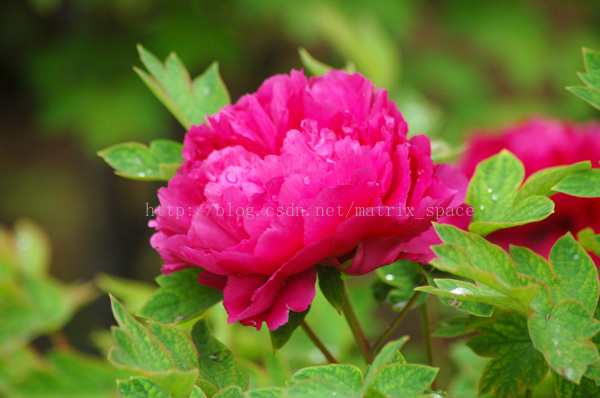
原图
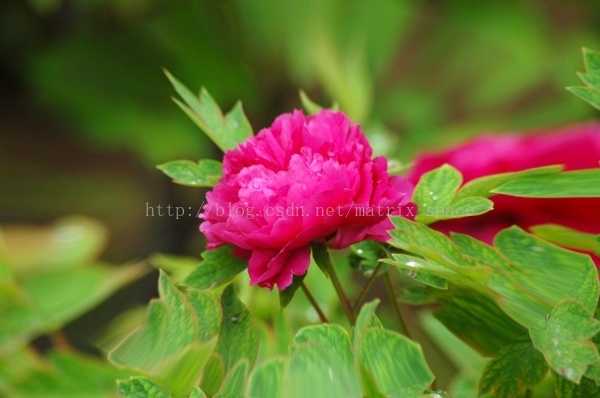
效果图
OpenCV——PS滤镜算法之 Ellipsoid (凹陷)的更多相关文章
- OpenCV——PS滤镜算法之 球面化 (凹陷效果)
// define head function #ifndef PS_ALGORITHM_H_INCLUDED #define PS_ALGORITHM_H_INCLUDED #include < ...
- OpenCV——PS滤镜算法之 Ellipsoid (凸出)
// define head function #ifndef PS_ALGORITHM_H_INCLUDED #define PS_ALGORITHM_H_INCLUDED #include < ...
- OpenCV——PS 滤镜算法之极坐标变换到平面坐标
// define head function #ifndef PS_ALGORITHM_H_INCLUDED #define PS_ALGORITHM_H_INCLUDED #include < ...
- OpenCV——PS 滤镜算法之平面坐标到极坐标的变换
// define head function #ifndef PS_ALGORITHM_H_INCLUDED #define PS_ALGORITHM_H_INCLUDED #include < ...
- OpenCV——PS滤镜算法之Spherize 球面化(凸出效果)
// define head function #ifndef PS_ALGORITHM_H_INCLUDED #define PS_ALGORITHM_H_INCLUDED #include < ...
- OpenCV——PS 滤镜, 浮雕效果
具体的算法原理可以参考: PS 滤镜, 浮雕效果 // define head function #ifndef PS_ALGORITHM_H_INCLUDED #define PS_ALGORITH ...
- OpenCV——PS 滤镜, 曝光过度
算法原理可以参考: PS 滤镜,曝光过度 #ifndef PS_ALGORITHM_H_INCLUDED #define PS_ALGORITHM_H_INCLUDED #include <io ...
- PS 滤镜算法原理——染色玻璃
%%%% 完成PS 中的染色玻璃滤镜特效 clc; clear all; close all; Image=imread('4.jpg'); Image=double(Image); Gray_Ima ...
- PS 滤镜算法原理 ——马赛克
% method : 利用邻域的随意一点取代当前邻域全部像素点 %%%% mosaic clc; clear all; addpath('E:\PhotoShop Algortihm\Image Pr ...
随机推荐
- 有关 GCC 及 JNA 涉及动态库/共享库时处理库文件名的问题
动态库尤其是共享库在 Linux 环境下普遍存在库文件名包含版本号的情况,比如 Linux 环境下经常会发现一个共享库的真实文件名是 libfoo.so.1.1.0,而同时会有多个指向该真实库文件的软 ...
- 小程序-地图API
摘要 地图组件-map 注意事项&&Bug: 1.map 组件是由客服端创建的原生组件,它的层级是最高的. 2.请勿在scroll-view中使用map组件 3.css动画对map组件 ...
- HDU - 5584 LCM Walk (数论 GCD)
A frog has just learned some number theory, and can't wait to show his ability to his girlfriend. No ...
- 安装 node-sass 的不成功
昨天安装项目依赖的包,差不多都装好了,然后就卡在了node-sass上,各种报错. 报错一.gyp ERR! stack Error: Can't find Python executable &qu ...
- Codeforces 375 D Tree and Queries
Discription You have a rooted tree consisting of n vertices. Each vertex of the tree has some color. ...
- java 基础 5 String StringBuffer StringBuilder
String是不可变的,原因 1是可以缓存hash值,因为String的hash值经常被使用,例如String用作HashMap等.不可变特性 使得hash值不变,因此只需要进行一次计算: 2Str ...
- CentOS 5.4 final下Systemtap的安装
CentOS 5.4 final下Systemtap的安装 时间:2015-02-11来源:linux网站 作者:zklth 一.Systemtap运行环境需求 (1)linux kernel ...
- SolidEdge如何自动标注尺寸
1 工具-尺寸-关系助手(必须在编辑草图轮廓状态下,如果你的草图不可编辑,则没有这些选项) 2 框选要自动标注尺寸的东西,这些东西立即变为黄色,然后打对勾 3 选择横纵坐标尺寸原点(其实就是为 ...
- photoshop 前端常用技巧
1.将图片转换成 png 格式 并且 使背景透明 (1)用矩形选框工具选取一块区域 (2)右键 选择 ‘变换选区’ 进行微调 F8 查看尺寸 (3)复制图层(ctrl+c) ->新建文件(ctr ...
- 生成可重集的排序 (白书P184)
#include<iostream> #include<cstdio> #include<cstring> #include<algorithm> us ...