
Spring Cloud(9):Config配置中心
Config配置中心作用简单来讲:统一配置,方便管理
开源配置中心:
1.百度Disconf
2.阿里Diamand
3.Spring Cloud Config
搭建Config-Server
快速上手:
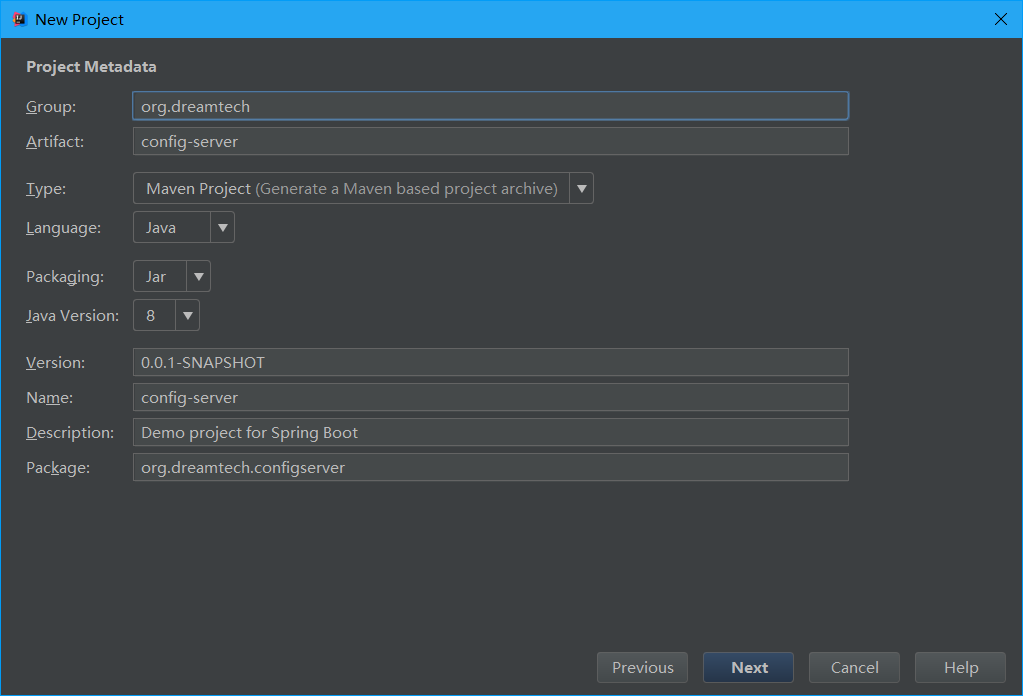
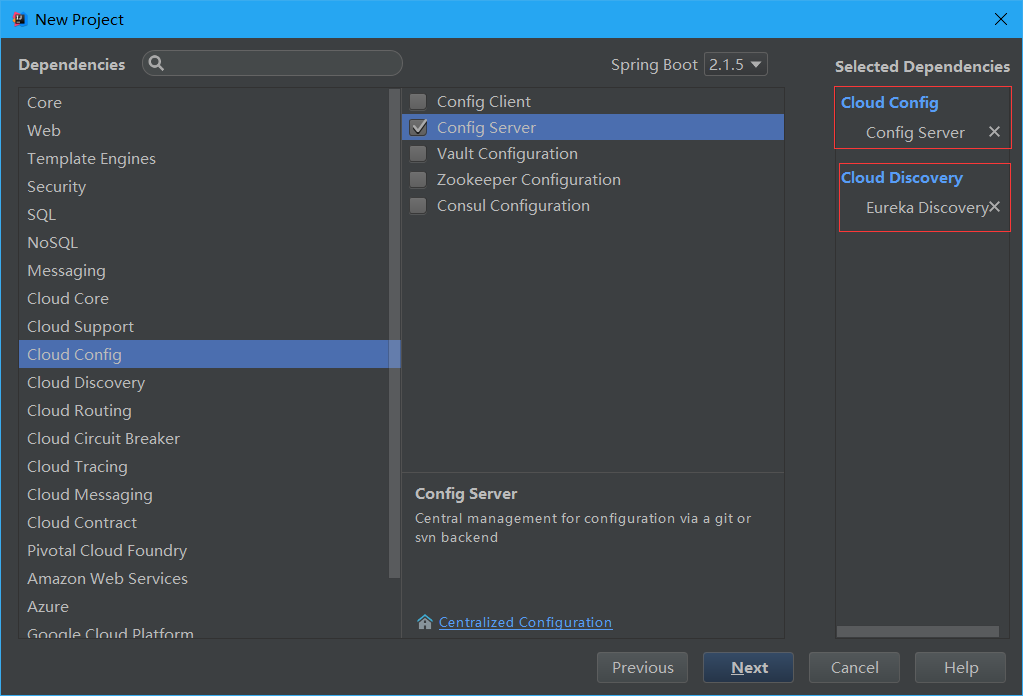
选择依赖:Eureka和Config
选取Eureka原因:保证高可用
启动类加入注解:
package org.dreamtech.configserver;

import org.springframework.boot.SpringApplication;

import org.springframework.boot.autoconfigure.SpringBootApplication;

import org.springframework.cloud.config.server.EnableConfigServer;

@SpringBootApplication

@EnableConfigServer

public class ConfigServerApplication {

    public static void main(String[] args) {

        SpringApplication.run(ConfigServerApplication.class, args);

    }

}
配置:
Eureka-Server的搭建:https://www.cnblogs.com/xuyiqing/p/10861541.html
使用Git服务器:我使用的是Github,新建一个测试仓库
spring.application.name=config-server

server.port=9100

eureka.client.service-url.defaultZone=http://localhost:8761/eureka

spring.cloud.config.server.git.uri=https://github.com/EmYiQing/SpringCloudTest

spring.cloud.config.server.git.username=EmYiQing

spring.cloud.config.server.git.password=xxxxxx
在Github上新建一个配置文件做测试:

测试:
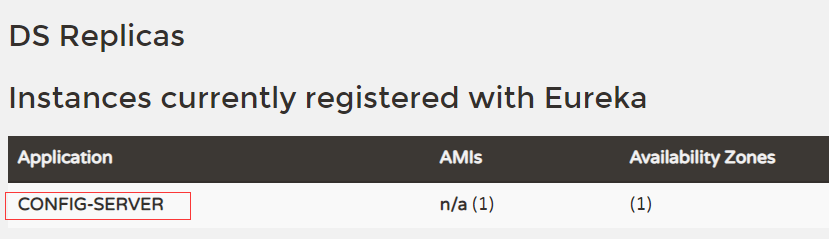
启动项目Eureka-Server->Config-Server
查看注册中心:成功
访问localhost:9100:报错
访问http://localhost:9100/product-service.yml:拿到刚才在Github新建的配置文件,成功
如果我们访问http://localhost:9100/product-service.properties?
那么Config会直接把YML转化为properties文件,很强大
注意:Git上的配置文件格式一定不能出错
还可以做一些默认配置:比如超时时间和默认分支
spring.cloud.config.server.git.timeout=5

spring.cloud.config.server.git.default-label=master
有了Server当然也要有Client:
在服务模块引入依赖
        <dependency>

            <groupId>org.springframework.cloud</groupId>

            <artifactId>spring-cloud-config-client</artifactId>

        </dependency>
将配置文件application.yml更名为bootstrap.yml:
进行三项配置:
1.Eureka-Server-URL
2.该服务模块名称
3.Config配置中心在Eureka-Server的名称和启用
eureka:

  client:

    service-url:

      defaultZone: http://localhost:8761/eureka/

spring:

  application:

    name: product-service

  cloud:

    config:

      discovery:

        service-id: CONFIG-SERVER

        enabled: true
启动项目耗时将会更长,因为读取Git服务器配置文件是耗时的操作
Config配置中心使用的注意事项:
1.保证Git服务器的配置文件格式正确
2.Git服务器的配置文件建议采用分支进行区分,不推荐使用后缀区分
比如使用/test/product-service.yml代替/product-service-test.yml
然而到这里还是没有结束,比如配置文件的动态更新等等,这些功能在以后实现
Spring Cloud(9):Config配置中心的更多相关文章
- Spring Cloud 2-Config 分布式配置中心(七)
Spring Cloud Config 1.github配置 2.服务端配置 pom.xml application.xml Application.java 3.配置和命名 1. 配置加载顺序 ...
- Spring Cloud Consul使用——配置中心
1.pom.xml <project xmlns="http://maven.apache.org/POM/4.0.0" xmlns:xsi="http://www ...
- spring cloud学习(六) 配置中心-自动更新
上一篇学习了spring cloud config的基本使用,但发现有个问题,就是每次更改配置后,都需要重启服务才能更新配置,这样肯定是不行的.在上网查资料了解后,spring cloud支持通过AM ...
- spring cloud学习(五) 配置中心
Spring Cloud Config为服务端和客户端提供了分布式系统的外部化配置支持.配置服务中心采用Git的方式存储配置文件,因此我们很容易部署修改,有助于对环境配置进行版本管理. 一.配置中心 ...
- Spring Cloud (6) 分布式配置中心-高可用
高可用 现在已经可以从配置中心读取配置文件了,当微服务很多时都从配置中心读取配置文件,这时可以将配置中心做成一个微服务,将其集群化,从而达到高可用. 改造config-server 加入eureka ...
- Spring Cloud (5) 分布式配置中心
Spring Cloud Config 在分布式系统中,由于服务数量很多,为了方便服务配置文件统一管理,实时更新,所以需要分布式配置中心组件.在Spring Cloud中,使用Spring Cloud ...
- spring cloud 集成分布式配置中心 apollo(单机部署apollo)
一.什么是apollo? Apollo(阿波罗)是携程框架部门研发的分布式配置中心,能够集中化管理应用不同环境.不同集群的配置,配置修改后能够实时推送到应用端,并且具备规范的权限.流程治理等特性,适用 ...
- Spring Cloud Gateway 结合配置中心限流
前言 上篇文章我讲过复杂的限流场景可以通过扩展RedisRateLimiter来实现自己的限流策略. 假设你领导给你安排了一个任务,具体需求如下: 针对具体的接口做限流 不同接口限流的力度可以不同 可 ...
- Spring Cloud之分布式配置中心
用服务的方式来实现 ConfigAppApplication.java package com.packtpub.ConfigApp; import org.springframework.boot. ...
- Spring Cloud Alibaba nacos 配置中心使用
背景 上一文我们讲到了如何去搭建注册中心,这一次我们讲述如何使用nacos作为注册中心 spring-cloud-alibaba-basis 创建基础依赖 首先我们创建一个spring-cloud-a ...
随机推荐
- java 读取txt,java读取大文件
java 读取txt,java读取大文件 package com.bbcmart.util; import java.io.File;import java.io.RandomAccessFile;i ...
- echarts简单用法快速上手
1.html结构 简单说就是一个标签一个图表:2.初始化:var myEcharts = echarts.init(document.getElementById("xxx")): ...
- itop安装中使用nginx安装后不能出现enter itop的问题
安装中没有出现enter itop,  如下的网络请求给了我们原因 原来使用的是域名请求资源文件,而该域名并不能指向我的服务器,所以安装中资源文件请求不成功,查看了我的nginx配置,如下 [ro ...
- nvidia 的一些命令
直接在命令行使用 NVIDIA-smi会有问题 首先要确保电脑下了cuda. 然后打开cmd,使用cd命令进入: C:\Program Files\NVIDIA Corporation\NVSMI 然 ...
- 请简述HTML和XHTML最重要的4点不同?
请简述HTML和XHTML最重要的4点不同? 不同: XHTML要求正确嵌套 XHTML 所有元素必须关闭 XHTML 区分大小 ...
- Java数据结构和算法(一)--栈
栈: 英文名stack,特点是只允许访问最后插入的那个元素,也就是LIFO(后进先出) jdk中的stack源码: public class Stack<E> extends Vector ...
- No-7.系统信息相关命令
系统信息相关命令 本节内容主要是为了方便通过远程终端维护服务器时,查看服务器上当前 系统日期和时间 / 磁盘空间占用情况 / 程序执行情况 本小结学习的终端命令基本都是查询命令,通过这些命令对系统资源 ...
- Ubuntu14.04环境下Qt5.5以上版本无法输入中文的解决教程
1.前言 由于Qt5.4之后对之前的Qt5版本不再二进制兼容,所以网上很多简单的旧的办法已经失效了,所以本教程的办法是重新编译fcitx-qt5,生成最新的libfcitxplatforminputc ...
- 「问题思考」python的递归中return返回none
代码: #求最大公约数 def gcd(x,y): if x < y: swap = x x = y y = swap if x%y == 0: return y else: gcd(y,x%y ...
- PAT 1027. 打印沙漏
打印沙漏 本题要求你写个程序把给定的符号打印成沙漏的形状.例如给定17个"*",要求按下列格式打印 ***** *** * *** ***** 所谓"沙漏形状" ...