
C# 如何在Excel 动态生成PivotTable
Excel 中的透视表对于数据分析来说,非常的方便,而且很多业务人员对于Excel的操作也是非常熟悉的,因此用Excel作为分析数据的界面,不失为一种很好的选择。那么如何用C#从数据库中抓取数据,并在Excel 动态生成PivotTable呢?下面结合实例来说明。
一般来说,数据库的设计都遵循规范化的原则,从而减少数据的冗余,但是对于数据分析来说,数据冗余能够提高数据加载的速度,因此为了演示透视表,这里现在数据库中建立一个视图,将需要分析的数据整合到一个视图中。如下图所示:
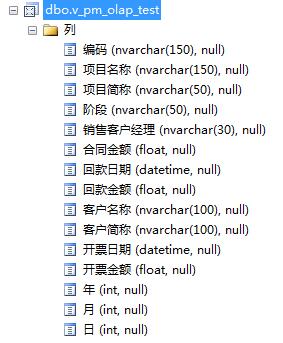
数据源准备好后,我们先来建立一个web应用程序,然后用NuGet加载Epplus程序包,如下图所示:
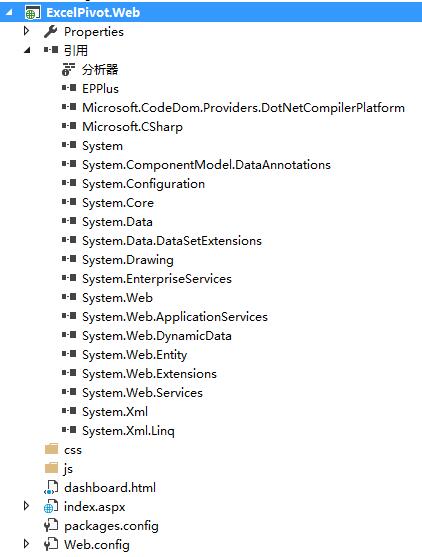
在index.aspx前台页面中,编写如下脚本:
 <%@ Page Language="C#" AutoEventWireup="true" CodeBehind="index.aspx.cs" Inherits="ExcelPivot.Web.index" %>

 <!DOCTYPE html>

 <html xmlns="http://www.w3.org/1999/xhtml">

 <head runat="server">

 <meta http-equiv="Content-Type" content="text/html; charset=utf-8"/>

     <title>Excel PivotTable</title>

     <link rel="stylesheet" type="text/css" href="css/style.css" />

 </head>

 <body>

     <form id="form1" runat="server">

        <div id="container">

             <div id="contents">

                 <div id="post">

                     <header>

                         <h1> Excel PivotTable </h1>

                     </header>

                     <div id="metro-array" style="display: inline-block;">

                         <div style="width: 230px; height: 230px; float: left; ">

                             <a class="metro-tile" style="cursor: pointer; width: 230px; height: 110px; display: block; background-color:#ff0000; color: #fff; margin-bottom: 10px;">

                                  <input type="button" runat="server" id="Button1" name="btn1" value="回款情况分析" onserverclick="btn1_ServerClick"

                                                    style="background-color:transparent; color:white; font-size:16px;float:left; border:0; width:230px; height:110px; cursor:pointer;"/>

                             </a>

                             <a class="metro-tile" style="cursor: pointer; width: 230px; height: 110px; display: block; background-color:#ff6a00; color: #fff;">

                                  <input type="button" runat="server" id="Button2" name="btn1" value="sampe1" onserverclick="btn1_ServerClick"

                                                    style="background-color:transparent; color:white; font-size:16px;float:left; border:0; width:230px; height:110px; cursor:pointer;"/>

                             </a>

                         </div>

                         <div style="width: 230px; height: 230px; float: left; margin-left: 10px">

                             <a class="metro-tile" style="cursor: pointer; width: 230px; height: 230px; display: block; background-color:#ffd800; color: #fff">

                                  <input type="button" runat="server" id="btn1" name="btn1" value="sampe1" onserverclick="btn1_ServerClick"

                                                    style="background-color:transparent; color:white; font-size:16px;float:left; border:0; width:230px; height:230px; cursor:pointer;"/>

                             </a>

                         </div>

                         <div style="width: 230px; height: 230px; float: left; margin-left: 10px">

                             <a class="metro-tile" style="cursor: pointer; width: 230px; height: 110px; display: block; background-color:#0094ff; color: #fff; margin-bottom: 10px;">

                                  <input type="button" runat="server" id="Button3" name="btn1" value="sampe1" onserverclick="btn1_ServerClick"

                                                    style="background-color:transparent; color:white; font-size:16px;float:left; border:0; width:230px; height:110px; cursor:pointer;"/>

                             </a>

                             <a class="metro-tile" style="cursor: pointer; width: 110px; height: 110px; margin-right: 10px; display: block; float: left; background-color: #4800ff; color: #fff;">

                                  <input type="button" runat="server" id="Button4" name="btn1" value="sampe1" onserverclick="btn1_ServerClick"

                                                    style="background-color:transparent; color:white; font-size:16px;float:left; border:0; width:110px; height:110px; cursor:pointer;"/>

                             </a>

                             <a class="metro-tile" style="cursor: pointer; width: 110px; height: 110px; display: block; background-color: #b200ff; float: right; color: #fff;">

                                  <input type="button" runat="server" id="Button5" name="btn1" value="sampe1" onserverclick="btn1_ServerClick"

                                                    style="background-color:transparent; color:white; font-size:16px;float:left; border:0; width:110px; height:110px; cursor:pointer;"/>

                             </a>

                         </div>

                     </div>

                 </div>

             </div>

         </div>

     </form>

 </body>

     <script src="js/tileJs.js" type="text/javascript"></script>

 </html>
其中 TileJs是一个开源的构建类似win8 Metro风格的javascript库。
编写后台脚本:
 using System;

 using System.Collections.Generic;

 using System.Linq;

 using System.Web;

 using System.Web.UI;

 using System.Web.UI.WebControls;

 using OfficeOpenXml;

 using OfficeOpenXml.Table;

 using OfficeOpenXml.ConditionalFormatting;

 using OfficeOpenXml.Style;

 using OfficeOpenXml.Utils;

 using OfficeOpenXml.Table.PivotTable;

 using System.IO;

 using System.Data.SqlClient;

 using System.Data;

 namespace ExcelPivot.Web

 {

     public partial class index : System.Web.UI.Page

     {

         protected void Page_Load(object sender, EventArgs e)

         {

         }

         private DataTable getDataSource()

         {

             //createDataTable();

             //return ProductInfo;

             SqlConnection conn = new SqlConnection();

             conn.ConnectionString = "Data Source=.;Initial Catalog=olap;Persist Security Info=True;User ID=sa;Password=sa";

             conn.Open();

             SqlDataAdapter ada = new SqlDataAdapter("select * from v_pm_olap_test", conn);

             DataSet ds = new DataSet();

             ada.Fill(ds);

             return ds.Tables[];

         }

         protected void btn1_ServerClick(object sender, EventArgs e)

         {

             try

             {

                 DataTable table = getDataSource();

                 string path = "_demo_" + System.Guid.NewGuid().ToString().Replace("-", "_") + ".xls";

                 //string path = "_demo.xls";

                 FileInfo fileInfo = new FileInfo(path);

                 var excel = new ExcelPackage(fileInfo);

                 var wsPivot = excel.Workbook.Worksheets.Add("Pivot");

                 var wsData = excel.Workbook.Worksheets.Add("Data");

                 wsData.Cells["A1"].LoadFromDataTable(table, true, OfficeOpenXml.Table.TableStyles.Medium6);

                 if (table.Rows.Count != )

                 {

                     foreach (DataColumn col in table.Columns)

                     {

                         if (col.DataType == typeof(System.DateTime))

                         {

                             var colNumber = col.Ordinal + ;

                             var range = wsData.Cells[, colNumber, table.Rows.Count + , colNumber];

                             range.Style.Numberformat.Format = "yyyy-MM-dd";

                         }

                         else

                         {

                         }

                     }

                 }

                 var dataRange = wsData.Cells[wsData.Dimension.Address.ToString()];

                 dataRange.AutoFitColumns();

                 var pivotTable = wsPivot.PivotTables.Add(wsPivot.Cells["A1"], dataRange, "Pivot");

                 pivotTable.MultipleFieldFilters = true;

                 pivotTable.RowGrandTotals = true;

                 pivotTable.ColumGrandTotals = true;

                 pivotTable.Compact = true;

                 pivotTable.CompactData = true;

                 pivotTable.GridDropZones = false;

                 pivotTable.Outline = false;

                 pivotTable.OutlineData = false;

                 pivotTable.ShowError = true;

                 pivotTable.ErrorCaption = "[error]";

                 pivotTable.ShowHeaders = true;

                 pivotTable.UseAutoFormatting = true;

                 pivotTable.ApplyWidthHeightFormats = true;

                 pivotTable.ShowDrill = true;

                 pivotTable.FirstDataCol = ;

                 //pivotTable.RowHeaderCaption = "行";

                 //row field

                 var field004 = pivotTable.Fields["销售客户经理"];

                 pivotTable.RowFields.Add(field004);

                 var field001 = pivotTable.Fields["项目简称"];

                 pivotTable.RowFields.Add(field001);

                 //field001.ShowAll = false;

                 //column field

                 var field002 = pivotTable.Fields["年"];

                 pivotTable.ColumnFields.Add(field002);

                 field002.Sort = OfficeOpenXml.Table.PivotTable.eSortType.Ascending;

                 var field005 = pivotTable.Fields["月"];

                 pivotTable.ColumnFields.Add(field005);

                 field005.Sort = OfficeOpenXml.Table.PivotTable.eSortType.Ascending;

                 //data field

                 var field003 = pivotTable.Fields["回款金额"];

                 field003.Sort = OfficeOpenXml.Table.PivotTable.eSortType.Descending;

                 pivotTable.DataFields.Add(field003);

                 pivotTable.RowGrandTotals = false;

                 pivotTable.ColumGrandTotals = false;

                 //save file

                 excel.Save();

                 //open excel file

                 string file = @"C:\Windows\explorer.exe";

                 System.Diagnostics.Process.Start(file, path);

             }

             catch (Exception ex)

             {

               Response.Write(ex.Message);

             }

         }

     }

 }
编译运行,如下图所示:
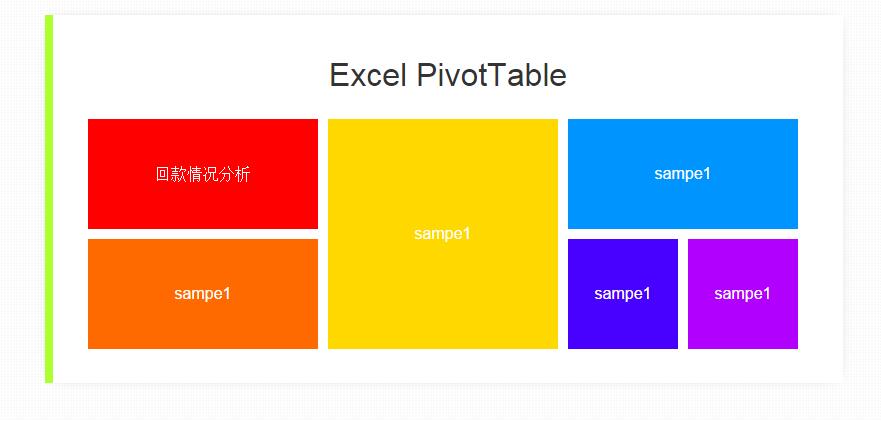
单击 [回款情况分析],稍等片刻,会打开Excel,并自动生成透视表,如下图所示:

C# 如何在Excel 动态生成PivotTable的更多相关文章
- Excel动态生成JSON
在最近的一个项目中,有大量的数据源来至Excel,转成JSON供前台使用.Excel数据是人工录入的,难免会有错误,所以中间会有逻辑检查.在C#中读取Excel的方式有很多,网上一搜一大堆,这里我也贴 ...
- 分享我基于NPOI+ExcelReport实现的导入与导出EXCEL类库:ExcelUtility (续3篇-导出时动态生成多Sheet EXCEL)
ExcelUtility 类库经过我(梦在旅途)近期不断的优化与新增功能,现已基本趋向稳定,功能上也基本可以满足绝大部份的EXCEL导出需求,该类库已在我们公司大型ERP系统全面使用,效果不错,今天应 ...
- java动态生成带下拉框的Excel导入模板
在实际开发中,由于业务需要,常常需要进行Excel导入导出操作.以前做一些简单的导入时,先准备一个模板,再进行导入,单有十几. 二十几个导入模板时,往往要做十几.二十几个模板.而且,当在模板中需要有下 ...
- 使用C#动态生成Word文档/Excel文档的程序测试通过后,部署到IIS服务器上,不能正常使用的问题解决方案
使用C#动态生成Word文档/Excel文档的程序功能调试.测试通过后,部署到服务器上,不能正常使用的问题解决方案: 原因: 可能asp.net程序或iis访问excel组件时权限不够(Ps:Syst ...
- ExtJS4 动态生成grid出口excel(纯粹的接待)
搜索相当长的时间,寻找一些样本,因为我刚开始学习的原因,大多数人不知道怎么用.. 他曾在源代码.搞到现在终于实现了主下载.. 表的采集格不重复下载一个小BUG,一个使用grid初始化发生的BUG 以下 ...
- java 如何在pdf中生成表格
1.目标 在pdf中生成一个可变表头的表格,并向其中填充数据.通过泛型动态的生成表头,通过反射动态获取实体类(我这里是User)的get方法动态获得数据,从而达到动态生成表格. 每天生成一个文件夹存储 ...
- Javascript动态生成的页面信息爬取和openpyxl包FAQ小记
最近,笔者在使用Requests模拟浏览器发送Post请求时,发现程序返回的html与浏览器F12观察到的略有不同,经过观察返回的response.text,cookies确认有效,因为我们可以看到返 ...
- EBS 多sheet页Excel动态报表开发过程
http://zhangzhongjie.iteye.com/blog/1779891 .前言本文讲述的多Sheet页EXCEL报表开发方式和开发HTML,PDF这类报表的方法大致是一致的,唯一不同的 ...
- C# 动态生成word文档 [C#学习笔记3]关于Main(string[ ] args)中args命令行参数 实现DataTables搜索框查询结果高亮显示 二维码神器QRCoder Asp.net MVC 中 CodeFirst 开发模式实例
C# 动态生成word文档 本文以一个简单的小例子,简述利用C#语言开发word表格相关的知识,仅供学习分享使用,如有不足之处,还请指正. 在工程中引用word的动态库 在项目中,点击项目名称右键-- ...
随机推荐
- 快速入门系列--深入理解C#
C#语言在近些年得到了长足的方法,代码风格越来越简洁美观,例如常用的泛型及其约束.可空类型.隐式类型.匿名类型和委托等,通过下面的表格可以对这部分相对简单的特性的使用有一个初步的了解. 特性 示例 泛 ...
- Oracle Dataguard之Real-Time Apply
Oracle Dataguard一共支持三种模式:最大可用模式(Maximum Availability),最大性能模式(Maximum Performance),最大保护模式(Maximum Pro ...
- Hard Drive Inspector Pro 4.26.208(硬盘检测工具)简体中文特别版
Hard Drive Inspector监视硬盘错误并且接收警报,检查变化并实施诊断.例如:驱动器旋转时间增加以及数次重试才能运转驱动器通常意味着发动机和/或者轴存在可以导致数据丢失的错误.HardD ...
- JavaScript面向对象程序设计:数组
或许你会奇怪,面向对象的程序设计为什么从数组开始讲起?这是因为……其间的种种关系吧……嘿嘿,这里先卖个关子,先来看看我们熟悉的数组在JavaScript里面是什么样子的. 1. 创建数组 在J ...
- MySQL(Navicat)运行.sql文件时报错:[Err] 2006 - MySQL server has gone away 的解决方法
背景: 今天导入一个数据量很大的.sql文件时,报错: 原因: 可能是sql语句过长,超过mysql通信缓存区最大长度. 解决:1. 编辑 MySQL 安装目录下的 my.ini,在最后添加以下内容: ...
- git入门到熟练使用
最近以为接触ios开发,所以对git也产生了一点兴趣.所以在网上搜索资料开始学习,但大部分都是没用的copy的文章,有一个还不错的,推荐给大家 http://www.liaoxuefeng.com/w ...
- Chrome开发者工具详解(2)-Network面板
Chrome开发者工具详解(2)-Network面板 注: 这一篇主要讲解面板Network,参考了Google的相关文档,主要用于公司内部技术分享. Chrome开发者工具面板 面板上包含了Elem ...
- 组件Newtonsoft.Json实现object2json转换
很多情况下,我们需要把数据类型做一些转换,供其它外部的子系统调用. 最为典型的是生成json格式供javascript作调用. 现成的组件Newtonsoft.Json可以实现object2json之 ...
- WPF 将DLL嵌入EXE文件(安装包)
网上很多例子,各种套路,就是没有测试过. WPF 将DLL嵌入EXE文件的套路是这样的 1.将要引用的dll源文件添加到wpf 项目中,dll 的属性->生成操作为[嵌入的资源]. 2.监听 ...
- MySQL的Incorrect string value错误
用以下SQL语句向表2中插入数据: insert into 表2 select * from 表1 结果出现Incorrect string value错误: 打开表2一看,里面全是问号: 后来才发现 ...