
006_Salesforce Sharing 使用说明
Salesforce Sharing 使用说明
背景说明:Salesforce共享实施记录和其它数据时,需要员工之间共享或多个用户在一个组织间的共享。然而,共享这些数据是有风险的,尤其是当它涉及到敏感数据的共享。因此,对于Admin来讲是很有必要,去监测创建共享规则和共享人员对数据的操作,以确保数据的安全性。
共享分为两种方式:Manual Sharing、Automatic Sharing
Manual Sharing:Account Team也属于Manual Sharing 范畴。
l 这种手动共享的共享过程发生在一个完整的和不受限制的访问记录的用户。
- 数据Owner
- Owner 以上的Role 级别User
- 被授权”Full Access” 的User
- Administrator
l 只是这对于当前的Record,sharing规则设定好之后才有效
下图是account manual sharing 的操作步骤及说明:
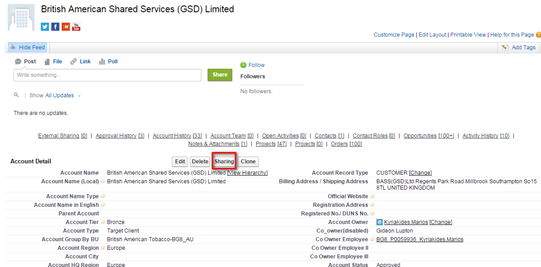
- Click Sharing
- Click Add.
- From the Search drop-down list, select the type of group, user, role, or territory to add.
Depending on the data in your organization, your options can include:
|
Type |
Description |
|
Public Groups |
All public groups defined by your administrator. |
|
Users |
All users in your organization. Does not include portal users. |
|
Roles |
All roles defined for your organization. This includes all of the users in each role. |
|
Roles and Subordinates |
All of the users in the role plus all of the users in roles below that role in the hierarchy. Only available when no portals are enabled for your organization. |
这个时候页面效果是这样的
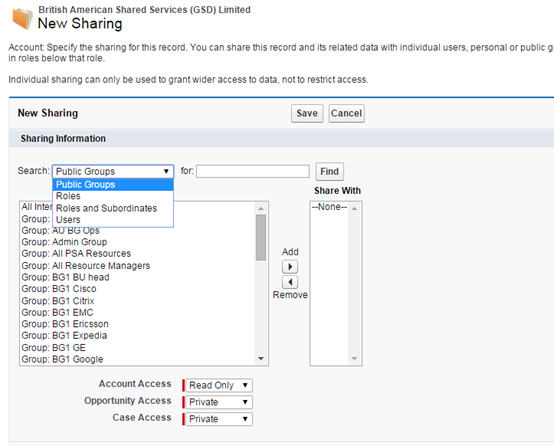
4. 可以通过Add和Remove来决定你的Share With 人员
5. 当你共享数据给其他user的时候,你可以按照实际情况来分配他们的访问权限,
|
AccessLevel |
Description |
|
Read/Write |
User can view and edit the record, and add associated records, notes, and attachments to it. |
|
Read Only |
User can view the record, and add associated records to it. They cannot edit the record or add notes or attachments. |
|
Private |
User cannot access the record in any way. |
6. Save
Automatic Sharing :
l 不同于manual sharing 对于单独一条Record 进行操作,而Automatic sharing 是对于多个Records进行操作的
l 当设置好规则后,凡是满足设定条件的,不管是历史数据还是新建数据都会执行。
l 限制:共享规则可以根据记录所有者或其他标准,包括记录类型和特定的字段值。您可以定义多达300账户共享规则,包括50 criteria-based共享规则。
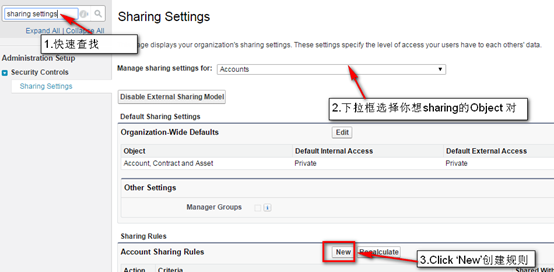
下图是Account automatic sharing 的操作步骤及说明:
- From Setup, enter Sharing Settings in the Quick Find box, then select Sharing Settings.
- Select Manage sharing settings for :Account
- In the Account Sharing Rules related list, click New.(这三个步骤参照下图)
- Enter the Label Name and Rule Name. 名字保持一致就行
- Enter the Description.
- Select a rule type.
- Based on record owner—基于Records owner来sharing,以下图为例,是将’ASEANRelease Group’中的所有user的Account Records 共享给了Group为 ’AU BG Ops’中的所有User。
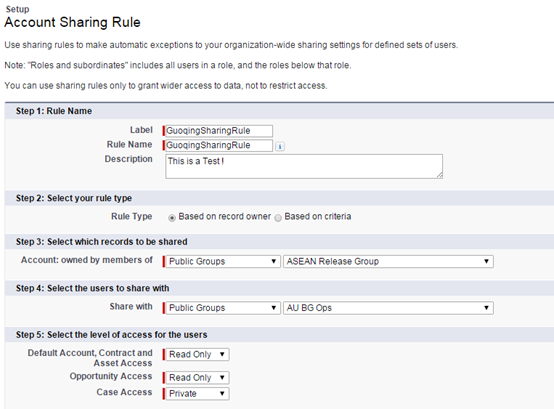
- Based on criteria—满足设定条件的数据都是sharing的Records,如下图,是将所有Account中Account city 是Taiwan的Records 共享给 Group ‘AU BG Ops’所有的User。
特别注意的是,这种share with 中是没有User的,如果你想单独设置一个规则给一个User的话,那么你就应该先创建一个Group,然后把这个User加进Group就可以。
- Select the access settings for the records associated with the shared accounts.
|
Access Setting |
Description |
|
Private (available for associated contacts, opportunities, and cases only) |
Users can’t view or update records, unless access is granted outside of this sharing rule. |
|
Read Only |
Users can view, but not update, records. |
|
Read/Write |
Users can view and update records. |
9.Save
Account Sharing功能,两个例子中都是以Account为例,同样适用于其他Object的,都是共通的。
值得注意的是,Admin应该小心给user真正想要的安全级别。
006_Salesforce Sharing 使用说明的更多相关文章
- 伪共享(false sharing),并发编程无声的性能杀手
在并发编程过程中,我们大部分的焦点都放在如何控制共享变量的访问控制上(代码层面),但是很少人会关注系统硬件及 JVM 底层相关的影响因素.前段时间学习了一个牛X的高性能异步处理框架 Disruptor ...
- Atitit.项目修改补丁打包工具 使用说明
Atitit.项目修改补丁打包工具 使用说明 1.1. 打包工具已经在群里面.打包工具.bat1 1.2. 使用方法:放在项目主目录下,执行即可1 1.3. 打包工具的原理以及要打包的项目列表1 1. ...
- awk使用说明
原文地址:http://www.cnblogs.com/verrion/p/awk_usage.html Awk使用说明 运维必须掌握的三剑客工具:grep(文件内容过滤器),sed(数据流处理器), ...
- Salesforce的sharing Rule 不支持Lookup型字段解决方案
Salesforce 中 sharing rule 并不支持Look up 字段 和 formula 字段.但在实际项目中,有时会需要在sharing rule中直接取Look up型字段的值,解决方 ...
- [Erlang 0127] Term sharing in Erlang/OTP 上篇
之前,在 [Erlang 0126] 我们读过的Erlang论文 提到过下面这篇论文: On Preserving Term Sharing in the Erlang Virtual Machine ...
- “我爱背单词”beta版发布与使用说明
我爱背单词BETA版本发布 第二轮迭代终于画上圆满句号,我们的“我爱背单词”beta版本已经发布. Beta版本说明 项目名称 我爱背单词 版本 Beta版 团队名称 北京航空航天大学计算机学院 拒 ...
- Oracle 中 union 和union all 的简单使用说明
1.刚刚工作不久,经常接触oracle,但是对oracle很多东西都不是很熟.今天我们来了解一下union和union all的简单使用说明.Union(union all): 指令的目的是将两个 S ...
- 跨域的另一种解决方案——CORS(Cross-Origin Resource Sharing)跨域资源共享
在我们日常的项目开发时使用AJAX,传统的Ajax请求只能获取在同一个域名下面的资源,但是HTML5打破了这个限制,允许Ajax发起跨域的请求.浏览器是可以发起跨域请求的,比如你可以外链一个外域的图片 ...
- Map工具系列-02-数据迁移工具使用说明
所有cs端工具集成了一个工具面板 -打开(IE) Map工具系列-01-Map代码生成工具说明 Map工具系列-02-数据迁移工具使用说明 Map工具系列-03-代码生成BySQl工具使用说明 Map ...
随机推荐
- LoadRunner使用技巧-IP欺骗的使用
设置IP欺骗的原因 1.当某个IP的访问过于频繁,或者访问量过大是,服务器会拒绝访问请求,这时候通过IP欺骗可以增加访问频率和访问量,以达到压力测试的效果. 2.某些服务器配置了负载均 ...
- Thinking in Java——笔记(13)
Strings Immutable Strings Objects of the String class are immutable. Every method in the class that ...
- eclipse如何配置tomcat运行web项目时省略项目名称
三个关键点,如图所示
- [bzoj1087][scoi2005]互不侵犯king
题目大意 在N×N的棋盘里面放K个国王,使他们互不攻击,共有多少种摆放方案.国王能攻击到它上下左右,以及左上 左下右上右下八个方向上附近的各一个格子,共8个格子. 思路 首先,搜索可以放弃,因为这是一 ...
- Flink - InstanceManager
InstanceManager用于管理JobManager申请到的taskManager和slots资源 /** * Simple manager that keeps track of which ...
- Enable Cross-Origin Requests in Asp.Net WebApi 2[Reprint]
Browser security prevents a web page from making AJAX requests to another domain. This restriction i ...
- css 居中问题
水平居中有text-align:center 和 margin:0 auto,前者是针对父元素进行设置而后者则是对子元素.margin:0 auto; 这里实现的前提是子元素没有float 浮动起来, ...
- 设置默认访问项目的客户端的浏览器版本(IE版本)
在项目开发部署中,发现浏览器不兼容现象,在不处理兼容性情况下让用户更好体验(IE浏览器) 我们来设置客户端默认访问项目的浏览器版本 如下所示的是不同IE版本下的效果截图比较: IE5.IE6下: IE ...
- 转:MVC 数据验证
一.基础特性 一.Required 必填选项,当提交的表单缺少该值就引发验证错误. 二.StringLength 指定允许的长度 指定最大长度: [StringLength()] //最大长度不超过2 ...
- LintCode Longest Common Subsequence
原题链接在这里:http://www.lintcode.com/en/problem/longest-common-subsequence/ 题目: Given two strings, find t ...