
Mysql 练习题一
库操作:
1. 创建 数据库
create database db1;
2. 使用数据库
use db1
3. 查看表
show tables;
4. 删除
drop database db1
表操作:
创建一个表
create  TABLE t1(

name VARCHAR() not null ,

age int NULL,

salary DOUBLE(,)

);
删除表
drop table t1
查询:
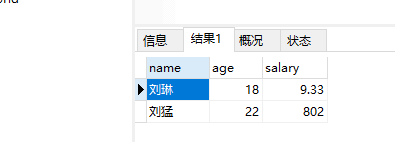
SELECT * from t1
复制表
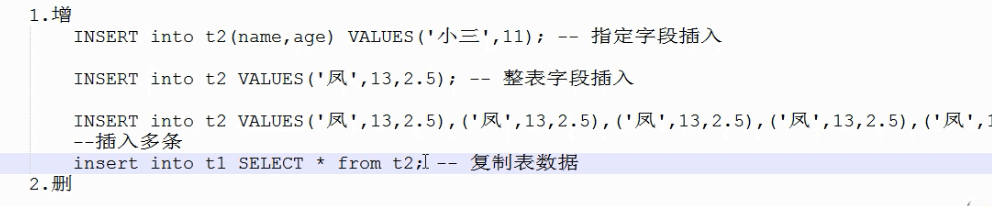
create table t2 select * from t1; # 复制表结构和数据,
create table t3 like t1; #复制表结构
插入数据:
insert into t2(name,age) VALUES("li", 19);
修改表字段:
update t2 set name ="小风" where name ="li"
删除操作:
delete from t2 where age =18
查询部门id为空的数据
SELECT * from person where dept_id IS NULL;
and 语法
SELECT * from person where salary >4000 and age<=30;
区间查询.
select * from person where salary between 5000 and 10000
集合查询
-- select * from person where age =20 or age =23 or age =40
select * from where not age in(23,20);
模糊查询
select * from person where name LIKE "%月"
select * from person where name LIKE "%月%" --包含的意思
select * from person where name LIKE "_l__" #_为占位符
排序:
select * from person ORDER BY salary desc
select * from person ORDER BY salary desc,age DESC
select * from person ORDER BY CONVERT(name USING gbk) #对中文进行排序.
聚合函数:
-- select MAX(salary) from person
--
-- select MIN(salary) from person
-- --
-- SELECT AVG(salary) FROM person
--
-- SELECT SUM(salary) from person
--
SELECT count(*) from person

分组:
SELECT count(id) ,avg(salary)from person group by dept_id having avg(salary)>= 5000;

正则匹配
SELECT * from person where name REGEXP "^a"
SELECT * from person where name REGEXP "[a,e,n]"
sql语句的执行顺序

多表查询
select * from person,dept where person.dept_id =dept.did
SELECT * from person LEFT JOIN dept on person.dept_id =dept.did; #以左表作为基准,
1.创建留言数据库: liuyandb;
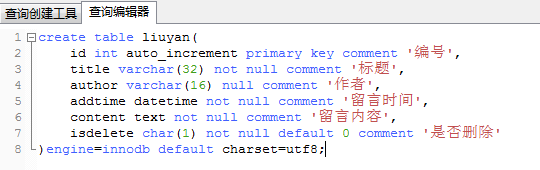
create table liuyan(

    id int auto_increment primary key comment '编号',

    title varchar(32) not null comment '标题',

    author varchar(16) null comment '作者',

    addtime datetime not null comment '留言时间',

    content text not null comment '留言内容',

    isdelete char(1) not null default 0 comment '是否删除'

)engine=innodb default charset=utf8;
2.在liuyandb数据库中创建留言表liuyan,结构如下:
|
表名 |
liuyan |
留言信息表 |
|||
|
序号 |
字段名称 |
字段说明 |
类型 |
属性 |
备注 |
|
1 |
id |
编号 |
int |
非空 |
主键,自增1 |
|
2 |
title |
标题 |
varchar(32) |
非空 |
|
|
3 |
author |
作者 |
varchar(16) |
可以空 |
|
|
4 |
addtime |
留言时间 |
datetime |
非空 |
|
|
5 |
content |
留言内容 |
text |
非空 |
|
|
6 |
isdelete |
是否删除 |
char(1) |
非空 |
默认值 0 |
3.在留言表最后添加一列状态(status char(1) 默认值为0)
alter table liuyan add status char(1) default 0 ;

4.修改留言表author的默认值为’youku’,设为非空
alter table liuyan modify author VARCHAR(16) not null default 'youkong'
5.删除liuyan表中的isdelete字段
alter table liuyan drop isdelete
6.为留言表添加>5条测试数据 (例如:
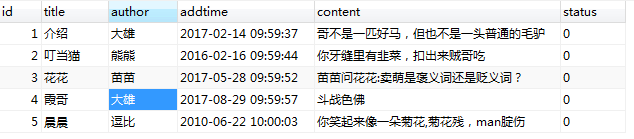
insert into liuyan values

(null,'介绍','大雄','2017-02-14 09:59:37','哥不是一匹好马,但也不是一头普通的毛驴',null),

(null,'叮当猫','熊熊','2016-02-16 09:59:44','你牙缝里有韭菜,扣出来贼哥吃',null),

(null,'花花','苗苗','2017-05-28 09:59:52','苗苗问花花:卖萌是褒义词还是贬义词?',null),

(null,'霞哥','大雄','2017-08-29 09:59:57','斗战色佛',null),

(null,'晨晨','逗比','2010-06-22 10:00:03','你笑起来像一朵菊花,菊花残,man腚伤',null);
7. 要求将id值大于3的信息中author 字段值改为admin
update liuyan set author ='admin' where id >3
8. 删除id号为4的数据。
delete from liuyan where id =4
附加题:
- 为留言表添加>10条测试数据,要求分三个作者添加数据
- 查询某一个作者的留言信息。
select id,title,author,addtime,content,status from liuyan where author ='xxxx';
- 查询所有数据,按时间降序排序。
select * from liuyan order by addtime DESC
- 获取id在2到6之间的留言信息,并按时间降序排序
select * from liuyan where id BETWEEN 2 and 6 ORDER BY addtime desc
y
- 统计每个作者留了多少条留言,并对数量按从小到大排序。
select author,count(id) as'留言条数' from liuyan group by author order by count(id) desc
将id为8、9的两条数据的作者改为’doudou’.
update liuyan set author ='doudou' where id in (,);
- 取出最新的三条留言。
select * from (select id,title,author,addtime,content,status from liuyan ORDER BY addtime desc) haha LIMIT 3
- 查询留言者中包含”a”字母的留言信息,并按留言时间从小到大排序
select * from liuyan where author like '%a%' order by addtime asc
- 删除”作者”重复的数据,并保留id最大的一个作者
delete from liuyan where author in(

    select author from (select author from liuyan group by author having count()>) a

)

and id not in(

    select id from (select max(id) id from liuyan group by author having count()>) b

)
Mysql 练习题一的更多相关文章
- MySQL练习题
MySQL练习题 一.表关系 请创建如下表,并创建相关约束 二.操作表 1.自行创建测试数据 2.查询“生物”课程比“物理”课程成绩高的所有学生的学号: 3.查询平均成绩大于60分的同学的学号和平均成 ...
- MySQL练习题参考答案
MySQL练习题参考答案 2.查询“生物”课程比“物理”课程成绩高的所有学生的学号: 思路: 获取所有有生物课程的人(学号,成绩) - 临时表 获取所有有物理课程的人(学号,成绩) - 临时表 根据[ ...
- s15day12作业:MySQL练习题参考答案
MySQL练习题参考答案 导出现有数据库数据: mysqldump -u用户名 -p密码 数据库名称 >导出文件路径 # 结构+数据 mysqldump -u用户名 -p ...
- Python/ MySQL练习题(一)
Python/ MySQL练习题(一) 查询“生物”课程比“物理”课程成绩高的所有学生的学号 SELECT * FROM ( SELECT * FROM course LEFT JOIN score ...
- python/MySQL练习题(二)
python/MySQL练习题(二) 查询各科成绩前三名的记录:(不考虑成绩并列情况) select score.sid,score.course_id,score.num,T.first_num,T ...
- python 全栈开发,Day65(MySQL练习题,参考答案)
一.MySQL练习题 一.表关系 请创建如下表,并创建相关约束 二.操作表 1.自行创建测试数据 2.查询“生物”课程比“物理”课程成绩高的所有学生的学号.ps:针对的是自己的生物成绩比物理成绩高,再 ...
- mysql 练习题答案
一 题目 1.查询所有的课程的名称以及对应的任课老师姓名 2.查询学生表中男女生各有多少人 3.查询物理成绩等于100的学生的姓名 4.查询平均成绩大于八十分的同学的姓名和平均成绩 5.查询所有学生的 ...
- mysql练习题练习
1.数据库是按照原文制作的,表格结构一样具体存储的数据有些差异 原文地址:MySQL练习题 原答案地址:MySQL练习题参考答案 2.查询“生物”课程比“物理”课程成绩高的所有学生的学号: selec ...
- MySQL练习题及答案(复习)
新建一个叫做 review 的数据库,将测试数据脚本导进去.(可以使用Navicat查询功能) /* Navicat MySQL Data Transfer Source Server : DB So ...
- mysql练习题-查询同时参加计算机和英语考试的学生的信息-遁地龙卷风
(-1)写在前面 文章参考http://blog.sina.com.cn/willcaty. 针对其中的一道练习题想出两种其他的答案,希望网友给出更多回答. (0) 基础数据 student表 +-- ...
随机推荐
- Java中spring读取配置文件的几种方法
Spring读取配置XML文件分三步: 一.新建一个Java Bean: package springdemo; public class HelloBean { private String hel ...
- OpenSSL基础知识
1.openssl里的fips是什么意思? openssl-fips是符合FIPS标准的Openssl. 联邦信息处理标准(Federal Information Processing Standar ...
- 11月11日光棍节考试总结hhh
好吧,第一题字符串裸栈就能A 第二题字典序没调完,先写的第一题和第三题暴力,第二题读题感觉自己不会写,其实也能写出来,浪费了好多时间 第三题DP大概是写的暴力,原本可以搞到20分,要交的时候发现自己少 ...
- toArray()
- mysq 日期l查询
pym=mysql(host = '#', port = 3306, user = '#',passworld='#',database='#') #根据起始和结束时间 charge_sql = 'S ...
- 小程序getUserInfo授权升级更新登录优化
小程序基础库2.0.7更新小程序组件 <button> 新增 open-type 属性有效值 openSetting,所以说,再也不能愉快的直接调用getUserInfo了.但是不想用官方 ...
- python之数据类型1
什么是数据类型及数据类型分类 python中的数据类型 python使用对象模型来存储数据,每一个数据类型都有一个内置的类,每新建一个数据,实际就是在初始化生成一个对象,即所有数据都是对 ...
- 全球晶圆代工厂哪家强?2016年Top30名单
1.台积电(TSMC) 总部:台湾 简介:世界上最大的独立半导体晶圆代工企业,与联华电子并称“晶圆双雄”. 主要客户:苹果,高通,联发科,华为海思 官网:http://www.tsmc.com/ 2. ...
- 8.7 使用索引-notes
七 正确使用索引 一 索引未命中 并不是说我们创建了索引就一定会加快查询速度,若想利用索引达到预想的提高查询速度的效果,我们在添加索引时,必须遵循以下问题 1 范围问题,或者说条件不明确,条件中出现这 ...
- 如何在MAC下安装Myeclipse2015真的很虐心!!!!!!!!!!
最近笔者换了一个新的笔记本,mac pro 因为同学说大公司的web开发都是写在Linux操作系统下的,所以我决定搞一个,但是装软件就是很困难啊!找了大量资料发现都不全,最后,终于搞好了,分享给同样虐 ...