
使用cJSON库解析JSON
cJSON库的下载
cJSON是一个基于C的JSON解析库,这个库非常简单,只有cJSON.c和cJSON.h两个文件,支持JSON的解析和封装,需要调用时,只需要#include "cJSON.h"就可以使用了,
库源码下载地址:cJSON download
JSON官方网站:json
只包含键值对的JSON字符串解析
JSON字符串:
{

	"name": "Andy",      //键值对1

	"age": 20              //键值对2

}

这个JSON对象只有两个键值对,键name对应字符串Andy,键age对应数字20。
void Parse_Str1(void)

{

    char str1[] = "{\"name\":\"Andy\",\"age\":20}";

    cJSON *str1_json, *str1_name, *str1_age;

    printf("str1:%s\n\n",str1);

    str1_json = cJSON_Parse(str1);   //创建JSON解析对象,返回JSON格式是否正确

    if (!str1_json)

    {

        printf("JSON格式错误:%s\n\n", cJSON_GetErrorPtr()); //输出json格式错误信息

    }

    else

    {

        printf("JSON格式正确:\n%s\n\n",cJSON_Print(str1_json) );

        str1_name = cJSON_GetObjectItem(str1_json, "name"); //获取name键对应的值的信息

        if (str1_name->type == cJSON_String)

        {

            printf("姓名:%s\r\n", str1_name->valuestring);

        }

        str1_age = cJSON_GetObjectItem(str1_json, "age");   //获取age键对应的值的信息

        if(str1_age->type==cJSON_Number)

        {

            printf("年龄:%d\r\n", str1_age->valueint);

        }

        cJSON_Delete(str1_json);//释放内存

    }

}
运行结果:

包含数组的JSON字符串解析
JSON字符串:
{

	"location": [{

			"name": "Faye",

			"address": "北京"

		},

		{

			"name": "Andy",

			"address": "香港"

		}

	],

	"time": "2018-11-17"

}

解析函数:
void Parse_Str2(void)

{

    char str2[] = "{\"location\":[{\"name\":\"Faye\",\"address\":\"北京\"},{\"name\":\"Andy\",\"address\":\"香港\"}],\"time\":\"2018-11-17\"}";

    cJSON *root = 0;

    cJSON *loc_json = 0;

    cJSON *name1_json,*name2_json;

    char *time_str, *str_tmp;

    root = cJSON_Parse(str2);

    if(!root)

        printf("str2 JSON格式错误:%s \r\n", cJSON_GetErrorPtr());

    else

    {

        printf("str2 JSON格式正确:\n%s\n",cJSON_Print(root));

        time_str = cJSON_GetObjectItem(root,"time")->valuestring;//time键值对

        printf("time:%s\n", time_str);

        loc_json = cJSON_GetObjectItem(root,"location");

        if(loc_json)

        {

            name1_json = cJSON_GetArrayItem(loc_json,0);        //数组第0个元素

            str_tmp = cJSON_GetObjectItem(name1_json, "name")->valuestring;//name键对应的值

            printf("name1 is : %s \r\n", str_tmp);

            str_tmp = cJSON_GetObjectItem(name1_json, "address")->valuestring;//addr1键对应的值

            printf("addr1 is : %s \r\n", str_tmp);

            name2_json = cJSON_GetArrayItem(loc_json,1);       //数组第1个元素

            str_tmp = cJSON_GetObjectItem(name2_json, "name")->valuestring;

            printf("name2 is : %s \r\n", str_tmp);

            str_tmp = cJSON_GetObjectItem(name2_json, "address")->valuestring;

            printf("addr2 is : %s \r\n", str_tmp);

        }

    }

    cJSON_Delete(loc_json);

}
运行结果:

北京时间JSON数据解析
api地址:
http://api.k780.com:88/?app=life.time&appkey=10003&sign=b59bc3ef6191eb9f747dd4e83c99f2a4&format=json
JSON字符串:
{

	"success": "1",

	"result": {

		"timestamp": "1543922613",

		"datetime_1": "2018-12-04 19:23:33",

		"datetime_2": "2018年12月04日 19时23分33秒",

		"week_1": "2",

		"week_2": "星期二",

		"week_3": "周二",

		"week_4": "Tuesday"

	}

}
解析函数:
void Parse_BJ_Time(void)

{

    char bj_time_str[] = "{\"success\":\"1\",\"result\":{\"timestamp\":\"1542456793\",\"datetime_1\":\"2018-11-17 20:13:13\",\"datetime_2\":\"2018年11月17日 20时13分13秒\",\"week_1\":\"6\",\"week_2\":\"星期六\",\"week_3\":\"周六\",\"week_4\":\"Saturday\"}}";

    cJSON *root;

    cJSON *result_json;

    char *datetime, *week;

    root = cJSON_Parse(bj_time_str);

    if(root)

    {

        printf("json格式正确:\n%s\n\n", cJSON_Print(root));

        result_json =  cJSON_GetObjectItem(root, "result");  //获取result键对应的值

        if(result_json)

        {

            datetime = cJSON_GetObjectItem(result_json, "datetime_2")->valuestring;

            printf("北京时间: %s \r\n", datetime);

            week = cJSON_GetObjectItem(result_json, "week_2")->valuestring;

            printf("星期: %s \r\n", week);

        }

    }

    cJSON_Delete(root);

    cJSON_Delete(result_json);

}
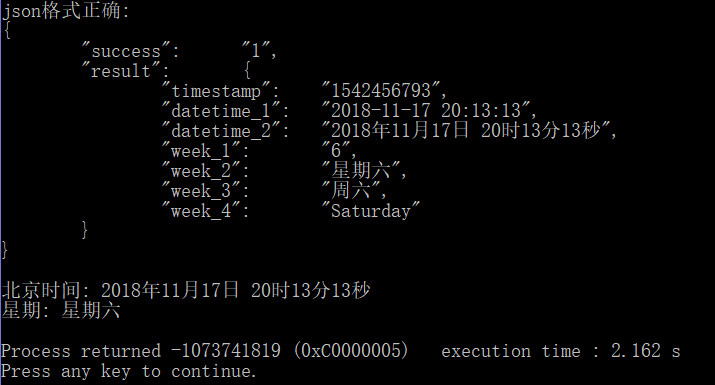
运行结果:
心知天气JSON数据解析
JSON字符串:
{

	"results": [{

		"location": {

			"id": "WS10730EM8EV",

			"name": "深圳",

			"country": "CN",

			"path": "深圳,深圳,广东,中国",

			"timezone": "Asia/Shanghai",

			"timezone_offset": "+08:00"

		},

		"daily": [{

			"date": "2018-11-18",

			"text_day": "多云",

			"code_day": "4",

			"text_night": "多云",

			"code_night": "4",

			"high": "26",

			"low": "20",

			"precip": "",

			"wind_direction": "无持续风向",

			"wind_direction_degree": "",

			"wind_speed": "10",

			"wind_scale": "2"

		}, {

			"date": "2018-11-19",

			"text_day": "小雨",

			"code_day": "13",

			"text_night": "小雨",

			"code_night": "13",

			"high": "25",

			"low": "20",

			"precip": "",

			"wind_direction": "无持续风向",

			"wind_direction_degree": "",

			"wind_speed": "10",

			"wind_scale": "2"

		}, {

			"date": "2018-11-20",

			"text_day": "小雨",

			"code_day": "13",

			"text_night": "小雨",

			"code_night": "13",

			"high": "25",

			"low": "21",

			"precip": "",

			"wind_direction": "无持续风向",

			"wind_direction_degree": "",

			"wind_speed": "10",

			"wind_scale": "2"

		}],

		"last_update": "2018-11-18T11:00:00+08:00"

	}]

}
解析函数:
void parse_seniverse_weather(void)

{

    char weather_str[] =

        "{\"results\":[{\"location\":{\"id\":\"WS10730EM8EV\",\"name\":\"深圳\",\"country\":\"CN\",\"path\":\"深圳,深圳,广东,中国\",\"timezone\":\"Asia/Shanghai\",\"timezone_offset\":\"+08:00\"},\"daily\":[{\"date\":\"2018-11-18\",\"text_day\":\"多云\",\"code_day\":\"4\",\"text_night\":\"多云\",\"code_night\":\"4\",\"high\":\"26\",\"low\":\"20\",\"precip\":\"\",\"wind_direction\":\"无持续风向\",\"wind_direction_degree\":\"\",\"wind_speed\":\"10\",\"wind_scale\":\"2\"},{\"date\":\"2018-11-19\",\"text_day\":\"小雨\",\"code_day\":\"13\",\"text_night\":\"小雨\",\"code_night\":\"13\",\"high\":\"25\",\"low\":\"20\",\"precip\":\"\",\"wind_direction\":\"无持续风向\",\"wind_direction_degree\":\"\",\"wind_speed\":\"10\",\"wind_scale\":\"2\"},{\"date\":\"2018-11-20\",\"text_day\":\"小雨\",\"code_day\":\"13\",\"text_night\":\"小雨\",\"code_night\":\"13\",\"high\":\"25\",\"low\":\"21\",\"precip\":\"\",\"wind_direction\":\"无持续风向\",\"wind_direction_degree\":\"\",\"wind_speed\":\"10\",\"wind_scale\":\"2\"}],\"last_update\":\"2018-11-18T11:00:00+08:00\"}]}";

    cJSON *root;

    cJSON *results;

    cJSON *last_update;

    cJSON *loc_json, *daily_json;

    cJSON *forecast_json;

    char *loc_tmp, *weather_tmp, *update_tmp;

    int i = 0;

    root = cJSON_Parse((const char*)weather_str);

    if(root)

    {

//        printf("JSON格式正确:\n%s\n\n",cJSON_Print(root));    //输出json字符串

        results = cJSON_GetObjectItem(root, "results");

        results = cJSON_GetArrayItem(results,0);

        if(results)

        {

            loc_json = cJSON_GetObjectItem(results, "location");   //得到location键对应的值,是一个对象

            loc_tmp = cJSON_GetObjectItem(loc_json, "id") -> valuestring;

            printf("城市ID:%s\n",loc_tmp);

            loc_tmp = cJSON_GetObjectItem(loc_json, "name") -> valuestring;

            printf("城市名称:%s\n",loc_tmp);

            loc_tmp = cJSON_GetObjectItem(loc_json, "timezone") -> valuestring;

            printf("城市时区:%s\n\n",loc_tmp);

            daily_json = cJSON_GetObjectItem(results, "daily");

            if(daily_json)

            {

                for(i = 0; i < 3; i++)

                {

                    forecast_json = cJSON_GetArrayItem(daily_json, i);

                    weather_tmp = cJSON_GetObjectItem(forecast_json, "date") -> valuestring;

                    printf("日期:%s\r\n", weather_tmp);

                    weather_tmp = cJSON_GetObjectItem(forecast_json, "code_day") -> valuestring;

                    printf("白天天气代码:%s\r\n", weather_tmp);

                    weather_tmp = cJSON_GetObjectItem(forecast_json, "code_night") -> valuestring;

                    printf("晚上天气代码:%s\r\n", weather_tmp);

                    weather_tmp = cJSON_GetObjectItem(forecast_json, "high") -> valuestring;

                    printf("最高温度:%s\r\n", weather_tmp);

                    weather_tmp = cJSON_GetObjectItem(forecast_json, "low") -> valuestring;

                    printf("最低温度:%s\r\n", weather_tmp);

                    weather_tmp = cJSON_GetObjectItem(forecast_json, "wind_direction_degree") -> valuestring;

                    printf("风向角度:%s\r\n", weather_tmp);

                    weather_tmp = cJSON_GetObjectItem(forecast_json, "wind_scale") -> valuestring;

                    printf("风力:%s\r\n\n", weather_tmp);

                }

            }

            else

                printf("daily json格式错误\r\n");

            last_update = cJSON_GetObjectItem(results, "last_update");

            update_tmp = last_update->valuestring;

            if(last_update)

            {

                printf("更新时间:%s\r\n", update_tmp);

            }

        }

        else

        {

            printf("results格式错误:%s\r\n", cJSON_GetErrorPtr());

        }

    }

    else

    {

        printf("JSON格式错误\r\n");

    }

    cJSON_Delete(root);

    cJSON_Delete(results);

}
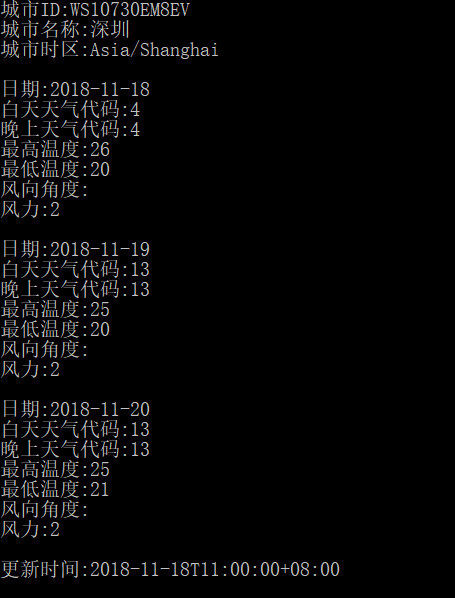
运行结果:
和风天气数据解析
JSON字符串:
{

	"HeWeather6": [{

		"basic": {

			"cid": "CN101010700",

			"location": "昌平",

			"parent_city": "北京",

			"admin_area": "北京",

			"cnty": "中国",

			"lat": "40.21808624",

			"lon": "116.23590851",

			"tz": "+8.00"

		},

		"update": {

			"loc": "2018-11-21 21:45",

			"utc": "2018-11-21 13:45"

		},

		"status": "ok",

		"daily_forecast": [{

			"cond_code_d": "100",

			"cond_code_n": "100",

			"cond_txt_d": "晴",

			"cond_txt_n": "晴",

			"date": "2018-11-21",

			"hum": "21",

			"mr": "16:02",

			"ms": "04:27",

			"pcpn": "0.0",

			"pop": "0",

			"pres": "1030",

			"sr": "07:08",

			"ss": "16:53",

			"tmp_max": "9",

			"tmp_min": "-3",

			"uv_index": "5",

			"vis": "10",

			"wind_deg": "323",

			"wind_dir": "西北风",

			"wind_sc": "1-2",

			"wind_spd": "4"

		}, {

			"cond_code_d": "100",

			"cond_code_n": "101",

			"cond_txt_d": "晴",

			"cond_txt_n": "多云",

			"date": "2018-11-22",

			"hum": "21",

			"mr": "16:36",

			"ms": "05:33",

			"pcpn": "0.0",

			"pop": "0",

			"pres": "1030",

			"sr": "07:09",

			"ss": "16:52",

			"tmp_max": "8",

			"tmp_min": "-4",

			"uv_index": "3",

			"vis": "20",

			"wind_deg": "35",

			"wind_dir": "东北风",

			"wind_sc": "1-2",

			"wind_spd": "5"

		}, {

			"cond_code_d": "101",

			"cond_code_n": "100",

			"cond_txt_d": "多云",

			"cond_txt_n": "晴",

			"date": "2018-11-23",

			"hum": "23",

			"mr": "17:15",

			"ms": "06:41",

			"pcpn": "0.0",

			"pop": "16",

			"pres": "1024",

			"sr": "07:10",

			"ss": "16:52",

			"tmp_max": "7",

			"tmp_min": "-2",

			"uv_index": "2",

			"vis": "20",

			"wind_deg": "305",

			"wind_dir": "西北风",

			"wind_sc": "1-2",

			"wind_spd": "3"

		}]

	}]

}
解析函数:
//解析和风天气,格式和心知天气非常像

void parse_heweather(void)

{

    char heweather_str[] = "{\"HeWeather6\":[{\"basic\":{\"cid\":\"CN101010700\",\"location\":\"昌平\",\"parent_city\":\"北京\",\"admin_area\":\"北京\",\"cnty\":\"中国\",\"lat\":\"40.21808624\",\"lon\":\"116.23590851\",\"tz\":\"+8.00\"},\"update\":{\"loc\":\"2018-11-21 21:45\",\"utc\":\"2018-11-21 13:45\"},\"status\":\"ok\",\"daily_forecast\":[{\"cond_code_d\":\"100\",\"cond_code_n\":\"100\",\"cond_txt_d\":\"晴\",\"cond_txt_n\":\"晴\",\"date\":\"2018-11-21\",\"hum\":\"21\",\"mr\":\"16:02\",\"ms\":\"04:27\",\"pcpn\":\"0.0\",\"pop\":\"0\",\"pres\":\"1030\",\"sr\":\"07:08\",\"ss\":\"16:53\",\"tmp_max\":\"9\",\"tmp_min\":\"-3\",\"uv_index\":\"5\",\"vis\":\"10\",\"wind_deg\":\"323\",\"wind_dir\":\"西北风\",\"wind_sc\":\"1-2\",\"wind_spd\":\"4\"},{\"cond_code_d\":\"100\",\"cond_code_n\":\"101\",\"cond_txt_d\":\"晴\",\"cond_txt_n\":\"多云\",\"date\":\"2018-11-22\",\"hum\":\"21\",\"mr\":\"16:36\",\"ms\":\"05:33\",\"pcpn\":\"0.0\",\"pop\":\"0\",\"pres\":\"1030\",\"sr\":\"07:09\",\"ss\":\"16:52\",\"tmp_max\":\"8\",\"tmp_min\":\"-4\",\"uv_index\":\"3\",\"vis\":\"20\",\"wind_deg\":\"35\",\"wind_dir\":\"东北风\",\"wind_sc\":\"1-2\",\"wind_spd\":\"5\"},{\"cond_code_d\":\"101\",\"cond_code_n\":\"100\",\"cond_txt_d\":\"多云\",\"cond_txt_n\":\"晴\",\"date\":\"2018-11-23\",\"hum\":\"23\",\"mr\":\"17:15\",\"ms\":\"06:41\",\"pcpn\":\"0.0\",\"pop\":\"16\",\"pres\":\"1024\",\"sr\":\"07:10\",\"ss\":\"16:52\",\"tmp_max\":\"7\",\"tmp_min\":\"-2\",\"uv_index\":\"2\",\"vis\":\"20\",\"wind_deg\":\"305\",\"wind_dir\":\"西北风\",\"wind_sc\":\"1-2\",\"wind_spd\":\"3\"}]}]}";

    cJSON *root;

    cJSON *results;

    cJSON *basic_json, *update_json, *forecast_json;

    cJSON *daily_json;

    int i = 0;

    char *basic_tmp, *update_tmp, *status_tmp, *weather_tmp;

    root = cJSON_Parse(heweather_str);

    if(root)

    {

        results = cJSON_GetObjectItem(root, "HeWeather6");      //HeWeather键对应的值,是一个数组

        results = cJSON_GetArrayItem(results,0);

        if(results)

        {

            basic_json = cJSON_GetObjectItem(results, "basic");

            if(basic_json)

            {

                basic_tmp = cJSON_GetObjectItem(basic_json, "cid") -> valuestring;

                printf("城市ID:%s\n",basic_tmp);

                basic_tmp = cJSON_GetObjectItem(basic_json, "location") -> valuestring;

                printf("县级市:%s\n",basic_tmp);

                basic_tmp = cJSON_GetObjectItem(basic_json, "parent_city") -> valuestring;

                printf("地级市:%s\n",basic_tmp);

                basic_tmp = cJSON_GetObjectItem(basic_json, "admin_area") -> valuestring;

                printf("所属省:%s\n",basic_tmp);

                basic_tmp = cJSON_GetObjectItem(basic_json, "lat") -> valuestring;

                printf("纬度:%s\n",basic_tmp);

                basic_tmp = cJSON_GetObjectItem(basic_json, "lon") -> valuestring;

                printf("经度:%s\n\n",basic_tmp);

            }

            update_json = cJSON_GetObjectItem(results, "update");

            if(update_json)

            {

                update_tmp = cJSON_GetObjectItem(update_json, "loc") -> valuestring;

                printf("更新时间:%s(所在地时间)\n", update_tmp);

                update_tmp = cJSON_GetObjectItem(update_json, "utc") -> valuestring;

                printf("更新时间:%s(世界时间)\n\n", update_tmp);

            }

            status_tmp = cJSON_GetObjectItem(results, "status") -> valuestring;

            printf("解析状态:%s\n\n", status_tmp);

            daily_json = cJSON_GetObjectItem(results, "daily_forecast");

            if(daily_json)

            {

                for(i = 0; i < 3; i++)

                {

                    forecast_json = cJSON_GetArrayItem(daily_json, i);

                    weather_tmp = cJSON_GetObjectItem(forecast_json, "date") -> valuestring;

                    printf("日期:%s\r\n", weather_tmp);

                    weather_tmp = cJSON_GetObjectItem(forecast_json, "cond_txt_d") -> valuestring;

                    printf("白天天气:%s\r\n", weather_tmp);

                    weather_tmp = cJSON_GetObjectItem(forecast_json, "cond_txt_n") -> valuestring;

                    printf("晚上天气:%s\r\n", weather_tmp);

                    weather_tmp = cJSON_GetObjectItem(forecast_json, "tmp_max") -> valuestring;

                    printf("最高温度:%s\r\n", weather_tmp);

                    weather_tmp = cJSON_GetObjectItem(forecast_json, "tmp_min") -> valuestring;

                    printf("最低温度:%s\r\n", weather_tmp);

                    weather_tmp = cJSON_GetObjectItem(forecast_json, "wind_deg") -> valuestring;

                    printf("风向角度:%s\r\n", weather_tmp);

                    weather_tmp = cJSON_GetObjectItem(forecast_json, "wind_dir") -> valuestring;

                    printf("风向:%s\r\n", weather_tmp);

                    weather_tmp = cJSON_GetObjectItem(forecast_json, "wind_sc") -> valuestring;

                    printf("风力:%s\r\n\n", weather_tmp);

                }

            }

        }

    }

    cJSON_Delete(root);

    cJSON_Delete(results);

    cJSON_Delete(basic_json);

    cJSON_Delete(update_json);

    cJSON_Delete(forecast_json);

    cJSON_Delete(daily_json);

}
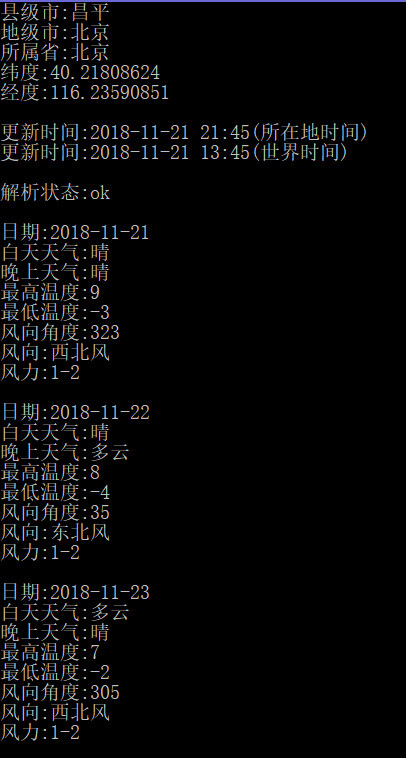
运行结果:
源码下载及实用的API地址:
历史精选文章:
- Jlink使用技巧之读取STM32内部的程序
- Jlink使用技巧之单独下载HEX文件到单片机
- Jlink使用技巧之J-Scope虚拟示波器功能
- 百度智能手环方案开源(含源码,原理图,APP,通信协议等)
- 如何在Keil-MDK开发环境生成Bin格式文件
- elf格式转换为hex格式文件的两种方法
- 两个HC-05蓝牙模块互相绑定构成无线串口模块
- STM32实战应用(一)——1602蓝牙时钟1液晶的显示测试
- 单片机之模块化编程
- 单片机课程设计——《基于AT89S52单片机和DS1302时钟芯片的电子时钟(可蓝牙校准)》
- 个人博客添加网易云音乐Flash插件
- 两行代码搞定博客访问量统计
欢迎大家关注我的个人博客
或微信扫码关注我的公众号

使用cJSON库解析JSON的更多相关文章
- 使用cJSON库解析和构建JSON字符串
使用cJSON库解析和构建JSON字符串 前言 其实之前的两篇博文已经介绍了json格式和如何使用cJSON库来解析JSON: 使用cJSON库解析JSON JSON简介 当时在MCU平台上使用时,会 ...
- 使用QtScript库解析Json数组例子
本文转载自:http://blog.sina.com.cn/s/blog_671732440100uwxh.html 使用qtscipt库解析json数组首先在工程文件中加 QT += ...
- [置顶] cJSON库(构建json与解析json字符串)-c语言
一.c语言获取json中的数据. 1.先要有cJOSN库,两个文件分别是cJSON.c和cJSON.h. 2.感性认识 char * json = "{ \"json\" ...
- SpringMVC Jackson 库解析 json 串属性名大小写自动转换问题
问题描述 在项目开发中,当实体类和表中定义的某个字段为 RMBPrice,首字母是大写的,sql 查询出来的列名也是大写的 RMBPrice,但是使用 jquery 的 ajax 返回请求响应时却出错 ...
- jmespath库解析json
在测试过程中,经常会去JSON中的某个值,jmespath可以是除了jsonpath的另外一种选择. 下面通过几个例子来说明jmespath在python的使用 jmespath python安装 非 ...
- Oracle 使用GSON库解析复杂json串
在前文中讲到了如何使用JSON标准库解析json串,参考: Oracle解析复杂json的方法(转) 现补充一篇使用GSON库在Oracle中解析复杂json的方法. GSON串的使用教程参考官方文档 ...
- C语言cJSON库的使用,解析json数据格式
C语言cJSON库的使用,解析json数据格式 摘自:https://www.cnblogs.com/piaoyang/p/9274925.html 对于c语言来说是没有字典这样的结构的,所以对于解析 ...
- 使用CJSON库实现XML与JSON格式的相互转化
之前完成了一个两个平台对接的项目.由于这两个平台一个是使用json格式的数据,一个是使用xml格式的数据,要实现它们二者的对接就涉及到这两个数据格式的转化,在查阅相关资料的时候发现了这个CJSON库, ...
- 两种库解析、构造 JSON
1.用CJSON库 1.1解析Json 需要解析的JSON文件: { "name":"Tsybius", , "sex_is_male":t ...
随机推荐
- Linux 系统必须掌握的文件_【all】
0.Linux 系统文件的详解 1.Linux 系统的网络配置文件 2.Linux 系统的DNS配置文件 3.Linux 系统的IP与域名解析文件[局域网的DNS] 4.Linux 系统的主机别名文件 ...
- Linux head/tail命令详解
head命令用于显示文件的开头的内容.在默认情况下,head命令显示文件的头10行内容. tail命令用于显示文件的结尾的内容.在默认情况下,taild命令显示文件的后10行内容. head常见命令参 ...
- Android点击事件
Android点击事件 备注 全局实现View.OnClickListener 或许需要将MainActivity设置为public 注册事件 btn_login.setOnClickListener ...
- matlab规定小数点保留4位且非科学计数法格式存储txt
matlab 不保存为科学计数法 http://blog.sciencenet.cn/blog-472136-402727.html 经常在表示matlab值时,它总会把一些小于1的大于1000的数使 ...
- 安装OpenCV:OpenCV 3.0、OpenCV 2.4.8、OpenCV 2.4.9 +VS 开发环境配置(转)
安装根据这个配置的,但是opencv3.0安装不成功,后来改安2.48就可以了. http://blog.csdn.net/poem_qianmo/article/details/19809337/ ...
- 访问一个HTTPS的网站的大致流程
浏览器向服务器发送请求,请求中包括浏览器支持的协议,并附带一个随机数. 服务器收到请求后,选择某种非对称加密算法,把数字证书签名公钥.身份信息发送给浏览器,同时也附带一个随机数. 浏览器收到后,验证证 ...
- 1059. [ZJOI2007]矩阵游戏【二分图】
Description 小Q是一个非常聪明的孩子,除了国际象棋,他还很喜欢玩一个电脑益智游戏——矩阵游戏.矩阵游戏在一个N *N黑白方阵进行(如同国际象棋一般,只是颜色是随意的).每次可以对该矩阵进行 ...
- [USACO08JAN]Running
嘟嘟嘟 这很显然是一道dp题. 令dp[i][j]表示第 i 分钟末,疲劳度为 j 是的最大跑步距离,则 dp[i][0] = max(dp[i - 1][0], max(dp[i - j][j])) ...
- 【转】Android 内核初识(6)SystemServer进程
简介 SystemServer的进程名实际上叫做“system_server”,通常简称为SS. 系统中的服务驻留在其中,常见的比如WindowManagerServer(Wms).ActivityM ...
- (十一)T检验-第二部分
了解什么是有效大小,尝试一个单一样本t检验的完整示例. 效应量 调查研究的一个重要方面是效应量,在实验性研究中或存在处理变量的研究中,效应量是指处理效应的大小,意思很直观: 在非实验性研究中,效应量是 ...