
JSTL介绍
JSTL介绍
一、介绍
JSP标准标签库(JSTL)是一个JSP标签集合,它封装了JSP应用的通用核心功能。
JSTL支持通用的、结构化的任务,比如迭代,条件判断,XML文档操作,国际化标签,SQL标签。 除了这些,它还提供了一个框架来使用集成JSTL的自定义标签。
根据JSTL标签所提供的功能,可以将其分为5个类别。
- 核心标签
- 格式化标签
- SQL 标签
- XML 标签
- JSTL 函数
二、JSTL安装
Apache Tomcat安装JSTL 库步骤如下:
从Apache的标准标签库中下载的二进包(jakarta-taglibs-standard-current.zip)。
- 官方下载地址:http://archive.apache.org/dist/jakarta/taglibs/standard/binaries/
- 本站下载地址:jakarta-taglibs-standard-1.1.2.zip
下载jakarta-taglibs-standard-1.1.2.zip 包并解压,将jakarta-taglibs-standard-1.1.2/lib/下的两个jar文件:standard.jar和jstl.jar文件拷贝到/WEB-INF/lib/下。
接下来我们在 web.xml 文件中添加以下配置:
<?xml version="1.0" encoding="UTF-8"?>
<web-app version="2.4"
xmlns="http://java.sun.com/xml/ns/j2ee"
xmlns:xsi="http://www.w3.org/2001/XMLSchema-instance"
xsi:schemaLocation="http://java.sun.com/xml/ns/j2ee
http://java.sun.com/xml/ns/j2ee/web-app_2_4.xsd">
<jsp-config>
<taglib>
<taglib-uri>http://java.sun.com/jstl/fmt</taglib-uri>
<taglib-location>/WEB-INF/fmt.tld</taglib-location>
</taglib>
<taglib>
<taglib-uri>http://java.sun.com/jstl/fmt-rt</taglib-uri>
<taglib-location>/WEB-INF/fmt-rt.tld</taglib-location>
</taglib>
<taglib>
<taglib-uri>http://java.sun.com/jstl/core</taglib-uri>
<taglib-location>/WEB-INF/c.tld</taglib-location>
</taglib>
<taglib>
<taglib-uri>http://java.sun.com/jstl/core-rt</taglib-uri>
<taglib-location>/WEB-INF/c-rt.tld</taglib-location>
</taglib>
<taglib>
<taglib-uri>http://java.sun.com/jstl/sql</taglib-uri>
<taglib-location>/WEB-INF/sql.tld</taglib-location>
</taglib>
<taglib>
<taglib-uri>http://java.sun.com/jstl/sql-rt</taglib-uri>
<taglib-location>/WEB-INF/sql-rt.tld</taglib-location>
</taglib>
<taglib>
<taglib-uri>http://java.sun.com/jstl/x</taglib-uri>
<taglib-location>/WEB-INF/x.tld</taglib-location>
</taglib>
<taglib>
<taglib-uri>http://java.sun.com/jstl/x-rt</taglib-uri>
<taglib-location>/WEB-INF/x-rt.tld</taglib-location>
</taglib>
</jsp-config>
</web-app>
使用任何库,你必须在每个JSP文件中的头部包含<taglib>标签。
三、核心标签
核心标签是最常用的JSTL标签。引用核心标签库的语法如下:
<%@ taglib prefix="c"uri="http://java.sun.com/jsp/jstl/core" %>
1、<c:out> 用于在JSP中显示数据 如同<%= %>
<c:out>标签用来显示一个表达式的结果,与<%= %>作用相似,它们的区别就是<c:out>标签可以直接通过"."操作符来访问属性。
举例来说,如果想要访问customer.address.street,只需要这样写:<c:out value="customer.address.street">。
<c:out>标签会自动忽略XML标记字符,所以它们不会被当做标签来处理。
语法格式:
<c:out value="<string>" default="<string>" escapeXml="<true|false>"/>
<c:out>标签有如下属性:

2、<c:set>
标签用于设置变量值和对象属性。
<c:set>标签就是<jsp:setProperty>行为标签的孪生兄弟。
这个标签之所以很有用呢,是因为它会计算表达式的值,然后使用计算结果来设置 JavaBean 对象或 java.util.Map 对象的值。
语法格式
<c:set
var="<string>"
value="<string>"
target="<string>"
property="<string>"
scope="<string>"/>
属性

3、<c:remove>
<c:remove>标签用于移除一个变量,可以指定这个变量的作用域,若未指定,则默认为变量第一次出现的作用域。
这个标签不是特别有用,不过可以用来确保JSP完成清理工作。
语法格式
<c:remove var="<string>" scope="<string>"/>
属性

4、<c:catch>
<c:catch> 标签主要用来处理产生错误的异常状况,并且将错误信息储存起来。
语法格式
<c:catch var="<string>">
...</c:catch>
属性

实例:
<c:catch var ="catchException">
<% int x = 5/0;%>
</c:catch>
<c:if test = "${catchException != null}">
<p>异常为 : ${catchException} <br />
发生了异常: ${catchException.message}</p>
</c:if>
5、<c:if>
<c:if>标签判断表达式的值,如果表达式的值为 true 则执行其主体内容。
语法格式
<c:if test="<boolean>" var="<string>" scope="<string>">
...
</c:if>
属性

<c:setvar="salary"scope="session"value="${2000*2}"/>
<c:iftest="${salary > 2000}">
<p>我的工资为: <c:outvalue="${salary}"/><p>
</c:if>
6、<c:choose>, <c:when>, <c:otherwise>
<c:choose>标签与Java switch语句的功能一样,用于在众多选项中做出选择。
switch语句中有case,而<c:choose>标签中对应有<c:when>,switch语句中有default,而<c:choose>标签中有<c:otherwise>。
语法格式
<c:choose>
<c:when test="<boolean>"/>
...
</c:when>
<c:when test="<boolean>"/>
...
</c:when>
...
...
<c:otherwise>
...
</c:otherwise>
</c:choose>
属性
- <c:choose>标签没有属性。
- <c:when>标签只有一个属性,在下表中有给出。
- <c:otherwise>标签没有属性。

7、<c:import>
<c:import>标签提供了所有<jsp:include>行为标签所具有的功能,同时也允许包含绝对URL。
举例来说,使用<c:import>标签可以包含一个FTP服务器中不同的网页内容。
语法格式
<c:import
url="<string>"
var="<string>"
scope="<string>"
varRender="<string>"
context="<string>"
charEncoding="<string>"/>
属性

8、<c:forEach>, <c:forTokens>
这些标签封装了Java中的for,while,do-while循环。
相比而言,<c:forEach>标签是更加通用的标签,因为它迭代一个集合中的对象。
<c:forTokens>标签通过指定分隔符将字符串分隔为一个数组然后迭代它们。
forEach 语法格式
<c:forEach
items="<object>"
begin="<int>"
end="<int>"
step="<int>"
var="<string>"
varStatus="<string>">
...
forTokens 语法格式
<c:forTokens
items="<string>"
delims="<string>"
begin="<int>"
end="<int>"
step="<int>"
var="<string>"
varStatus="<string>">
<c:forEach>标签有如下属性:

<c:forTokens>标签与<c:forEach>标签有相似的属性,不过<c:forTokens>还有另一个属性:

9、<c:param>
<c:param>标签用于在<c:url>标签中指定参数,而且与URL编码相关。
在<c:param>标签内,name属性表明参数的名称,value属性表明参数的值。
语法格式
<c:param name="<string>" value="<string>"/>
属性

10、<c:redirect>
<c:redirect>标签通过自动重写URL来将浏览器重定向至一个新的URL,它提供内容相关的URL,并且支持c:param标签。
语法格式
<c:redirect url="<string>" context="<string>"/>
属性

11、<c:url>
<c:url>标签将URL格式化为一个字符串,然后存储在一个变量中。
这个标签在需要的时候会自动重写URL。
var属性用于存储格式化后的URL。
<c:url>标签只是用于调用response.encodeURL()方法的一种可选的方法。它真正的优势在于提供了合适的URL编码,包括<c:param>中指定的参数。
语法格式
<c:url
var="<string>"
scope="<string>"
value="<string>"
context="<string>"/>
属性

四、格式化标签
JSTL格式化标签用来格式化并输出文本、日期、时间、数字。引用格式化标签库的语法如下:
<%@ taglib prefix="fmt" uri="http://java.sun.com/jsp/jstl/fmt" %>
1、<fmt:formatNumber>
<fmt:formatNumber>标签用于格式化数字,百分比,货币。
语法格式
<fmt:formatNumber
value="<string>"
type="<string>"
pattern="<string>"
currencyCode="<string>"
currencySymbol="<string>"
groupingUsed="<string>"
maxIntegerDigits="<string>"
minIntegerDigits="<string>"
maxFractionDigits="<string>"
minFractionDigits="<string>"
var="<string>"
scope="<string>"/>
属性

如果type属性为percent或number,那么您就可以使用其它几个格式化数字属性。maxIntegerDigits属性和minIntegerDigits属性允许您指定整数的长度。若实际数字超过了maxIntegerDigits所指定的最大值,则数字将会被截断。
有一些属性允许您指定小数点后的位数。minFractionalDigits属性和maxFractionalDigits属性允许您指定小数点后的位数。若实际的数字超出了所指定的范围,则这个数字会被截断。
数字分组可以用来在每三个数字中插入一个逗号。groupingIsUsed属性用来指定是否使用数字分组。当与minIntegerDigits属性一同使用时,就必须要很小心地来获取预期的结果了。
您或许会使用pattern属性。这个属性可以让您在对数字编码时包含指定的字符。接下来的表格中列出了这些字符。

<h3>数字格式化:</h3>
<c:setvar="balance"value="120000.2309"/>
<p>格式化数字 (1): <fmt:formatNumbervalue="${balance}"
type="currency"/></p>
<p>格式化数字 (2): <fmt:formatNumbertype="number"
maxIntegerDigits="3"value="${balance}"/></p>
<p>格式化数字 (3): <fmt:formatNumbertype="number"
maxFractionDigits="3"value="${balance}"/></p>
<p>格式化数字 (4): <fmt:formatNumbertype="number"
groupingUsed="false"value="${balance}"/></p>
<p>格式化数字 (5): <fmt:formatNumbertype="percent"
maxIntegerDigits="3"value="${balance}"/></p>
<p>格式化数字 (6): <fmt:formatNumbertype="percent"
minFractionDigits="10"value="${balance}"/></p>
<p>格式化数字 (7): <fmt:formatNumbertype="percent"
maxIntegerDigits="3"value="${balance}"/></p>
<p>格式化数字 (8): <fmt:formatNumbertype="number"
pattern="###.###E0"value="${balance}"/></p>
<p>美元 :
<fmt:setLocalevalue="en_US"/>
<fmt:formatNumbervalue="${balance}"type="currency"/></p>
2、<fmt:parseNumber>
<fmt:parseNumber>标签用来解析数字,百分数,货币
语法格式
<fmt:parseNumber
value="<string>"
type="<string>"
pattern="<string>"
parseLocale="<string>"
integerOnly="<string>"
var="<string>"
scope="<string>"/>
属性

pattern属性与<fmt:formatNumber>标签中的pattern有相同的作用。在解析时,pattern属性告诉解析器期望的格式。
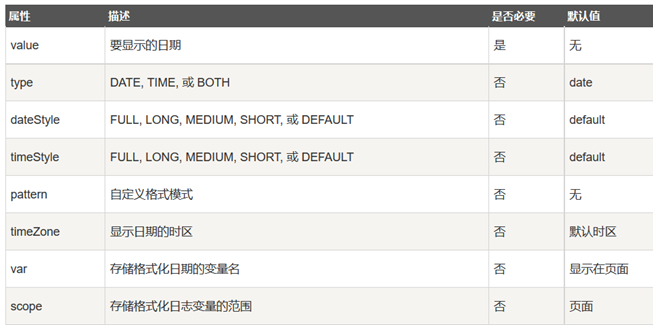
3、<fmt:formatDate>
<fmt:formatDate>标签用于使用不同的方式格式化日期。
语法格式
<fmt:formatDate
value="<string>"
type="<string>"
dateStyle="<string>"
timeStyle="<string>"
pattern="<string>"
timeZone="<string>"
var="<string>"
scope="<string>"/>
属性

<fmt:formatDate> 标签格式模式


<h3>日期格式化:</h3>
<c:setvar="now"value="<%=new java.util.Date()%>"/>
<p>日期格式化 (1): <fmt:formatDatetype="time"
value="${now}"/></p>
<p>日期格式化 (2): <fmt:formatDatetype="date"
value="${now}"/></p>
<p>日期格式化 (3): <fmt:formatDatetype="both"
value="${now}"/></p>
<p>日期格式化 (4): <fmt:formatDatetype="both"
dateStyle="short"timeStyle="short"
value="${now}"/></p>
<p>日期格式化 (5): <fmt:formatDatetype="both"
dateStyle="medium"timeStyle="medium"
value="${now}"/></p>
<p>日期格式化 (6): <fmt:formatDatetype="both"
dateStyle="long"timeStyle="long"
value="${now}"/></p>
<p>日期格式化 (7): <fmt:formatDatepattern="yyyy-MM-dd"
value="${now}"/></p>
4、<fmt:parseDate>
<fmt:parseDate> 标签用于解析日期。
语法格式
<fmt:parseDate
value="<string>"
type="<string>"
dateStyle="<string>"
timeStyle="<string>"
pattern="<string>"
timeZone="<string>"
parseLocale="<string>"
var="<string>"
scope="<string>"/>
属性
五、SQL
JSTL SQL标签库提供了与关系型数据库(Oracle,MySQL,SQL Server等等)进行交互的标签。引用SQL标签库的语法如下
<%@ taglib prefix="sql" uri="http://java.sun.com/jsp/jstl/sql" %>
1、<sql:setDataSource>
<sql:setDataSource>标签用来配置数据源或者将数据源信息存储在某作用域的变量中,用来作为其它JSTL数据库操作的数据源。
语法格式
<sql:setDataSource
var="<string>"
scope="<string>"
dataSource="<string>"
driver="<string>"
url="<string>"
user="<string>"
password="<string>"/>
属性

<sql:setDataSourcevar="snapshot"driver="com.mysql.jdbc.Driver"
url="jdbc:mysql://localhost:3306/rentcarsystem"
user="root"password="root"/>
<sql:querydataSource="${snapshot}"var="result">
SELECT * from car_info;
</sql:query>
<tableborder="1"width="100%">
<tr>
<th>Emp ID</th>
<th>First Name</th>
<th>Last Name</th>
<th>Age</th>
</tr>
<c:forEachvar="row"items="${result.rows}">
<tr>
<td><c:outvalue="${row.id}"/></td>
<td><c:outvalue="${row.car_code}"/></td>
<td><c:outvalue="${row.conf_style}"/></td>
<td><c:outvalue="${row.buy_date}"/></td>
</tr>
</c:forEach>
</table>
六、JSTL函数
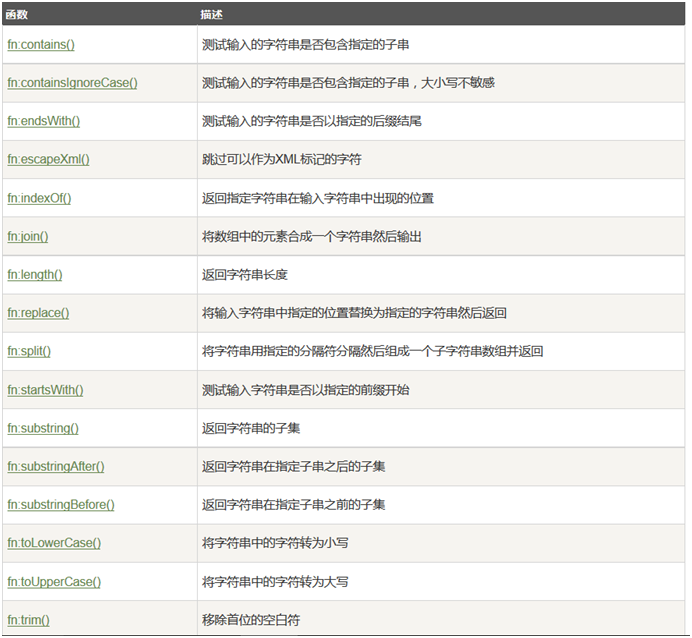
JSTL包含一系列标准函数,大部分是通用的字符串处理函数。引用JSTL函数库的语法如下:
<%@ taglib prefix="fn"uri="http://java.sun.com/jsp/jstl/functions" %>
1、fn:contains()函数
fn:contains()函数用于确定一个字符串是否包含指定的子串。
语法
<c:if test="${fn:contains(<原始字符串>, <要查找的子字符串>)}">
...</c:if>
例子:
<c:setvar="theString"value="I am from cxsw"/>
<c:iftest="${fn:contains(theString, 'cxsw')}">
<p>找到 runoob<p>
</c:if>
<c:iftest="${fn:contains(theString, 'RUNOOB')}">
<p>找到 RUNOOB<p>
</c:if>
2、fn:containsIgnoreCase()函数
fn:containsIgnoreCase()函数用于确定一个字符串是否包含指定的子串,忽略大小写。
语法:
<c:if test="${fn:containsIgnoreCase(<原始字符串>, <要查找的子字符串>)}">
...</c:if>
例子:
<c:set var="theString" value="I am from runoob"/>
<c:if test="${fn:containsIgnoreCase(theString, 'runoob')}">
<p>找到 runoob<p></c:if>
<c:if test="${fn:containsIgnoreCase(theString, 'RUNOOB')}">
<p>找到 RUNOOB<p></c:if>
JSTL介绍的更多相关文章
- JSTL介绍及使用
JSTL介绍及使用 一.JSTL(JSP Standard Tag Library)简介 > JSTL是JSP的标准标签库 > JSTL为我们提供了一些常用的标签,供我们日常开发使用(if ...
- java Web JSTL介绍及基本应用
由于实际开发中我们一般不能在jsp页面上写java代码,而el表达式也做不了判断 循环之类的复杂操作,为了弥补这些缺点,所以就有了JSTL. 简介 JavaServer Pages Standard ...
- [原创]java WEB学习笔记43:jstl 介绍,core库详解:表达式操作,流程控制,迭代操作,url操作
本博客为原创:综合 尚硅谷(http://www.atguigu.com)的系统教程(深表感谢)和 网络上的现有资源(博客,文档,图书等),资源的出处我会标明 本博客的目的:①总结自己的学习过程,相当 ...
- 四种会话跟踪技术以及jstl介绍
四种会话跟踪技术 page:代表与一个页面相关的对象和属性.一个页面由一个编译好的 Java servlet 类(可以带有任何的 include 指令,但是没有 include 动作)表示.这既包括 ...
- JSTL中的TLD配置和使用。
一,JSTL介绍: JSTL标签库,是日常开发经常使用的,也是众多标签中性能最好的.把常用的内容,放在这里备份一份,随用随查.尽量做到不用查,就可以随手就可以写出来.这算是Java程序员的基本功吧,一 ...
- JSP简单介绍
前言 知识点 1.JSP是什么 java server page,javaserver端页面技术.其主要作用在server端动态生成页面, 其组成java代码和html, 2.JSP的组成 ...
- JSTL标签库的基本教程之核心标签库(一)
JSTL介绍 Java Server Pages Standard Tag Libray(JSTL):JSP标准标签库,它封装了JSP应用的通用核心功能.JSTL支持通用的.结构化的任务,比如迭代,条 ...
- 第75节:Java的中的JSP,EL和JSTL
第75节:Java中的JSP,EL和JSTL 哭吧看不完的!!! Cookie和`Session 请求转发和重定向的区别: 地址不一样 请求次数也不一样 数据无法传递 4.跳转范围有限制 效率 请求转 ...
- jsp之jstl核心标签库
JSTL核心标签库技术 1. JSTL介绍 在JSP页面中即可书写html,也可以书写Java代码,导致页面混乱,维护,修改,升级难度加大,于是国际上不同的公司在实际应用中,根据页面的需求将Java代 ...
随机推荐
- 单调栈(G - Sliding Window POJ - 2823 )
题目链接:https://cn.vjudge.net/contest/276251#problem/G 题目大意:给你n和m,然后问你对于(m,n)这中间的每一个数,(i-m+1,i)这个区间的最小值 ...
- halcon发布
1: halcon发布 : 在MFC程序中 添加 #include "include/halcon/cpp/HalconCpp.h"using namespace Halcon;# ...
- 2016.5.24——Intersection of Two Linked Lists
Intersection of Two Linked Lists 本题收获: 1.链表的输入输出 2.交叉链表:这个链表可以有交叉点,只要前一个节点的的->next相同即可. 题目:Inters ...
- web项目打包后在代码中获取资源文件
在web项目里面,有时代码里面需要引用一些自定义的配置文件,这些配置文件如果放在类路径下,项目经过打包后使用的相对路径也会发生变化,所以以下给出了三种解决方案. 一.properties下配置 在类路 ...
- 2017 ACM-ICPC 亚洲区(西安赛区)网络赛 Coin 概率+矩阵快速幂
题目链接: https://nanti.jisuanke.com/t/17115 题意: 询问硬币K次,正面朝上次数为偶数. 思路: dp[i][0] = 下* dp[i-1][0] + 上*dp[i ...
- Deploy Openstack all-in-one Shell Script
Deploy Openstack all-in-one Shell Script At present(2015/10), the RDO deploment method can only inst ...
- linux系统iostat命令详解
iostat -k 3 5 (以KB为单位,每3秒统计一次,共统计5次) • avg-cpu: 总体cpu使用情况统计信息,对于多核cpu,这里为所有cpu的平均值 %user 用户空 ...
- window.print打印方法实现
vue中使用window.print打印效果 项目要求 打印每页有10行表格,如果接口数据没有十个显示10行 效果图 第一页 第二页 子组件 <template> <div> ...
- win7下weblogic安装与部署项目调试记录
下载 weblogic12c, 官网下载通用版本 安装 略 下载jdk jdk所有版本连接 http://www.oracle.com/technetwork/java/archive-13921 ...
- 在 Python 中使用 GDB 来调试 转载
2013/11/01 | Comments 大约一年前,我接触了 Java 中的 Btrace 能够不停机查看线上 JVM 运行情况的特性让我艳羡不已. 另外还有强悍的 jStack 和 jConso ...