
Windows7系统下OpenCV2.4.4+PCL1.6.0+SSBA3.0+VS2010 IDE32环境下编译和安装以实现Sfm和PCL点云数据可视化
最近在学习《深入理解OpenCV:实用计算机视觉项目解析》一书的第三章和第四章时,遇到很多编译问题,书中又没有详细的讲解环境配置和搭建过程。经过多天的捉摸、调试、排错终于将两章的程序都调试成功了,先做个记录以备忘。该书的英文名为:《Mastering OpenCV with Practical Computer Vision Projects》。
一、开发环境概述
1、OpenCV版本:2.4.4;
2、PCL版本:1.6.0;
3、SSBA版本:3.0;
4、IDE版本:VS2010 32位,字符集:使用多字节字符集;
5、PCL如果涉及到OpenGL,则采用OpenGL32.lib和OpenGL.dll。
二、OpenCV2.4.4编译和安装
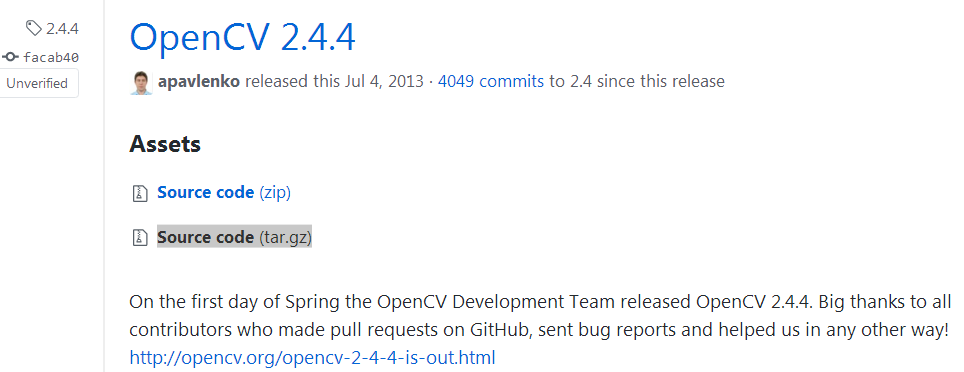
1、OpenCV2.4.4下载地址:https://github.com/opencv/opencv/releases?after=2.4.6.1,如下图所示:
2、具体的编译和配置工作参考:OpenCV2.4.12 开启OpenGL启用三维可视化支持。
注意:(1)第一次点击“Configure”时,请在“Specify the generator for this project”选择“Visual Studio 10”,该选项是32位的;
(2)如果你的计算机上已经安装了英伟达GPU CUDA驱动程序,则CMake会检测出来并默认勾选上“WITH_CUDA”。一般情况下,大家的计算机的GPU卡的计算能力CC不够高,为了避免后续编译时出现的各种错误,此去请不要勾选上“WITH_CUDA”。除非你的显卡支持能够支持高级的CUDA计算能力,才能够编译通过。
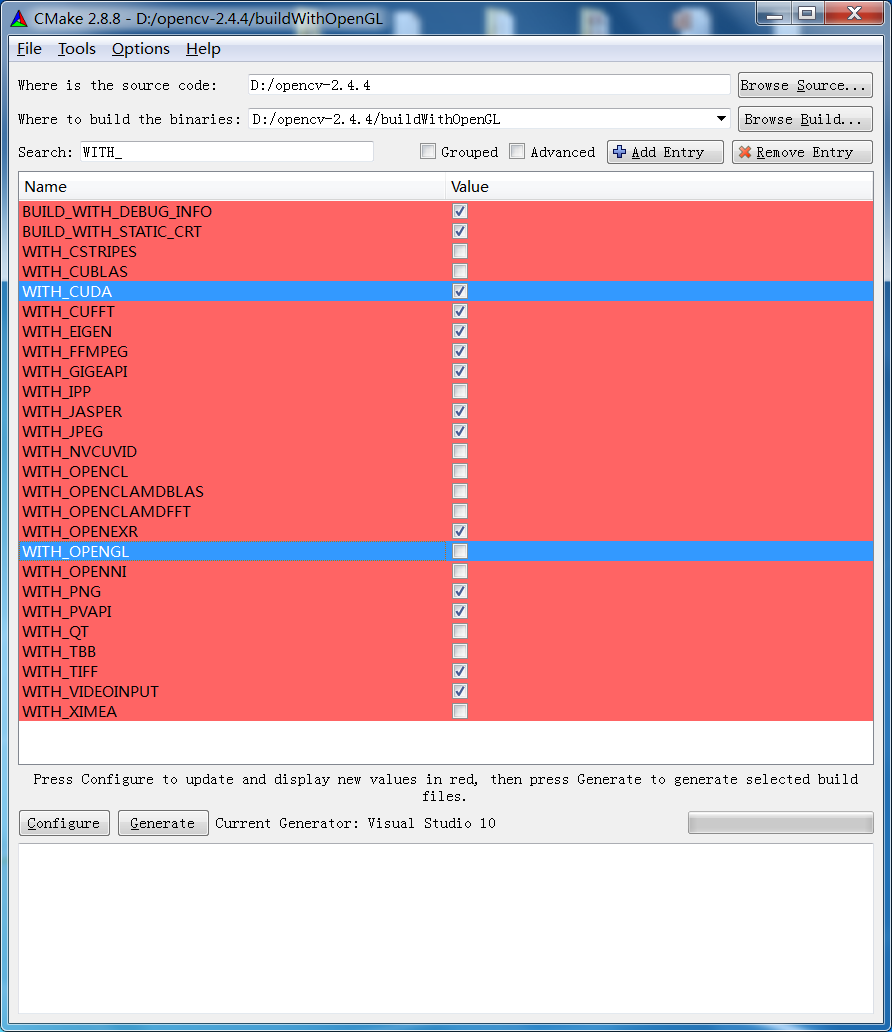
(3)OpenCV默认情况下是不支持OpenGL的,如果要使OpenCV支持OpenGL,则需要重编译。则需要勾选上“WITH_OPENGL”。如下图所示:
3、常见编译问题汇总:
- OPENCV3.3+CUDA9.0 环境搭建若干错误总结
- VS2010自行编译OpenCV2.4.4时缺少python27_d.lib的解决方法
- VS2015+OpenCV3.3 GPU模块和opencv_contrib模块的编译以及采用CMake编译opencv_contrib时提示“No extra modules found in folder”问题的解决方案
三、PCL1.6.0编译和安装
PCL1.6.0下载、编译和安装请参考文档:VS2010中配置PCL
四、SSBA3.0编译和安装
SSBA3.0下载、编译和安装请参考博文:VS2013+简单稀疏光束调整库SSBA配置(64位编译)
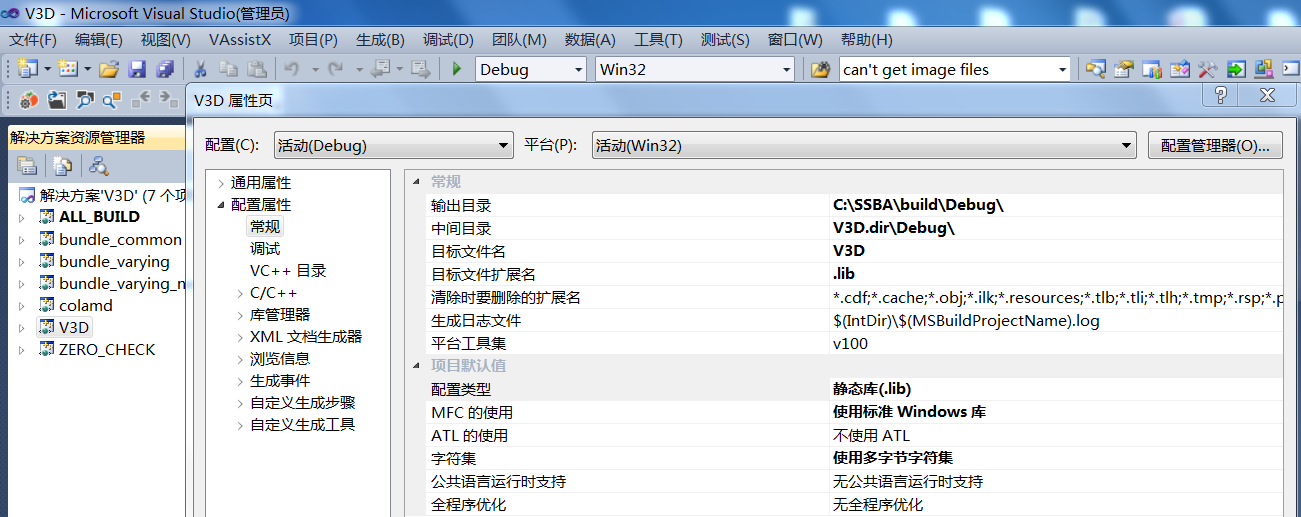
注意:该项目编译出来的colamd.lib和V3D.lib都是静态库,没有*.dll后缀的文件。因为colamd和V3D两个项目的配置类型都是“静态库(.lib)”。如下图所示:
五:其它注意事项
1、所有的所依赖的第三方开源框架库都配置好后,如果还需要OpenGL库的话,需要给工程文件添加OpenGL32.lib的静态到入库(项目属性-连接器-输入-附加依赖项)和OpenGL.dll动态链接库。
2、在编译的过程中可能会提示“vtk***无法解决的外部符号”,如下所示:
>vtkSDIDoc.obj : error LNK2019: 无法解析的外部符号 "__declspec(dllimport) public: thiscall vtkSmartPointerBase::vtkSmartPointerBase(void)" (imp_??0vtkSmartPointerBase@@QAE@XZ),该符号在函数 "public: thiscall vtkSmartPointer::vtkSmartPointer(void)" (???$vtkSmartPointer@VvtkImageData@@@@QAE@XZ) 中被引用

>vtkSDIView.obj : error LNK2001: 无法解析的外部符号 "declspec(dllimport) public: thiscall vtkSmartPointerBase::vtkSmartPointerBase(void)" (imp_??0vtkSmartPointerBase@@QAE@XZ)

>vtkSDIDoc.obj : error LNK2019: 无法解析的外部符号 "__declspec(dllimport) public: thiscall vtkSmartPointerBase::~vtkSmartPointerBase(void)" (imp_??1vtkSmartPointerBase@@QAE@XZ),该符号在函数 "public: thiscall vtkSmartPointer::~vtkSmartPointer(void)" (???$vtkSmartPointer@VvtkImageData@@@@QAE@XZ) 中被引用

>vtkSDIView.obj : error LNK2001: 无法解析的外部符号 "declspec(dllimport) public: thiscall vtkSmartPointerBase::~vtkSmartPointerBase(void)" (imp_??1vtkSmartPointerBase@@QAE@XZ)

>vtkSDIDoc.obj : error LNK2019: 无法解析的外部符号 "__declspec(dllimport) public: class vtkSmartPointerBase & thiscall vtkSmartPointerBase::operator=(class vtkObjectBase *)" (imp_??4vtkSmartPointerBase@@QAEAAV0@PAVvtkObjectBase@@@Z),该符号在函数 "public: class vtkSmartPointer & thiscall vtkSmartPointer::operator=(class vtkImageData *)" (???$vtkSmartPointer@VvtkImageData@@@@QAEAAV0@PAVvtkImageData@@@Z) 中被引用

>vtkSDIDoc.obj : error LNK2019: 无法解析的外部符号 "declspec(dllimport) public: class vtkSmartPointerBase & thiscall vtkSmartPointerBase::operator=(class vtkSmartPointerBase const &)" (imp_??4vtkSmartPointerBase@@QAEAAV0@ABV0@@Z),该符号在函数 "public: class vtkSmartPointer & thiscall vtkSmartPointer::operator=(class vtkSmartPointer const &)" (???$vtkSmartPointer@VvtkImageData@@@@QAEAAV0@ABV0@@Z) 中被引用

>vtkSDIView.obj : error LNK2001: 无法解析的外部符号 "declspec(dllimport) public: class vtkSmartPointerBase & thiscall vtkSmartPointerBase::operator=(class vtkSmartPointerBase const &)" (imp_??4vtkSmartPointerBase@@QAEAAV0@ABV0@@Z)

>vtkSDIDoc.obj : error LNK2019: 无法解析的外部符号 "__declspec(dllimport) protected: thiscall vtkSmartPointerBase::vtkSmartPointerBase(class vtkObjectBase *,class vtkSmartPointerBase::NoReference const &)" (imp_??0vtkSmartPointerBase@@IAE@PAVvtkObjectBase@@ABVNoReference@@@Z),该符号在函数 "protected: thiscall vtkSmartPointer::vtkSmartPointer(class vtkImageData *,class vtkSmartPointerBase::NoReference const &)" (???$vtkSmartPointer@VvtkImageData@@@@IAE@PAVvtkImageData@@ABVNoReference@vtkSmartPointerBase@@@Z) 中被引用

>vtkSDIView.obj : error LNK2001: 无法解析的外部符号 "declspec(dllimport) protected: thiscall vtkSmartPointerBase::vtkSmartPointerBase(class vtkObjectBase *,class vtkSmartPointerBase::NoReference const &)" (imp_??0vtkSmartPointerBase@@IAE@PAVvtkObjectBase@@ABVNoReference@@@Z)

>vtkSDIDoc.obj : error LNK2019: 无法解析的外部符号 "__declspec(dllimport) public: static class vtkImageData * cdecl vtkImageData::New(void)" (imp_?New@vtkImageData@@SAPAV1@XZ),该符号在函数 "public: static class vtkSmartPointercdecl vtkSmartPointer::New(void)" (?New@?$vtkSmartPointer@VvtkImageData@@@@SA?AV1@XZ) 中被引用

>vtkSDIDoc.obj : error LNK2019: 无法解析的外部符号 "declspec(dllimport) public: class vtkImageData * thiscall vtkImageAlgorithm::GetOutput(void)" (imp_?GetOutput@vtkImageAlgorithm@@QAEPAVvtkImageData@@XZ),该符号在函数 "public: void thiscall CvtkSDIDoc::OnFileOpen(void)" (?OnFileOpen@CvtkSDIDoc@@QAEXXZ) 中被引用

>vtkSDIDoc.obj : error LNK2019: 无法解析的外部符号 "declspec(dllimport) public: static class vtkJPEGReader * cdecl vtkJPEGReader::New(void)" (imp_?New@vtkJPEGReader@@SAPAV1@XZ),该符号在函数 "public: static class vtkSmartPointercdecl vtkSmartPointer::New(void)" (?New@?$vtkSmartPointer@VvtkJPEGReader@@@@SA?AV1@XZ) 中被引用

>vtkSDIView.obj : error LNK2019: 无法解析的外部符号 "declspec(dllimport) public: static class vtkImageViewer2 * cdecl vtkImageViewer2::New(void)" (imp_?New@vtkImageViewer2@@SAPAV1@XZ),该符号在函数 "public: static class vtkSmartPointercdecl vtkSmartPointer::New(void)" (?New@?$vtkSmartPointer@VvtkImageViewer2@@@@SA?AV1@XZ) 中被引用

>vtkSDIView.obj : error LNK2019: 无法解析的外部符号 "declspec(dllimport) public: static class vtkRenderWindowInteractor * cdecl vtkRenderWindowInteractor::New(void)" (imp_?New@vtkRenderWindowInteractor@@SAPAV1@XZ),该符号在函数 "public: static class vtkSmartPointer __cdecl vtkSmartPointer::New(void)" (?New@?$vtkSmartPointer@VvtkRenderWindowInteractor@@@@SA?AV1@XZ) 中被引用
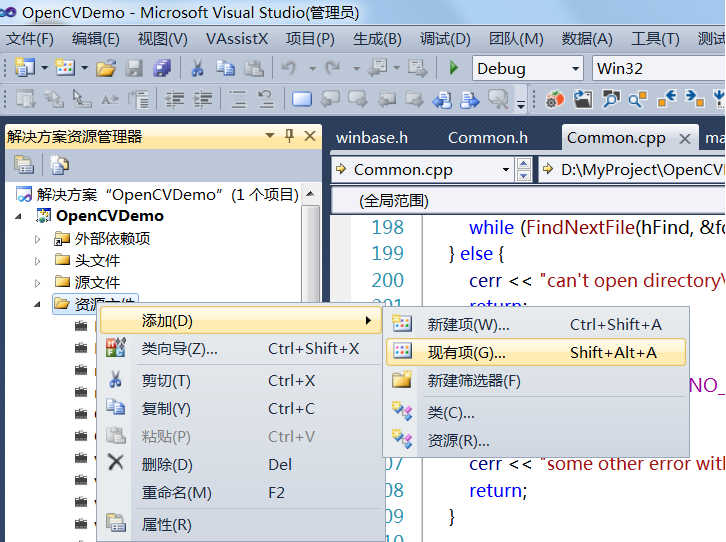
首先说明,VTK是PCL所依赖的第三方库开源的可视化工具库。此时,需要把C:\Program Files (x86)\PCL 1.6.0\3rdParty\VTK\lib\vtk-5.8目录下的vtk开头的相关*.lib文件通过“项目属性-连接器-输入-附加依赖项”方式添加到工程,但是这样太麻烦,可在“解决方案资源管理器”中的“资源文件”上单击右键-添加-现有项,从而将所有vtk开头的相关*.lib文件添加到工程中。如下图所示:
3、fatal error C1083: 无法打开包括文件:“vtkCommand.h”: No such file or direct:可在系统环境变量PATH中将VTK的包含目录再增加一层:$(PCL_ROOT)\3rdParty\VTK\include\vtk-5.8。其中PCL_ROOT为PCL安装时设置的系统环境变量,其值为:C:\Program Files (x86)\PCL 1.6.0。
4、OpenCV和PCL同时引用了Flann 引起冲突:Opencv+PCL=Flann 冲突?
5、安装CMake和PCL-1.6.0-AllInOne-msvc2010-win32.exe打算使安装程序自行将路径添加到系统的环境变量PATH时,会弹出失败提示:path too long installer unable to modify path 导致PCL配置失败记。此时可手工将相关路径添加到系统的环境变量PATH中。path too long installer unable to modify path 导致PCL配置失败记。
6、std::max、std::min error C2589: “(”:“::”右边的非法标记,error C2059: 语法错误:“::”
参考链接:
1、OpenCV2.4.13+CUDA8.0+SSBA3.0+VS2010编译安装
2、WIN7(32位)VS2010+openCV 2.4.10+PCL 1.6.0+CUDA 6.5.14+CMake 3.2.1+SSBA-3.0配置
Windows7系统下OpenCV2.4.4+PCL1.6.0+SSBA3.0+VS2010 IDE32环境下编译和安装以实现Sfm和PCL点云数据可视化的更多相关文章
- VS2010 C++环境下DLL和LIB文件目录及名称修改
VS2010 C++环境下DLL和LIB文件目录及名称修改 转自:http://blog.csdn.net/archielau/article/details/8507581 DLL工程,Debug版 ...
- 水晶报表在vs2010 WPF环境下的尝试
原文:水晶报表在vs2010 WPF环境下的尝试 由于VS2010没有集成水晶报表组件,尝试前必须先安装 水晶报表 for VS2010,若机器未安装的可点击这里>>>下载安装 新建 ...
- 【原创】Linux环境下的图形系统和AMD R600显卡编程(1)——Linux环境下的图形系统简介
Linux/Unix环境下最早的图形系统是Xorg图形系统,Xorg图形系统通过扩展的方式以适应显卡和桌面图形发展的需要,然而随着软硬件的发展,特别是嵌入式系统的发展,Xorg显得庞大而落后.开源社区 ...
- Linux环境下的图形系统和AMD R600显卡编程(1)——Linux环境下的图形系统简介
转:https://www.cnblogs.com/shoemaker/p/linux_graphics01.html Linux/Unix环境下最早的图形系统是Xorg图形系统,Xorg图形系统通过 ...
- win8.1 vs2010 C++环境下 编译Android Adb.exe
1 IntelliSense: cannot open source file "usb100.h" adb 这是因为没有安装sdk造成的.win7下安装wdk,vs2010能够 ...
- VS2010 C++环境下DLL和LIB文件的生成与调试
利用VS2010工具,调试DLL文件的方法现总结如下: 在一个解决方案中生成两个工程,假设MYDLL和MYDLG两个工程,前者是DLL工程,后者DLG调用前边的DLL工程.设置如下: 目录如下:图,本 ...
- VS2010 C++环境下DLL和LIB文件的生成与调试 备忘
利用VS2010工具,调试DLL文件的方法现总结如下: 在一个解决方案中生成两个工程,假设MYDLL和MYDLG两个工程,前者是DLL工程,后者DLG调用前边的DLL工程.设置如下: 目录如下:图,本 ...
- 【转】Oracle RAC 环境下的连接管理
文章转自:http://www.oracle.com/technetwork/cn/articles/database-performance/oracle-rac-connection-mgmt-1 ...
- Redis学习——Linux环境下Redis的安装(一)
一.关于Redis Redis最为一款开源的key-value存储系统,自推出到现在一直受到编程人员的喜爱.它支持存储多种value类型,String .List .Set .Zset .Hash.这 ...
随机推荐
- zookeeper3.4.5+Hbase1.2.6安装教程
说明:在安装zookeeper+Hbase之前,我们应该已经将hadoop集群搭建好了(三个节点),并且验证启动成功.因为HBase是一种构建在HDFS之上的分布式.面向列的存储系*统. zookee ...
- maven插件 按配置加载不同环境配置文件进行打包(maven-war-plugin)
1.配置多种不同环境 如(本地local,开发dev,测试test 环境等) <profiles> <profile> <id>local</id> & ...
- IDEA项目搭建三——简单配置Maven使用国内及本地仓库
大家在前面创建时发现Maven下载jar包的时候会很慢,我们又引入了自己的Maven,所以可以配置一下不让其去国外下载jar包,而使用国内的镜像站来加快下载速度 1.找到Maven所在文件夹 2.在c ...
- IDEA项目搭建二——使用SpringBoot创建Web层
一.编写底层代码 1.demo-common中创建FormatString类 先在默认com.tyh中创建package命名为common 删除自动生成的app.java,在common包下创建新类 ...
- 如何扩展Linux虚拟内存文件系统
由于ArcGIS GeoAnalystics Server和Raster Analytics Server大数据分析平台都是基于Spark分析平台的,其部署服务器除了要求具有高内存特点外,也需要确保相 ...
- 自定义适用于手机和平板电脑的 Dynamics 365(三):显示的实体
您可以启用 适用于手机的 Dynamics 365 和 适用于平板电脑的 Dynamics 365 的有限实体集. 若要查看是否启用了实体,或者要启用实体,请单击“设置”>“自定义”>“自 ...
- pm2以windows服务运行
借助于pm2-windows-service 可以把pm2以windows服务运行.已服务运行的好处就是,即时用户注销也,pm2也会在后台运行 npm i pm2 -g npm i pm2-windo ...
- Unity Profiler连接Android真机调试
Profiler在Editor模式就可以观看性能消耗,但是毕竟电脑配置高,跟手机真机环境还是有区别.实际开发中的优化还是推荐用真机测试. 因为IOS一般比Android手机的配置高,在Android平 ...
- Android--字符串和16进制相互转化(解决中文乱码)
import java.io.ByteArrayOutputStream; /** * Created by Administrator on 2016/2/2. * -----------16进制和 ...
- Expo大作战(十二)--expo中的自定义样式Custom font,以及expo中的路由Route&Navigation
简要:本系列文章讲会对expo进行全面的介绍,本人从2017年6月份接触expo以来,对expo的研究断断续续,一路走来将近10个月,废话不多说,接下来你看到内容,讲全部来与官网 我猜去全部机翻+个人 ...