
001 SpringMVC的helloWorld程序
一:helloworld程序
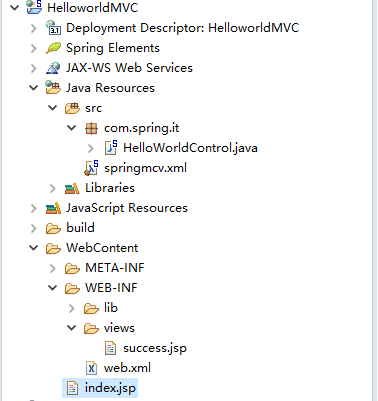
1.结构目录
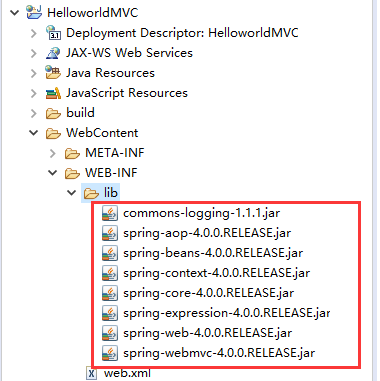
2.添加lib包
3.在web.xml中配置DispatchServlet
这个就是主servlet。
 <?xml version="1.0" encoding="UTF-8"?>

 <web-app xmlns:xsi="http://www.w3.org/2001/XMLSchema-instance"

     xmlns="http://xmlns.jcp.org/xml/ns/javaee"

     xsi:schemaLocation="http://xmlns.jcp.org/xml/ns/javaee http://xmlns.jcp.org/xml/ns/javaee/web-app_3_1.xsd"

     id="WebApp_ID" version="3.1">

     <servlet>

         <servlet-name>DispatchServlet</servlet-name>

         <servlet-class>org.springframework.web.servlet.DispatcherServlet</servlet-class>

         <init-param>

             <param-name>contextConfigLocation</param-name>

             <param-value>classpath:springmcv.xml</param-value>

         </init-param>

         <load-on-startup>1</load-on-startup>

     </servlet>

     <servlet-mapping>

         <servlet-name>DispatchServlet</servlet-name>

         <url-pattern>/</url-pattern>

     </servlet-mapping>

 </web-app>
4.加入mvc配置文件
这个有一个地方要注意一下,context:component-san是扫描包,要写包名。
同时要写关于视图的解析器。
 <?xml version="1.0" encoding="UTF-8"?>

 <beans xmlns="http://www.springframework.org/schema/beans"

     xmlns:context="http://www.springframework.org/schema/context"

     xmlns:xsi="http://www.w3.org/2001/XMLSchema-instance"

     xsi:schemaLocation="http://www.springframework.org/schema/beans

                        http://www.springframework.org/schema/beans/spring-beans-3.0.xsd

                        http://www.springframework.org/schema/context

                        http://www.springframework.org/schema/context/spring-context-3.0.xsd">

     <!-- 配置自定义扫描的包 -->

     <context:component-scan base-package="com.spring.it" ></context:component-scan>

     <!-- 配置视图解析器 -->

     <bean class="org.springframework.web.servlet.view.InternalResourceViewResolver">

         <property name="prefix" value="/WEB-INF/views/" />

           <property name="suffix" value=".jsp" />

     </bean>

 </beans>
5.写一个控制器
使用RequestMapping来映射请求的URL。
 package com.spring.it;

 import org.springframework.stereotype.Controller;

 import org.springframework.web.bind.annotation.RequestMapping;

 @Controller

 public class HelloWorldControl {

     @RequestMapping("/helloworld")

     public String hello() {

         System.out.println("hello world*");

         return "success";

     }

 }
6.写一个应答请求的index.jsp
 <%@ page language="java" contentType="text/html; charset=ISO-8859-1"

     pageEncoding="ISO-8859-1"%>

 <!DOCTYPE html PUBLIC "-//W3C//DTD HTML 4.01 Transitional//EN" "http://www.w3.org/TR/html4/loose.dtd">

 <html>

 <head>

 <meta http-equiv="Content-Type" content="text/html; charset=ISO-8859-1">

 <title>Insert title here</title>

 </head>

 <body>

     <a href="helloworld">Hello world</a>

 </body>

 </html>
7.视图
 <%@ page language="java" contentType="text/html; charset=ISO-8859-1"

     pageEncoding="ISO-8859-1"%>

 <!DOCTYPE html PUBLIC "-//W3C//DTD HTML 4.01 Transitional//EN" "http://www.w3.org/TR/html4/loose.dtd">

 <html>

 <head>

 <meta http-equiv="Content-Type" content="text/html; charset=ISO-8859-1">

 <title>Insert title here</title>

 </head>

 <body>

     success page

 </body>

 </html>
8.效果

-------

二:一些细节问题
1.关于init-param的问题
上面使用的是contextConfigLocation来配置SpringMVC的配置文件springmvc.xml,现在说一下使用别的方式:默认的方式。
默认的文件为:/WEB-INF/<servlet-name>-servlet.xml
所以:
将上文的springmvc.xml拷贝到WEB-INF下,并改名为DispatchServlet-servlet.xml,这样的效果是一样的。
001 SpringMVC的helloWorld程序的更多相关文章
- SpringMVC创建HelloWorld程序
1.IDE说明和依赖管理工具说明 开发工具:intellij idea 依赖管理使用:maven 2.创建maven工程 创建新的maven工程,并添加相应的文件夹,创建好的项目目录如下所示: 3.添 ...
- SpringMVC基础入门,创建一个HelloWorld程序
ref:http://www.admin10000.com/document/6436.html 一.SpringMVC基础入门,创建一个HelloWorld程序 1.首先,导入SpringMVC需要 ...
- Java Learning 001 新建一个Java工程 HelloWorld程序
Java Learning 001 新建一个Java工程 HelloWorld程序 Step 1 . 在Eclipse 软件里,点击: File -> New -> Java Projec ...
- 学习SpringMVC——从HelloWorld开始
前言: 时隔十二年,中国女排最终过关斩将,用3:1的成绩证明了自己的实力,霸气夺冠,为中国赢得了一枚意义非常的金牌.这是一次全民的狂欢,一场视听盛宴,带给我们不仅是熠熠生辉的金牌,更传递出的是一种女排 ...
- SpringMVC——从HelloWorld
学习SpringMVC——从HelloWorld开始 前言: 时隔十二年,中国女排最终过关斩将,用3:1的成绩证明了自己的实力,霸气夺冠,为中国赢得了一枚意义非常的金牌.这是一次全民的狂欢,一场视 ...
- SpringMVC(一) HelloWorld
学习新东西的的第一个程序--HelloWorld,以下是SpringMVC的HelloWorld 第一步: 用MAVEN 创建webapp,并添加依赖.(强烈建议使用MAVEN,MAVEN学习书籍和视 ...
- OGRE启动过程详解(OGRE HelloWorld程序原理解析)
本文介绍 OGRE 3D 1.9 程序的启动过程,即从程序启动到3D图形呈现,背后有哪些OGRE相关的代码被执行.会涉及的OGRE类包括: Root RenderSystem RenderWindow ...
- Bullet核心类介绍(Bullet 2.82 HelloWorld程序及其详解,附程序代码)
实验平台:win7,VS2010 先上结果截图: 文章最后附有生成该图的程序. 1. 刚体模拟原理 Bullet作为一个物理引擎,其任务就是刚体模拟(还有可变形体模拟).刚体模拟,就是要计算预测物体的 ...
- Android Studio新建一个HelloWorld 程序(App)
Android Studio新建一个HelloWorld程序(App) 新建 或者直接启动程序(注:如果已有程序,此方法会直接打开最近一次关闭从程序) 更改App名 选择App运行平台 选择模板 更改 ...
随机推荐
- Python OS模块中的fork方法实现多进程
import os '''使用OS模块中的fork方式实现多进程''' '''fork方法返回两次,分别在父进程和子进程中返回,子进程中永远返回0,父进程返回的是子进程的is''' if __name ...
- 检测传入字符串是否存在重复字符,返回boolean
检测传入字符串是否存在重复字符,返回boolean,比如"abc"返回true:"aac"返回false 这里提供两种思路: 第一种: import java. ...
- T分布在医药领域应用-python建模
sklearn实战-乳腺癌细胞数据挖掘 https://study.163.com/course/introduction.htm?courseId=1005269003&utm_campai ...
- android客户端app和服务端交互token的作用
Android客户端和服务端如何使用Token和Session niceheart关注1人评论34644人阅读2014-09-16 16:38:44 对于初学者来说,对Token和Session的 ...
- swift学习笔记3
1.在 Swift 中,枚举类型是一等(first-class)类型.它们采用了很多在传统上只被类(class)所支持的特性,例如计算型属性(computed properties),用于提供枚举值的 ...
- WHAT I READ FOR DEEP-LEARNING
WHAT I READ FOR DEEP-LEARNING Today, I spent some time on two new papers proposing a new way of trai ...
- 利用fiddler来模拟低速环境
为了让我们的站点拥有更好的用户体验,更短的加载时间,我们会“按需加载”页面的资源. 在调试程序的时候,我们希望能有一个低速率的网络环境来模拟真实线上的环境,这个时候fiddler(下载fiddler请 ...
- xml json
简单概括的话就是,xml本身是一种格式规范,是一种包含了数据以及数据说明的文本格式规范. 比如,我们要给对方传输一段数据,数据内容是“too young,too simple,sometimes na ...
- Shell中各种判断语法
Shell判断 按照文件类型进行判断 -b 判断文件是否存在,并且是否为快设备文件(是块设备文件为真) -c 判断文件是否存在,并且是否为字符设备文件(是字符设备文件为真) -d 判断文件是否存在,并 ...
- Linux DRM KMS 驱动简介【转】
转自:https://blog.csdn.net/yangkuanqaz85988/article/details/48689521 Whoops,上次写完<Linux DRM Graphic ...