
Mac使用终端安装Homebrew(brew)
Homebrew简称brew,OSX上的软件包管理工具,在Mac终端可以通过brew安装、更新、卸载软件。
1、打开终端直接输入下面指令回车:
- //
- ruby -e "$(curl -fsSL https://raw.githubusercontent.com/Homebrew/install/master/install)"
- //
注意:如果当前的用户是管理员,需要对权限进行许可,在执行上面的指令前先执行:sudo chmod -R g+w /usr/local
2、在1中指令回车后会提示“Press RETURN to continue or any other key to abort”(回车继续或者按其他键终止),这是直接回车进入“Downloading and installing Homebrew...”,如果网络不好的话可能会提示“fatal: unable to access 'https://github.com/Homebrew/brew/': SSLRead() return error -9806...等”,没关系重新输入1的指令更新。
3、更新完成后的提示如下图所示:
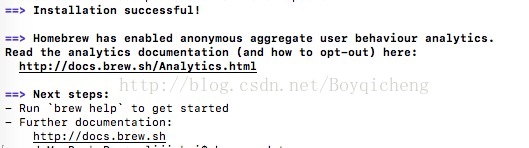
4、常用的三条语句搜索(search)、更新(install)、卸载(remove)
搜索:brew search SoftwareName
更新:brew install SoftwareName
卸载:brew remove SoftwareName
(SoftwareName 是你需要处理的软件名)
5、下面是我安装时的过程代码(仅供参考):
Last login: Wed May 10 08:44:45 on console
userdeMacBook-Pro:~ lijinkui$ sudo chmod -R g+w /usr/local
Password:
userdeMacBook-Pro:~ lijinkui$ ruby -e "$(curl -fsSL https://raw.githubusercontent.com/Homebrew/install/master/install)"
==> This script will install:
/usr/local/bin/brew
/usr/local/share/doc/homebrew
/usr/local/share/man/man1/brew.1
/usr/local/share/zsh/site-functions/_brew
/usr/local/etc/bash_completion.d/brew
/usr/local/Homebrew
==> The following existing directories will be made writable by user only:
/usr/local/share/zsh
/usr/local/share/zsh/site-functions
Press RETURN to continue or any other key to abort
==> /usr/bin/sudo /bin/chmod u+rwx /usr/local/share/zsh /usr/local/share/zsh/site-functions
==> /usr/bin/sudo /bin/chmod 755 /usr/local/share/zsh /usr/local/share/zsh/site-functions
==> Downloading and installing Homebrew...
fatal: unable to access 'https://github.com/Homebrew/brew/': SSLRead() return error -9806
Failed during: git fetch origin master:refs/remotes/origin/master --tags --force --depth=1
userdeMacBook-Pro:~ lijinkui$ ruby -e "$(curl -fsSL https://raw.githubusercontent.com/Homebrew/install/master/install)"
==> This script will install:
/usr/local/bin/brew
/usr/local/share/doc/homebrew
/usr/local/share/man/man1/brew.1
/usr/local/share/zsh/site-functions/_brew
/usr/local/etc/bash_completion.d/brew
/usr/local/Homebrew
Press RETURN to continue or any other key to abort
==> Downloading and installing Homebrew...
remote: Total 0 (delta 0), reused 0 (delta 0), pack-reused 0
HEAD is now at f1d4c4b Merge pull request #2607 from MikeMcQuaid/travis-ci-tweaks-2
==> Tapping homebrew/core
Cloning into '/usr/local/Homebrew/Library/Taps/homebrew/homebrew-core'...
remote: Counting objects: 4408, done.
remote: Compressing objects: 100% (4213/4213), done.
remote: Total 4408 (delta 37), reused 454 (delta 15), pack-reused 0
Receiving objects: 100% (4408/4408), 3.52 MiB | 298.00 KiB/s, done.
Resolving deltas: 100% (37/37), done.
Tapped 4213 formulae (4,451 files, 11MB)
==> Cleaning up /Library/Caches/Homebrew...
==> Migrating /Library/Caches/Homebrew to /Users/lijinkui/Library/Caches/Homebre
==> Deleting /Library/Caches/Homebrew...
Already up-to-date.
Error: Could not link:
/usr/local/share/man/man1/brew.1
Please delete these paths and run `brew update`.
Error: Could not link:
/usr/local/share/doc/homebrew
Please delete these paths and run `brew update`.
==> Installation successful!
==> Homebrew has enabled anonymous aggregate user behaviour analytics.
Read the analytics documentation (and how to opt-out) here:
http://docs.brew.sh/Analytics.html
==> Next steps:
- Run `brew help` to get started
- Further documentation:
http://docs.brew.sh
userdeMacBook-Pro:~ lijinkui$ brew update
Already up-to-date.
Mac使用终端安装Homebrew(brew)的更多相关文章
- 【转】Mac系统中安装homebrew(类似redhat|Centos中的yum;类似Ubuntu中的apt-get)
Homebrew,Homebrew简称brew,是Mac OSX上的软件包管理工具,能在Mac中方便的安装软件或者卸载软件,可以说Homebrew就是mac下的apt-get.yum神器 Homebr ...
- mac下高效安装 homebrew 及完美避坑姿势 (亲测有效)
世上无难事,只要找到 Homebrew 的正确安装方式. Homebrew 是什么 Homebrew是 mac的包管理器,仅需执行相应的命令,就能下载安装需要的软件包,可以省掉自己去下载.解压.拖拽( ...
- Mac系统下安装Homebrew后无法使用brew命令
打开终端输入 brew提示:command not found 解决方法 输入命令: sudo vim .bash_profile 然后输入以下代码: export PATH=/usr/local/b ...
- Mac系统下安装Homebrew后无法使用brew命令,-bash: brew: command not found
使用如下命令: sudo vim .bash_profile 然后输入以下代码: export PATH=/usr/local/bin:$PATH 再使用以下命令使配置生效: source .bash ...
- mac下的安装神奇 brew --例子 安装 mysql
da打开终端 输入bre 输入 bre search mysql (查找mysql版本) 输入 bre install mysql@5.6(选择mysql版本安装)
- Mac上面不能安装Homebrew
这个stackoverflow的答案解决了我的问题: http://stackoverflow.com/questions/18039029/mac-can-t-install-homebrew 问题 ...
- Mac 10.12安装Homebrew图形化界面管理工具Cakebrew
下载: (链接: https://pan.baidu.com/s/1mivJ9H2 密码: f8dr)
- Mac 终端下Homebrew的几个常用命令(新手笔记)
最近在研究用appium来做IOS的自动化,所以开始接触Mac系统.记录一下在Mac的终端下Homebrew的几个常用命令 安装(需要 Ruby,不过一般自带都有):ruby -e "$(c ...
- Mac安装homebrew,postman,charles
Homebrew是一款Mac OS平台下的软件包管理工具,拥有安装.卸载.更新.查看.搜索等很多实用的功能.简单的一条指令,就可以实现包管理,而不用你关心各种依赖和文件路径的情况,十分方便快捷. 1. ...
随机推荐
- js倒计时跳转页面实现
- jquery源码学习
1,"use strict"; //16行 用在代码开始处,表示之后的代码将按照严格模式执行
- Java.WeakReference-SoftReference-PhantomReference
Weak Reference, Soft Reference, Phantom Reference 1. Introduction "Weak reference objects, whic ...
- BZOJ1233 干草堆 - 单调队列优化DP
问题描述: 若有干个干草, 分别有各自的宽度, 要求将它们按顺序摆放, 并且每层的宽度不大于 它的下面一层 , 求最多叠几层 题解: zkw神牛证明了: 底边最短, 层数最高 证明: ...
- jQuery操作(二)
一: 操作元素 1. 属性操作 1.1 $("p").text() $("p").html() $(":checkbox").val() 1 ...
- Eclipse的下载及安装
Eclipse的下载地址: https://www.eclipse.org/downloads/ 下载完成后,双击安装包即可安装 选择 Eclipse IDE for Java EE Decelope ...
- [Jmeter] 将参数从Jenkins传递给Jmeter
Configuration in Jmeter Configuration in Jenkins
- vue脚手架搭建的具体步骤
1.全局安装cli npm install -g vue-cli 在全局安装vue的命令行工具 2.初始化项目 vue init webpack my-project 初始化一个基于webpack ...
- xpath笔记
参考 1.使用lxml.etree.parse()解析html文件,该方法默认使用的是“XML”解析器,所以如果碰到不规范的html文件时就会解析错误,报错代码如下: lxml.etree.XMLSy ...
- Linux学习笔记:系统目录结构
Linux系统文件夹代表的含义: /bin - Binaries. /boot - Files required for booting. /dev - Device files. /etc - Et ...