
[Winform]Media Player组件全屏播放的设置
摘要
在设置程序开始运行时,让视频全屏播放时,直接设置
windowsMediaPlay.fullScreen = true;
会报错,代码如下
                windowsMediaPlay.URL = _videoPath;

                windowsMediaPlay.Ctlcontrols.play();

                windowsMediaPlay.fullScreen = true;

                windowsMediaPlay.ClickEvent += windowsMediaPlay_ClickEvent;

                windowsMediaPlay.KeyUpEvent += windowsMediaPlay_KeyUpEvent;

                windowsMediaPlay.StatusChange += windowsMediaPlay_StatusChange;
错误
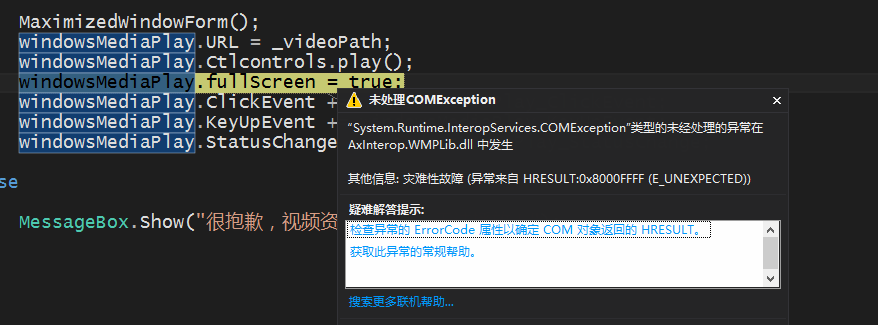
抱着相信微软的心情,就在猜想,可能是位置不对,是不是必须视频在播放中才可以设置全屏?
所以在视频状态变化的事件中,这样设置
        void windowsMediaPlay_StatusChange(object sender, EventArgs e)

        {

            /*

             * 0 Undefined Windows Media Player is in an undefined state.(未定义)

               1 Stopped Playback of the current media item is stopped.(停止)

               2 Paused Playback of the current media item is paused. When a media item is paused, resuming
playback begins from the same location.(停留)

               3 Playing The current media item is playing.(播放)

               4 ScanForward The current media item is fast forwarding.

               5 ScanReverse The current media item is fast rewinding.

               6 Buffering The current media item is getting additional data from the server.(转换)

               7 Waiting Connection is established, but the server is not sending data. Waiting for session to begin.(暂停)

               8 MediaEnded Media item has completed playback. (播放结束)

               9 Transitioning Preparing new media item.

               10 Ready Ready to begin playing.(准备就绪)

               11 Reconnecting Reconnecting to stream.(重新连接)

           */

            //判断视频是否已停止播放

            if ((int)windowsMediaPlay.playState == )

            {

                //停顿2秒钟再重新播放

                System.Threading.Thread.Sleep();

                //重新播放

                windowsMediaPlay.Ctlcontrols.play();

            }

            else if ((int)windowsMediaPlay.playState == )

            {

                windowsMediaPlay.fullScreen = true;

            }

        }
MSDN
Remarks
For full-screen mode to work properly when embedding the Windows Media Player control, the video display area must have a height and width of at least one pixel. If uiMode is set to "mini" or "full", the height of the control itself must be 65 or greater to accommodate the video display area in addition to the user interface.
If uiMode is set to "invisible", then setting this property to true raises an error and does not affect the behavior of the control.
During full-screen playback, Windows Media Player hides the mouse cursor when enableContextMenu equals false and uiMode equals "none".
If uiMode is set to "full" or "mini", Windows Media Player displays transport controls in full-screen mode when the mouse cursor moves. After a brief interval of no mouse movement, the transport controls are hidden. If uiMode is set to "none", no controls are displayed in full-screen mode.
Note Displaying transport controls in full-screen mode requires the Windows XP operating system.If transport controls are not displayed in full-screen mode, then Windows Media Player automatically exits full-screen mode when playback stops.
参考
https://msdn.microsoft.com/en-us/library/windows/desktop/dd562419(v=vs.85).aspx
[Winform]Media Player组件全屏播放的设置的更多相关文章
- winform下实现pictureBox全屏播放
最近开发一个项目,需要通过双击pictureBox实现全屏的功能,网上查找资料,加上一点摸索,最终实现了.做一下记录,以备以后需要. 主要功能都在下面这个类里面 using System; using ...
- [Winform]Media Player com组件应用中遇到的问题
摘要 最近一个项目中,需要用到在客户端全屏循环播放视频,当时考虑使用开源的播放器,但控制起来不方便,然后考虑既然都是windows系统,那么可以考虑使用微软自带的Media Player播放器.所以在 ...
- [转]Android WebView播放视频(包括全屏播放),androidwebview
Android WebView播放视频(包括全屏播放),androidwebview 最近项目开发中用到了WebView播放视频的功能,总结了开发中犯过的错误,这些错误在开发是及容易遇到的,所以我这里 ...
- 【wpf基础】wpf MediaElement全屏播放视频功能
最近在研究如何将视频全屏播放,一开始思路A:弹窗将MediaElement对象add到一个新的全屏窗体,报错 指定的元素已经是另一个元素的逻辑子元素.请先将其断开连接. 后续转换思路B:将本窗体其他控 ...
- uwp,c#,全屏播放保持屏幕响应
在开发视频app的时候,全屏播放一段时间内没有电脑操作,电脑会自动进入睡眠模式,这时就要多写些代码来保持响应了. (这里使用的是MediaElement播放控件,MediaElement需要手动添加代 ...
- h5页面自动播放视频、音频_关于媒体文件自动全屏播放的实现方式
在移动端(ios和android)播放视频的时候,我们即使定义了autoplay属性,仍然不能自动播放.这是由于手机浏览器为了防止浪费用户的网络流量,在默认情况下是不允许媒体文件自动播放的,除非用户自 ...
- 【Win 10应用开发】实现全屏播放的方法
有人会问,以前的MediaElement控件不是有现成的一排操作按钮吗?而且可以直接进入全屏播放.是的,我们知道,以往的Store App都是在全屏模式下运行的,只要MediaElement控件填满整 ...
- iphone H5视频行内播放(禁止全屏播放)
一般用户都知道,ios在网页点击视频播放时,视频会弹出全屏播放框. video标签的playsinline.webkit-playsinline标记根本就不会起作用. 还有传闻说对于没有声音的视频不会 ...
- HTML5新标签video在iOS上默认全屏播放
今天做一个app时发现一个问题,应用html5中的video标签加载视频,在Android手机上默认播放大小,但是换成iPhone手机上出问题了,默认弹出全屏播放,查找了好多论坛,都没有谈论这个的.然 ...
随机推荐
- 第八集:魔法阵 NTT求循环卷积
题目来源:http://www.fjutacm.com/Problem.jsp?pid=3283 题意:给两串长度为n的数组a和b,视为环,a和b可以在任意位置开始互相匹配得到这个函数的值,求这个函数 ...
- CodeForces Contest #1114: Round #538 (Div. 2)
比赛传送门:CF #1114. 比赛记录:点我. 又 FST 了. [A]Got Any Grapes? 题意简述: 有三个人,第一个人需要吃绿色葡萄至少 \(a\) 个,第二个人需要吃绿色和紫色葡萄 ...
- 有用的linux命令集锦
http://blog.csdn.net/hackerain/article/details/7946193 1. 查看内存使用情况 free -m 2. 查看系统版本信息 sudo lsb_rele ...
- artDialog4.1.7 摘自网络
jquery.artDialog.source.js学习 1 关键的对象关系 art = jQuery = $ function artDialog() {...} artDialog.fn = ar ...
- yum安装软件报错:curl#6 - "Could not resolve host: mirrorlist.centos.org; Temporary failure in name resolut
# yum install -y epel-release Loaded plugins: fastestmirror Repository base is listed more than once ...
- 不借助autolt实现下载文件到指定目录
今天尝试了下不用借助autolt完成下载文件到指定目录, 好处:在于集成回归,远程机可以绕过执行autolt程序权限问题,导致autolt程序无法调用,不能完成脚本的回归 Firefox浏览器已经成功 ...
- sass和scss相关知识
参考地址:http://www.imooc.com/learn/311 什么是css预处理器? CSS 预处理器定义了一种新的语言,其基本思想是,用一种专门的编程语言,为 CSS 增加了一些编程的特性 ...
- PHP 字符串截取()[]{} 中内容
$str="你好<我>(爱)[北京]{天安门}"; echo f1($str); //返回你好 echo f2($str); //返回我 echo f3($str); ...
- KDevelop调试NS2
1.将NS2项目导入到KDevelop 具体操作步骤:打开Kdevelop,首先,选择"Project"->"Open/Import Project".然 ...
- HDU 4348 To the moon(主席树区间修改)
题意 给你一个区间,支持如下操作: 在一段区间内加上一个值,并生成一个历史版本 查询某个版本下一段区间内的和 回到一个历史版本上并舍弃之后的版本 做法 这就是主席树区间修改裸题啦QwQ 上一篇博客我讲 ...