
【每日一学】pandas_透视表函数&交叉表函数
每日一悟
【分开工作内外8小时】

前一个月,我经常把工作内的问题带到路上、地铁上、睡觉前,甚至是周末。

然而很快发现,我工作外的成就几乎没有,而工作内的进展也并不理想。

仔细想想,工作外是需要学新东西,产生新灵感。一方面是工作内的支撑,另一方面也是新的方向。而不是低效率地光在脑子里想工作内的解决方案。

所以,我觉得有必要明确工作内外的目标和行动,比如工作外每周一本书,每天的原版技术书阅读;工作内做好事务优先级,处理前先想清楚思路再着手准备。

高效且多产,这才是目的。
pandas.pivot_table
pivot_table(data, values=None, index=None, columns=None, aggfunc='mean', fill_value=None, margins=False, dropna=True, margins_name='All')
简介:
method of pandas.core.frame.DataFrame instance Create a spreadsheet-style pivot table as a DataFrame. The levels in the pivot table will be stored in MultiIndex objects (hierarchical indexes) on the index and columns of the result DataFrame.
pandas核心实例的方法,创建一个大宽表的透视表数据框,在这个结果数据框中的索引和列等级,将会被存储在多重索引对象中(分层索引)。
应用格式:
pandas.pivot_table(dataframe,Other parameters)
等同于
dataframe.pivot_table(Other parameters)
参数:
在看参数之前我们先看看Excel中透视表的结构,结构为筛选、列、行、值。除了筛选,列、行、值与下面要介绍的pandas.pivot_table功能一值。
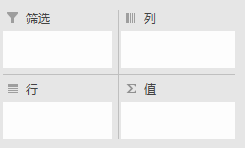
data : 要应用透视表的数据框;
values: 可选,是要聚合的列,相当于“值”,例如 values=["Price"];
index : 是要聚合值的分组,相当于“行”,多个层次格式例如 index=["Name","Rep","Manager"];
columns : 是要聚合值的分组,相当于“列”;
aggfunc : 是要应用的聚合函数,指定不同值使用不同聚合函数时可用字典格式,例如 aggfunc=[np.mean,len],aggfunc={"Quantity":len,"Price":[np.sum,np.mean]};
fill_value : 有时候聚合结果里出现了NaN,想替换成0时,fill_value=0;
margins : 是否添加所有行或列的小计/总计,margins=True;
margins_name : 当margins设置为True时,设置总计的名称,默认是“ALL”。
举例:
见help(pandas.pivot_table)
pandas.crosstab
crosstab(index, columns, values=None, rownames=None, colnames=None, aggfunc=None, margins=False,margins_name='All', dropna=True, normalize=False)
    Compute a simple cross-tabulation of two (or more) factors. By default

    computes a frequency table of the factors unless an array of values and an

    aggregation function are passed

    Parameters

    ----------

    index : array-like, Series, or list of arrays/Series

        Values to group by in the rows

    columns : array-like, Series, or list of arrays/Series

        Values to group by in the columns

    values : array-like, optional

        Array of values to aggregate according to the factors.

        Requires `aggfunc` be specified.

    aggfunc : function, optional

        If specified, requires `values` be specified as well

    rownames : sequence, default None

        If passed, must match number of row arrays passed

    colnames : sequence, default None

        If passed, must match number of column arrays passed

    margins : boolean, default False

        Add row/column margins (subtotals)

    margins_name : string, default 'All'

        Name of the row / column that will contain the totals

        when margins is True.

        .. versionadded:: 0.21.0

    dropna : boolean, default True

        Do not include columns whose entries are all NaN

    normalize : boolean, {'all', 'index', 'columns'}, or {0,1}, default False

        Normalize by dividing all values by the sum of values.

        - If passed 'all' or `True`, will normalize over all values.

        - If passed 'index' will normalize over each row.

        - If passed 'columns' will normalize over each column.

        - If margins is `True`, will also normalize margin values.

        .. versionadded:: 0.18.1

    Notes

    -----

    Any Series passed will have their name attributes used unless row or column

    names for the cross-tabulation are specified.

    Any input passed containing Categorical data will have **all** of its

    categories included in the cross-tabulation, even if the actual data does

    not contain any instances of a particular category.

    In the event that there aren't overlapping indexes an empty DataFrame will

    be returned.

    Examples

    --------

a = np.array(["foo", "foo", "foo", "foo", "bar", "bar",

              "bar", "bar", "foo", "foo", "foo"], dtype=object)

b = np.array(["one", "one", "one", "two", "one", "one",

              "one", "two", "two", "two", "one"], dtype=object)

c = np.array(["dull", "dull", "shiny", "dull", "dull", "shiny",

              "shiny", "dull", "shiny", "shiny", "shiny"],

              dtype=object)

pd.crosstab(a, [b, c], rownames=['a'], colnames=['b', 'c'])

# doctest: +NORMALIZE_WHITESPACE

    b   one        two

    c   dull shiny dull shiny

    a

    bar    1     2    1     0

    foo    2     2    1     2

foo = pd.Categorical(['a', 'b'], categories=['a', 'b', 'c'])

bar = pd.Categorical(['d', 'e'], categories=['d', 'e', 'f'])

crosstab(foo, bar)  # 'c' and 'f' are not represented in the data,

                    # but they still will be counted in the output

# doctest: +SKIP

    col_0  d  e  f

    row_0

    a      1  0  0

    b      0  1  0

    c      0  0  0

    Returns

    -------

    crosstab : DataFrame
【每日一学】pandas_透视表函数&交叉表函数的更多相关文章
- pandas_使用透视表与交叉表查看业绩汇总数据
# 使用透视表与交叉表查看业绩汇总数据 import pandas as pd import numpy as np import copy # 设置列对齐 pd.set_option("d ...
- Pandas透视表和交叉表
透视表 参数名 说明 values 待聚合的列的名称.默认聚合所有数值列 index 用于分组的列名或其他分组键,出现在结果透视表的行 columns 用于分组的列表或其他分组键,出现在结果透视表的列 ...
- 2018.03.29 python-pandas 数据透视pivot table / 交叉表crosstab
#透视表 pivot table #pd.pivot_table(data,values=None,index=None,columns=None, import numpy as np import ...
- FastReport的交叉表实际使用的一个例子
计算发行-->定义份数月表(打开)出现 PosFraisPaysInput选择时间段后,点击“打印”.这个设计表格,就是交叉表. 交叉表的特点是:数据库是一条一条并列的但是出来的结果却是:横向是 ...
- RS导出Excel交叉表角对应的列占用多列问题
在Cognos报表展示的时候,很多用户为了计算会把数据报表导出成excel然后再做统计,于是乎我做的一张报表导出成Excel的时候就出现了这样的问题 从上图可以看出交叉表角对应的列 ‘一级手术’和‘二 ...
- pandas交叉表和透视表及案例分析
一.交叉表: 作用: 交叉表是一种用于计算分组频率的特殊透视图,对数据进行汇总 考察预测数据和正式数据的对比情况,一个作为行,一个作为列 案例: 医院预测病人病情: 真实病情如下数组(B:有病,M:没 ...
- pandas 之 交叉表-透视表
import numpy as np import pandas as pd 认识 A pivot table is a data summarization tool(数据汇总工具) frequen ...
- 你真的会玩SQL吗?表表达式,排名函数
你真的会玩SQL吗?系列目录 你真的会玩SQL吗?之逻辑查询处理阶段 你真的会玩SQL吗?和平大使 内连接.外连接 你真的会玩SQL吗?三范式.数据完整性 你真的会玩SQL吗?查询指定节点及其所有父节 ...
- 通过sql做数据透视表,数据库表行列转换(pivot和Unpivot用法)(一)
在mssql中大家都知道可以使用pivot来统计数据,实现像excel的透视表功能 一.MSsqlserver中我们通常的用法 1.Sqlserver数据库测试 ---创建测试表 Create tab ...
随机推荐
- C#编程的最佳工具
C#是企业中广泛使用的编程语言,特别是那些依赖微软的程序语言.如果您使用C#构建应用程序,则最有可能使用Visual Studio,并且已经寻找了一些扩展来对您的开发进行管理.但是,这个工具列表可能会 ...
- 线程【五】VCL下的线程类
在这里把网友常常搞不清楚的属性作用列出来: 一.FreeOnTerminate用于表明线程执行完毕后是自动释放还是保留,默认为False 二.Terminate 该过程只是简单地设置线程类的Termi ...
- win7下python2.6如何安装setuptools和pip
1. 下载 setuptools-0.6c9.tar.gz 下载地址:http://pypi.python.org/packages/source/s/setuptools/setuptools-0. ...
- 【mongodb】之安装
export PATH=/opt/mongodb64-3.4.10/bin:$PATHmongod --dbpath data --logpath logs/mongo.log --fork
- bzoj5007: TCP协议
Description 在如今的网络中,TCP是一种被广泛使用的网络协议,它在传输层提供了可靠的通信服务.众所周知,网络是存在 时延的,例如用户先后向服务器发送了两个指令op1和op2,并且希望服务器 ...
- ElasticSearch 5.0.0 安装部署常见错误或问题
1.ERROR: bootstrap checks failed [1]: max file descriptors [65535] for elasticsearch process is too ...
- elasticsearch 安装(基于java运行环境)
解压安装包 [root@Aliyun resource]# tar -xvf elasticsearch-5.5.2.tar.gz 添加当前主机的普通账户 [root@Aliyun resource] ...
- 学习笔记之Sublime Text
Sublime Text - A sophisticated text editor for code, markup and prose https://www.sublimetext.com/ A ...
- MaidSafe区块链项目白皮书解读
MaidSafe.net宣布项目SAFE到社区 1. 介绍 现有的互联网基础设施越来越难以应付超过24亿互联网用户的需求,这个数字在2017年预计将增长到36亿.今天的架构中,中央中介(服务器)存储并 ...
- [UE4]迁移小地图到其他工程
一.创建一个新工程,类型不限,本次测试场创建的是赛车类工程. 二.为了方便管理,最好在All文件文件夹下新建一个名为MiniMap的目录,并把所有小地图相关的都放进来. 三.在小地图工程中,右键Rou ...