
springmvc关于redisCluster的使用及配置
首先附上maven仓库jar包的下载地址:https://repo.spring.io/webapp/#/artifacts/browse/tree/General/libs-release-local/org
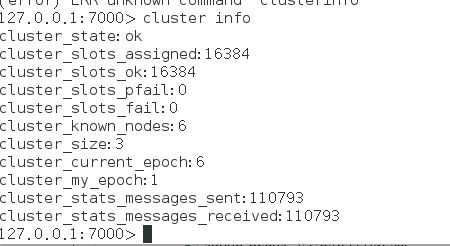
首先在linux系统安装redis3.0以上的版本,并且保证redis集群已经启动:
本次项目所需jar包:
完整图视:

1 新建属性文件:在src/conf/redis.properties:
address0=127.0.0.1:7000
address1=127.0.0.1:7001
address2=127.0.0.1:7002
address3=127.0.0.1:7003
address4=127.0.0.1:7004
address5=127.0.0.1:7005
redis.timeout=300000
redis.maxActive=1024
redis.minIdle=8
redis.maxIdle=100
redis.maxWaitMillis=1000
redis.maxRedirections=6
redis.testOnBorrow=true
2 新建文件夹 :src/xml/redis-context.xml
<?xml version="1.0" encoding="UTF-8"?>
<beans xmlns="http://www.springframework.org/schema/beans"
xmlns:xsi="http://www.w3.org/2001/XMLSchema-instance"
xmlns:context="http://www.springframework.org/schema/context"
xsi:schemaLocation="http://www.springframework.org/schema/beans
http://www.springframework.org/schema/beans/spring-beans-4.0.xsd
http://www.springframework.org/schema/context
http://www.springframework.org/schema/context/spring-context-4.0.xsd">
<!-- 加载配置文件 -->
<context:property-placeholder location="classpath:/conf/redis.properties" ignore-unresolvable="true"/>
<context:component-scan base-package="conf"/>
<bean name="genericObjectPoolConfig" class="org.apache.commons.pool2.impl.GenericObjectPoolConfig">
<property name="maxWaitMillis" value="-1" />
<property name="maxTotal" value="1000" />
<property name="minIdle" value="8" />
<property name="maxIdle" value="100" />
<property name="testOnBorrow" value="true" />
</bean>
<bean id="jedisCluster" class="testDao.JedisClusterFactory">
<property name="addressConfig" value="classpath:/conf/redis.properties"/>
<property name="addressKeyPrefix" value="address" /> <!-- 属性文件里 key的前缀 -->
<property name="timeout" value="300000" />
<property name="maxRedirections" value="6" />
<property name="genericObjectPoolConfig" ref="genericObjectPoolConfig" />
</bean>
</beans>
3 实现bean工厂:src/testDao/JedisClusterFactory
package testDao;
import java.util.HashSet;
import java.util.Properties;
import java.util.Set;
import java.util.regex.Pattern;
import org.apache.commons.pool2.impl.GenericObjectPoolConfig;
import org.springframework.beans.factory.FactoryBean;
import org.springframework.beans.factory.InitializingBean;
import org.springframework.core.io.Resource;
import redis.clients.jedis.HostAndPort;
import redis.clients.jedis.JedisCluster;
public class JedisClusterFactory implements FactoryBean<JedisCluster>, InitializingBean{
private Resource addressConfig;
private String addressKeyPrefix ;
private JedisCluster jedisCluster;
private Integer timeout;
private Integer maxRedirections;
private GenericObjectPoolConfig genericObjectPoolConfig;
private Pattern p = Pattern.compile("^.+[:]\\d{1,5}\\s*$");
public JedisClusterFactory() {
}
@Override
public void afterPropertiesSet() throws Exception {
Set<HostAndPort> haps = this.parseHostAndPort();
jedisCluster = new JedisCluster(haps, timeout, maxRedirections,genericObjectPoolConfig);
}
private Set<HostAndPort> parseHostAndPort() throws Exception{
try {
Properties prop = new Properties();
prop.load(this.addressConfig.getInputStream());
Set<HostAndPort> haps = new HashSet<HostAndPort>();
for (Object key : prop.keySet()) {
if (!((String) key).startsWith(addressKeyPrefix)) {
continue;
}
String val = (String) prop.get(key);
boolean isIpPort = p.matcher(val).matches();
if (!isIpPort) {
throw new IllegalArgumentException("ip 或 port 不合法");
}
String[] ipAndPort = val.split(":");
HostAndPort hap = new HostAndPort(ipAndPort[0], Integer.parseInt(ipAndPort[1]));
haps.add(hap);
}
return haps;
} catch (IllegalArgumentException ex) {
throw ex;
} catch (Exception ex) {
throw new Exception("解析 jedis 配置文件失败", ex);
}
}
@Override
public JedisCluster getObject() throws Exception {
return jedisCluster;
}
@Override
public Class<? extends JedisCluster> getObjectType() {
return (this.jedisCluster != null ? this.jedisCluster.getClass() : JedisCluster.class);
}
@Override
public boolean isSingleton() {
return true;
}
public void setAddressConfig(Resource addressConfig) {
this.addressConfig = addressConfig;
}
public void setTimeout(int timeout) {
this.timeout = timeout;
}
public void setMaxRedirections(int maxRedirections) {
this.maxRedirections = maxRedirections;
}
public void setAddressKeyPrefix(String addressKeyPrefix) {
this.addressKeyPrefix = addressKeyPrefix;
}
public void setGenericObjectPoolConfig(GenericObjectPoolConfig genericObjectPoolConfig) {
this.genericObjectPoolConfig = genericObjectPoolConfig;
}
}
4 新建Test类 测试redis-cluster
public class Test {
@Autowired
static
JedisCluster jedisCluster;
private static ApplicationContext context;
static{
context = new ClassPathXmlApplicationContext("classpath:/xml/redis-context.xml");
}
public static void main(String[] args) {
jedisCluster = (JedisCluster) context.getBean("jedisCluster",JedisCluster.class);
System.out.println(jedisCluster.get("name1"));
System.out.println(jedisCluster.get("name2"));
System.out.println(jedisCluster.get("first"));
int num = 100;
String key = "wusc";
String value = "";
for (int i=1; i <= num; i++){
// 存数据
// jedisCluster.set(key+i,"WuShuicheng"+i);
// 取数据
value= jedisCluster.get(key+i);
System.out.println(value);
// // 删除数据
// jedisCluster.del(key+i);
}
}
}
springmvc关于redisCluster的使用及配置的更多相关文章
- spring-mvc不拦截静态资源的配置
spring-mvc不拦截静态资源的配置 标签: spring 2015-03-27 23:54 11587人阅读 评论(0) 收藏 举报 版权声明:本文为博主原创文章,未经博主允许不得转载. &qu ...
- springmvc国际化 基于请求的国际化配置
springmvc国际化 基于请求的国际化配置 基于请求的国际化配置是指,在当前请求内,国际化配置生效,否则自动以浏览器为主. 项目结构图: 说明:properties文件中为国际化资源文件.格式相关 ...
- springmvc 项目完整示例07 设置配置整合springmvc springmvc所需jar包springmvc web.xml文件配置
前面主要是后台代码,spring以及mybatis的整合 下面主要是springmvc用来处理请求转发,展现层的处理 之前所有做到的,完成了后台,业务层和持久层的开发完成了 接下来就是展现层了 有很多 ...
- 使用IntelliJ IDEA开发SpringMVC网站(二)框架配置
原文:使用IntelliJ IDEA开发SpringMVC网站(二)框架配置 摘要 讲解如何配置SpringMVC框架xml,以及如何在Tomcat中运行 目录[-] 文章已针对IDEA 15做了一定 ...
- springMVC学习记录2-使用注解配置
前面说了一下使用xml配置springmvc,下面再说说注解配置.项目如下: 业务很简单,主页和输入用户名和密码进行登陆的页面. 看一下springmvc的配置文件: <?xml version ...
- spring 和springmvc 在 web.xml中的配置
(1)问题:如何在Web项目中配置Spring的IoC容器? 答:如果需要在Web项目中使用Spring的IoC容器,可以在Web项目配置文件web.xml中做出如下配置: <!-- Sprin ...
- 使用IntelliJ IDEA开发SpringMVC网站(三)数据库配置
原文:使用IntelliJ IDEA开发SpringMVC网站(三)数据库配置 摘要 讲解在IntelliJ IDEA中,如何进行Mysql数据库的配置 目录[-] 文章已针对IDEA 15做了一定的 ...
- spring-mvc.xml 和 application-context.xml的配置与深入理解
在java框架这个话题,前几篇文章是基于搭建ssm项目框架,以及web.xml的配置讲解,本篇主要就ssm框架的其他配置文件进行深入讲解,他们分别是:1.application-context.xml ...
- Maven+SpringMVC+Dubbo 简单的入门demo配置
转载自:https://cloud.tencent.com/developer/article/1010636 之前一直听说dubbo,是一个很厉害的分布式服务框架,而且巴巴将其开源,这对于咱们广大程 ...
随机推荐
- python第二十九课——文件读写(读取读取中文字符)
演示:读取中文字符 结论: 1).如果不设置encoding,默认使用gbk进行编解码 2).如果编码和解码不一致,最终导致报错,但是一旦设置了errors='ingore',那么就不会报错,而采取乱 ...
- PHP(Mysql/Redis)消息队列的介绍及应用场景案例--转载
郑重提示:本博客转载自好友博客,个人觉得写的很牛逼所以未经同意强行转载,原博客连接 http://www.cnblogs.com/wt645631686/p/8243438.html 欢迎访问 在进行 ...
- istio1.0.2配置
项目的组件相对比较复杂,原有的一些选项是靠 ConfigMap 以及 istioctl 分别调整的,现在通过重新设计的Helm Chart,安装选项用values.yml或者 helm 命令行的方式来 ...
- leetcode18—4Sum
Given an array nums of n integers and an integer target, are there elements a, b, c, and d in nums s ...
- 静态工厂方法和实例工厂方法及普通的bean
容纳你的bean bean工厂:最简单的容器,提供了基础的依赖注入支持.创建各种类型的Bean. 应用上下文(ApplicationContext):建立在bean工厂基础之上,提供系统架构服务. ...
- WebView之加载网页时增加进度提示
上一节讲了一些webview的基本使用以及在记载网页时如何屏蔽掉第三方浏览器,使我们自己开发的程序成为一个微型浏览器.那么这一节将一下在webView加载网页的过程中如何加上进度提示.效果图如下: 主 ...
- kubernetes 限制网络带宽 annotation -- 注解 -- 类似 label
1.可以通过给Pod增加 kubernetes.io/ingressbandwidth和 kubernetes.io/egress-bandwidth 这两个annotation来限制Pod的网络带宽 ...
- fabric简单案例
1 执行一个简单的task任务,显示两台机器的/home/guol/目录下的文件 from fabric.api import * env.users='root' env.port=22 env. ...
- solr服务器搭建与Tomact整合及使用
一:solr服务器的搭建 1:搭建全新的为solr专用的solr服务器: 在自己电脑上搭建两台Tomact服务器,一台仍为应用服务器,一台作为solr服务器,应用服务器按照正常Tomact服务器搭建即 ...
- Hadoop开发第2期---虚拟机中搭建Linux
注:关于如何将hadoop源码导入Eclipse详见http://pan.baidu.com/s/1hq8ArUs 一.Hadoop配置软件(我的电脑是Windows7旗舰--64bit) 1. VM ...