
C#_会员管理系统:开发六(数据搜索)
增加界面中的搜索功能
会员资料管理界面(VIPManager.cs):
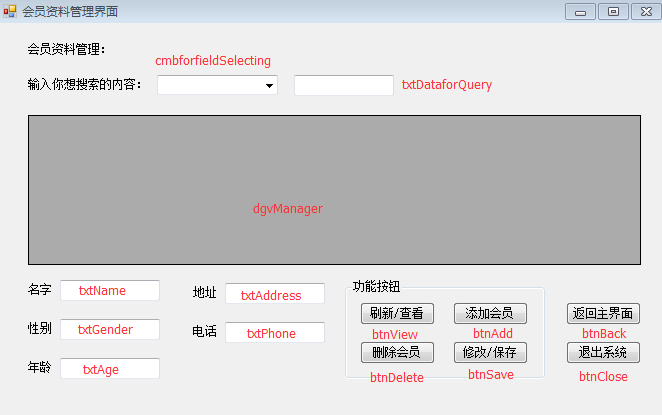
详细代码如下:
 using System;

 using System.Collections.Generic;

 using System.ComponentModel;

 using System.Configuration;

 using System.Data;

 using System.Data.SqlClient;

 using System.Drawing;

 using System.Linq;

 using System.Text;

 using System.Threading.Tasks;

 using System.Windows.Forms;

 namespace 会员管理系统

 {

     public partial class VIPManager : Form

     {

         public VIPManager()

         {

             InitializeComponent();

         }

         //连接字符串 获取配置文件里的连接路径,多次需要调用,放在外面方便

         static string connStr = ConfigurationManager.ConnectionStrings["str"].ConnectionString;

         //窗体运行自动加载

         private void VipManager_Load(object sender, EventArgs e)

         {

             //刷新数据

             Refresh();

             cmbforfieldSelecting.Text = "全局搜索";

             cmbforfieldSelecting.Items.Add("全局搜索");

             cmbforfieldSelecting.Items.Add("编号");

             cmbforfieldSelecting.Items.Add("名字");

             cmbforfieldSelecting.Items.Add("性别");

             cmbforfieldSelecting.Items.Add("年龄");

             cmbforfieldSelecting.Items.Add("地址");

             cmbforfieldSelecting.Items.Add("电话");

         }

         //写一个刷新数据的方法(跟查看数据一样)

         public void Refresh(bool isAdded = false)

         {

             //查询数据库字符串

             string sql = String.Format("select vId '{0}',vName '{1}',vGender '{2}',vAge '{3}',vAddress '{4}',vPhone '{5}' from VipInformation", "编号", "名字", "性别", "年龄", "地址", "电话");

             //连接数据库对象

             SqlConnection conn = new SqlConnection(connStr);

             //操作数据库对象

             SqlCommand cmd = new SqlCommand(sql, conn);

             //创建表对象

             System.Data.DataTable dt = new System.Data.DataTable();

             //创建数据库填充操作对象(语句)

             SqlDataAdapter sda = new SqlDataAdapter(cmd);

             //把数据填充进dt表中

             sda.Fill(dt);

             //指定dgvManager控件的数据源:dt

             dgvManager.DataSource = dt;

             //if (isAdded)

             //{

             //    if (dt.Rows.Count > 0)

             //        dgvManager.Rows[0].Selected = false;

             //    dgvManager.Rows[dt.Rows.Count - 1].Selected = true;

             //}

         }

         //刷新数据界面

         private void btnView_Click(object sender, EventArgs e)

         {

             //刷新数据

             Refresh();

         }

         //添加数据

         private void btnAdd_Click(object sender, EventArgs e)

         {

             //判断文本框是否为空,提示数据完整性

             if (txtName.Text == "" || txtGender.Text == "" || txtAge.Text == "" || txtAddress.Text == "" || txtPhone.Text == "")

             {

                 MessageBox.Show("数据不能为空,请填写齐全");

                 return;

             }

             //插入数据库字符串

             string sql = string.Format("insert into VipInformation values('{0}','{1}',{2},'{3}','{4}')",txtName.Text.Trim(),txtGender.Text.Trim(),txtAge.Text.Trim(),txtAddress.Text.Trim(),txtPhone.Text.Trim());

             //连接数据库对象

             SqlConnection conn = new SqlConnection(connStr);

             //操作数据库对象

             SqlCommand cmd = new SqlCommand(sql, conn);

             //创建表对象

             System.Data.DataTable dt = new DataTable();

             //创建数据库填充操作对象(语句)

             SqlDataAdapter sda = new SqlDataAdapter(cmd);

             //把数据填充进dt表中

             sda.Fill(dt);

             //指定dgvManager控件的数据源:dt

             dgvManager.DataSource = dt;

             //刷新数据

             Refresh();

         }

         //删除数据

         private void btnDelete_Click(object sender, EventArgs e)

         {

             //使用sql删除语句,where 1=1 就是没有条件,等于全部数据删除

             string sql = "delete from VipInformation where 1=1";

             //如果选中某行则执行

             if (dgvManager.CurrentRow.Selected)

             {

                 sql = sql + " and vid=" + Convert.ToInt32(dgvManager.CurrentRow.Cells[].Value.ToString());

             }

             int n = ;

             //创建连接数据库对象

             SqlConnection conn = new SqlConnection(connStr);

             //创建操作数据库对象

             SqlCommand cmd = new SqlCommand(sql, conn);

             //打开数据库

             conn.Open();

             //取得ExecuteNonQuery返回的受影响行数,无影响则为0

             n = cmd.ExecuteNonQuery();

             if (n == )

             {

                 MessageBox.Show("删除操作失败!不存在的ID");

                 conn.Close();

                 return;

             }

             else if (n > )

             {

                 MessageBox.Show("删除操作成功!");

             }

             //关闭数据库连接

             conn.Close();

             //刷新数据界面

             Refresh();

         }

         //修改数据

         private void btnSave_Click(object sender, EventArgs e)

         {

             if (txtName.Text == "" || txtGender.Text == "" || txtAge.Text == "" || txtAddress.Text == "" || txtPhone.Text == "")

             {

                 MessageBox.Show("所提供的数据不完整,请填写完整数据");

                 return;

             }

             int n = ;

             //更新SQL语句

             string sqlupdate = "update VipInformation set vName='" + txtName.Text + "',vgender='" + txtGender.Text + "',vage=" + txtAge.Text + ",vaddress='" + txtAddress.Text + "',vphone='" + txtPhone.Text + "' where vid='" + dgvManager.CurrentRow.Cells[].Value.ToString() + "'";

             SqlConnection conn = new SqlConnection(connStr);

             SqlCommand cmd = new SqlCommand(sqlupdate, conn);

             conn.Open();

             n = cmd.ExecuteNonQuery();

             if (n == )

             {

                 MessageBox.Show("修改操作失败!");

                 conn.Close();

                 return;

             }

             else if (n > )

             {

                 MessageBox.Show("修改操作成功!");

             }

             conn.Close();

             Refresh();

         }

         //点击dgvManager在文本框上显示

         private void dgvManager_CellContentClick(object sender, DataGridViewCellEventArgs e)

         {

             txtName.Text = dgvManager.CurrentRow.Cells[].Value.ToString();

             txtGender.Text = dgvManager.CurrentRow.Cells[].Value.ToString();

             txtAge.Text = dgvManager.CurrentRow.Cells[].Value.ToString();

             txtAddress.Text = dgvManager.CurrentRow.Cells[].Value.ToString();

             txtPhone.Text = dgvManager.CurrentRow.Cells[].Value.ToString();

         }

         string selectedValue;

         //事件索引改变时触发

         private void cmbforfieldSelecting_SelectedIndexChanged(object sender, EventArgs e)

         {

             string strSelected = cmbforfieldSelecting.Text;

             switch (strSelected)

             {

                 case "全局搜索":

                     selectedValue = "全局搜索";

                     break;

                 case "编号":

                     selectedValue="vid";

                     break;

                 case "名字":

                     selectedValue = "vname";

                     break;

                 case "性别":

                     selectedValue = "vgender";

                     break;

                 case "年龄":

                     selectedValue = "vage";

                     break;

                 case "地址":

                     selectedValue = "vaddress";

                     break;

                 case "电话":

                     selectedValue = "vphone";

                     break;

                 default:

                     selectedValue = "全局搜索";

                     break;

             }

         }

         private void txtDataforQuery_TextChanged(object sender, EventArgs e)

         {

             string sql = "";

             if (txtDataforQuery.Text.Trim() == "")

             {

                 //执行查询语句

                 sql = "select * from VipInformation";

             }

             else if (cmbforfieldSelecting.Text.Trim() == "全局搜索" || selectedValue == "全局搜索")

             {

                 //全字段搜索

                 sql = "select * from VipInformation where vName like '%" + txtDataforQuery.Text.Trim() + "%' or vgender like '%" + txtDataforQuery.Text.Trim() + "%' or vage like '%" + txtDataforQuery.Text.Trim() + "%' or vaddress like '%" + txtDataforQuery.Text.Trim() + "%' or vphone like '%" + txtDataforQuery.Text.Trim() + "%'";

             }

             else if (selectedValue == "vid" || selectedValue == "vname" || selectedValue == "vgender" || selectedValue == "vage" || selectedValue == "vaddress" || selectedValue == "vphone")

             {

                 //通过相应的字段进行搜索

                 sql = "select * from VipInformation where " + selectedValue + " like '%" + txtDataforQuery.Text.Trim() + "%'";

             }

             SqlConnection conn = new SqlConnection(connStr);

             SqlCommand cmd = new SqlCommand(sql, conn);

             conn.Open();

             DataTable dt = new DataTable();

             SqlDataAdapter sda = new SqlDataAdapter(cmd);

             sda.Fill(dt);

             dgvManager.DataSource = dt;

             conn.Close();

         }

         private void btnBack_Click(object sender, EventArgs e)

         {

             VIPMain vmain = new VIPMain();

             vmain.Show();

             this.Hide();

         }

         private void btnClose_Click(object sender, EventArgs e)

         {

             VIPLog vpl = new VIPLog();

             vpl.GetExitTime();

             vpl.AddMsg();

             //彻底的退出

             System.Environment.Exit();

         }

     }

 }
日志查看(VIPLog.cs):
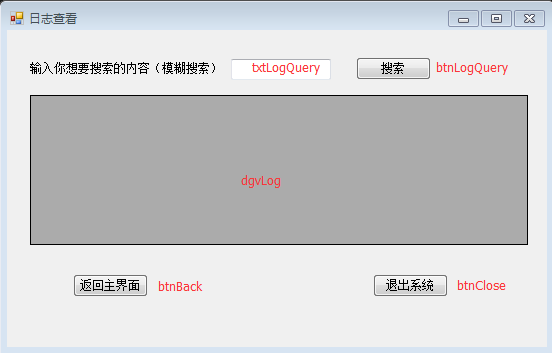
详细代码如下:
 using System;

 using System.Collections.Generic;

 using System.ComponentModel;

 using System.Data;

 using System.Drawing;

 using System.Linq;

 using System.Text;

 using System.Threading.Tasks;

 using System.Windows.Forms;

 using System.Data.SqlClient;

 using System.Configuration;

 namespace 会员管理系统

 {

     public partial class VIPLog : Form

     {

         public VIPLog()

         {

             InitializeComponent();

         }

         //连接数据库字符串多次调用,放在外面省代码量

         public static string connstr = ConfigurationManager.ConnectionStrings["str"].ToString();

         private void btnClose_Click(object sender, EventArgs e)

         {

             //获取当前时间

             GetExitTime();

             //添加当前的用户信息到日志中

             AddMsg();

             //退出程序

             System.Environment.Exit();

         }

         private void btnBack_Click(object sender, EventArgs e)

         {

             VIPMain vm = new VIPMain();

             vm.Show();

             this.Hide();

         }

         private void VIPLog_Load(object sender, EventArgs e)

         {

             //AddMsg();

             ShowMsg();

         }

         //写一个窗体加载自动从数据库获取数据并显示在datagridview的方法

         public void ShowMsg()

         {

             //连接数据库对象

             SqlConnection conn = new SqlConnection(connstr);

             string sql = "select [id] 编号,vName 名字,situation 状态,[time] 登录或退出时间,vtype 权限 from [log]";

             //操作数据库对象

             SqlCommand cmd = new SqlCommand(sql, conn);

             //创建表对象

             DataTable dt = new DataTable();

             //创建数据库填充操作对象(语句)

             SqlDataAdapter sda = new SqlDataAdapter(cmd);

             //把数据填充进dt表中

             sda.Fill(dt);

             //指定dgvManager控件的数据源:dt

             dgvLog.DataSource = dt;

         }

         //写一个窗体加载(或者退出)自动添加当前用户登录信息进数据库的方法

         public void AddMsg()

         {

             //连接数据库对象

             SqlConnection conn = new SqlConnection(connstr);

             string sql = string.Format("insert into [Log](vName,situation,time) values('{0}','{1}','{2}')",VIPLogin.uid,VIPLogin.situation,VIPLogin.time);

             //操作数据库对象

             SqlCommand cmd = new SqlCommand(sql,conn);

             //打开数据库连接

             conn.Open();

             //执行操作数据库对象并返回受影响条数

             int n = cmd.ExecuteNonQuery();

             //关闭数据库连接

             conn.Close();

         }

         //写一个获取当前系统时间的方法(退出时间)

         //退出时顺手修改登录状态

         public void GetExitTime()

         {

             VIPLogin.time = DateTime.Now;

             VIPLogin.situation = "退出";

         }

         //日志查询

         private void btnLogQuery_Click(object sender, EventArgs e)

         {

             //初始化 showSql语句

             string sql = "";

             //如果文本框txtQuery 输入的内容为空值

             if (txtLogQuery.Text.Trim() == "")

             {

                 //显示所有数据

                 sql = "select * from [log]";

             }

             else

             {

                 //否则 进行 全局搜索 将文本框里的内容与 各字段 进行 匹配

                 sql = "select * from [Log] where [id] like '%" + txtLogQuery.Text.Trim() + "%' or vname like '%" + txtLogQuery.Text.Trim() + "%' or situation like '%" + txtLogQuery.Text.Trim() + "%' or [time] like '%" + txtLogQuery.Text.Trim() + "%' or vtype like '%" + txtLogQuery.Text.Trim() + "%'";

             }

             SqlConnection conn = new SqlConnection(connstr);

             SqlCommand cmd = new SqlCommand(sql, conn);

             conn.Open();

             DataTable dt = new DataTable();

             SqlDataAdapter sda = new SqlDataAdapter(cmd);

             sda.Fill(dt);

             dgvLog.DataSource = dt;

         }

     }

 }
C#_会员管理系统:开发六(数据搜索)的更多相关文章
- C#_会员管理系统:开发七(用户分类)
登录界面(VIPLogin.cs)详细代码: using System; using System.Collections.Generic; using System.ComponentModel; ...
- C#_会员管理系统:开发八(权限分配)
数据库设计 这里由于增加了普通用户权限值,我们需要对数据库结构稍作修改.这里在MovieAccount表中增加4列内容 分别用于 RightFManager 判断普通用户管理界面权限 ...
- C#_会员管理系统:开发四(日志查看)
新建一个日志查看窗体: 日志需要的登录时间和登录状态信息由用户刚登录程序时就提供,所以在登录窗体(VIPLogin.cs)中添加代码: //定义一个全局变量 Uid; //用于获取登录成功后的用户名 ...
- C#_会员管理系统:开发三(修改密码)
为以后多个功能界面考虑,新增一个主界面: 主界面如下: 主界面(VIPMain.cs)详细代码如下: using System; using System.Collections.Generic; u ...
- C#_会员管理系统:开发二(会员资料管理界面的‘增删改查’)
会员资料管理界面: 新建一个窗体,窗体界面和控件如下: 窗体中的控件dgvManager更改FullRowSelect属性(点击选中效果)为:FullRowSelect 会员资料管理界面窗体的详细代码 ...
- C#_会员管理系统:开发一(用户登录)
首先创建数据库: [Vip] 创建三张表: 分别是: [VipInformation](会员信息) [Log](日志) [VipAccount](账户权限) 详细语句: --创建数据库[Vip] cr ...
- C#_会员管理系统:开发五(用户注册)
创建一个新的用户注册窗体(VIPRegistration.cs): 用户注册窗体(VIPRegistration.cs)详细代码如下: using System; using System.Colle ...
- C#_会员管理系统
https://www.cnblogs.com/start-from-scratch/p/5420588.html
- 会员管理系统的设计和开发(2)-- RDLC报表的设计及动态加载
在上篇<会员管理系统的设计和开发(1)>介绍了关于会员系统的一些总体设计思路和要点,经过一段时间开发,软件终于完成并发布.在这期间,碰到了不少技术难点,并积累了不少开发心得和经验,本篇继续 ...
随机推荐
- centos7 环境搭建
centos7 环境搭建 CentOS-7-x86_64-DVD-1511.iso vmware121. 安装 使用iso安装系统:2. 修改yum源到光盘 先把光盘C ...
- MySqlQueryList
//辅助查询列表,或实例 public class MySqlQueryList { #region List<T> ToList<T>(string sql, params ...
- Python学习笔记 (3) :列表、元组的操作
列表,即写在方括号之间.用逗号分隔开的数值列表.列表内的项目不必全是相同的类型. >>> a = ['spam', 'eggs', 100, 1234] >>> a ...
- [LeetCode]题解(python):134-Gas Station
题目来源: https://leetcode.com/problems/gas-station/ 题意分析: 在一个圈子路线里面有N个汽油站,i站的汽油有gas[i]汽油.现在有一辆无限容量的车,它从 ...
- Delphi中使用TXMLDocument控件应注意的问题
今天写了一个类,其中用到了TXMLDocument控件.这个控件我是要动态生成的. 但是却遇到了非常奇怪的问题,下面分享一下 procedure TMainForm.Button1Click(Send ...
- C#使用WinAPI 修改电源设置,临时禁止笔记本合上盖子时睡眠
原文 http://www.cnblogs.com/h46incon/archive/2013/09/03/3299138.html 在 阻止系统自动睡眠的小软件,附C#制作过程 ,弄了一个防止系统睡 ...
- ThinkPHP 3.1.2 视图-1
一.模板的使用 (重点) a.规则 模板文件夹下[TPL]/[分组文件夹/][模板主题文件夹/]和模块名同名的文件夹[Index]/和方法名同名的文件 [index].html(.tpl) 更换模板文 ...
- Flex 按钮添加图标
第一种是在Flex应用中创建一个变量,利用[Bindable]和[Embed] ,在代码中以参数形式传入制定图标(icon)的路径,然后利用类似icon="{Icon}"的代码嵌入 ...
- Java-线程间通信
Java-线程间通信 一 线程通讯 就是多个线程操作同一个资源,可是操作的动作不同 二 停止线程: 控制住run的循环就能够控制线程结束 当线程处于冻结状态,就不会读取标记,线程就不会结束 inter ...
- struts2自己定义类型转换器
1.1. struts2自己定义类型转换器 1) 自定类型转换类,继承DefaultTypeConverter类 package com.morris.ticket.conversio ...