
ES 7.8 速成笔记(中)
接上篇继续,本篇主要研究如何查询
一、sql方式查询
习惯于数据库开发的同学,自然最喜欢这种方式。为了方便讲解,先写一段代码,生成一堆记录
package com.cnblogs.yjmyzz;

import java.io.IOException;

import java.net.URI;

import java.net.URISyntaxException;

import java.net.http.HttpClient;

import java.net.http.HttpRequest;

import java.net.http.HttpResponse;

public class Test {

    public static void main(String[] args) throws IOException, URISyntaxException, InterruptedException {

        HttpClient httpClient = HttpClient.newBuilder().build();

        for (int i = 1000000; i < 2000000; i++) {

            HttpRequest httpRequest = HttpRequest.newBuilder()

                    .header("Content-Type", "application/json")

                    .version(HttpClient.Version.HTTP_1_1)

                    .uri(new URI("http://localhost:9200/cnblogs/_doc/" + i))

                    .POST(HttpRequest.BodyPublishers.ofString("{\n" +

                            "   \"blog_id\":" + i + ",\n" +

                            "   \"blog_title\":\"java并发编程(" + i + ")\",\n" +

                            "   \"blog_content\":\"java并发编程学习笔记" + i + "-by 菩提树下的杨过\",\n" +

                            "   \"blog_category\":\"java\"\n" +

                            "}")).build();

            HttpResponse<String> response = httpClient.send(httpRequest, HttpResponse.BodyHandlers.ofString());

            System.out.println(response.toString() + "\t" + i);

        }

    }

}
这里没借助任何第3方类库,仅用jdk 11自带的HttpClient向ES添加100w条记录,插入后数据大致长这样
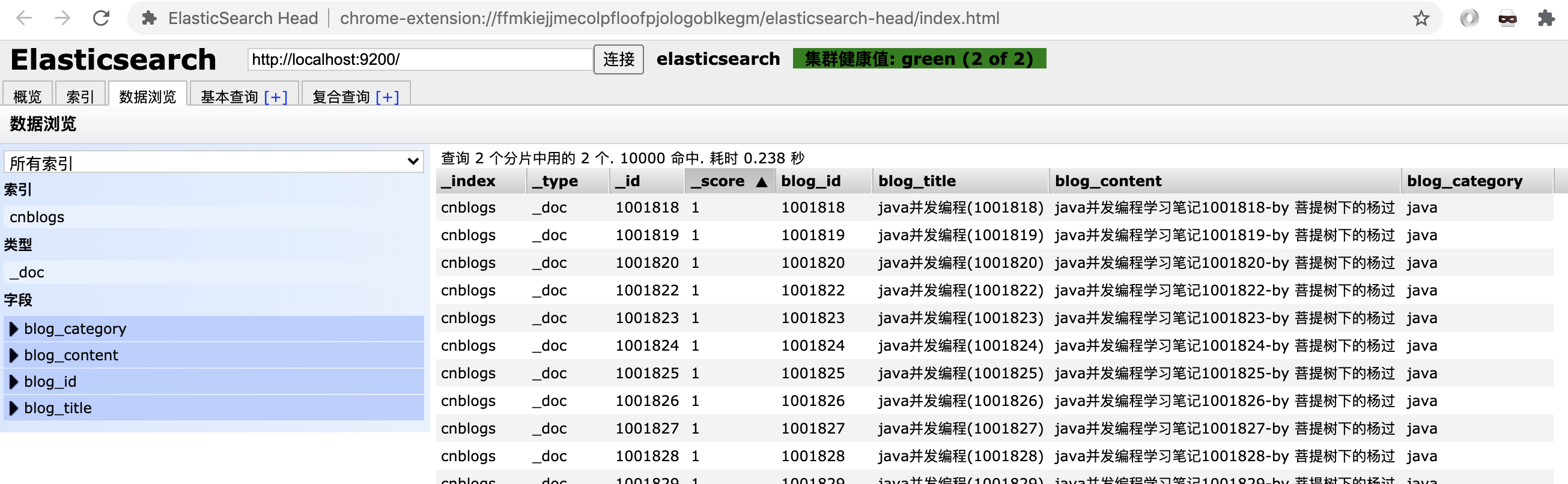
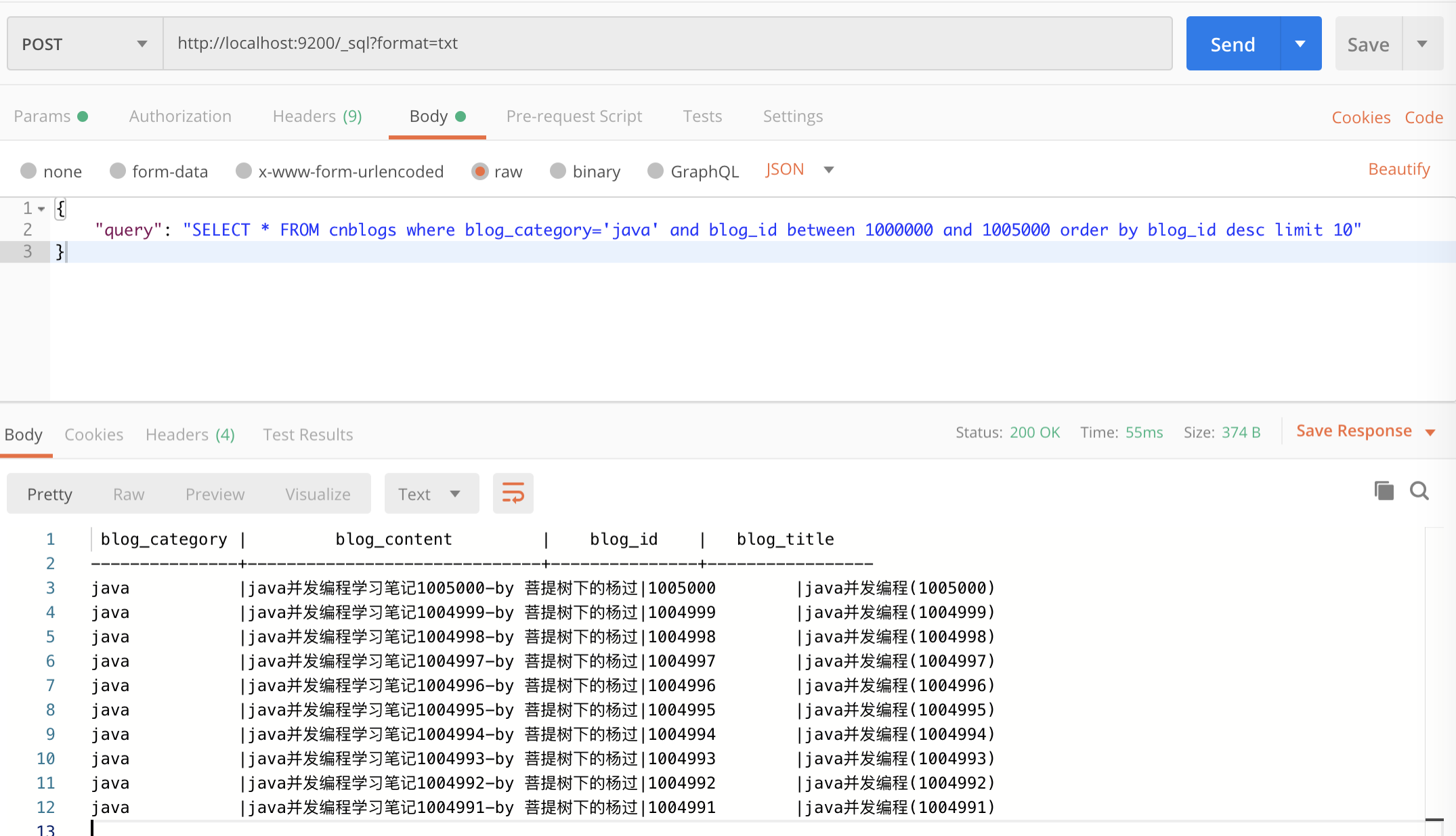
如果想用sql取前10条,可以这样:
POST http://localhost:9200/_sql?format=txt
{

    "query": "SELECT * FROM cnblogs where blog_category='java' and blog_id between 1000000 and 1005000 order by blog_id desc limit 10"

}
只要象查mysql一样,写sql就行了,非常方便。执行效果:
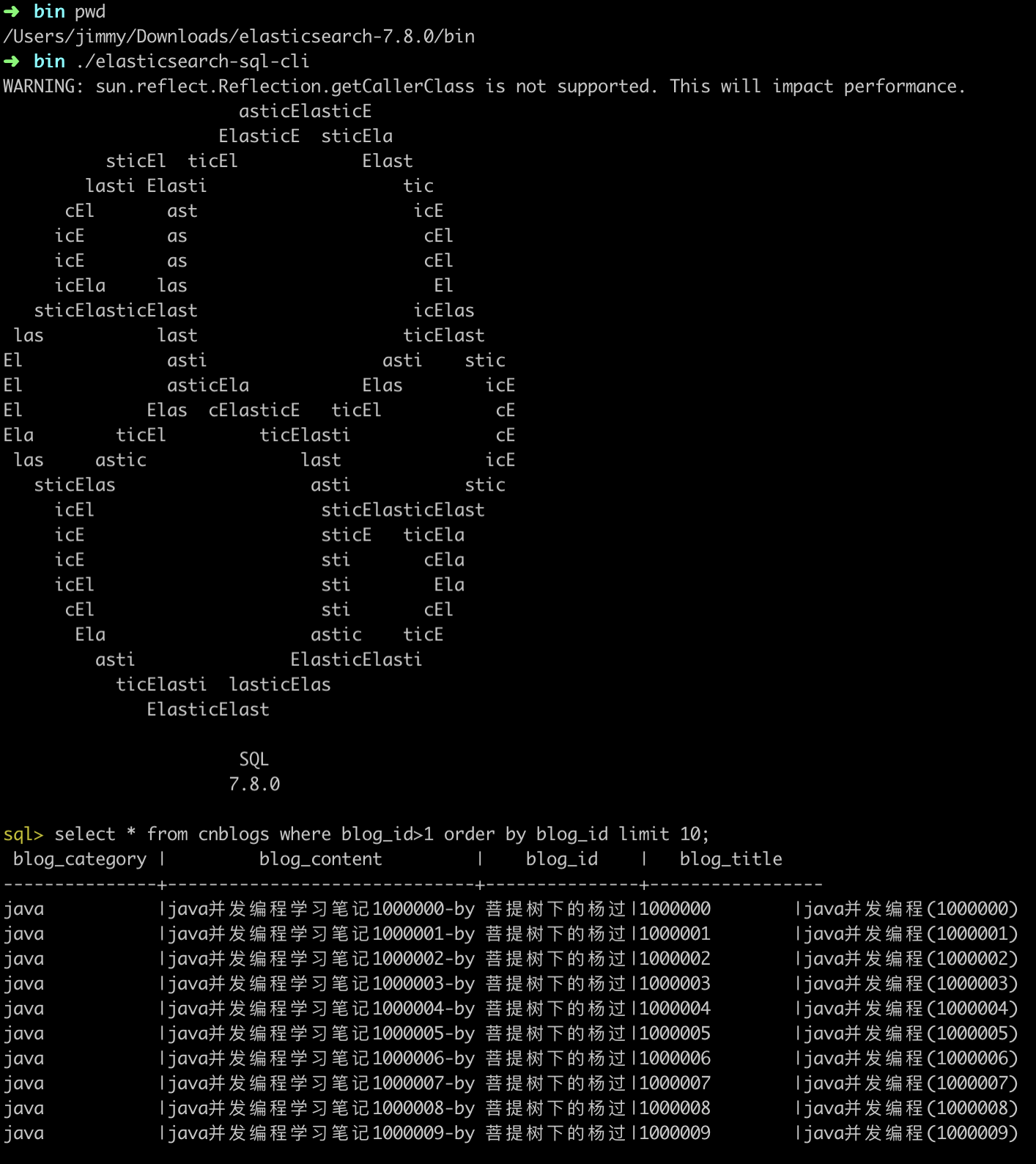
另外,es还提供了一个SQL的CLI,命令终端输入 ./elasticsearch-sql-cli 即可
更多SQL搜索的细节,可参考 https://www.elastic.co/guide/en/elasticsearch/reference/current/xpack-sql.html
二、URI简单搜索
2.1 根据内部_id精确搜索
GET http://localhost:9200/cnblogs/_doc/1001818
如果存在_id=1001818的数据,将返回
{

   "_index": "cnblogs",

   "_type": "_doc",

   "_id": "1001818",

   "_version": 1,

   "_seq_no": 954,

   "_primary_term": 1,

   "found": true,

   "_source": {

      "blog_id": 1001818,

      "blog_title": "java并发编程(1001818)",

      "blog_content": "java并发编程学习笔记1001818-by 菩提树下的杨过",

      "blog_category": "java"

   }

}
如果数据不存在,将返回404的http状态码。
tips: 如果不希望返回_xxx这一堆元数据,可以URI后面加上/_source,即:http://localhost:9200/cnblogs/_doc/1001818/_source,将返回
{

   "blog_id": 1001818,

   "blog_title": "java并发编程(1001818)",

   "blog_content": "java并发编程学习笔记1001818-by 菩提树下的杨过",

   "blog_category": "java"

}
另外有些大文本的字段,每次返回也比较消耗性能,如果只需要返回指定字段,可以这么做:
http://localhost:9200/cnblogs/_doc/1001818/_source/?_source=blog_id,blog_title
将只返回blog_id,blog_title这2列
2.2 利用_search?q搜索
GET http://localhost:9200/cnblogs/_search?q=blog_id:1001818
这表示搜索blog_id为1001818的记录
更多搜索细节,可参考https://www.elastic.co/guide/en/elasticsearch/reference/current/search-search.html
三、DSL搜索
_search也支持POST复杂方式搜索,称为Query DSL,比如:取出第5条数据
POST http://localhost:9200/cnblogs/_search
{

  "size": 5,

  "from": 0

}
这跟mysql中的limit x,y 分页是类似效果,但是要注意的事,这种分页方式遇到偏移量大时,性能极低下,ES7.x默认会判断,如果超过10000,就直接返回错误了
比如:
{

  "size": 5,

  "from": 10000

}
会返回:
{

    "error": {

        "root_cause": [

            {

                "type": "illegal_argument_exception",

                "reason": "Result window is too large, from + size must be less than or equal to: [10000] but was [10005]. See the scroll api for a more efficient way to request large data sets. This limit can be set by changing the [index.max_result_window] index level setting."

            }

        ],

        "type": "search_phase_execution_exception",

        "reason": "all shards failed",

        "phase": "query",

        "grouped": true,

        "failed_shards": [

            {

                "shard": 0,

                "index": "cnblogs",

                "node": "TZ_qYEMOSZ63E1HMl4lFfA",

                "reason": {

                    "type": "illegal_argument_exception",

                    "reason": "Result window is too large, from + size must be less than or equal to: [10000] but was [10005]. See the scroll api for a more efficient way to request large data sets. This limit can be set by changing the [index.max_result_window] index level setting."

                }

            }

        ],

        "caused_by": {

            "type": "illegal_argument_exception",

            "reason": "Result window is too large, from + size must be less than or equal to: [10000] but was [10005]. See the scroll api for a more efficient way to request large data sets. This limit can be set by changing the [index.max_result_window] index level setting.",

            "caused_by": {

                "type": "illegal_argument_exception",

                "reason": "Result window is too large, from + size must be less than or equal to: [10000] but was [10005]. See the scroll api for a more efficient way to request large data sets. This limit can be set by changing the [index.max_result_window] index level setting."

            }

        }

    },

    "status": 400

}
利用DSL可以构造很复杂的查询,
比如:
POST http://localhost:9200/cnblogs/_search
{

  "query": {

    "bool": {

      "must": [

        {

          "range": {

            "blog_id": {

              "gte": 1001818,

              "lte": 1001830

            }

          }

        },

        {

          "match": {

            "blog_category": "java"

          }

        }

      ]

    }

  },

  "size": 10,

  "from": 0

}
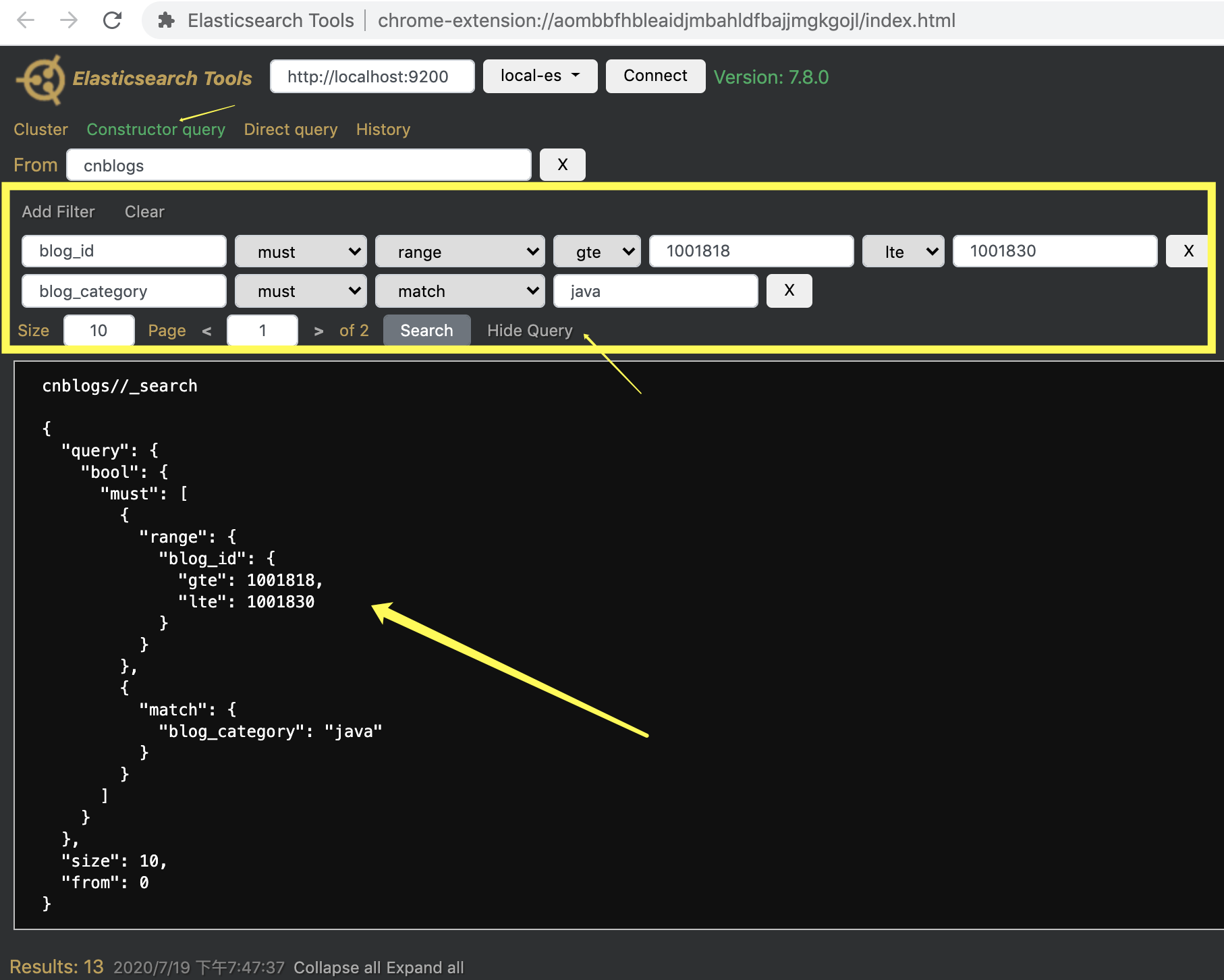
翻译成sql的话,等价于 blog_id between 1001818 and 10001830 and blog_category='java' limit 0,10
DSL不建议死记,可以通过Elasticsearch Tools以可视化方式生成
另外还可以通过highlight来让匹配的结果,相应的关键字高亮显示
{

    "query": {

        "bool": {

            "must": [

                {

                    "match": {

                        "blog_title": "并发 ES"

                    }

                }

            ]

        }

    },

    "highlight": {

        "fields": {

            "blog_title": {}

        }

    },

    "size": "1",

    "from": 0

}
返回结果:
{

    "took": 63,

    "timed_out": false,

    "_shards": {

        "total": 2,

        "successful": 2,

        "skipped": 0,

        "failed": 0

    },

    "hits": {

        "total": {

            "value": 10000,

            "relation": "gte"

        },

        "max_score": 9.87141,

        "hits": [

            {

                "_index": "cnblogs",

                "_type": "_doc",

                "_id": "1",

                "_score": 9.87141,

                "_source": {

                    "blog_id": 10000001,

                    "blog_title": "ES 7.8速成笔记(新标题)",

                    "blog_content": "这是一篇关于ES的测试内容by 菩提树下的杨过",

                    "blog_category": "ES"

                },

                "highlight": {

                    "blog_title": [

                        "<em>ES</em> 7.8速成笔记(新标题)"

                    ]

                }

            }

        ]

    }

}
多出的highlight中,匹配成功的关键字,会有em标识。
指定排序(sort)
{

    "query": {

        "bool": {

            "must": [

                {

                    "match": {

                        "blog_title": "并发 ES"

                    }

                }

            ]

        }

    },

    "highlight": {

        "fields": {

            "blog_title": {}

        }

    },

    "sort": [

        {

            "blog_id": {

                "order": "desc"

            }

        }

    ],

    "size": "1",

    "from": 0

}
注意sort部分,默认为asc升序。
聚合(group by)
{

  "aggs": {

    "all_interests": {

      "terms": {

        "field": "blog_category"

      }

    }

  },

  "size": 0,

  "from": 0

}
上述查询,类似sql中的 select count(0) from cnblogs group by blog_category 返回结果如下:
{

    "took": 1783,

    "timed_out": false,

    "_shards": {

        "total": 2,

        "successful": 2,

        "skipped": 0,

        "failed": 0

    },

    "hits": {

        "total": {

            "value": 10000,

            "relation": "gte"

        },

        "max_score": null,

        "hits": []

    },

    "aggregations": {

        "all_interests": {

            "doc_count_error_upper_bound": 0,

            "sum_other_doc_count": 0,

            "buckets": [

                {

                    "key": "java",

                    "doc_count": 514666

                },

                {

                    "key": "ES",

                    "doc_count": 1

                },

                {

                    "key": "sql",

                    "doc_count": 1

                }

            ]

        }

    }

}
更多Query DSL细节,可参考文档https://www.elastic.co/guide/en/elasticsearch/reference/current/query-dsl.html
四、使用Client SDK查询
ES提供了2种客户端:elasticsearch-rest-client、elasticsearch-rest-high-level-client
4.1 elasticsearch-rest-client
pom依赖:
        <dependency>

            <groupId>com.google.code.gson</groupId>

            <artifactId>gson</artifactId>

            <version>2.8.6</version>

        </dependency>

        <dependency>

            <groupId>org.elasticsearch.client</groupId>

            <artifactId>elasticsearch-rest-client</artifactId>

            <version>7.8.0</version>

        </dependency>
示例代码:
package com.cnblogs.yjmyzz;

import com.google.gson.Gson;

import com.google.gson.GsonBuilder;

import org.apache.http.HttpHost;

import org.apache.http.util.EntityUtils;

import org.elasticsearch.client.*;

import java.io.IOException;

import java.util.HashMap;

import java.util.Map;

public class EsClientTest {

    private static Gson gson = new GsonBuilder()

            .setPrettyPrinting()

            .setDateFormat("yyyy-MM-dd HH:mm:ss.SSS")

            .create();

    public static void main(String[] args) throws IOException {

        RestClientBuilder builder = RestClient.builder(new HttpHost("127.0.0.1", 9200, "http"));

        builder.setFailureListener(new RestClient.FailureListener() {

            @Override

            public void onFailure(Node node) {

                System.out.println("fail:" + node);

                return;

            }

        });

        RestClient client = builder.build();

        //简单的get查询示例

        Request request = new Request("GET", "/cnblogs/_doc/1001818/_source/?_source=blog_id,blog_title");

        request.addParameter("pretty", "true");

        Response response = client.performRequest(request);

        System.out.println(response.getRequestLine());

        System.out.println(response.getStatusLine());

        System.out.println(EntityUtils.toString(response.getEntity()));

        System.out.println("----------------");

        //post查询示例

        request = new Request("POST", "/cnblogs/_search/?_source=blog_id,blog_title");

        request.addParameter("pretty", "true");

        Map<String, Integer> map = new HashMap<>();

        map.put("size", 2);

        map.put("from", 0);

        request.setJsonEntity(gson.toJson(map));

        response = client.performRequest(request);

        System.out.println(response.getRequestLine());

        System.out.println(response.getStatusLine());

        System.out.println(EntityUtils.toString(response.getEntity()));

    }

}
4.2 elasticsearch-rest-high-level-client
pom依赖:
        <dependency>

            <groupId>org.elasticsearch.client</groupId>

            <artifactId>elasticsearch-rest-high-level-client</artifactId>

            <version>7.8.0</version>

        </dependency>
示例代码:
package com.cnblogs.yjmyzz;

import com.google.gson.Gson;

import com.google.gson.GsonBuilder;

import org.apache.http.HttpHost;

import org.elasticsearch.action.get.GetRequest;

import org.elasticsearch.action.get.GetResponse;

import org.elasticsearch.action.search.SearchRequest;

import org.elasticsearch.action.search.SearchResponse;

import org.elasticsearch.client.*;

import org.elasticsearch.index.query.QueryBuilder;

import org.elasticsearch.index.query.QueryBuilders;

import org.elasticsearch.search.SearchHit;

import org.elasticsearch.search.builder.SearchSourceBuilder;

import java.io.IOException;

public class EsClientHighLevelTest {

    public static void main(String[] args) throws IOException {

        RestClientBuilder builder = RestClient.builder(new HttpHost("127.0.0.1", 9200, "http"));

        builder.setFailureListener(new RestClient.FailureListener() {

            @Override

            public void onFailure(Node node) {

                System.out.println("fail:" + node);

                return;

            }

        });

        RestHighLevelClient client = new RestHighLevelClient(builder);

        //简单的get查询示例

        GetRequest request = new GetRequest("cnblogs", "1001818");

        GetResponse response = client.get(request, RequestOptions.DEFAULT);

        System.out.println(response.getSourceAsString());

        //search示例

        SearchRequest searchRequest = new SearchRequest("cnblogs");

        SearchSourceBuilder sourceBuilder = new SearchSourceBuilder();

        sourceBuilder.query(QueryBuilders.matchQuery("blog_title", "并发 笔记"));

        sourceBuilder.from(0);

        sourceBuilder.size(5);

        searchRequest.source(sourceBuilder);

        SearchResponse searchResponse = client.search(searchRequest, RequestOptions.DEFAULT);

        for (SearchHit hit : searchResponse.getHits()) {

            System.out.println(hit.getSourceAsString());

        }

        client.close();

    }

}
ES 7.8 速成笔记(中)的更多相关文章
- pyqt样式表语法笔记(中)--原创
pyqt样式表语法笔记(中) pyqt QSS python 样式表 一.弹窗 在日常的各种桌面软件的使用中,我们都会碰到弹窗.例如注册,登录的时候,会有相应的信息弹窗,这里就以信息收集弹窗为例进行弹 ...
- pyqt样式表语法笔记(中)
pyqt样式表语法笔记(中) pyqt QSS python 样式表 一.弹窗 在日常的各种桌面软件的使用中,我们都会碰到弹窗.例如注册,登录的时候,会有相应的信息弹窗,这里就以信息收集弹窗为例进行弹 ...
- 在为知笔记中使用Markdown和思维导图
为知笔记Wiz是一款很好的网摘和笔记工具,作为为知的忠实用户,我在为知收费后第一时间就购买了两年的授权,毕竟这么多年积累的资料都在为知上,我也习惯了使用Wiz来做些工作相关的笔记.为知笔记自带Mark ...
- 菜鸟教程之学习Shell script笔记(中)
菜鸟教程Shell script学习笔记(中) 以下内容是学习菜鸟教程之shell教程,所整理的笔记 菜鸟教程之shell教程:http://www.runoob.com/linux/linux-sh ...
- OpenGL ES SL 3.0规范中以前的attribute改成了in varying改成了out
OpenGL ES和OpenGL的图标 关于“OpenGL ES SL 3.0规范中以前的attribute改成了in varying改成了out”这个问题,做一阐述: 1.关键字的小修 ...
- Zookeeper学习笔记(中)
Zookeeper学习笔记(中) Zookeeper的基本原理和基本实现 深入了解ZK的基本原理 ZK的一致性: ZAB 协议: Zookeeper 原子消息广播协议 ZK通过选举保证 leader ...
- 黑马程序员----java基础笔记中(毕向东)
<p>------<a href="http://www.itheima.com" target="blank">Java培训.Andr ...
- 在为知笔记中使用JQuery
为知笔记很好用,深得我心.原来还有一点想法,创建一些自己的模板,用的更加深入一些.后来发现,必要性不大,笔记自带的功能足够满足大多数的需求,如果画蛇添足,反而不利于跨电脑,跨平台使用. 不过近期又有一 ...
- 【ES】elasticsearch学习笔记
ES学习 1 优势 1.1 简单 1.1.1 相比Solor配置部署等非常简单 1.2 高效 1.2.1 ES使用Netty作为内部RPC框架,Solor使用Jetty 1.3 插件化 1.3.1 E ...
- 【C++ OpenGL ES 2.0编程笔记】8: 使用VBO和IBO绘制立方体 【转】
http://blog.csdn.net/kesalin/article/details/8351935 前言 本文介绍了OpenGL ES 2.0 中的顶点缓冲对象(VBO: Vertex Buff ...
随机推荐
- 119K star!无需GPU轻松本地部署多款大模型,DeepSeek支持!这个开源神器绝了
嗨,大家好,我是小华同学,关注我们获得"最新.最全.最优质"开源项目和高效工作学习方法 "只需一行命令就能在本地运行Llama 3.DeepSeek-R1等前沿大模型,支 ...
- CLion打开VS创建的GBK编码格式的项目中文乱码问题的解决方法
在 CLion 中设置 GBK 编码用于编译代码时,如果输出的 message 乱码,通常是由于控制台编码与代码文件的编码不匹配导致的.以下是解决问题的步骤: 1. 设置文件编码为 GBK 确保你的源 ...
- CF1930G Prefix Max Set Counting 题解
题意: 给定一棵以 1 为根的有根树,求出其所有 dfs 序中前缀最大值序列的数量.\(n\le 10^6\). 思路 显然考虑 DP. 由于是求前缀最大值序列的方案数,因此如果一些点要出现在这个序列 ...
- C#之System.Text.Json的用法
System.Text.Json 是 C# 中的一个 JSON 序列化和反序列化库,它在 .NET Core 3.0 及更高版本中提供了内置支持.以下是 System.Text.Json 的用法详解: ...
- 全网最全!1500+ 免费、美观的前端网页模板,建站神器(包括HTML、Vue、Angular、React等)!
前言 经常有小伙伴问我 Vue.React.Bootstrap 或者 Angular 这些有好看且免费的前端模板推荐的吗?今天大姚给大家分享一个宝藏网站,它汇聚了1500+ 免费.美观的前端网页模板, ...
- 万字长文: 仅花7天,利用AI编程神器Cursor 从0到1开发上线个人网站,保姆级教程!
大家好,我是狂师. 今天我们来分享一下,如何利用AI编程帮助我们开发一款个人定制网站,保姆级教程,篇符较长,建议先保存收藏. 这篇文章,将从0到1,讲解如何利用AI编程开发并上线一款个人网站产品,包括 ...
- java 腾讯云、阿里云SMS短信工具类
引入POM依赖 <!-- 腾讯云SMS SDK --> <dependency> <groupId>com.tencentcloudapi</groupId& ...
- C#获得项目最后编译时间
C#获得项目最后编译时间 效果 具体格式可以自定义 核心代码 string GetCompileVersion() { string OriginVersion = "" + Sy ...
- MVVM - Model和ViewModel的创建和配置
MVVM-Model和ViewModel的创建和配置 本文同时为b站WPF课程的笔记,相关示例代码 简介 MVVM:Model-View-ViewModel,是一种软件架构的模式.通过引入一个中间层V ...
- 什么?AI还是儿童百科全书呢
本文由 ChatMoney团队出品 介绍说明 在孩子充满好奇与探索欲望的成长道路上,知识是他们最宝贵的财富.而我们的儿童百科全书智能体,就像一座知识的宝库,为孩子们打开了一扇通往世界的神奇大门. 儿童 ...