
requests基本应用
requests基本功能详解
import requests

response = requests.get('https://www.baidu.com')

print('type属性:',type(response))

print('Status Code: ',response.status_code)

print(type(response.text))

print('Response Headers:',response.headers)

print(response.text)

print('content:',response.content)

print(response.content.decode('utf-8'))

print('cookies:',response.cookies)
很多情况下的网站如果直接response.text会出现乱码的问题,所以这个使用response.content,
这样返回的数据格式其实是二进制格式,然后通过decode()转换为utf-8,这样就解决了通过response.text直接返回显示乱码的问题.。
还有一种通过encoding="utf-8"来解决response.text乱码问题。
response =requests.get("http://www.baidu.com")

response.encoding="utf-8"

print(response.text)
不管是通过response.content.decode("utf-8)的方式还是通过response.encoding="utf-8"的方式都可以避免乱码的问题发生
常用的请求方式
- get请求方式
import requests

# get带参请求

response = requests.get("http://httpbin.org/get?name=zhaofan&age=23")

print(response.text)

data = {

    'name':'zhaofan',

    'age':'23'

}

# params关键字传递参数,已一个字典传递这些参数

response1 = requests.get('http://httpbin.org/get',params=data)

print(response1.url)

print(response1.text)
上述两种的结果是相同的,通过params参数传递一个字典内容,从而直接构造url
注意:第二种方式通过字典的方式的时候,如果字典中的参数为None则不会添加到url上
- post带参请求
import requests

data = {

    "name":"zhaofan",

    "age":23

}

response = requests.post("http://httpbin.org/post",data=data)

print(response.text)
同样的在发送post请求的时候也可以和发送get请求一样通过headers参数传递一个字典类型的数据
- 响应
我们可以通过response获得很多属性,举个栗子:
import requests

response = requests.get("http://www.baidu.com")

print(type(response.status_code),response.status_code)

print(type(response.headers),response.headers)

print(type(response.cookies),response.cookies)

print(type(response.url),response.url)

print(type(response.history),response.history)
运行结果如下:
<class 'int'> 200

<class 'requests.structures.CaseInsensitiveDict'> {'Cache-Control': 'private, no-cache, no-store, proxy-revalidate, no-transform', 'Connection': 'Keep-Alive', 'Content-Encoding': 'gzip', 'Content-Type': 'text/html', 'Date': 'Tue, 02 Apr 2019 03:58:51 GMT', 'Last-Modified': 'Mon, 23 Jan 2017 13:28:36 GMT', 'Pragma': 'no-cache', 'Server': 'bfe/1.0.8.18', 'Set-Cookie': 'BDORZ=27315; max-age=86400; domain=.baidu.com; path=/', 'Transfer-Encoding': 'chunked'}

<class 'requests.cookies.RequestsCookieJar'> <RequestsCookieJar[<Cookie BDORZ=27315 for .baidu.com/>]>

<class 'str'> http://www.baidu.com/

<class 'list'> []

Process finished with exit code 0
- 状态码判断
Requests还附带了一个内置的状态码查询对象
主要有如下内容:
100: ('continue',),
101: ('switching_protocols',),
102: ('processing',),
103: ('checkpoint',),
122: ('uri_too_long', 'request_uri_too_long'),
200: ('ok', 'okay', 'all_ok', 'all_okay', 'all_good', '\o/', '✓'),
201: ('created',),
202: ('accepted',),
203: ('non_authoritative_info', 'non_authoritative_information'),
204: ('no_content',),
205: ('reset_content', 'reset'),
206: ('partial_content', 'partial'),
207: ('multi_status', 'multiple_status', 'multi_stati', 'multiple_stati'),
208: ('already_reported',),
226: ('im_used',),
Redirection.
300: ('multiple_choices',),
301: ('moved_permanently', 'moved', '\o-'),
302: ('found',),
303: ('see_other', 'other'),
304: ('not_modified',),
305: ('use_proxy',),
306: ('switch_proxy',),
307: ('temporary_redirect', 'temporary_moved', 'temporary'),
308: ('permanent_redirect',
'resume_incomplete', 'resume',), # These 2 to be removed in 3.0
Client Error.
400: ('bad_request', 'bad'),
401: ('unauthorized',),
402: ('payment_required', 'payment'),
403: ('forbidden',),
404: ('not_found', '-o-'),
405: ('method_not_allowed', 'not_allowed'),
406: ('not_acceptable',),
407: ('proxy_authentication_required', 'proxy_auth', 'proxy_authentication'),
408: ('request_timeout', 'timeout'),
409: ('conflict',),
410: ('gone',),
411: ('length_required',),
412: ('precondition_failed', 'precondition'),
413: ('request_entity_too_large',),
414: ('request_uri_too_large',),
415: ('unsupported_media_type', 'unsupported_media', 'media_type'),
416: ('requested_range_not_satisfiable', 'requested_range', 'range_not_satisfiable'),
417: ('expectation_failed',),
418: ('im_a_teapot', 'teapot', 'i_am_a_teapot'),
421: ('misdirected_request',),
422: ('unprocessable_entity', 'unprocessable'),
423: ('locked',),
424: ('failed_dependency', 'dependency'),
425: ('unordered_collection', 'unordered'),
426: ('upgrade_required', 'upgrade'),
428: ('precondition_required', 'precondition'),
429: ('too_many_requests', 'too_many'),
431: ('header_fields_too_large', 'fields_too_large'),
444: ('no_response', 'none'),
449: ('retry_with', 'retry'),
450: ('blocked_by_windows_parental_controls', 'parental_controls'),
451: ('unavailable_for_legal_reasons', 'legal_reasons'),
499: ('client_closed_request',),
Server Error.
500: ('internal_server_error', 'server_error', '/o\', '✗'),
501: ('not_implemented',),
502: ('bad_gateway',),
503: ('service_unavailable', 'unavailable'),
504: ('gateway_timeout',),
505: ('http_version_not_supported', 'http_version'),
506: ('variant_also_negotiates',),
507: ('insufficient_storage',),
509: ('bandwidth_limit_exceeded', 'bandwidth'),
510: ('not_extended',),
511: ('network_authentication_required', 'network_auth', 'network_authentication'),
通过下面例子测试:(不过通常还是通过状态码判断更方便)
import requests

response= requests.get("http://www.baidu.com")

if response.status_code == requests.codes.ok:

    print("访问成功")
- 解析json
import requests

import json

response = requests.get("http://httpbin.org/get")

print(type(response.text))

print(response.json())

print(json.loads(response.text))

print(type(response.json()))
从结果可以看出requests里面集成的json其实就是执行了json.loads()方法,两者的结果是一样的
- 获取二进制数据
在上面提到了response.content,这样获取的数据是二进制数据,同样的这个方法也可以用于下载图片以及
视频资源
- 添加headers
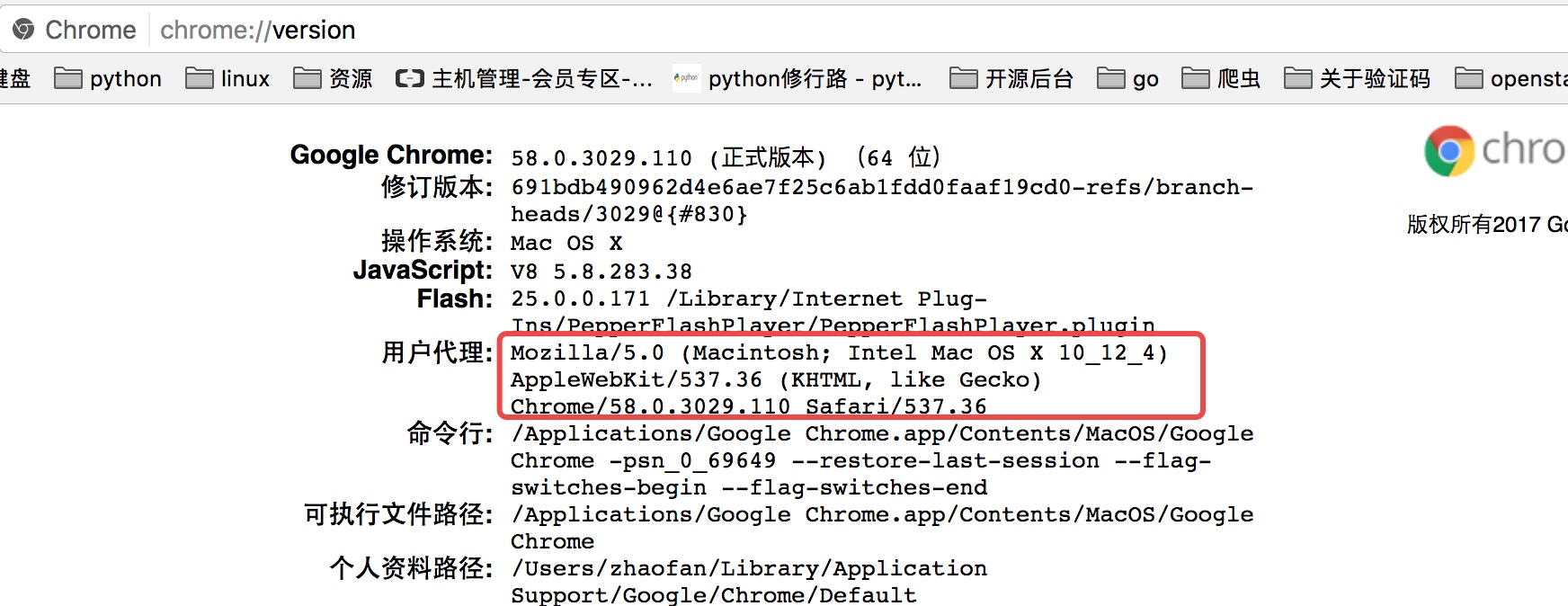
因为访问知乎需要头部信息,这个时候我们在谷歌浏览器里输入chrome://version,就可以看到用户代理,将用户代理添加到头部信息
import requests

headers = {

    "User-Agent":"Mozilla/5.0 (Macintosh; Intel Mac OS X 10_12_4) AppleWebKit/537.36 (KHTML, like Gecko) Chrome/58.0.3029.110 Safari/537.36"

}

response =requests.get("https://www.zhihu.com",headers=headers)

print(response.text)
这样就可以正常的访问知乎了
- 获取cookie
import requests

response = requests.get("http://www.baidu.com")

print(response.cookies)

for key,value in response.cookies.items():

    print(key+"="+value)
- 会话维持
cookie的一个作用就是可以用于模拟登陆,做会话维持
import requests

s = requests.Session()

s.get("http://httpbin.org/cookies/set/number/123456")

response = s.get("http://httpbin.org/cookies")

print(response.text)
通过创建一个session对象,两次请求都通过这个对象访问
- 证书验证
现在的很多网站都是https的方式访问,所以这个时候就涉及到证书的问题
import requests

response = requests.get("https:/www.12306.cn")

print(response.status_code)
默认的12306网站的证书是不合法的,这样就会提示如下错误
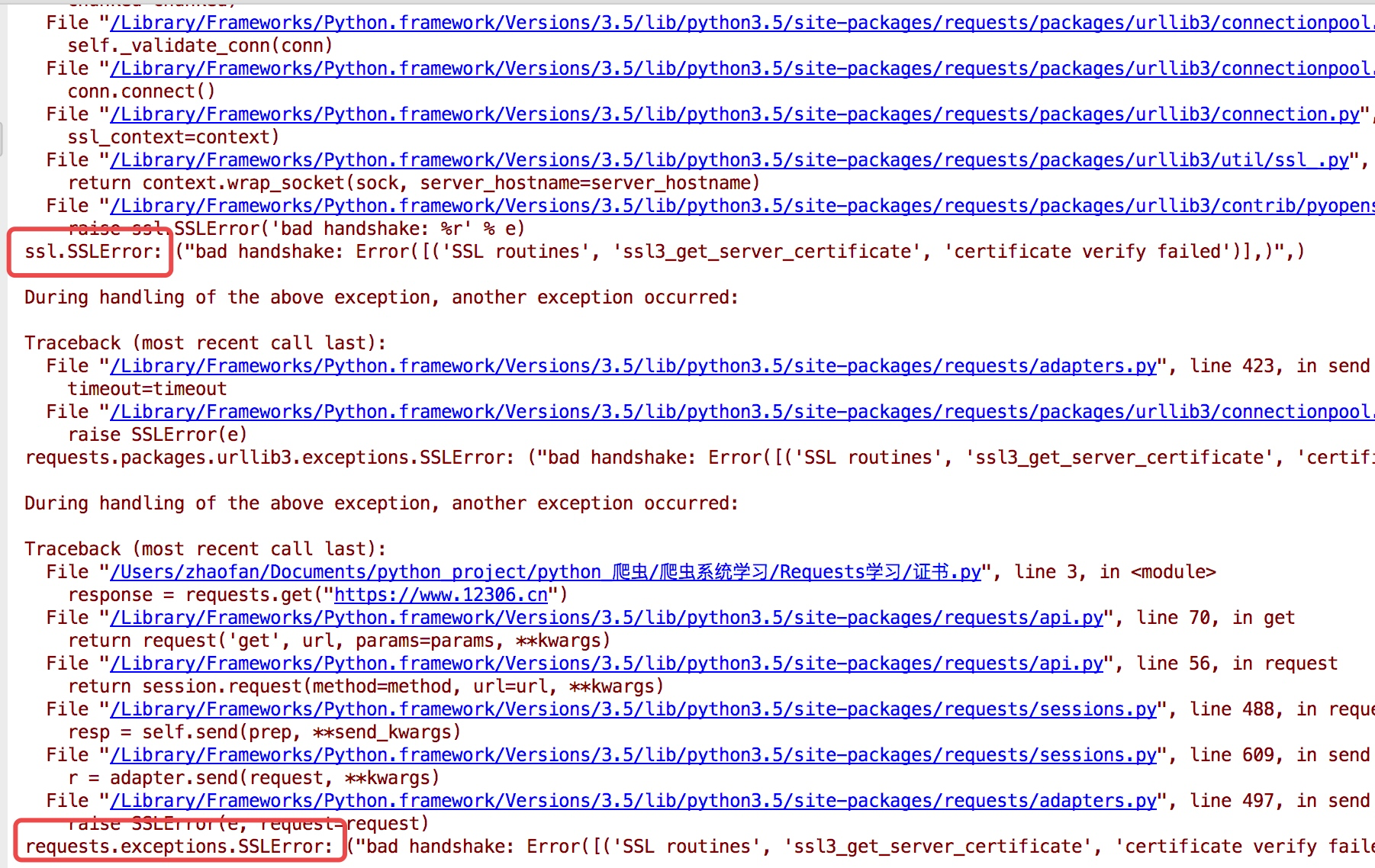
为了避免这种情况的发生可以通过verify=False
但是这样是可以访问到页面,但是会提示:
InsecureRequestWarning: Unverified HTTPS request is being made. Adding certificate verification is strongly advised. See: https://urllib3.readthedocs.io/en/latest/advanced-usage.html#ssl-warnings InsecureRequestWarning)
import requests

from requests.packages import urllib3

urllib3.disable_warnings()

response = requests.get("https://www.12306.cn",verify=False)

print(response.status_code)
这样就不会提示警告信息,当然也可以通过cert参数放入证书路径
- 代理设置
import requests

proxies= {

    "http":"http://127.0.0.1:9999",

    "https":"http://127.0.0.1:8888"

}

response  = requests.get("https://www.baidu.com",proxies=proxies)

print(response.text)
如果代理需要设置账户名和密码,只需要将字典更改为如下:
proxies = {
"http":"http://user:password@127.0.0.1:9999"
}
如果你的代理是通过sokces这种方式则需要pip install "requests[socks]"
proxies= {
"http":"socks5://127.0.0.1:9999",
"https":"sockes5://127.0.0.1:8888"
}
- 超时设置
通过timeout参数可以设置超时的时间
- 认证设置
如果碰到需要认证的网站可以通过requests.auth模块实现
import requests

from requests.auth import HTTPBasicAuth

response = requests.get("http://120.27.34.24:9001/",auth=HTTPBasicAuth("user","123"))

print(response.status_code)
当然这里还有一种方式
import requests

response = requests.get("http://120.27.34.24:9001/",auth=("user","123"))

print(response.status_code)
- 异常处理
关于reqeusts的异常在这里可以看到详细内容:
http://www.python-requests.org/en/master/api/#exceptions
所有的异常都是在requests.excepitons中
从源码我们可以看出RequestException继承IOError,
HTTPError,ConnectionError,Timeout继承RequestionException
ProxyError,SSLError继承ConnectionError
ReadTimeout继承Timeout异常
这里列举了一些常用的异常继承关系,详细的可以看:
http://cn.python-requests.org/zh_CN/latest/_modules/requests/exceptions.html#RequestException
通过下面的例子进行简单的演示
import requests

from requests.exceptions import ReadTimeout,ConnectionError,RequestException

try:

    response = requests.get("http://httpbin.org/get",timout=0.1)

    print(response.status_code)

except ReadTimeout:

    print("timeout")

except ConnectionError:

    print("connection Error")

except RequestException:

    print("error")
其实最后测试可以发现,首先被捕捉的异常是timeout,当把网络断掉的haul就会捕捉到ConnectionError,如果前面异常都没有捕捉到,最后也可以通过RequestExctption捕捉到
requests基本应用的更多相关文章
- requests的content与text导致lxml的解析问题
title: requests的content与text导致lxml的解析问题 date: 2015-04-29 22:49:31 categories: 经验 tags: [Python,lxml, ...
- requests源码阅读学习笔记
0:此文并不想拆requests的功能,目的仅仅只是让自己以后写的代码更pythonic.可能会涉及到一部分requests的功能模块,但全看心情. 1.另一种类的初始化方式 class Reques ...
- Python爬虫小白入门(二)requests库
一.前言 为什么要先说Requests库呢,因为这是个功能很强大的网络请求库,可以实现跟浏览器一样发送各种HTTP请求来获取网站的数据.网络上的模块.库.包指的都是同一种东西,所以后文中可能会在不同地 ...
- 使用beautifulsoup与requests爬取数据
1.安装需要的库 bs4 beautifulSoup requests lxml如果使用mongodb存取数据,安装一下pymongo插件 2.常见问题 1> lxml安装问题 如果遇到lxm ...
- python爬虫学习(6) —— 神器 Requests
Requests 是使用 Apache2 Licensed 许可证的 HTTP 库.用 Python 编写,真正的为人类着想. Python 标准库中的 urllib2 模块提供了你所需要的大多数 H ...
- ImportError: No module named 'requests'
补充说明: 当前环境是在windows环境下 python版本是:python 3.4. 刚开始学习python,一边看书一边论坛里阅读感兴趣的代码, http://www.oschina.net/c ...
- Python-第三方库requests详解
Requests 是用Python语言编写,基于 urllib,采用 Apache2 Licensed 开源协议的 HTTP 库.它比 urllib 更加方便,可以节约我们大量的工作,完全满足 HTT ...
- Requests 乱码
当使用Requests请求网页时,出现下面图片中的一些乱码,我就一脸蒙逼. 程序是这样的. def getLinks(articleUrl): headers = { "Uset-Agent ...
- 爬虫requests模块 2
会话对象¶ 会话对象让你能够跨请求保持某些参数.它也会在同一个 Session 实例发出的所有请求之间保持 cookie, 期间使用 urllib3 的 connection pooling 功能.所 ...
- 爬虫requests模块 1
让我们从一些简单的示例开始吧. 发送请求¶ 使用 Requests 发送网络请求非常简单. 一开始要导入 Requests 模块: >>> import requests 然后,尝试 ...
随机推荐
- 快速搭建一个vue开发环境
常规的搭建就是从npm到vue到webpack这样一个一个的来,这样一套下来说不上复杂但是也不简单.之前公司的vue后台项目 我还是写的轻车熟路的,因为前端同事已经把架子搭好了,环境配置的丝般顺滑,你 ...
- 【.Net】优秀的开源框架
AutoMapper 官网:http://automapper.org/ github:https://github.com/AutoMapper/AutoMapper 文档:http://autom ...
- IIS日志分析工具
发现一个强大的图形化IIS日志分析工具:Log Parser Studio. 安装 需要先安装Log Parser下载地址:http://www.microsoft.com/en-us/downloa ...
- MySQL学习基础知识2
1.基础语句 查 select(* | 字段名 | 四则运算 | 聚合函数) from 表名称; 加上as取别名 as可省略 如:select name, (math+english)/2 total ...
- <TCP/IP原理> (三) 底层网络技术
传输介质 局域网(LAN) 交换(Switching) 广域网(WAN) 连接设备 第三章 底层网络技术 引言 1)Interne不是一种新的网络 建立在底层网络上的网际网 底层网络——“物理网”,网 ...
- 洛谷 P2325 [SCOI2005]王室联邦
简化版题意: 一个国家由\(n\)个城市组成一颗树,要将其划分为\(n\)个省 每个城市大小为\([B,3B]\),每个省有一个省会(不一定要在省内),使得每个省的所有城市到省会的路径上不能经过其他省 ...
- mysql优化 | 存储引擎,建表,索引,sql的优化建议
个人对于选择存储引擎,建表,建索引,sql优化的一些总结,给读者提供一些参考意见 推荐访问我的个人网站,排版更好看: https://chenmingyu.top/mysql-optimize/ 存储 ...
- 用js提取字符串中的某一段字符
String.prototype.getQuery = function(name){var reg = new RegExp("(^|&)"+ name +"= ...
- .NET常用开发框架汇总
分布式缓存框架:Microsoft Velocity:微软自家分布式缓存服务框架.Memcahed:一套分布式的高速缓存系统,目前被许多网站使用以提升网站的访问速度.Redis:是一个高性能的KV数据 ...
- Windows下U盘管理程序
一个操作系统的作业,生成的程序需要使用管理员权限运行,参考了很多网上的代码,如果打开错误,请修改字符集为使用多字节字符集,并且调整为release模式. 作业的内容如下: 任务操作系统API应用体验与 ...