
php 基于tcpdf插件生成pdf
之前在公司做了个项目,,需要导出pdf合同,,在网上找了很久,选择用了tcpdf插件,,具体的插件网上可以搜到,中间遇到了很多的坑,慢慢的填。
先下好插件放到指定文件夹下
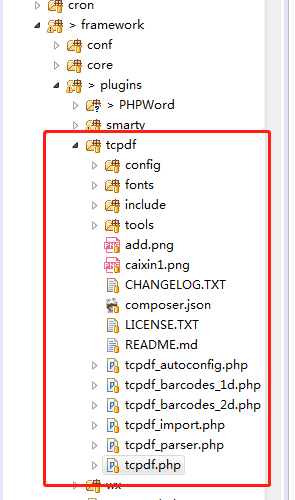
然后使用tcpdf插件里html生成pdf,,,不过有好多复杂html的样式tcpdf识别不了,,,简单点的可以。
require_once(FW_PATH.'/plugins/tcpdf/tcpdf.php');
class Controller_Pdf_Gps extends Controller_Base {

/**

*

* @param string $html

* @param string $title

* @author wy

*/

public function actionWriteToPdf(){

$contractCarrentId = isset($_REQUEST['contract_carrent_id']) ? $_REQUEST['contract_carrent_id'] : 0;

$productTypeId = isset($_REQUEST['product_type_id']) ? $_REQUEST['product_type_id'] : 0;

$didiType = isset($_REQUEST['didi_type']) ? $_REQUEST['didi_type'] : 0;//滴滴合同没有附件1、2标识, 用didi_type区分

//I,默认值,在浏览器中打开;D,PDF文件会被下载下来;F,文件会被保存在服务器中;S,PDF会以字符串形式输出;E:PDF以邮件的附件输出。

$title = isset($_REQUEST['title']) ? $_REQUEST['title'] : 'GPS安装确认及使用规则告知书';

$headerLogo = isset($_REQUEST['header_logo']) ? $_REQUEST['header_logo'] : 'caixin1.png';

$headerLogoWidth = isset($_REQUEST['header_logo_width']) ? $_REQUEST['header_logo_width'] : 30;

$headerTitle = isset($_REQUEST['header_title']) ? $_REQUEST['header_title'] : '';

$headerString = isset($_REQUEST['header_string']) ? $_REQUEST['header_string'] : ' 发过火发过火发过火有限公司';

if($contractCarrentId <= 0) {

return $this->error('合同(租车)ID错误');

}

if($productTypeId <= 0) {

return $this->error('产品类型ID错误');

}

//contract_carrent

$contractCarrent = Remote::instance()->get(CAIXIN_BASE_DOMIAN, 'contract/carrent/detail', array('contract_carrent_id' => $contractCarrentId));

if($contractCarrent['code'] != 200 || !isset($contractCarrent['data']['contract_carrent'])) {

return $this->error('获取合同(租车)信息错误');

}

$contractCarrent = $contractCarrent['data']['contract_carrent'];

//application_control

$appControl = Remote::instance()->get(CAIXIN_BASE_DOMIAN, 'application/control/detail', array('application_control_id' => $contractCarrent['application_control_id']));

if($appControl['code'] != 200 || !isset($appControl['data']['application_control'])) {

return $this->error('获取申请流程控制信息错误');

}

$appControl = $appControl['data']['application_control'];

$html = '';

$html = $this->personInfo($appControl, $title, $didiType);

if($html == '') {

return $this->error('获取不到转换页面');

}

$pdf = new TCPDF(PDF_PAGE_ORIENTATION, PDF_UNIT, PDF_PAGE_FORMAT, true, 'UTF-8', false);

$pdf->SetCreator(PDF_CREATOR);

$pdf->SetTitle($title); //设置文件的title

$pdf->SetHeaderData($headerLogo, $headerLogoWidth, $headerTitle, $headerString);//设置头部,比如header_logo,header_title,header_string及其属性

$pdf->setHeaderFont(Array(PDF_FONT_NAME_MAIN, '', PDF_FONT_SIZE_MAIN)); //设置页头字体

$pdf->setFooterFont(Array(PDF_FONT_NAME_DATA, '', PDF_FONT_SIZE_DATA)); //设置页尾字体

$pdf->setPrintHeader(true); //页面头部横线 false取消

$pdf->setPrintFooter(true); //页面底部更显 false取消

$pdf->SetDefaultMonospacedFont(PDF_FONT_MONOSPACED);

$pdf->SetMargins(PDF_MARGIN_LEFT, 13, PDF_MARGIN_RIGHT);

$pdf->SetHeaderMargin(0);

$pdf->SetFooterMargin(PDF_MARGIN_FOOTER);

$pdf->SetAutoPageBreak(false, PDF_MARGIN_BOTTOM);//自动分页

$pdf->setImageScale(PDF_IMAGE_SCALE_RATIO);

$pdf->AddPage();//增加一个页面

$pdf->setPageMark();

$pdf->SetFont('stsongstdlight', '', 13);

$pdf->writeHTML($html, true, true, true, true, '');

// $pdf->writeHTML($html, true, 0, true, true);

// $pdf->writeHTMLCell(0, 0, '', '', $html, 0, 1, 0, true, 'C', true);

$pdf->lastPage();

ob_end_clean();

//写入文件

$time = time();

$content = $pdf->Output($time.'.pdf', 'S');

if(in_array($productTypeId, array(4,5))) {

$category_path = WWW_ROOT.'/tmp_zip/合同'.$contractCarrentId.'/文件夹/文件名';

$file_path = WWW_ROOT.'/tmp_zip/合同'.$contractCarrentId.'/文件夹/文件名/'.$title.date('Ymd',time()).'.pdf';

}else if(in_array($productTypeId, array(6,7))) {

$category_path = WWW_ROOT.'/tmp_zip/合同'.$contractCarrentId.'/文件夹/文件名';

$file_path = WWW_ROOT.'/tmp_zip/合同'.$contractCarrentId.'/文件夹/文件名/'.$title.date('Ymd',time()).'.pdf';

}

if (!file_exists($category_path)){

mkdir($category_path,0777,true);

}

$fp = fopen($file_path,'w') or die("Unable to open file!");

fwrite($fp,$content);

fclose($fp);

return $this->output('ok');

}

以上有些业务。

/**

     * 个人

     * @author yxf

     */

    private function personInfo($appControl, $title, $didiType) {

        //门店

        $store = Remote::instance()->get(CAIXIN_BASE_DOMIAN, 'store/detail', array('store_id' => $appControl['store_id']));

        if($store['code'] != 200 || !isset($store['data']['store'])) {

            return $this->error('获取门店信息错误');

        }

        $store = $store['data']['store'];

        if($appControl['customer_type'] != 1) {

            return $this->error('客户性质错误');

        }

        //申请单(自然人)

        $appPerson = Remote::instance()->get(CAIXIN_BASE_Y_DOMIAN, 'applicationperson/detail', array('application_person_id' => $appControl['application_person_id']));

        if($appPerson['code'] != 200 || !isset($appPerson['data']['application_person'])) {

            return $this->error($appPerson['msg']);

        }

        $appPerson = $appPerson['data']['application_person'];

        $appPerson['name'] = !empty($appPerson) ? $appPerson['name'] : '';

        /* 附件二:GPS安装确认及使用规则告知书  */

        $html = <<<EOD

<!DOCTYPE html>

<html lang="en">

<head>

    <meta charset="UTF-8">

    <title>{$title}</title>

    <style>

        body {

            padding: 10px;

        }

        .color-red {

            color: red;

            text-decoration: underline;

        }

        h1 {

            text-align: center;

            font-size: 22px;

            position: relative;

        }

        h3 span {

            position: absolute;

            left: 0;

            top: 0;

        }

        h2 {

            font-size: 16px;

            margin: 5px 0;

            position: relative;

        }

        h3 {

            font-size: 16px;

            text-align: center;

            position: relative;

            margin-top: 50px;

            margin-bottom: 50px;

        }

        p {

            font-size: 14px;

        }

        table {

            border-collapse: collapse;

            width: 100%;

        }

        th {

            border: 1px solid #000;

        }

        td {

            border: 1px solid #000;

            padding: 5px 10px;

            font-size: 13px;

            line-height: 30px;

            height: 30px;

        }

        td img {

            max-width: 100%;

        }

        .title-xl {

            font-size: 16px;

        }

        .title {

            background: #d4d4d4;

            width: 110px;

            text-align: center;

        }

        .underline_xl {

            width: 200px;

            display: inline-block;

            border-bottom: 1px solid #000;

            vertical-align: bottom;

        }

        .underline_l {

            width: 150px;

            display: inline-block;

            border-bottom: 1px solid #000;

            vertical-align: bottom;

        }

        .underline_s {

            width: 50px;

            display: inline-block;

            border-bottom: 1px solid #000;

            vertical-align: bottom;

        }

        .item {

            display: table;

        }

        .text-no {

            display: table-cell;

            width: 50px;

            padding-left: 20px;

        }

        .text-no + span {

            display: table-cell;

        }

        .check {

            border: 1px solid #000;

            display: inline-block;

            width: 14px;

            height: 14px;

            position: relative;

            top: 3px;

        }

        .uncheck {

            border: 1px solid #000;

            display: inline-block;

            width: 14px;

            height: 14px;

            position: relative;

            top: 3px;

            overflow: hidden;

        }

        .uncheck:after {

            content: 'X';

            position: absolute;

            top: 0;

            left: 0px;

            font-size: 24px;

            font-style: normal;

            display: block;

            font-weight: 100;

            width: 14px;

            height: 14px;

            line-height: 16px;

            text-align: center;

        }

        .unline {

            border-bottom: 1px solid #000;

        }

        .unline .underline_s {

            border: 0;

            vertical-align: bottom;

        }

        .no_border {

            border: 0;

        }

        .width_s {

            width: 110px;

            text-align: center;

        }

    </style>

</head>

<body>

<p style="font-weight: bold">

EOD;

$html2 = '';

if($didiType != 1) {

$html2 .= <<<EOD

附件二:使用规则告知书

EOD;

}

$html2 .= <<<EOD

</p>

<h1 style="text-align:center;">使用规则告知书</h1>

<br/><br/>

<p>尊敬的客户:{$appPerson['name']}<br/>

</p>

<div style="text-align:right;">

    <p>公司:{$store['invoice']}

    </p>

</div>

<br/>

<div style="text-align:right;">

    <p>

      年

      月

      日</p>

</div>

<p><b>本人已阅读、理解并同意上述规则条款,自愿执行上述规则,如因违反上述规则导致的任何后果由本人自行承担。</b>

</p>

<div style="text-align: right;">

    <p>客户(签字):         </p>

    <p>

      年

      月

      日</p>

</div>

</body>

</html>

EOD;

        return $html1.$html2;

    }
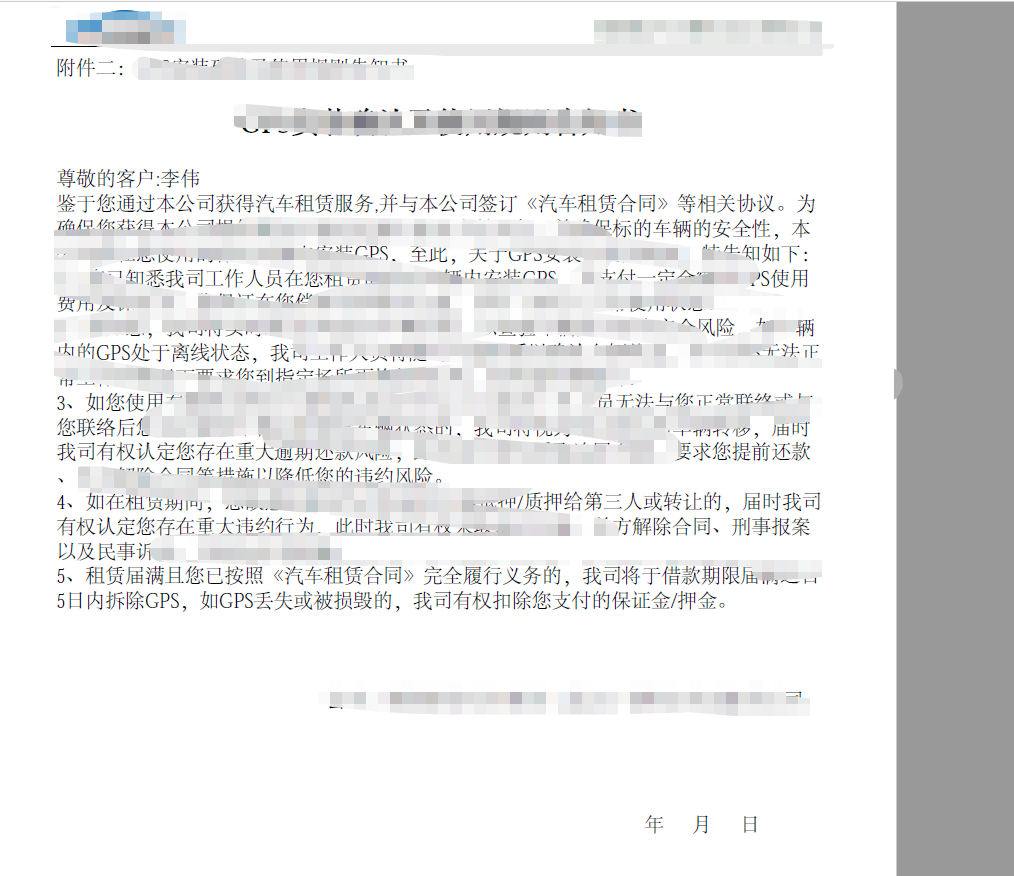
以上具体的html,自行设计。
php 基于tcpdf插件生成pdf的更多相关文章
- 使用TCPDF插件生成pdf以及pdf的中文处理
目录(?)[+] 多种多样的pdf开发库 WKHTMLTOPDF 2FPDF 3TCPDF 中文问题 做了这么多年项目,以前只是在别人的项目中了解过PHP生成pdf文件,知道并不难,但是涉及到了p ...
- vue通过插件实现PDF生成以及下载
第一步: 安装插件 npm install --save html2canvas //将html转换成图片 npm install jspdf --save //将图片生成pdf 第二步: 在需要的地 ...
- 前端生成PDF,让后端刮目相看
PDF 简介 PDF 全称Portable Document Format (PDF)(便携文档格式),该格式的显示与操作系统.分辨率.设备等因素没有关系,不论是在Windows,Unix还是在苹果公 ...
- php生成pdf,php+tcpdf生成pdf, php pdf插件
插件例子:https://tcpdf.org/examples/ 下载tcpdf插件: demo // Include the main TCPDF library (search for insta ...
- 赞!jsPDF – 基于 HTML5 的强大 PDF 生成工具
jsPDF 是一个基于 HTML5 的客户端解决方案,用于生成各种用途的 PDF 文档.使用方法很简单,只要引入 jsPDF 库,然后调用内置的方法就可以了.浏览器兼容性: IE 10, Firefo ...
- jsPDF – 基于 HTML5 的强大 PDF 生成工具
jsPDF 是一个基于 HTML5 的客户端解决方案,用于生成各种用途的 PDF 文档. 使用方法很简单,只要引入 jsPDF 库,然后调用内置的方法就可以了. 米扑科技项目用到了HHTML5生成PD ...
- PHP生成PDF完美支持中文,解决TCPDF乱码
PHP生成PDF完美支持中文,解决TCPDF乱码 2011-09-26 09:04 418人阅读 评论(0) 收藏 举报 phpfontsheaderttfxhtml文档 PHP生成PDF完美支持中文 ...
- tcpdf 将网页生成pdf
需求:需要将HTML页面生成PDF文档 开发语言:PHP 使用TCPDF第三方类库进行生成,下载地址:http://sourceforge.net/projects/tcpdf/ 核心代码: publ ...
- php+tcpdf生成pdf: 中文乱码
TCPDF是一个生成PDF的不错的库,可惜,官方对包括中文在内的东亚字体支持不怎么样的.场景:某项目需要根据数据库信息生成pdf格式的发票,考虑采用稳定的tcpdf,虽然还有许多其它选择,但是这个应该 ...
随机推荐
- Hadoop Mapreduce中wordcount 过程解析
将文件split 文件1: 分割结果: hello world ...
- Easy methods to select MB Star, Extremely MB Star, MB SD C4, Mercedes BENZ C5 SD
MB Star, Extremely MB SD Connect C4, MB SD C4, Mercedes BENZ C5 SD are usually analysis tools to get ...
- 使用MSBuild Tools调用csproj项目文件发布网站时$(SolutionDir)宏参数值丢失为空的解决方案
使用Visual Studio打开解决方案,对<网站项目>右键点击<发布>,一切都是正常的,所有宏都可用,宏参数值也是正确的. 而通过批处理脚本命令调用MSBuild.exe对 ...
- java线程学习之Sleep方法
sleep方法是在线程中常用到的一个方法,它是一个静态方法. sleep(long millis) 在指定的毫秒数内让当前正在执行的线程休眠(暂停执行),此操作受到系统计时器和调度程序精度 ...
- tomcat启动命令行中文乱码
1.找到${CATALINA_HOME}/conf/logging.properties 2.添加语句:java.util.logging.ConsoleHandler.encoding = GBK ...
- ltp-ddt emmc_dd_rw
emmc_dd_rw EMMC_M_FUNC_DD_RW_500M source "common.sh"; install_modules.sh "emmc"; ...
- PHP7.1 mcrypt_module_open() is deprecated
PHP7.1 mcrypt_module_open() is deprecated 一:函数前添加抑制符 @ mcrypt_module_open....;->@mcrypt_module_op ...
- 利用递归解决“汉诺塔的移动”问题(使用python来做的,其它语言也行)
有a,b,c三个柱子,n个盘子. def move(n, a, b, c): if n == 1: print('move', a, '-->', c) else: move(n-1, a, c ...
- Linux服务器 XAMPP后添加PHP和MYSQL环境变量
编辑/etc/profile文件 在文件末尾添加两行代码 vi /etc/profile CentOS: PATH=$PATH:/opt/lampp/bin export PATH Ubuntu: e ...
- UIPresentationController - iOS自定义模态弹出框
参考: https://developer.apple.com/library/archive/featuredarticles/ViewControllerPGforiPhoneOS/Definin ...