
php 基于tcpdf插件生成pdf
之前在公司做了个项目,,需要导出pdf合同,,在网上找了很久,选择用了tcpdf插件,,具体的插件网上可以搜到,中间遇到了很多的坑,慢慢的填。
先下好插件放到指定文件夹下
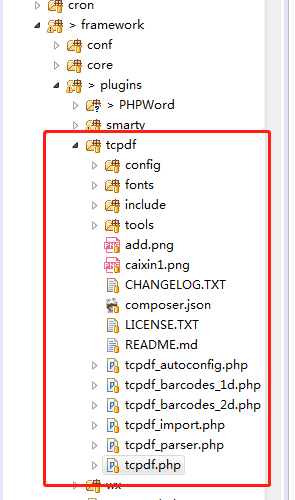
然后使用tcpdf插件里html生成pdf,,,不过有好多复杂html的样式tcpdf识别不了,,,简单点的可以。
require_once(FW_PATH.'/plugins/tcpdf/tcpdf.php');
class Controller_Pdf_Gps extends Controller_Base {

/**

*

* @param string $html

* @param string $title

* @author wy

*/

public function actionWriteToPdf(){

$contractCarrentId = isset($_REQUEST['contract_carrent_id']) ? $_REQUEST['contract_carrent_id'] : 0;

$productTypeId = isset($_REQUEST['product_type_id']) ? $_REQUEST['product_type_id'] : 0;

$didiType = isset($_REQUEST['didi_type']) ? $_REQUEST['didi_type'] : 0;//滴滴合同没有附件1、2标识, 用didi_type区分

//I,默认值,在浏览器中打开;D,PDF文件会被下载下来;F,文件会被保存在服务器中;S,PDF会以字符串形式输出;E:PDF以邮件的附件输出。

$title = isset($_REQUEST['title']) ? $_REQUEST['title'] : 'GPS安装确认及使用规则告知书';

$headerLogo = isset($_REQUEST['header_logo']) ? $_REQUEST['header_logo'] : 'caixin1.png';

$headerLogoWidth = isset($_REQUEST['header_logo_width']) ? $_REQUEST['header_logo_width'] : 30;

$headerTitle = isset($_REQUEST['header_title']) ? $_REQUEST['header_title'] : '';

$headerString = isset($_REQUEST['header_string']) ? $_REQUEST['header_string'] : ' 发过火发过火发过火有限公司';

if($contractCarrentId <= 0) {

return $this->error('合同(租车)ID错误');

}

if($productTypeId <= 0) {

return $this->error('产品类型ID错误');

}

//contract_carrent

$contractCarrent = Remote::instance()->get(CAIXIN_BASE_DOMIAN, 'contract/carrent/detail', array('contract_carrent_id' => $contractCarrentId));

if($contractCarrent['code'] != 200 || !isset($contractCarrent['data']['contract_carrent'])) {

return $this->error('获取合同(租车)信息错误');

}

$contractCarrent = $contractCarrent['data']['contract_carrent'];

//application_control

$appControl = Remote::instance()->get(CAIXIN_BASE_DOMIAN, 'application/control/detail', array('application_control_id' => $contractCarrent['application_control_id']));

if($appControl['code'] != 200 || !isset($appControl['data']['application_control'])) {

return $this->error('获取申请流程控制信息错误');

}

$appControl = $appControl['data']['application_control'];

$html = '';

$html = $this->personInfo($appControl, $title, $didiType);

if($html == '') {

return $this->error('获取不到转换页面');

}

$pdf = new TCPDF(PDF_PAGE_ORIENTATION, PDF_UNIT, PDF_PAGE_FORMAT, true, 'UTF-8', false);

$pdf->SetCreator(PDF_CREATOR);

$pdf->SetTitle($title); //设置文件的title

$pdf->SetHeaderData($headerLogo, $headerLogoWidth, $headerTitle, $headerString);//设置头部,比如header_logo,header_title,header_string及其属性

$pdf->setHeaderFont(Array(PDF_FONT_NAME_MAIN, '', PDF_FONT_SIZE_MAIN)); //设置页头字体

$pdf->setFooterFont(Array(PDF_FONT_NAME_DATA, '', PDF_FONT_SIZE_DATA)); //设置页尾字体

$pdf->setPrintHeader(true); //页面头部横线 false取消

$pdf->setPrintFooter(true); //页面底部更显 false取消

$pdf->SetDefaultMonospacedFont(PDF_FONT_MONOSPACED);

$pdf->SetMargins(PDF_MARGIN_LEFT, 13, PDF_MARGIN_RIGHT);

$pdf->SetHeaderMargin(0);

$pdf->SetFooterMargin(PDF_MARGIN_FOOTER);

$pdf->SetAutoPageBreak(false, PDF_MARGIN_BOTTOM);//自动分页

$pdf->setImageScale(PDF_IMAGE_SCALE_RATIO);

$pdf->AddPage();//增加一个页面

$pdf->setPageMark();

$pdf->SetFont('stsongstdlight', '', 13);

$pdf->writeHTML($html, true, true, true, true, '');

// $pdf->writeHTML($html, true, 0, true, true);

// $pdf->writeHTMLCell(0, 0, '', '', $html, 0, 1, 0, true, 'C', true);

$pdf->lastPage();

ob_end_clean();

//写入文件

$time = time();

$content = $pdf->Output($time.'.pdf', 'S');

if(in_array($productTypeId, array(4,5))) {

$category_path = WWW_ROOT.'/tmp_zip/合同'.$contractCarrentId.'/文件夹/文件名';

$file_path = WWW_ROOT.'/tmp_zip/合同'.$contractCarrentId.'/文件夹/文件名/'.$title.date('Ymd',time()).'.pdf';

}else if(in_array($productTypeId, array(6,7))) {

$category_path = WWW_ROOT.'/tmp_zip/合同'.$contractCarrentId.'/文件夹/文件名';

$file_path = WWW_ROOT.'/tmp_zip/合同'.$contractCarrentId.'/文件夹/文件名/'.$title.date('Ymd',time()).'.pdf';

}

if (!file_exists($category_path)){

mkdir($category_path,0777,true);

}

$fp = fopen($file_path,'w') or die("Unable to open file!");

fwrite($fp,$content);

fclose($fp);

return $this->output('ok');

}

以上有些业务。

/**

     * 个人

     * @author yxf

     */

    private function personInfo($appControl, $title, $didiType) {

        //门店

        $store = Remote::instance()->get(CAIXIN_BASE_DOMIAN, 'store/detail', array('store_id' => $appControl['store_id']));

        if($store['code'] != 200 || !isset($store['data']['store'])) {

            return $this->error('获取门店信息错误');

        }

        $store = $store['data']['store'];

        if($appControl['customer_type'] != 1) {

            return $this->error('客户性质错误');

        }

        //申请单(自然人)

        $appPerson = Remote::instance()->get(CAIXIN_BASE_Y_DOMIAN, 'applicationperson/detail', array('application_person_id' => $appControl['application_person_id']));

        if($appPerson['code'] != 200 || !isset($appPerson['data']['application_person'])) {

            return $this->error($appPerson['msg']);

        }

        $appPerson = $appPerson['data']['application_person'];

        $appPerson['name'] = !empty($appPerson) ? $appPerson['name'] : '';

        /* 附件二:GPS安装确认及使用规则告知书  */

        $html = <<<EOD

<!DOCTYPE html>

<html lang="en">

<head>

    <meta charset="UTF-8">

    <title>{$title}</title>

    <style>

        body {

            padding: 10px;

        }

        .color-red {

            color: red;

            text-decoration: underline;

        }

        h1 {

            text-align: center;

            font-size: 22px;

            position: relative;

        }

        h3 span {

            position: absolute;

            left: 0;

            top: 0;

        }

        h2 {

            font-size: 16px;

            margin: 5px 0;

            position: relative;

        }

        h3 {

            font-size: 16px;

            text-align: center;

            position: relative;

            margin-top: 50px;

            margin-bottom: 50px;

        }

        p {

            font-size: 14px;

        }

        table {

            border-collapse: collapse;

            width: 100%;

        }

        th {

            border: 1px solid #000;

        }

        td {

            border: 1px solid #000;

            padding: 5px 10px;

            font-size: 13px;

            line-height: 30px;

            height: 30px;

        }

        td img {

            max-width: 100%;

        }

        .title-xl {

            font-size: 16px;

        }

        .title {

            background: #d4d4d4;

            width: 110px;

            text-align: center;

        }

        .underline_xl {

            width: 200px;

            display: inline-block;

            border-bottom: 1px solid #000;

            vertical-align: bottom;

        }

        .underline_l {

            width: 150px;

            display: inline-block;

            border-bottom: 1px solid #000;

            vertical-align: bottom;

        }

        .underline_s {

            width: 50px;

            display: inline-block;

            border-bottom: 1px solid #000;

            vertical-align: bottom;

        }

        .item {

            display: table;

        }

        .text-no {

            display: table-cell;

            width: 50px;

            padding-left: 20px;

        }

        .text-no + span {

            display: table-cell;

        }

        .check {

            border: 1px solid #000;

            display: inline-block;

            width: 14px;

            height: 14px;

            position: relative;

            top: 3px;

        }

        .uncheck {

            border: 1px solid #000;

            display: inline-block;

            width: 14px;

            height: 14px;

            position: relative;

            top: 3px;

            overflow: hidden;

        }

        .uncheck:after {

            content: 'X';

            position: absolute;

            top: 0;

            left: 0px;

            font-size: 24px;

            font-style: normal;

            display: block;

            font-weight: 100;

            width: 14px;

            height: 14px;

            line-height: 16px;

            text-align: center;

        }

        .unline {

            border-bottom: 1px solid #000;

        }

        .unline .underline_s {

            border: 0;

            vertical-align: bottom;

        }

        .no_border {

            border: 0;

        }

        .width_s {

            width: 110px;

            text-align: center;

        }

    </style>

</head>

<body>

<p style="font-weight: bold">

EOD;

$html2 = '';

if($didiType != 1) {

$html2 .= <<<EOD

附件二:使用规则告知书

EOD;

}

$html2 .= <<<EOD

</p>

<h1 style="text-align:center;">使用规则告知书</h1>

<br/><br/>

<p>尊敬的客户:{$appPerson['name']}<br/>

</p>

<div style="text-align:right;">

    <p>公司:{$store['invoice']}

    </p>

</div>

<br/>

<div style="text-align:right;">

    <p>

      年

      月

      日</p>

</div>

<p><b>本人已阅读、理解并同意上述规则条款,自愿执行上述规则,如因违反上述规则导致的任何后果由本人自行承担。</b>

</p>

<div style="text-align: right;">

    <p>客户(签字):         </p>

    <p>

      年

      月

      日</p>

</div>

</body>

</html>

EOD;

        return $html1.$html2;

    }
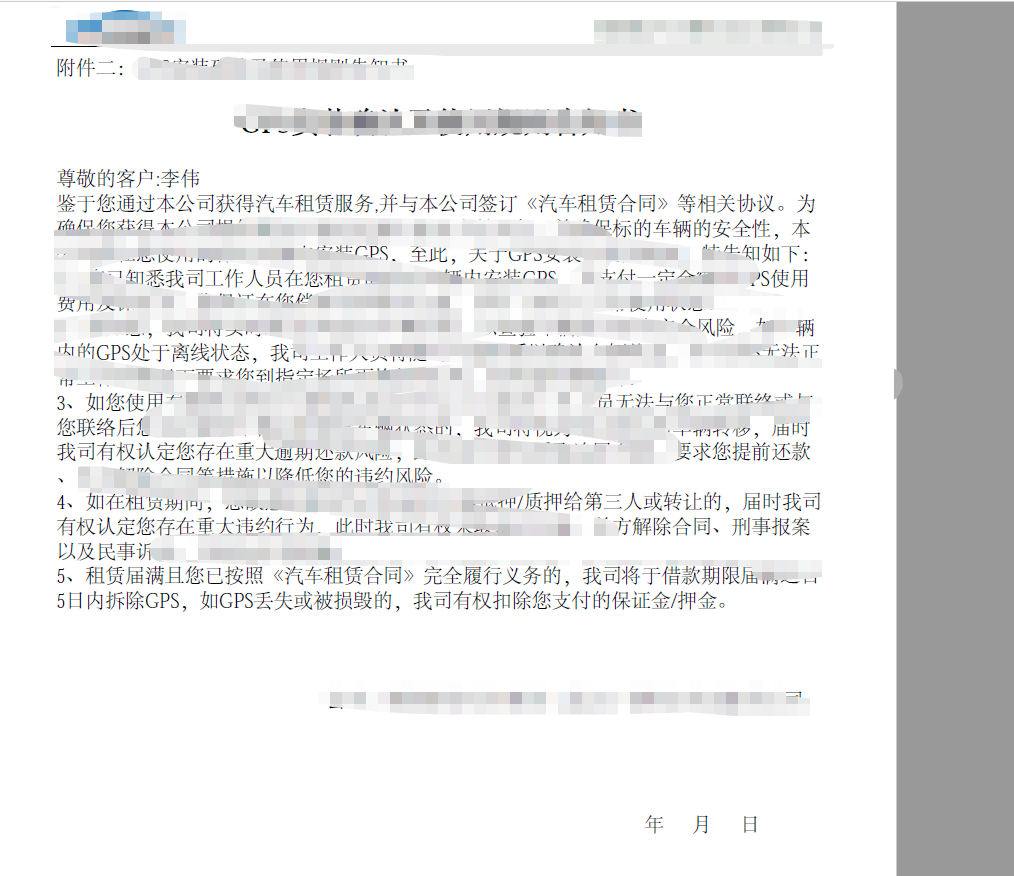
以上具体的html,自行设计。
php 基于tcpdf插件生成pdf的更多相关文章
- 使用TCPDF插件生成pdf以及pdf的中文处理
目录(?)[+] 多种多样的pdf开发库 WKHTMLTOPDF 2FPDF 3TCPDF 中文问题 做了这么多年项目,以前只是在别人的项目中了解过PHP生成pdf文件,知道并不难,但是涉及到了p ...
- vue通过插件实现PDF生成以及下载
第一步: 安装插件 npm install --save html2canvas //将html转换成图片 npm install jspdf --save //将图片生成pdf 第二步: 在需要的地 ...
- 前端生成PDF,让后端刮目相看
PDF 简介 PDF 全称Portable Document Format (PDF)(便携文档格式),该格式的显示与操作系统.分辨率.设备等因素没有关系,不论是在Windows,Unix还是在苹果公 ...
- php生成pdf,php+tcpdf生成pdf, php pdf插件
插件例子:https://tcpdf.org/examples/ 下载tcpdf插件: demo // Include the main TCPDF library (search for insta ...
- 赞!jsPDF – 基于 HTML5 的强大 PDF 生成工具
jsPDF 是一个基于 HTML5 的客户端解决方案,用于生成各种用途的 PDF 文档.使用方法很简单,只要引入 jsPDF 库,然后调用内置的方法就可以了.浏览器兼容性: IE 10, Firefo ...
- jsPDF – 基于 HTML5 的强大 PDF 生成工具
jsPDF 是一个基于 HTML5 的客户端解决方案,用于生成各种用途的 PDF 文档. 使用方法很简单,只要引入 jsPDF 库,然后调用内置的方法就可以了. 米扑科技项目用到了HHTML5生成PD ...
- PHP生成PDF完美支持中文,解决TCPDF乱码
PHP生成PDF完美支持中文,解决TCPDF乱码 2011-09-26 09:04 418人阅读 评论(0) 收藏 举报 phpfontsheaderttfxhtml文档 PHP生成PDF完美支持中文 ...
- tcpdf 将网页生成pdf
需求:需要将HTML页面生成PDF文档 开发语言:PHP 使用TCPDF第三方类库进行生成,下载地址:http://sourceforge.net/projects/tcpdf/ 核心代码: publ ...
- php+tcpdf生成pdf: 中文乱码
TCPDF是一个生成PDF的不错的库,可惜,官方对包括中文在内的东亚字体支持不怎么样的.场景:某项目需要根据数据库信息生成pdf格式的发票,考虑采用稳定的tcpdf,虽然还有许多其它选择,但是这个应该 ...
随机推荐
- JavaFX-Application
JavaFX—Application 1.Application是JavaFX程序的入口,任何javafx应用程序程序都要继承该类并重写start()方法 public class TsetStage ...
- html5与css3面试题(2)
10.xhtml与HTML的区别? Html是对web网页设计的语言,而xhtml是基于xml的置标语言 11.面向对象的引用方法分为几种? 内部写的 原型链引用的 12.什么是重载? 函数名相同,但 ...
- 信步漫谈之JDK—源码编译
一.环境 Linux 系统:CentOS_6.5_x86_64 JDK 安装包:jdk-7u80-linux-x64.rpm OpenJDK 源码包:OpenJDK7 下载路径:http://down ...
- java 几个实用的小工具
1.除法运算 编程的人都知道,java中的“/”.“%”运算,其中前者为取整,后者取余数.那么有没有快捷的运算方法取正常的运算结果呢? 查了资料,发现很简单.代码如下: public static S ...
- QT4.8应用控制程序设计
2012-02-20 22:06:59 从uboot到kernel最新版最后到QT最新版移植都完成后,从初级阶段要走向中级阶段了.初步一个设想是然2440通过QT界面控制小车.先做一个界面模块控制LE ...
- 对于react中rredux的理解
1.什么是redux? redux是一个应用数据流框架,主要作用是对于应用状态的管理 2.reducer特点 : (1)默认的state (2)state是只可读不可修改 (3)必须返回一个纯函数 3 ...
- vue学习笔记—bootstrap+vue用户管理
vue,读音view,简单易用的前端框架.特点如下: 1.一个mvvm的前端框架,内部做好了html中dom对象和后台用js语言定义的变量的双向绑定 2.中国人尤雨溪维护的个人项目,中文资料多,和go ...
- TeamCity 创建docker构建步骤
1 dockerfile source 选择dockerfile文件的路径,一共有三种方式: 1.1.1 file content 这种方式是在线写dockerfile文件. 其在进行创建的时候会在 ...
- iperf 测试工具
Iperf是一个网络性能测试工具.Iperf可以测试TCP和UDP带宽质量.Iperf可以测量最大TCP带宽,具有多种参数和UDP特性. Iperf可以报告带宽,延迟抖动和数据包丢失.利用Iperf这 ...
- JDK一键部署, 新添加进度条
JDK部署, 脚本与JDK安装包放在同一目录 然后执行 source ./jdk.sh 稍等进度条100%即可 #******************************************* ...