
Oracle的一些操作
. 创建用户

Create user 用户名 identified by “密码”;

例如:create user ghc_ez identified by “ghc_211”;

授权:

grant connect,resource,dba to用户名;

例如:grant connect,resource,dba to ghc_ez;

.创建所需表空间--注意创建表空间的位置(datafile)

-----查询当前用户所有的表的表空间-------------

Select table_name 表名 ,tablespace_name 所使用表空间 from user_tables order by table_name;

--------------------------------------------------

------------------修改表空间-----------------

修改用户表table的表空间:

alter table 表名 move tablespace 新表空间名;

------------------------------------------------------------------

------------------创建表空间------------------

create tablespace fc_data

logging

datafile 'D:\app\Administrator\oradata\bi_data.dbf'

size 50m

autoextend on

next 50m maxsize 20480m

extent management local;

-------------------------------------------------

create tablespace fwk_data

logging

datafile 'D:\app\Administrator\oradata\bi_data.dbf'

size 50m

autoextend on

next 50m maxsize 20480m

extent management local;

-------------------------------------------------

create tablespace hie_data

logging

datafile 'D:\app\Administrator\oradata\bi_data.dbf'

size 50m

autoextend on

next 50m maxsize 20480m

extent management local;

-------------------------------------------------

create tablespace fwk_data

logging

datafile 'D:\app\Administrator\oradata\bi_data.dbf'

size 50m

autoextend on

next 50m maxsize 20480m

extent management local;

.导入

Imp 用户名/密码@服务名 full=y file=dmp文件所在的路径 ignore=y

例如:imp ghc_ez/ghc_211@orcl full=y file=d:ezhou.dmp ignore=y

--导出数据--

exp hz_hie_201604/ghc_211@orcl FILE=d:\hz_hie_201604_data.dmp tables=(agd_doctor,analysis_patientsettlement)

--导出当前用户的所有表和数据

exp hz_hie_201604/ghc_211@orcl owner=(hz_hie_201604) FILE=d:\hz_hie_201604_data.dmp

--导入数据--

imp hz_hie_201604/ghc_211@orcl file=d:\hz_hie_201604_data.dmp full=y ignore=y

--修改用户表table的表空间:alter table 表名 move tablespace 新表空间名;

alter table view_usra10 move tablespace bi_data;

--查询当前用户所有表的表空间名称

Select table_name 表名 ,tablespace_name 所使用表空间 from user_tables order by table_name;


3.impdp system/123456@WZOJK_250 directory=TY_DUMP_DIR dumpfile=fsdb_all_bak_20161114.DMP  LOGFILE=fsdb_all_bak_20161114.LOG full=y

impdp system/wanzhou123456@WZDB directory=TY_DUMP_DIR dumpfile=WZDB_ALL_BAK_20161130.DMP  LOGFILE=wzdb_all_bak_20161201.LOG full=y

导出语句
expdp system/123456@WZOJK_250 directory=TY_DUMP_DIR1 dumpfile=wzdb_all_bak_20161206.DMP  LOGFILE=wzdb_all_bak_20161206.LOG full=y

expdp system/123456@ggdb_250 directory=TY_DUMP_DIR dumpfile=ggdb_all_bak_20170103.DMP  LOGFILE=ggdb_all_bak_20170103.LOG full=y

--游标的使用--

--for循环游标不需要开启和关闭游标--

declare

    --声明一个游标

    cursor cur_emp

    is

    select empno,ename,job,sal from emp

    where job='IT';

    --定义一个游标变量

    cur_rec cur_emp%rowtype;

begin

    for cur_rec in cur_emp loop

        dbms_output.put_line(cur_rec.empno||'-'||cur_rec.ename||'-'cur_rec.job||'-'cur_rec.sal);

    end loop;

end

/

--fetch游标使用的时候必须明确的打开和关闭--

declare

    cursor cur_emp

    is

    select empno,ename,job,sal

    from emp

    where job='it';

    cur_rec cur_emp%rowtype;

begin

    open cur_emp;

    --loop循环

    loop

    --提取一行数据到cur_rec中

    fetch cur_emp into cur_rec;

    --判断是否取到值,没取到值就退出

    --取到值cur_emp%notfound是false

    --取不到cur_emp%notfound是true

    exit when cur_emp%notfound;

    dbms_output.put_line(cur_rec.empno||'-'||cur_rec.name);

    end loop;

    close cur_emp;

end

/

--游标的4种属性

%notfound fetch是否提取到数据 没有是true

%found fetch是否提取到数据  有是true

%rowfound 已经取出来的记录的条数

%isopen 游标是否打开

--存储过程

create or replace procedure Up_msg_get_messages(

        v_user_id varchar2,--用户id

        v_login_org varchar2,

        v_result out sys_refcursor)

)

as

begin

    open v_result for

     select a.*,b.* from fwk_msg a

     left join fwk_msg_type b on a.msg_type=b.msg_type_code

     where a.due_data>=sysdate

end up_msg_get_messages;

--函数

create or replace function fun_name(eno number)

return number

as

v_sal emp.sal%type;

begin

    select sal into v_sal from emp empno=eno;

    return v_sal;

end fun_name;

--权限

CONNECT角色,主要应用在临时用户,特别是那些不需要建表的用户,

通常只赋予他们CONNECT role。CONNECT是使用Oracle的简单权限,

拥有CONNECT角色的用户,可以与服务器建立连接会话(session,客户端对服务器连接,称为会话)

RESOURCE角色,更可靠和正式的数据库用户可以授予RESOURCE role。RESOURCE提供给用户另外的权限

以创建他们自己的表、序列、过程(procedure)、触发器(trigger)、索引(index)等。

DBA角色,DBA role拥有所有的系统权限----包括无限制的空间限额和给其他用户授予各种权限的能力。用户SYSTEM拥有DBA角色

一般情况下,一个普通的用户(如SCOTT),拥有CONNECT和RESOURCE两个角色即可进行常规的数据库开发工作。

--给某个用户或者角色权限

grant connect to wj;

grant resource to wj;

grant connect,resource,dba to wj;

grant create session to zhangsan;//授予zhangsan用户创建session的权限,即登陆权限

grant unlimited tablespace to zhangsan;//授予zhangsan用户使用表空间的权限

grant create table to zhangsan;//授予创建表的权限

grant drop table to zhangsan;//授予删除表的权限

grant insert table to zhangsan;//插入表的权限

grant update table to zhangsan;//修改表的权限

grant all to public;//这条比较重要,授予所有权限(all)给所有用户(public)

grant select on tablename to zhangsan;//授予zhangsan用户查看指定表的权限

grant drop on tablename to zhangsan;//授予删除表的权限

grant insert on tablename to zhangsan;//授予插入的权限

grant update on tablename to zhangsan;//授予修改表的权限

grant insert(id) on tablename to zhangsan;

grant update(id) on tablename to zhangsan;//授予对指定表特定字段的插入和修改权限,注意,只能是insert和update

grant alert all table to zhangsan;//授予zhangsan用户alert任意表的权限

--回收权限

revoke dba from wj;

--创建自动增长列--

create sequence employ_autoId

minvalue

maxvalue

start with

increment by

nocache;

--创建触发器将序列中的赋值给插入到emoloee表中

create or replace trigger insert_employee_autoId

before insert on employee(表名)

for each row

begin

 select employ_autoId(sequence名称).nextval into :new.id(需要自动增长的名称) from dual;

 end insert_employee_autoId;
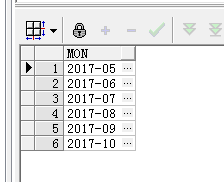
select column_value as mon

  from table(strsplit('2017-05,2017-06,2017-07,2017-08,2017-09,2017-10', ','));
Oracle的一些操作的更多相关文章
- oracle数据库误操作把表删除了,怎样恢复
一:表的恢复 对误删的表,只要没有使用PURGE永久删除选项,那么从flash back区恢复回来希望是挺大的.一般步骤有:1.从flash back里查询被删除的表 select * from re ...
- Oracle闪回操作
Oracle闪回操作 1. 记录当前时间或SCN 在数据库变动前记录时间或SCN SQL> select to_char(sysdate,'YYYY-MM-DD HH24:mi:ss') fr ...
- [oracle] Oracle存储过程里操作BLOB的字节数据的办法,例如写入32位整数
作者: zyl910 一.缘由 BLOB是指二进制大对象,也就是英文Binary Large Object的缩写. 在很多时候,我们是通过其他编程语言(如Java)访问BLOB的字节数据,进行字节级的 ...
- ORACLE数据库误操作执行了DELETE,该如何恢复数据?
ORACLE数据库误操作执行了DELETE,该如何恢复数据? 原创 2016年08月11日 17:23:04 10517 作为一个程序员,数据库操作是必须的,但是如果操作失误,一般都会造成比较严重的后 ...
- 请教怎么查询ORACLE的历史操作记录!
请问如何查询ORACLE的历史操作记录!!!!!我用的是linux oracle 11g r2,想查一下前几天的数据库的历史操作记录,例如对表的insert,delete,update等等的操作记录, ...
- eclipse利用sql语句对Oracle数据库进行操作
对Oracle数据库执行操作的sql语句中表名和列名都需用英文双引号("")括起来. 注(\为转义符) 1.插入数据 sql = "insert into \" ...
- Oracle数据库基础操作语法
转载自:https://www.cnblogs.com/fallen-seraph/p/10685997.html 一.登录Oracle数据库 首先运行Oracle数据库: 默认的有两个账号: 管理员 ...
- Oracle 数据库简单操作
现在大型企业一般都用Oracle数据库,Oracle数据库在一般采用expdp,impdp 导出导入数据,但是在操作中经常会遇到一些问题.下面来浅析这些问题. 1. 导出数据 一般导出数据的时候需要建 ...
- mysql和oracle的mybatis操作
1.Oracle.MySQL插入时返回下一个主键的操作 Oracle:<insert id="insert" parameterClass="ROLE"& ...
- ORACLE 导入导出操作
1.导入命令: imp userId/psw@orcl full=y file=D:\data\xxx.dmp ignore=y 2.导出命令 exp userId/psw@orcl file=d: ...
随机推荐
- spring源码:Aware接口(li)
一.spring容器中的aware接口介绍 Spring中提供了各种Aware接口,比较常见的如BeanFactoryAware,BeanNameAware,ApplicationContextAwa ...
- [连载]《C#通讯(串口和网络)框架的设计与实现》- 11.调试器的设计
目 录 第十一章 调试器设计... 2 11.1 调试接口... 2 11.2 界面方式调试... 3 11.3 命令行方式调试.. ...
- 伙伴们休息啦canvas绘图夜空小屋
HTML5 canvas绘图夜空小屋 伙伴们园友们,夜深了,休息啦,好人好梦... 查看效果:http://hovertree.com/texiao/html5/28/ 效果图如下: 代码如下: &l ...
- GreenDao3.0新特性解析(配置、注解、加密)
Greendao3.0release与7月6日发布,其中最主要的三大改变就是:1.换包名 2.实体注解 3.加密支持的优化 本文里面会遇到一些代码示例,就摘了官方文档和demo里的例子了,因为他们的例 ...
- iOS - UITableView中Cell重用机制导致Cell内容出错的解决办法
"UITableView" iOS开发中重量级的控件之一;在日常开发中我们大多数会选择自定Cell来满足自己开发中的需求, 但是有些时候Cell也是可以不自定义的(比如某一个简单的 ...
- swift学习笔记4——扩展、协议
之前学习swift时的个人笔记,根据github:the-swift-programming-language-in-chinese学习.总结,将重要的内容提取,加以理解后整理为学习笔记,方便以后查询 ...
- ArrayList、Vector、HashMap、HashSet的默认初始容量、加载因子、扩容增量
当底层实现涉及到扩容时,容器或重新分配一段更大的连续内存(如果是离散分配则不需要重新分配,离散分配都是插入新元素时动态分配内存),要将容器原来的数据全部复制到新的内存上,这无疑使效率大大降低. 加载因 ...
- EF和MVC系列文章导航:EF Code First、DbContext、MVC
对于之前一直使用webForm服务器控件.手写ado.net操作数据库的同学,突然来了EF和MVC,好多新概念泉涌而出,的确犹如当头一棒不知所措.本系列文章可以帮助新手入门并熟练使用EF和MVC,有了 ...
- sql面试题(学生表_课程表_成绩表_教师表)
原帖链接:http://bbs.csdn.net/topics/280002741 表架构 Student(S#,Sname,Sage,Ssex) 学生表 Course(C#,Cname,T#) 课程 ...
- 【Windows编程】系列第六篇:创建Toolbar与Statusbar
上一篇我们学习了解了如何使用Windows GDI画图,该应用程序都是光光的静态窗口,我们使用Windows应用程序,但凡稍微复杂一点的程序都会有工具栏和状态栏,工具栏主要用于一些快捷功能按钮.比如典 ...