
如何解决 React 官方脚手架不支持 Less 的问题
说在前面
create-react-app 是由 React 官方提供并推荐使用构建新的 React 单页面应用程序的最佳方式,不过目前版本(1.5.x)其构建的项目中默认是不支持动态样式语言 Less 的。如果我们的项目必须要使用 Less 呢,这就需要我们手动集成一下。本篇主要针对集成的过程做一个简要记录。
环境准备
本小节先用 create-react-app 构建一个全新的 React 项目作为实验环境。
如果您之前未曾使用过 create-react-app,请先通过如下命令全局安装(假定您本机已经安装了 Node.js):
npm install -g create-react-app
然后,通过如下命令构建一个新的项目my-app:
npx create-react-app my-app
通过cd my-app命令进入项目文件夹,执行yarn start命令启动程序,成功运行,则实验环境准备完毕。
最终项目结构:
├─ node_modules

├─ public

├─ src

├─ .gitignore

├─ package.json

├─ README.md

└─ yarn.lock
安装 less & less-loader
要使 create-react-app 构建的项目能正常解析 less 文件,只需要让 webpack 能够把 less 文件编译成 css 文件即可。
所以,首先要把 less 和 less-loader (less 编译器)添加到项目中:
yarn add less less-loader
这样就 OK 了?以上只是在项目中安装了 less 和 less-loader ,但还未曾通过 webpack 使用 less-loader。
至于怎么使用?几种使用方式?请参见 webpack 文档 ,这里不再赘述。
假定您已经仔细阅读过上述 webpack 文档,想必您也清楚我们应该选择在webpack.config.js文件中配置 less-loader。
暴露 webpack 配置文件
突然,您会发现在我们实验项目中找不到 webpack 相关配置文件。
因为脚手架为了实现“零配置”,会默认把一些通用的脚本和配置集成到 react-scripts,目的是让我们专注于src目录下的开发工作,不再操心环境配置。同时,被其集成的脚本和配置也会从程序目录中消失 ,程序目录也会变得干净许多。
如果我们要自定义环境配置怎么办?
项目构建完成后,会提供一个命令yarn eject,通过这个命令,我们可以把被 react-scripts 集成的配置和脚本暴露出来。
以下是脚手架关于yarn eject命令的介绍:
yarn eject
Removes this tool and copies build dependencies, configuration files and scripts into the app directory. If you do this, you can’t go back!
大概意思是,执行该命令后会把已构建依赖项、配置文件和脚本复制到程序目录中。该操作是不可逆转的,执行完成后会删除这个命令,也就是说只能执行一次。
至于 react-scripts 都集成了哪些东西,通过yarn eject命令的执行记录也能看出个大概:
λ yarn eject

yarn run v1.6.0

$ react-scripts eject

? Are you sure you want to eject? This action is permanent. Yes

Ejecting...

Copying files into E:\React\my-app

  Adding \config\env.js to the project

  Adding \config\paths.js to the project

  Adding \config\polyfills.js to the project

  Adding \config\webpack.config.dev.js to the project

  Adding \config\webpack.config.prod.js to the project

  Adding \config\webpackDevServer.config.js to the project

  Adding \config\jest\cssTransform.js to the project

  Adding \config\jest\fileTransform.js to the project

  Adding \scripts\build.js to the project

  Adding \scripts\start.js to the project

  Adding \scripts\test.js to the project

Updating the dependencies

  Removing react-scripts from dependencies

  Adding autoprefixer to dependencies

  Adding babel-core to dependencies

  Adding babel-eslint to dependencies

  Adding babel-jest to dependencies

  Adding babel-loader to dependencies

  Adding babel-preset-react-app to dependencies

  Adding babel-runtime to dependencies

  Adding case-sensitive-paths-webpack-plugin to dependencies

  Adding chalk to dependencies

  Adding css-loader to dependencies

  Adding dotenv to dependencies

  Adding dotenv-expand to dependencies

  Adding eslint to dependencies

  Adding eslint-config-react-app to dependencies

  Adding eslint-loader to dependencies

  Adding eslint-plugin-flowtype to dependencies

  Adding eslint-plugin-import to dependencies

  Adding eslint-plugin-jsx-a11y to dependencies

  Adding eslint-plugin-react to dependencies

  Adding extract-text-webpack-plugin to dependencies

  Adding file-loader to dependencies

  Adding fs-extra to dependencies

  Adding html-webpack-plugin to dependencies

  Adding jest to dependencies

  Adding object-assign to dependencies

  Adding postcss-flexbugs-fixes to dependencies

  Adding postcss-loader to dependencies

  Adding promise to dependencies

  Adding raf to dependencies

  Adding react-dev-utils to dependencies

  Adding resolve to dependencies

  Adding style-loader to dependencies

  Adding sw-precache-webpack-plugin to dependencies

  Adding url-loader to dependencies

  Adding webpack to dependencies

  Adding webpack-dev-server to dependencies

  Adding webpack-manifest-plugin to dependencies

  Adding whatwg-fetch to dependencies

Updating the scripts

  Replacing "react-scripts start" with "node scripts/start.js"

  Replacing "react-scripts build" with "node scripts/build.js"

  Replacing "react-scripts test" with "node scripts/test.js"

Configuring package.json

  Adding Jest configuration

  Adding Babel preset

  Adding ESLint configuration

Ejected successfully!

Please consider sharing why you ejected in this survey:

  http://goo.gl/forms/Bi6CZjk1EqsdelXk1

Done in 5.37s.
说了这么多,现在怎样才能在我们的项目中暴露 webpack 的配置文件?没错,你没猜错,只需要运行一下yarn eject即可。
再来看我们的实验项目的目录,您会发现其中多了一个config文件夹,其中就有三个关于 webpack 的配置文件:
webpack.config.dev.js       # 开发环境配置

webpack.config.prod.js      # 生产环境配置

webpackDevServer.config.js  # 开发服务器配置
我们需要关注的是前两个,最后一个是关于本地开发服务器http://localhost:3000的一些相关配置。
修改 webpack 配置
理论上讲,需要同步修改 webpack.config.dev.js 和 webpack.config.prod.js 配置文件:
在module.rules节点中找到 css 文件的加载规则:
test: /\.css$/修改为test: /\.(css|less)$/;- 在
use数组最后新增一个对象元素{loader: require.resolve('less-loader')}。
修改完成后:
// "postcss" loader applies autoprefixer to our CSS.

// "css" loader resolves paths in CSS and adds assets as dependencies.

// "style" loader turns CSS into JS modules that inject <style> tags.

// In production, we use a plugin to extract that CSS to a file, but

// in development "style" loader enables hot editing of CSS.

{

  test: /\.(css|less)$/,

  use: [

    require.resolve('style-loader'),

    {

      loader: require.resolve('css-loader'),

      options: {

        importLoaders: 1,

      },

    },

    {

      loader: require.resolve('postcss-loader'),

      options: {

        // Necessary for external CSS imports to work

        // https://github.com/facebookincubator/create-react-app/issues/2677

        ident: 'postcss',

        plugins: () => [

          require('postcss-flexbugs-fixes'),

          autoprefixer({

            browsers: [

              '>1%',

              'last 4 versions',

              'Firefox ESR',

              'not ie < 9', // React doesn't support IE8 anyway

            ],

            flexbox: 'no-2009',

          }),

        ],

      },

    },

    {

      loader: require.resolve('less-loader')

    }

  ],

},
至此,就已经完成了 create-react-app 对 Less 的支持。
效果验证
最后,在我们的实验项目中验证一下配置是否生效。
首先在src根目录下使用 Less 语法创建一个 less 文件,取名为Test.less:
@title-color:#f00;

.App-title {

    color: @title-color

  }
然后在App.js文件中通过如下API导入上述的 less 文件:
import './Test.less';
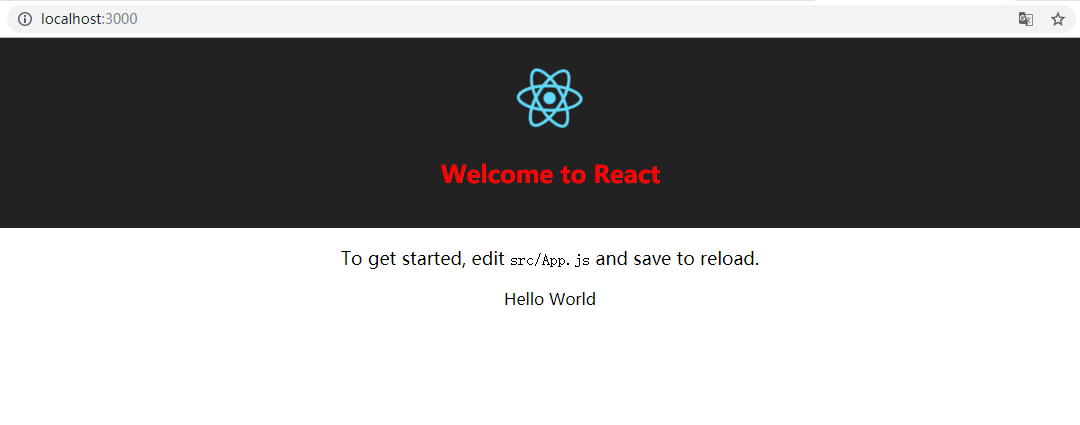
再次yarn start运行我们的程序,如果标题Welcome to React变成红色则说明配置没有问题。
如何解决 React 官方脚手架不支持 Less 的问题的更多相关文章
- React官方脚手架不支持less问题解决
create-react-app是由React官方提供,并推荐构建React单页应用程序的最佳方法,但是默认不支持less,需要手动集成: 1,必须手动安装less npm install less ...
- React 官方脚手架 create-react-app快速生成新项目
进入新公司已经半年了,各个业务线,技术栈都已经熟悉,工作也已经游刃有余,决定慢下脚步,沉淀积累,回顾一下所用技术栈所包含的基本知识,以及再公司中的实战. 首先回顾新项目搭建 react脚手架目前使用较 ...
- react官方脚手架搭建项目
1.全局安装 npm install -g create-react-app 2. app后面还要给项目文件命名 create-react-app //是全局命令来创建react项目 3.然后按照提示 ...
- 关于react 官方脚手架使用出现的问题
首先按照官网说明,一路的安装下来,很顺利,然后开始运行吧,提示个错误,缺少index.js 文件 原来是默认给出的文件是App.js 如何更改呢 找到react-script模块文件夹config下 ...
- react官方脚手架添加less配置
装两个包 npm install --save less less-loader 在node-modules/react-scripts/config/webpack.config.js中 在大概58 ...
- React/VUE 脚手架2.0和3.0
react官方脚手架 npm install -g create-react-app create-react-app my-app cd my-app npm start 区别自己对比 vue2.x ...
- 自制的React同构脚手架
代码地址如下:http://www.demodashi.com/demo/12575.html Web前端世界日新月异变化太快,为了让自己跟上节奏不掉队,总结出了自己的一套React脚手架,方便日后新 ...
- 从 React 原理来看 ahooks 是怎么解决 React 的闭包问题的?
本文是深入浅出 ahooks 源码系列文章的第三篇,该系列已整理成文档-地址.觉得还不错,给个 star 支持一下哈,Thanks. 本文来探索一下 ahooks 是怎么解决 React 的闭包问题的 ...
- 关于React的脚手架
Rewire你的应用 https://ant.design/docs/react/use-with-create-react-app-cn create-react-app (官方脚手架 简称cra) ...
随机推荐
- HDU 2544最短路 【dijkstra 链式前向星+优先队列优化】
最开始学最短路的时候只会用map二维数组存图,那个时候还不知道这就是矩阵存图,也不懂得效率怎么样 经过几个月的历练再回头看最短路的题, 发现图可以用链式前向星来存, 链式前向星的效率是比较高的.对于查 ...
- Scala中foldLeft的总结
源码分析 def seq: TraversableOnce[A] 上面两段代码是scala.collection.TraversableOnce特质的foldLeft方法源代码,实现了Traversa ...
- btcpool之总架构
一.架构图 二.模块划分 整个btcpool分成GbtMaker.BlockMaker.JobMaker.StratumServer.PoolWatcher.statshttpd.sharelogge ...
- html5+css基础
最近在学习html+css3基础教程,整理了一些基础知识点.在此与大家分享. 1.盒模型 定义:css处理网页时,它认为每个元素都包含在一个不可见的盒子里,即我们所熟知的盒模型.其中它的主要属性有:h ...
- 【QT】Installer requires Xcode Version 5.0.0 for Qt download if toolchain not found
When I install QT in MacOS 11.3.6, it prompts I need to install xcode then I install xcode but it wa ...
- Jackson流式API
public class JacksonTester { public static void main(String args[]){ JacksonTester tester = new ...
- Linux的发展历史
创始人: linux操作系统由林纳斯·本纳第克特·托瓦兹编写而成,是管理电脑硬件以及运行电脑软件的操作系统. 创始发展过程:Linux操作系统的诞生.发展和成长过程始终依赖着五个重要支柱:UNIX 操 ...
- 打开eclipse "Initializing Java Tooling"错误
问题:打开eclipse初始化界面过程中弹出An internal error occurred during: "Initializing Java Tooling". java ...
- 关于动态添加iview admin路由以及刷新侧边栏
在main.js中的mounted中使用router.addRouters()方法后界面上的路由并未刷新. 在注释掉路由跳转的权限限制之后,发现直接在地址栏输入对应路由能够进去,只是侧边栏没有刷新. ...
- spring boot + vue + element-ui全栈开发入门——spring boot后端开发
前言 本文讲解作为后端的spring boot项目开发流程,如果您还不会配置spring boot环境,就请点击<玩转spring boot——快速开始>,如果您对spring boot还 ...