
DotnetSpider (一) 架构的理解、应用、搭建
第一次写博客,比较浅显,欢迎大牛们指点一二,不胜感激。
** 温馨提示:如需转载本文,请注明内容出处。**
本文连接:http://www.cnblogs.com/grom/p/8931650.html
最近在做爬虫,之前一直在使用 HttpWebRequest 和 WebClient ,很方便快捷,也很适合新手,但随着抓取任务的增多,多任务,多库等情况的出现,使用一个优秀的爬虫框架是十分必要的。于是开始接触dotnetspider。
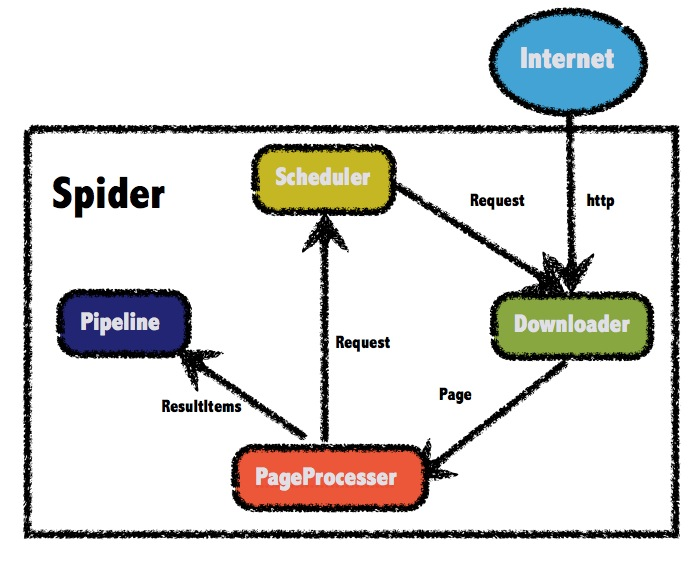
借鉴一下框架的设计图,在引入dotnetspider的NuGet包后,我基本也是按照这个进行了分层
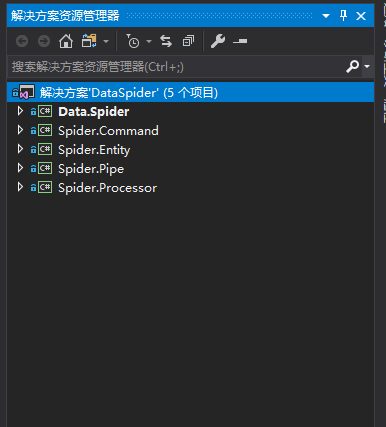
Data.Spider - 存放前台页面(Winform、控制台)和实体爬虫(EntitySpider)、Downloader等,相当于发起请求的起点。
Spider.Processor - 处理器,继承 IPageProcessor 实现对抓取内容的处理
Spider.Pipe - 管道,我将它理解为经过了 Processor 处理后的一个回调,将处理好的数据存储(文件、数据库等)
Spider.Entity - 数据实体类,继承 SpiderEntity
Spider.Command - 一些常用的公用命令,我这目前存放着转数据格式类,后台执行JS类,SqlHelper(因架构自带数据库管道,暂时没用)等
这样的分层也是参考了源码的示例
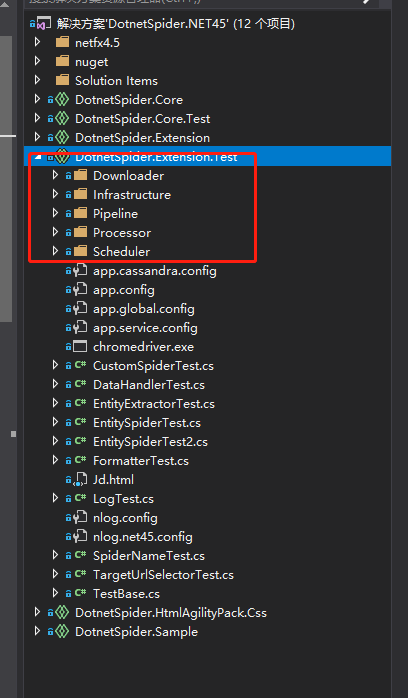
随着这几天的尝试,真的发现这个框架真的非常灵活,以凹凸租车的爬虫为例,上代码
实体类:
[EntityTable("CarWinsSpider", "AtzucheCar", EntityTable.Today)]
[EntitySelector(Expression = "$.data.content[*]", Type = SelectorType.JsonPath)]
public class AtzucheModel : SpiderEntity
{
/// <summary>
/// 车辆编号
/// </summary>
[PropertyDefine(Expression = "$.carNo", Type = SelectorType.JsonPath)]
public int carNo { get; set; }
/// <summary>
/// 品牌
/// </summary>
//[ReplaceFormatter(NewValue = "", OldValue = "\r")]
//[ReplaceFormatter(NewValue = "", OldValue = "\t")]
//[ReplaceFormatter(NewValue = "", OldValue = " ")]
//[ReplaceFormatter(NewValue = "", OldValue = "\n")]
//[ReplaceFormatter(NewValue = "", OldValue = "\"")]
//[ReplaceFormatter(NewValue = "", OldValue = " ")]
[PropertyDefine(Expression = "$.brand", Type = SelectorType.JsonPath)]
public string brand { get; set; }
/// <summary>
/// 地址
/// </summary>
[PropertyDefine(Expression = "$.carAddr", Type = SelectorType.JsonPath)]
public string carAddr { get; set; }
/// <summary>
/// 车系
/// </summary>
[PropertyDefine(Expression = "$.type", Type = SelectorType.JsonPath)]
public string type { get; set; }
/// <summary>
/// 排量
/// </summary>
[PropertyDefine(Expression = "$.sweptVolum", Type = SelectorType.JsonPath)]
public string sweptVolum { get; set; }
/// <summary>
/// 图片
/// </summary>
[PropertyDefine(Expression = "$.coverPic", Type = SelectorType.JsonPath)]
public string coverPic { get; set; }
/// <summary>
/// 日租金
/// </summary>
[PropertyDefine(Expression = "$.dayPrice", Type = SelectorType.JsonPath)]
public int dayPrice { get; set; }
/// <summary>
/// 公里数
/// </summary>
[PropertyDefine(Expression = "$.distance", Type = SelectorType.JsonPath)]
public string distance { get; set; }
/// <summary>
/// 评分
/// </summary>
[PropertyDefine(Expression = "$.evalScore", Type = SelectorType.JsonPath)]
public string evalScore { get; set; }
[PropertyDefine(Expression = "$.gbType", Type = SelectorType.JsonPath)]
public string gbType { get; set; }
/// <summary>
/// 车牌
/// </summary>
[PropertyDefine(Expression = "$.plateNum", Type = SelectorType.JsonPath)]
public string plateNum { get; set; }
[PropertyDefine(Expression = "$.replyTag", Type = SelectorType.JsonPath)]
public string replyTag { get; set; }
[PropertyDefine(Expression = "$.transCount", Type = SelectorType.JsonPath)]
public string transCount { get; set; }
/// <summary>
/// 年款
/// </summary>
[PropertyDefine(Expression = "$.year", Type = SelectorType.JsonPath)]
public int year { get; set; }
[PropertyDefine(Expression = "$.isPrivilege", Type = SelectorType.JsonPath)]
public int isPrivilege { get; set; }
[PropertyDefine(Expression = "$.isRecommend", Type = SelectorType.JsonPath)]
public int isRecommend { get; set; }
[PropertyDefine(Expression = "$.isUpgrade", Type = SelectorType.JsonPath)]
public int isUpgrade { get; set; }
[PropertyDefine(Expression = "$.lat", Type = SelectorType.JsonPath)]
public string lat { get; set; }
[PropertyDefine(Expression = "$.lon", Type = SelectorType.JsonPath)]
public string lon { get; set; }
[PropertyDefine(Expression = "$.queryId", Type = SelectorType.JsonPath)]
public string queryId { get; set; }
[PropertyDefine(Expression = "$.supplyCarService", Type = SelectorType.JsonPath)]
public int supplyCarService { get; set; }
[PropertyDefine(Expression = "$.freeCarService", Type = SelectorType.JsonPath)]
public int freeCarService { get; set; }
[PropertyDefine(Expression = "$.isShenMaCar", Type = SelectorType.JsonPath)]
public int isShenMaCar { get; set; }
[PropertyDefine(Expression = "$.supportGetReturn", Type = SelectorType.JsonPath)]
public int supportGetReturn { get; set; }
[PropertyDefine(Expression = "$.confirmation", Type = SelectorType.JsonPath)]
public int confirmation { get; set; }
}
起始:
/// <summary>
/// 应用程序的主入口点。
/// </summary>
[STAThread]
static void Main()
{
var site = new Site
{
CycleRetryTimes = 1,
SleepTime = 200,
Headers = new Dictionary<string, string>()
{
{"Accept","application/json, text/javascript, */*; q=0.01" },
{"Accept-Encoding","gzip, deflate" },
{"gzip, deflate","zh-CN,zh;q=0.9" },
{"X-Requested-With","XMLHttpRequest" },
{ "Referer", "http://www.atzuche.com/hz/car/search"},
{ "Connection","keep-alive" },
{ "Content-Type","application/json;charset=UTF-8" },
{ "Host","www.atzuche.com"},
{ "User-Agent","Mozilla/5.0 (Windows NT 10.0; WOW64) AppleWebKit/537.36 (KHTML, like Gecko) Chrome/65.0.3325.181 Safari/537.36"}
}
};
List<Request> resList = new List<Request>();
Request res = new Request();
//res.PostBody = $"id=7&j=%7B%22createMan%22%3A%2218273159100%22%2C%22createTime%22%3A1518433690000%2C%22row%22%3A5%2C%22siteUserActivityListId%22%3A8553%2C%22siteUserPageRowModuleId%22%3A84959%2C%22topids%22%3A%22%22%2C%22wherePhase%22%3A%221%22%2C%22wherePreferential%22%3A%220%22%2C%22whereUsertype%22%3A%220%22%7D&page={i}&shopid=83106681";//据说是post请求需要
res.Url = "http://www.atzuche.com/car/searchListMap/2?cityCode=330100&sceneCode=U002&filterCondition%5Blon%5D=120.219294&filterCondition%5Blat%5D=30.259258&filterCondition%5Bseq%5D=4&pageNum=1&pageSize=0";
res.Method = System.Net.Http.HttpMethod.Get;
resList.Add(res);
var spider = DotnetSpider.Core.Spider.Create(site, new QueueDuplicateRemovedScheduler(), new AtzucheProcessor())
.AddStartRequests(resList.ToArray())//页面抓取整理
.AddPipeline(new AtzuchePipe());//数据回调
//----------------------------------
spider.Monitor = new DotnetSpider.Core.Monitor.NLogMonitor();
spider.Downloader = new DotnetSpider.Core.Downloader.HttpClientDownloader();
spider.ClearSchedulerAfterComplete = false;//爬虫结束后不取消调度器
//----------------------------------
spider.ThreadNum = 1;
spider.Run();
Console.WriteLine("Press any key to continue...");
Console.Read();
}
这里也可将整个抓取方法当做一个Spider实例单独放置 -> EntitySpider
/// <summary>
/// 应用程序的主入口点。
/// </summary>
[STAThread]
static void Main()
{
AtzucheEntitySpider dDengEntitySpider = new AtzucheEntitySpider();
dDengEntitySpider.AddPageProcessor(new AtzucheProcessor());//控制器
dDengEntitySpider.AddPipeline(new AtzuchePipe());//回调
dDengEntitySpider.ThreadNum = 1;
dDengEntitySpider.Run();
Console.WriteLine("Press any key to continue...");
Console.Read();
}
新建爬虫实体类
public class AtzucheEntitySpider : EntitySpider
{
protected override void MyInit(params string[] arguments)
{
AddPipeline(new SqlServerEntityPipeline("Server=.;Database=AuzucheSpider;uid=sa;pwd=123;MultipleActiveResultSets=true"));//注意连接字符串中数据库不能带 . 亲测报错。。。
AddStartUrl("http://www.atzuche.com/car/searchListMap/2?cityCode=330100&sceneCode=U002&filterCondition%5Blon%5D=120.219294&filterCondition%5Blat%5D=30.259258&filterCondition%5Bseq%5D=4&pageNum=1&pageSize=0");
AddEntityType<AtzucheModel>();//如添加此实体类,框架将会根据此实体类上面的特性选择进行匹配,匹配成功后插入数据库,固可以省略Processor和Pipe,或者不使用此句,通过控制器和回调自定义存储方法
}
public AtzucheEntitySpider() : base("AuzucheSpider", new Site
{
CycleRetryTimes = 1,
SleepTime = 200,
Headers = new Dictionary<string, string>()
{
{"Accept","application/json, text/javascript, */*; q=0.01" },
{"Accept-Encoding","gzip, deflate" },
{"gzip, deflate","zh-CN,zh;q=0.9" },
{"X-Requested-With","XMLHttpRequest" },
{ "Referer", "http://www.atzuche.com/hz/car/search"},
{ "Connection","keep-alive" },
{ "Content-Type","application/json;charset=UTF-8" },
{ "Host","www.atzuche.com"},
{ "User-Agent","Mozilla/5.0 (Windows NT 10.0; WOW64) AppleWebKit/537.36 (KHTML, like Gecko) Chrome/65.0.3325.181 Safari/537.36"}
}
})
{
}
}
接下来是处理器:
解析抓取的数据封装到"AtzucheList"内,可Pipe内通过此名称获取处理好的数据。
public class AtzucheProcessor : IPageProcessor
{
public void Process(Page page, ISpider spider)
{
List<AtzucheModel> list = new List<AtzucheModel>();
var html = page.Selectable.JsonPath("$.data.content").GetValue();
list = JsonConvert.DeserializeObject<List<AtzucheModel>>(html);
page.AddResultItem("AtzucheList", list);
}
}
最后是回调,可在此加入保存数据的代码,至此结束。
public class AtzuchePipe : BasePipeline
{
public override void Process(IEnumerable<ResultItems> resultItems, ISpider spider)
{
var result = new List<AtzucheModel>();
foreach (var resultItem in resultItems)
{
Console.WriteLine((resultItem.Results["AtzucheList"] as List<AtzucheModel>).Count);
foreach (var item in (resultItem.Results["AtzucheList"] as List<AtzucheModel>))
{
result.Add(new AtzucheModel()
{
carNo = item.carNo
});
Console.WriteLine($"{item.carNo}:{item.type} ");
}
}
}
}
结果图:
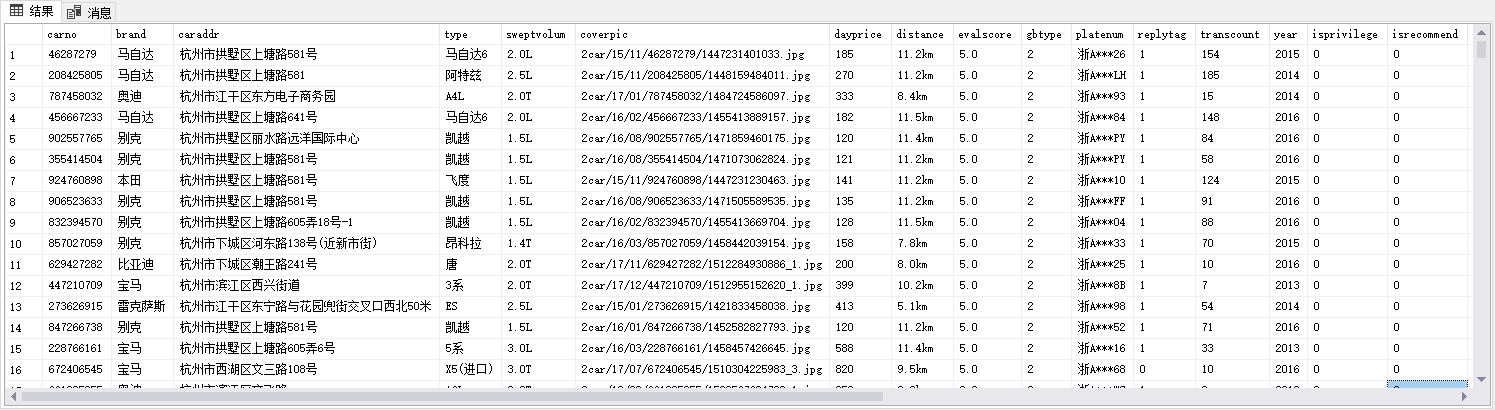
总体来说,此框架对新手还是很友好的,灵活写法可以让我们有较多的方式去实现爬虫,因为这个爬虫比较简单,就先写到这里,未来如果可能,会再尝试使用框架内的多线程、代理等功能,如有心得将继续分享,希望能对跟我一样的新手有所帮助,十分感谢。
DotnetSpider (一) 架构的理解、应用、搭建的更多相关文章
- 关于ASP.NET或VS2005 搭建三层架构的理解
最近想学习ASP.NET建网站,关于ASP.NET或VS2005 搭建三层架构的理解,网上摘录了一些资料,对于第(2)点的讲解让我理解印象深刻,如下: (1)为何使用N层架构? 因为每一层都可以在仅仅 ...
- Android基础-系统架构分析,环境搭建,下载Android Studio,AndroidDevTools,Git使用教程,Github入门,界面设计介绍
系统架构分析 Android体系结构 安卓结构有四大层,五个部分,Android分四层为: 应用层(Applications),应用框架层(Application Framework),系统运行层(L ...
- SQL SERVER 2005/2008 中关于架构的理解(二)
本文上接SQL SERVER 2005/2008 中关于架构的理解(一) 架构的作用与示例 用户与架构(schema)分开,让数据库内各对象不再绑在某个用户账号上,可以解决SQL SERVE ...
- SQL SERVER 2005/2008 中关于架构的理解(一)
SQL SERVER 2005/2008 中关于架构的理解(一) 在一次的实际工作中碰到以下情况,在 SQL SERVER 2008中,新建了一个新用户去访问几张由其他用户创建的表,但是无法进行查询, ...
- 【转】Linux 概念架构的理解
转:http://mp.weixin.qq.com/s?__biz=MzA3NDcyMTQyNQ==&mid=400583492&idx=1&sn=3b18c463dcc451 ...
- 架构师入门:搭建双注册中心的高可用Eureka架构(基于项目实战)
本文的案例是基于 架构师入门:搭建基本的Eureka架构(从项目里抽取) 改写的. 在上文里,我们演示Eureka客户端调用服务的整个流程,在这部分里我们将在架构上有所改进.大家可以想象下,在上文里案 ...
- 【转】SQL SERVER 2005/2008 中关于架构的理解
在一次的实际工作中碰到以下情况,在 SQL SERVER 2008中,新建了一个新用户去访问几张由其他用户创建的表,但是无法进行查询,提示“对象名'CustomEntry' 无效.”.当带上了架构名称 ...
- B/S和C/S架构简单理解
B/S和C/S架构简单理解 B/S结构.C/S结构 B(browser浏览器)-S(server服务器),说简单点就是通过浏览器来请求服务器,实现数据交互.那自然了,C(client客户端软件)-S( ...
- 庐山真面目之十一微服务架构手把手教你搭建基于Jenkins的企业级CI/CD环境
庐山真面目之十一微服务架构手把手教你搭建基于Jenkins的企业级CI/CD环境 一.介绍 说起微服务架构来,有一个环节是少不了的,那就是CI/CD持续集成的环境.当然,搭建CI/CD环境的工具很多, ...
随机推荐
- Python之面向对象三
面向对象的三大特性: 多态 多态指的是一类事物有多种形态.Python3天生支持多态. 动物有多种形态:人,狗,猪 import abc class Animal(metaclass=abc.ABCM ...
- idea中,发现某个java语法在低版本中不支持时的解决办法
比如,在某个工程中,准备用java.util.Objects#equals语法,发现提示版本不支持. F4查看Module的配置,发现原来是1.6版本. 当我手动修改为1.8时,提示我:Module是 ...
- HTNL表单详解
HTML表单 表单的结构 表单的标签:<form> </form> 常用属性 Name , method(get,post), action(服务器的接收的页面如:reg.ph ...
- cache和buffer
一.free命令是Linux查看内存使用情况的命令 1. centos 7风格 [root@bogon init.d]# free -m total used free shared buff/cac ...
- HTML初识
HTML初识 web服务本质 import socket def main(): sock = socket.socket(socket.AF_INET, socket.SOCK_STREAM) so ...
- Python系列之 - 锁(GIL,Lock,Rlock,Event,信号量)
python 的解释器,有很多种,但市场占有率99.9%的都是基于c语言编写的CPython. 在这个解释器里规定了GIL. In CPython, the global interpreter l ...
- 在MySQL中使用子查询
子查询作为数据源 子查询生成的结果集包含行.列数据,因而非常适合将它与表一起包含在from子句的子查询里.例: SELECT d.dept_id, d.name, e_cnt.how_many num ...
- 文件上传详解 (HTML FILE)
FileUpload 对象 在 HTML 文档中 <input type="file"> 标签每出现一次,一个 FileUpload 对象就会被创建. 该元素包含一个文 ...
- 机器学习技法:15 Matrix Factorization
Roadmap Linear Network Hypothesis Basic Matrix Factorization Stochastic Gradient Descent Summary of ...
- [HNOI 2008]GT考试
Description 题库链接 问你长度为 \(n\) 的可含前导零的数字串中,不含长度为 \(m\) 的子串 \(X\) 有多少个,取模. \(1\leq n\leq 10^9,1\leq m\l ...