
Entity Framework异步查询和保存
EF6开始提供了通过async和await关键字实现异步查询和保存的支持(.net 4.5及更高版本)。虽然不是所有的操作都能从异步中获益,但是耗时的操作、网络或IO密集型任务中,使用异步可以提升客户端性能和增强服务器的扩展性。
本文将覆盖一下主题:
- 实例演练异步操作
- 创建模型
- 创建同步程序
- 改为异步操作
实例演练异步操作
下面演练将通过对比,很容易的观察异步操作和同步操作,该演练目的不是说明何时才是异步操作的关键场景。
创建模型
下面使用CodeFirst的流程创建模型并生成数据库,不过异步方法可以很好的工作于所有EF模型,包括EF设计器生成的模型。
创建一个控制台应用程序AsyncDemo。
添加EntityFramework NuGet包到项目中。
添加Model.cs到项目中,代码如下:
 using System.Collections.Generic;

 using System.Data.Entity;

 namespace AsyncDemo

 {

     public class BloggingContext : DbContext

     {

         public DbSet<Blog> Blogs { get; set; }

         public DbSet<Post> Posts { get; set; }

     }

     public class Blog

     {

         public int BlogId { get; set; }

         public string Name { get; set; }

         public virtual List<Post> Posts { get; set; }

     }

     public class Post

     {

         public int PostId { get; set; }

         public string Title { get; set; }

         public string Content { get; set; }

         public int BlogId { get; set; }

         public virtual Blog Blog { get; set; }

     }

 }
创建同步程序
有了EF模型,下面通过代码模拟数据库存取。
 using System;

 using System.Linq;

 namespace AsyncDemo

 {

     class Program

     {

         static void Main(string[] args)

         {

             PerformDatabaseOperations();

             Console.WriteLine();

             Console.WriteLine("Quote of the day");

             Console.WriteLine(" Don't worry about the world coming to an end today... ");

             Console.WriteLine(" It's already tomorrow in Australia.");

             Console.WriteLine();

             Console.WriteLine("Press any key to exit...");

             Console.ReadKey();

         }

         public static void PerformDatabaseOperations()

         {

             using (var db = new BloggingContext())

             {

                 // Create a new blog and save it

                 db.Blogs.Add(new Blog

                 {

                     Name = "Test Blog #" + (db.Blogs.Count() + )

                 });

                 db.SaveChanges();

                 // Query for all blogs ordered by name

                 var blogs = (from b in db.Blogs

                             orderby b.Name

                             select b).ToList();

                 // Write all blogs out to Console

                 Console.WriteLine();

                 Console.WriteLine("All blogs:");

                 foreach (var blog in blogs)

                 {

                     Console.WriteLine(" " + blog.Name);

                 }

             }

         }

     }

 }
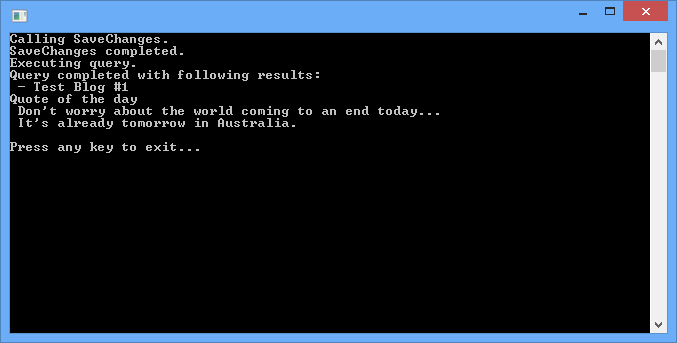
上面代码通过调用PerformDatabaseOperations() 保存一个Blog对象到数据库中,然后从数据库中检索所有Blog,并显示到控制台,然后显示一行文本”Quote of the day“。
由于上面程序是同步执行的,所有可以观察到程序按下面流程执行:
- SaveChanges保存Blog对象到数据库中。
- SaveChanges完成。
- 发送查询Blog请求到数据库。
- 查询返回结果,并写入控制台。
- 显示文本“Quote of the day”到控制台。
改造为异步操作
对上面程序加以修改,使用async和await关键字实现异步操作。
 using System;

 using System.Data.Entity;

 using System.Linq;

 using System.Threading.Tasks;

 namespace AsyncDemo

 {

     class Program

     {

         static void Main(string[] args)

         {

             var task = PerformDatabaseOperations();

             Console.WriteLine("Quote of the day");

             Console.WriteLine(" Don't worry about the world coming to an end today... ");

             Console.WriteLine(" It's already tomorrow in Australia.");

             task.Wait();

             Console.WriteLine();

             Console.WriteLine("Press any key to exit...");

             Console.ReadKey();

         }

         public static async Task PerformDatabaseOperations()

         {

             using (var db = new BloggingContext())

             {

                 // Create a new blog and save it

                 db.Blogs.Add(new Blog

                 {

                     Name = "Test Blog #" + (db.Blogs.Count() + )

                 });

                 Console.WriteLine("Calling SaveChanges.");

                 await db.SaveChangesAsync();

                 Console.WriteLine("SaveChanges completed.");

                 // Query for all blogs ordered by name

                 Console.WriteLine("Executing query.");

                 var blogs = await (from b in db.Blogs

                             orderby b.Name

                             select b).ToListAsync();

                 // Write all blogs out to Console

                 Console.WriteLine("Query completed with following results:");

                 foreach (var blog in blogs)

                 {

                     Console.WriteLine(" - " + blog.Name);

                 }

             }

         }

     }

 }
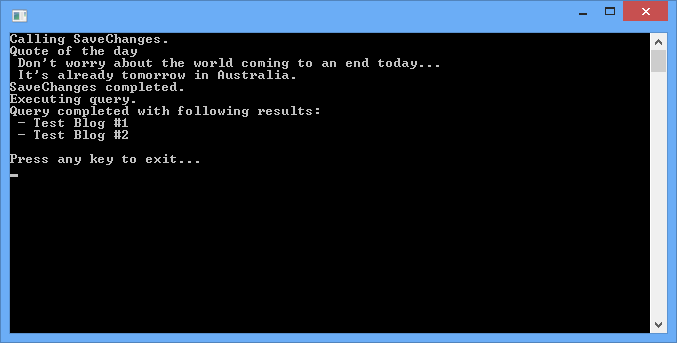
现在程序变为异步执行,可以观察到异步执行顺序为:
- 发送SaveChanges请求到数据库。
- 该请求发送给数据库时,当前线程不在占用CPU时间,从方法PerformDatabaseOperations中返回(虽然该方法还没有执行完成),控制权返回给主线程执行。
- 显示字符串“Quote of the day ”到控制台。
- SaveChanges完成。
- 发起查询Blogs请求到数据库。
- 查询完成返回结果,并显示到控制台。
Entity Framework异步查询和保存的更多相关文章
- 整理一下Entity Framework的查询
整理一下Entity Framework的查询 2012-08-30 13:41:59 标签:Entity Framework 原创作品,允许转载,转载时请务必以超链接形式标明文章 原始出处 .作者信 ...
- Entity Framework 简单查询
前言 首先来简单的复习一下如何使用Code First. 第一步还是先建立一个控制台的应用程序,然后通过Nuget添加Entity Framework.那么同时会给packages.config和Ap ...
- 整理一下Entity Framework的查询 [转]
Entity Framework是个好东西,虽然没有Hibernate功能强大,但使用更简便.今天整理一下常见SQL如何用EF来表达,Func形式和Linq形式都会列出来(本人更喜欢Func形式). ...
- 转:整理一下Entity Framework的查询
Entity Framework是个好东西,虽然没有Hibernate功能强大,但使用更简便.今天整理一下常见SQL如何用EF来表达,Func形式和Linq形式都会列出来(本人更喜欢Func形式). ...
- Entity Framework的查询
Entity Framework是个好东西,虽然没有Hibernate功能强大,但使用更简便.今天整理一下常见SQL如何用EF来表达,Func形式和Linq形式都会列出来(本人更喜欢Func形式). ...
- Entity Framework关联查询以及数据加载(延迟加载,预加载)
数据加载分为延迟加载和预加载 EF的关联实体加载有三种方式:Lazy Loading,Eager Loading,Explicit Loading,其中Lazy Loading和Explicit Lo ...
- Entity Framework (二) 查询
待完善-------------------------------------- ----------- base 关键字用于从派生类中访问基类的成员: 调用基类上已被其他方法重写的方法. 指定创建 ...
- Entity Framework: 视图查询时重复返回第一行值, duplicate frst rows in resultset from a view
http://blog.csdn.net/riverlau/article/details/7476449 1. 使用rownumber给view加上一个标示列 SELECT ROW_NUMBER() ...
- 《Entity Framework 6 Recipes》中文翻译系列 (41) ------ 第七章 使用对象服务之标识关系中使用依赖实体与异步查询保存
翻译的初衷以及为什么选择<Entity Framework 6 Recipes>来学习,请看本系列开篇 7-7 标识关系中使用依赖实体 问题 你想在标识关系中插入,更新和删除一个依赖实体 ...
随机推荐
- spring-boot-maven-plugin 插件的作用
pom文件中添加了"org.springframework.boot:spring-boot-maven-plugin"插件.在添加了该插件之后,当运行"mvn pack ...
- 塔防游戏 Day1
1. 创建地图 如上图所示,白色方块为可以放置塔楼的区域,粉红色区域为敌人的行走区域,绿色方块处为起始点,黄色方块点为终止点. 2. 控制游戏的视野 public class ViewScript : ...
- [iOS]隐藏导航栏把右滑退出操作保留
项目因为用到上面导航栏样式多变,就隐藏了导航栏自己用View代替了,但手势却不见了,后来发现问题解决.操作如下: 千万不要取消 Shows Navigation Bar 这个选项否则手势会消失 应该是 ...
- Hibernate核心API
------------------------siwuxie095 (一)Configuration 1.一般情况 或: 加载核心配置文件:在 src 下找到名称为 Hibernate.cfg.xm ...
- zabbix结合grafana
一.下载grafana 下载地址: http://docs.grafana.org/installation/rpm/ https://s3-us-west-2.amazonaws.com/grafa ...
- ActiveMQ 使用文档
一.为什么使用ActiveMQ 在总线的设计中可能会使用到JMS(Java Message Service)通道, Java消息服务(JMS)超越了生产商专有的MOM(Message-Oriented ...
- LINK : fatal error LNK1104: cannot open file "mfc42d.lib"
VC++6.0上建立了个基于MFC应用程序,在编译时候没出现错误,但在LINK的是时候出现这样的错误:Linking...LINK : fatal error LNK1104: cannot open ...
- 线上服务内存OOM问题定位
转自:架构师之路,http://mp.weixin.qq.com/s/iOC1fiKDItn3QY5abWIelg 相信大家都有感触,线上服务内存OOM的问题,是最难定位的问题,不过归根结底,最常见的 ...
- 每天一个Qt类之QWidget
每天一个Qt类之QWidget QWidget类是所有用户界面对象的基类 继承QObject和QPaintDevice 被QButton.QFrame.QDialog.QComboBox.QDataB ...
- 让你大开眼界的10款Android界面设计
根据调查显示, iOS与Android的市场份额差距正越来越大.Android设备正在成为手机应用市场的主力军.如何从设计层面创造一个优美的app界面来吸引用户已然成为广大App开发者们必做的功课之一 ...