
jQuery判断是否选中
1.判断check是否选中
<!DOCTYPE html>

<html lang="en">

<head>

    <meta charset="UTF-8">

    <title>判断check是否被选中</title>

    <meta name="viewport" content="width=device-width,initial-scale=1.0, minimum-scale=1.0, maximum-scale=1.0, user-scalable=no" />

    <meta content="yes" name="apple-mobile-web-app-capable" />

    <meta content="black" name="apple-mobile-web-app-status-bar-style" />

    <meta content="telephone=no" name="format-detection" />

    <style type="text/css">

        *{margin:0; padding: 0}

        body{font:14px/1.4 "Microsoft Yahei",Arial,Helvetica,sans-serif;background-color: #fff;color:#333;max-width: 640px;margin: 0 auto;}

        a{ text-decoration: none; color: #333 }

        /*btn*/

        .public_btn_s {padding: 10px 0; margin: 0 10px;}

        .public_btn_s a { display: block; height: 34px; line-height: 34px; text-align: center; font-size: 18px; background-color: #31b6e7; color: #fff; border-radius: 5px; -o-border-radius: 5px; -ms-border-radius: 5px; -moz-border-radius: 5px; -webkit-border-radius: 5px; }

    </style>

</head>

<body>

    <div class="public_agreement">

        <input type="checkbox" id="agreeInput" value="on">同意<a href="javascript:;" >个人隐私协议</a>

    </div>

    <div class="public_btn_s">

        <a href="javascript:;" class="J_ajax_submit_btn">点击查看</a>

    </div>

    <script src="http://apps.bdimg.com/libs/jquery/1.9.1/jquery.min.js" type="text/javascript"></script>

    <script type="text/javascript">

        $(function () {

            //按钮点击

            $('.J_ajax_submit_btn').on('click',function(){

                if($('#agreeInput').length){

                    if(!($('#agreeInput').is(':checked'))){

                        alert('您未同意个人隐私协议');

                        return false;

                    }else{

                        var url = 'http://www.baidu.com';

                        window.location.href=url;

                    }

                }

            });

        })

    </script>

</body>

</html>
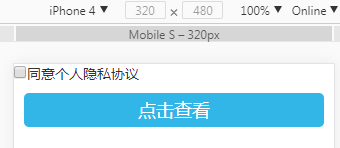
2.判断div是否被选中
<!DOCTYPE html>

<html lang="en">

<head>

    <meta charset="UTF-8">

    <title>判断div是否被选中</title>

    <meta name="viewport" content="width=device-width,initial-scale=1.0, minimum-scale=1.0, maximum-scale=1.0, user-scalable=no" />

    <meta content="yes" name="apple-mobile-web-app-capable" />

    <meta content="black" name="apple-mobile-web-app-status-bar-style" />

    <meta content="telephone=no" name="format-detection" />

    <style type="text/css">

        *{margin:0; padding: 0}

        body{font:14px/1.4 "Microsoft Yahei",Arial,Helvetica,sans-serif;background-color: #fff;color:#333;max-width: 640px;margin: 0 auto;}

        a{ text-decoration: none; color: #333 }

        /*选项卡*/

        .form_tab{ overflow: hidden; background-color: #fffdf0; margin:5px 10px; border:1px solid #f9a268; border-radius: 5px;}

        .ft_top{ overflow: hidden; height: 37px;line-height: 36px;}

        .ft_top a{float: left; width: 50%; box-sizing: border-box; border-right:1px solid #f9a268; text-align: center; background-color: #ffedda; border-bottom:1px solid #f9a268;}

        .ft_top a:last-child{ border-right:0}

        .ft_top a:hover,.ft_top a.current{ background-color: #fffdf0; border-top:2px solid #db2121; color: #db2121;}

        .ft_top a.current{ border-bottom:0}

        .ft_con{overflow: hidden;padding:20px 10px ;}

        .ft_con a{ height: 25px; line-height: 25px; padding:0 10px; border:1px solid #f9a268; background-color: #ffddbb;float:left; margin:0 5px; border-radius: 3px;}

        .ft_con a.current{ color: #db2121; border-color: #db2121;}

        /*btn*/

        .public_btn_s {padding: 10px 0; margin: 0 10px;}

        .public_btn_s a { display: block; height: 34px; line-height: 34px; text-align: center; font-size: 18px; background-color: #31b6e7; color: #fff; border-radius: 5px; -o-border-radius: 5px; -ms-border-radius: 5px; -moz-border-radius: 5px; -webkit-border-radius: 5px; }

    </style>

</head>

<body>

    <div class="form_tab">

        <div class=" ft_top" id="tabMenu">

            <a href="javascript:;" class="current">转盘法(排盘法)</a>

            <a href="javascript:;">飞盘法(排盘法)</a>

        </div>

        <div class="ft_con "id="tabCon">

            <a href="javascript:;">置润法</a>

            <a href="javascript:;">拆补法</a>

            <a href="javascript:;">茅山道人法</a>

        </div>

    </div>

    <div class="public_btn_s">

        <a href="javascript:;" class="J_ajax_submit_btn">点击查看</a>

    </div>

    <script src="http://apps.bdimg.com/libs/jquery/1.9.1/jquery.min.js" type="text/javascript"></script>

    <script type="text/javascript">

        $(function () {

            $("#tabMenu a").on('click',function () {

                $(this).addClass('current').siblings().removeClass('current');

            });

            $('#tabCon a').on('click',function () {

                $(this).addClass('current').siblings().removeClass('current');

            });

            //按钮点击

            $('.J_ajax_submit_btn').on('click',function(){

                if($('#tabCon a').length){

                    if(!($('#tabCon a').is('.current'))){

                        alert('您未选择排盘方法');

                        return false;

                    }else{

                        var url = 'http://www.baidu.com';

                        window.location.href=url;

                    }

                }

            });

        })

    </script>

</body>

</html>
效果图:

jQuery判断是否选中的更多相关文章
- JQuery判断checkbox选中,jquery获取选中的checkbox
选中的radio $('input[name="radInvoiceType"]:checked').val(); 这样能获得 $('input[name="radInv ...
- 复选框、单选框 jquery判断是否选中Demo
<%@ Page Language="C#" AutoEventWireup="true" CodeBehind="eachcheckbox.a ...
- Jquery判断checkbox选中状态
jQuery v3.3.1 <input type="checkbox" id="ch"> 判断 $('#ch').is(':checked'); ...
- jquery判断input选中事件
需求是默认第一个是选中状态,点第二个选中,第一个取消然后点支付时,跳转新页面 $(function(){ $(".nl_zhifutj a").click(function(){ ...
- jquery判断复选框checkbox是否被选中
jquery判断复选框checkbox是否被选中 使用is方法 //如果选中返回true //如果未选中返回false .is(':checked');
- JQuery判断radio是否选中,获取选中值
本文摘自:http://www.cnblogs.com/xcj1989/archive/2011/06/29/JQUERY_RADIO.html /*----------------------- ...
- jquery判断复选框是否选中
jquery判断复选框是否被选中 $(function(){ $(document).on("click", ".checkbox",function(){ v ...
- jQuery 判断checkbox是否被选中 4种方法
下午写JS验证,有一个需求需要判断 checkbox是否被选择,查阅相关资料后,总结以下4种方法,分享给大家. <!DOCTYPE html> <html lang="en ...
- jquery判断按钮是否被选中了
<script type="text/javascript"> function genjin_view2(elm){ if($(elm).attr("che ...
随机推荐
- django-rest-swagger
前提工作 pip3 install --user django>=2.0.0 pip3 install --user django-rest-swagger 安装完成之后,创建一个django项 ...
- 关于PHP如何用实现防止用户在浏览器上使用后退功能重复提交输入
$(function(){ if(window.history && window.history.pushState){ $(window).on('popstate',functi ...
- Android基础之sqlite 数据库简单操作
尽管很简单,但是也存下来,以后直接粘过去就能用了. public class DBHelper extends SQLiteOpenHelper { private static final ...
- 【Rsync项目实战一】备份全网服务器数据
目录 [Rsync项目实战]备份全网服务器数据 [企业案例] 1.1 环境部署 1.2 开始部署backup服务器:Rsync服务端过程: 1.3 开始部署nfs01服务器:Rsync客户端过程: [ ...
- jenkins-为什么要持续集成
持续集成(Continuous Integration),也就是我们经常说的 CI,是现代软件开发技术的基础.本文论述了当前软件开发过程中存在的问题,讲解了持续集成.持续集成服务器的概念,最终探讨了为 ...
- java算法 第七届 蓝桥杯B组(题+答案) 7.剪邮票
7.剪邮票 (结果填空) 如[图1.jpg], 有12张连在一起的12生肖的邮票.现在你要从中剪下5张来,要求必须是连着的.(仅仅连接一个角不算相连)比如,[图2.jpg],[图3.jpg]中,粉红 ...
- Culling & Depth Testing
[Culling & Depth Testing] Culling is an optimization that does not render polygons facing away f ...
- Opencv Harris角点检测
#include <iostream>#include <opencv2/opencv.hpp> using namespace std;using namespace cv; ...
- [C++] Swap Two Num
Swap Two Num
- code1074 食物链
开3*n的并查集,其中x用来连接与x同类的,x+n用来连接x吃的,x+2*n用来连接x被吃的. 1 x y时,如果 x吃y 或 x被y吃,那么为假话, 否则x与y同类,x吃的y也吃,x被吃的y也被吃: ...