
spring基础---->spring自定义标签(一)
Spring具有一个基于架构的扩展机制,可以使用xml文件定义和配置bean。本博客将介绍如何编写自定义XML bean的解析器,并用实例来加以说明。其实我一直相信 等你出现的时候我就知道是你。
Spring中标签的拓展
自定义标签大致分为以下几个步骤:
、Authoring an XML schema to describe your custom element(s).

、Coding a custom NamespaceHandler implementation (this is an easy step, don’t worry).

、Coding one or more BeanDefinitionParser implementations (this is where the real work is done).

、Registering the above artifacts with Spring (this too is an easy step).
项目的结构如下:
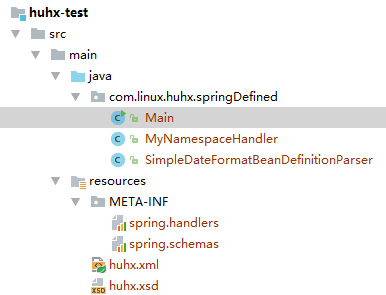
一、定义一个schema,命名为huhx.xsd。内容如下:
<?xml version="1.0" encoding="UTF-8"?>

<xsd:schema xmlns="http://www.huhx.com/schema/ch"

            xmlns:xsd="http://www.w3.org/2001/XMLSchema"

            xmlns:beans="http://www.springframework.org/schema/beans"

            targetNamespace="http://www.huhx.com/schema/ch"

            elementFormDefault="qualified"

            attributeFormDefault="unqualified">

    <xsd:import namespace="http://www.springframework.org/schema/beans" />

    <xsd:element name="dateformat">

        <xsd:complexType>

            <xsd:complexContent>

                <xsd:extension base="beans:identifiedType">

                    <xsd:attribute name="lenient" type="xsd:boolean"/>

                    <xsd:attribute name="pattern" type="xsd:string" use="required"/>

                </xsd:extension>

            </xsd:complexContent>

        </xsd:complexType>

    </xsd:element>

</xsd:schema>
二、编写一个NamespaceHandler,名为MyNamespaceHandler.java。
package com.linux.huhx.springDefined;

import org.springframework.beans.factory.xml.NamespaceHandlerSupport;

/**

 * Created by huhx on 2017-05-17.

 */

public class MyNamespaceHandler extends NamespaceHandlerSupport {

    @Override

    public void init() {

        registerBeanDefinitionParser("dateformat", new SimpleDateFormatBeanDefinitionParser());

    }

}
三、编写一个BeanDefinitionParser,名为SimpleDateFormatBeanDefinitionParser.java。
package com.linux.huhx.springDefined;

import org.springframework.beans.factory.support.BeanDefinitionBuilder;

import org.springframework.beans.factory.xml.AbstractSingleBeanDefinitionParser;

import org.springframework.util.StringUtils;

import org.w3c.dom.Element;

import java.text.SimpleDateFormat;

/**

 * Created by huhx on 2017-05-17.

 */

public class SimpleDateFormatBeanDefinitionParser extends AbstractSingleBeanDefinitionParser {

    protected Class getBeanClass(Element element) {

        return SimpleDateFormat.class;

    }

    protected void doParse(Element element, BeanDefinitionBuilder bean) {

        // this will never be null since the schema explicitly requires that a value be supplied

        String pattern = element.getAttribute("pattern");

        bean.addConstructorArgValue(pattern);

        // this however is an optional property

        String lenient = element.getAttribute("lenient");

        if (StringUtils.hasText(lenient)) {

            bean.addPropertyValue("lenient", Boolean.valueOf(lenient));

        }

    }

}
四、注册上述的handler和schema
在META-INF下面创建两个文件spring.handlers和spring.schemas,内容如下:
spring.handlers:
http\://www.huhx.com/schema/ch=com.linux.huhx.springDefined.MyNamespaceHandler
spring.schemas:
http\://www.huhx.com/schema/ch.xsd=huhx.xsd
五、在配置文件中我们测试使用自定义的标签:huhx.xml
<?xml version="1.0" encoding="UTF-8"?>

<beans xmlns="http://www.springframework.org/schema/beans"

       xmlns:xsi="http://www.w3.org/2001/XMLSchema-instance"

       xmlns:ch="http://www.huhx.com/schema/ch"

       xsi:schemaLocation="http://www.springframework.org/schema/beans

        http://www.springframework.org/schema/beans/spring-beans-3.1.xsd

        http://www.huhx.com/schema/ch

        http://www.huhx.com/schema/ch.xsd">

    <ch:dateformat id="dateFormat" pattern="yyyy-MM-dd HH:mm" lenient="true"/>

</beans>
六、测试的java类Main.java内容如下:
package com.linux.huhx.springDefined;

import org.springframework.context.ApplicationContext;

import org.springframework.context.support.ClassPathXmlApplicationContext;

import org.springframework.context.support.FileSystemXmlApplicationContext;

import java.text.SimpleDateFormat;

import java.util.Date;

/**

 * Created by huhx on 2017-05-17.

 */

public class Main {

    public static void main(String[] args) {

        ApplicationContext context = new ClassPathXmlApplicationContext("huhx.xml");

        SimpleDateFormat info = (SimpleDateFormat) context.getBean("dateFormat");

        System.out.println(info.format(new Date()));

    }

}
打印的结果如下:
-- :
友情链接
- spring自定义标签的官方文档:http://docs.spring.io/spring/docs/current/spring-framework-reference/htmlsingle/#xml-custom
spring基础---->spring自定义标签(一)的更多相关文章
- spring整合freemarker 自定义标签
1.自定义标签实现 TemplateDirectiveModel 接口 2.spring 配置,注意标红的两行 <bean id="freemarkerConfig" cla ...
- spring中的自定义标签
为了给系统提供可配置化支持,一般会用原生态的方式去解析定义好的XML文件,然后转化为配置对象.这种方式对于简单.单一的配置文件,或者是XML配置格式固定的配置文件,比较容易处理.但是对于一些配置非常复 ...
- spring源码-自定义标签-4
一.自定义标签,自定义标签在使用上面相对来说非常常见了,这个也算是spring对于容器的拓展.通过自定义标签的方式可以创造出很多新的配置方式,并且交给容器直接管理,不需要人工太多的关注.这也是spri ...
- Spring 源码(4)在Spring配置文件中自定义标签如何实现?
Spring 配置文件自定义标签的前置条件 在上一篇文章https://www.cnblogs.com/redwinter/p/16165274.html Spring BeanFactory的创建过 ...
- JavaWeb基础—JSP自定义标签入门
自定义标签的作用:替换JSP页面的java代码 步骤:1.标签处理类(标签是一个对象,那也就需要先有类) 2.tld文件 它是一个xml(可以向c标签里借),一般放到WEB-INF下,不让客户端浏览器 ...
- spring基础---->spring自定义初始化(二)
这里新增了对ref属性的支持,并且过滤了已经解析的元素.人生有两个词很棒,一言不合和不提也罢. spring自定义对ref属性支持 项目的结构如下:新增一个ThirdBean类,修改了ParseXml ...
- spring基础---->spring自定义初始化(一)
这里我们简单的实现一下spring中的初始化bean,以大概了解他的流程.受委屈几乎是一个人成长最快的途径,吃下去的是委屈,消化掉后得到的是格局. spring的自定义初始化 测试的项目结构如下: 一 ...
- Spring 源码学习(1) —— 自定义标签
Spring 工作流程是先加载解析xml配置文件:配置文件中存在默认的标签,也可以自定义标签.解析默认标签调用: private void parseDefaultElement(Element el ...
- spring基础学习01
spring基础 Spring是一个开放源代码的设计层面框架,他解决的是业务逻辑层和其他各层的松耦合问题,因此它将面向接口的编程思想贯穿整个系统应用 IOC控制反转 把创建对象和维护对象之间的关系权利 ...
随机推荐
- tsung 学习
tsung简介: Tsung是开源的基于Erlang语言开发的多协议分布式压力测试工具,它能用来压力测试HTTP, WebDAV, SOAP, PostgreSQL, MySQL, LDAP 和 ...
- (Windows Maven项目)Redis数据库的安装和操作实现
Redis是一个内存数据库,他会把你写入当中的数据缓存到内存中,之后会周期性的往磁盘中写入.这篇文章中介绍的是在Windows环境下利用Maven工具编译运行Java文件实现Red ...
- Python2.X和Python3.X中的urllib区别
Urllib是Python提供的一个用于操作URL的模块,在Python2.X中,有Urllib库,也有Urllib2库,在Python3.X中Urllib2合并到了Urllib中,我们爬取网页的时候 ...
- Windows下搭建HTK
转自:http://blog.csdn.net/yanli0823/article/details/8186382 亲测有效,环境: windows 8.1 perl版本: HTK版本:Hidden ...
- layui更新表格单元格数据口,更新单元格的内容
//监听工具条 table.on('tool(edit)', function(obj){ var data = obj.data; if(obj.event === 'getinvitation') ...
- psr-0和psr-4命名规范(未完)
这些命名规范都是为为自动加载服务(避免项目中有很多的include和require) psr-0: 1.命名空间必须与绝对路径一致 2.类名首字母必须大写 3.除入口文件外,其他“.php”必须只有一 ...
- PHP垃圾回收机制引用计数器概念
参考: http://www.phpddt.com/php/gc-refcounting-basics.html
- 浅谈AngularJS的$parse服务
$parse 作用:将一个AngularJS表达式转换成一个函数 Usage$parse(expression) arguments expression:需要被编译的AngularJS语句 retu ...
- python随机数seed用法
import random ... def main(): a = random.Random() a.seed(1) print a.random() 这样就可以通过种子取得固定随机值了 网上很多只 ...
- Delphi 全局画点TCanvas.Pixels[X,Y]
procedure TForm1.btnChangePixelClick(Sender: TObject); var baseX : integer ; baseY : integer ; i,j : ...