
HIVE学习(待更新)
1 安装hive

下载
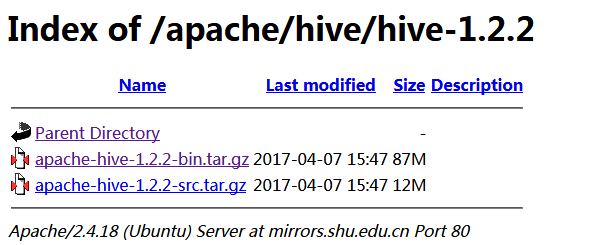
http://mirrors.shu.edu.cn/apache/hive/hive-1.2.2/,红框中的不需要编译。
由于hive是默认将元数据保存在本地内嵌的 Derby 数据库中,但是这种做法缺点也很明显,Derby不支持多会话连接,因此本文将选择mysql作为元数据存储。
安装mysql
yum安装mysql

  wget -i -c http://dev.mysql.com/get/mysql57-community-release-el7-10.noarch.rpm

 yum -y install mysql57-community-release-el7-.noarch.rpm

 yum -y install mysql-community-server

启动MySQL

systemctl start  mysqld.service

查看MySQL运行状态

systemctl status mysqld.service

mysql -uroot -p     # 回车后会提示输入密码

此时MySQL已经开始正常运行,不过要想进入MySQL还得先找出此时root用户的密码,通过如下命令可以在日志文件中找出密码:

ALTER USER 'root'@'localhost' IDENTIFIED BY 'new password';

12345

具体请参考

https://www.cnblogs.com/brianzhu/p/8575243.html
tar -zxvf apache-hive-1.2.3-bin.tar.gz 后的内容如下,进入到conf

cp hive-default.xml.template hive-site.xml
编辑文件hive-site.xml
<?xml version="1.0" encoding="utf-8"?>
<?xml-stylesheet type="text/xsl" href="configuration.xsl"?> <!--
Licensed to the Apache Software Foundation (ASF) under one or more
contributor license agreements. See the NOTICE file distributed with
this work for additional information regarding copyright ownership.
The ASF licenses this file to You under the Apache License, Version 2.0
(the "License"); you may not use this file except in compliance with
the License. You may obtain a copy of the License at http://www.apache.org/licenses/LICENSE-2.0 Unless required by applicable law or agreed to in writing, software
distributed under the License is distributed on an "AS IS" BASIS,
WITHOUT WARRANTIES OR CONDITIONS OF ANY KIND, either express or implied.
See the License for the specific language governing permissions and
limitations under the License.
-->
<configuration>
<property>
<name>javax.jdo.option.ConnectionUserName</name>
<value>xxxx</value>
</property>
<property>
<name>javax.jdo.option.ConnectionPassword</name>
<value>xxxx</value>
</property>
<property>
<name>javax.jdo.option.ConnectionURL</name>mysql
<value>jdbc:mysql://hostIP:3306/hive?createDatabaseIfNotExist=true&useSSL=false&nullNamePatternMatchesAll=true</value>
</property>
<property>
<name>javax.jdo.option.ConnectionDriverName</name>
<value>com.mysql.jdbc.Driver</value>
</property>
</configuration>
复制mysql的驱动程序到hive/lib下面
2 hive启动方式
运行hive之前首先要确保meta store服务已经启动,

nohup hive --service metastore > metastore.log >& &

如果需要用到远程客户端(比如 Tableau)连接到hive数据库,还需要启动hive service

nohup hive --service hiveserver2 > hiveserver2.log >& &

[sms@gc64 conf]$ hive --help
Usage ./hive <parameters> --service serviceName <service parameters>
Service List: beeline cli help hiveburninclient hiveserver2 hiveserver hwi jar lineage metastore metatool orcfiledump rcfilecat schemaTool version
Parameters parsed:
  --auxpath : Auxillary jars
  --config : Hive configuration directory
  --service : Starts specific service/component. cli is default
Parameters used:
  HADOOP_HOME or HADOOP_PREFIX : Hadoop install directory
  HIVE_OPT : Hive options
For help on a particular service:
  ./hive --service serviceName --help
Debug help:  ./hive --debug --help
hive2.0一下没有web查看
[sms@gc64 ~]$ hive

Logging initialized using configuration in jar:file:/home/sms/app/apache-hive-1.2.-bin/lib/hive-common-1.2..jar!/hive-log4j.properties

Loading class `com.mysql.jdbc.Driver'. This is deprecated. The new driver class is `com.mysql.cj.jdbc.Driver'. The driver is automatically registered via the SPI and manual loading of the driver class is generally unnecessary.

hive>

    >

    >

    > show databases;

OK

default

Time taken: 1.285 seconds, Fetched:  row(s)

hive>

    >

    >

    >

    >

    >

    >

    >

    >

    >
from pyspark.sql import HiveContext,Row

from pyspark import SparkConf, SparkContext

conf = SparkConf().setMaster("local").setAppName("count")

sc = SparkContext(conf=conf)

hiveCtx=HiveContext(sc)

hiveCtx.sql("show tables").show()

hiveCtx.sql("select count(1) from (select msid from raw_data group by msid) a").show()
HIVE学习(待更新)的更多相关文章
- hive学习
大数据的仓库Hive学习 10期-崔晓光 2016-06-20 大数据 hadoop 10原文链接 我们接着之前学习的大数据来学习.之前说到了NoSql的HBase数据库以及Hadoop中 ...
- [转]实现Hive数据同步更新的shell脚本
引言: 上一篇文章<Sqoop1.4.4 实现将 Oracle10g 中的增量数据导入 Hive0.13.1 ,并更新Hive中的主表>http://www.linuxidc.com/Li ...
- hive学习笔记之六:HiveQL基础
欢迎访问我的GitHub https://github.com/zq2599/blog_demos 内容:所有原创文章分类汇总及配套源码,涉及Java.Docker.Kubernetes.DevOPS ...
- Hive学习路线图(转)
Hadoophivehqlroadmap学习路线图 1 Comment Hive学习路线图 Hadoop家族系列文章,主要介绍Hadoop家族产品,常用的项目包括Hadoop, Hive, Pig ...
- 【转】Hive学习路线图
原文博客出自于:http://blog.fens.me/hadoop-hive-roadmap/ 感谢! Hive学习路线图 Hadoop家族系列文章,主要介绍Hadoop家族产品,常用的项目包括Ha ...
- Hive学习之六 《Hive进阶— —hive jdbc》 详解
接Hive学习五 http://www.cnblogs.com/invban/p/5331159.html 一.配置环境变量 hive jdbc的开发,在开发环境中,配置Java环境变量 修改/etc ...
- Hive学习路线图--张丹老师
前言 Hive是Hadoop家族中一款数据仓库产品,Hive最大的特点就是提供了类SQL的语法,封装了底层的MapReduce过程,让有SQL基础的业务人员,也可以直接利用Hadoop进行大数据的操作 ...
- Hive学习 系列博客
原 Hive作业优化 原 Hive学习六:HIVE日志分析(用户画像) 原 Hive学习五--日志案例分析 原 Hive学习三 原 Hive学习二 原 Hive学习一 博客来源,https://blo ...
- hive学习路线
hive学习路线图:
- Hive学习之修改表、分区、列
Hive学习之修改表.分区.列 https://blog.csdn.net/skywalker_only/article/details/30224309 https://www.cnblogs.co ...
随机推荐
- Creating an generated Earth AVI with C++
Creating an generated Earth AVI with C++ EarthGenerator.cpp /* EarthGenerator.cpp An examp ...
- python介绍和基础(待补充)
python的介绍 把命令放到一个文件中,文件还能执行,这样的语言叫shell脚本 写一个c语言程序,.c结尾的,gcc运行c语言程序,生成.out文件,然后执行.out文件 c语言是先编写代码,再编 ...
- 处理函数和数组声明[条款17]---《C++必知必会》
指向函数的指针声明和指向数组的指针声明容易混淆,原因在于函数和数组修饰符的优先级比指针修饰符的优先级高,因此通常需要使用圆括号. int *f1( );//一个返回值为 int* 的函数 int ( ...
- hdp (ambari) 集成hue
ambari-server resetambari-admin-password-reset https://github.com/EsharEditor/ambari-hue-service可以基于 ...
- C#调用小票打印机
using System;using System.Collections.Generic;using System.ComponentModel;using System.Data;using Sy ...
- 对Java ConcurrentHashMap的一些了解
①引言(为什么要使用ConcurrentHashMap) 因为多线程环境下,使用Hashmap进行put操作会引起死循环,导致CPU利用率接近100%,所以在并发情况下不能使用HashMap. Has ...
- docker issue-Cannot connect to the Docker daemon. Is 'docker -d' running on this host?
Here is my docker version when i run docker version : Client: Version: 1.8.1 API version: 1.20 Go ve ...
- RabbitMQ学习之(三)_Centos6下RabbitMQ PHP扩展的安装
安装rabbitmq-c依赖包 yum install libtool autoconf 下载安装rabbitmq-c wget https://github.com/alanxz/rabbitmq- ...
- ipythons 使用攻略
ipython是一个 python 的交互式 shell,比默认的 python shell 好用得多,支持变量自动补全,自动缩进,支持 bash shell 命令,内置了许多很有用的功能和函数. 安 ...
- 20145314郑凯杰 《Java程序设计》第7周学习总结
20145314郑凯杰 <Java程序设计>第7周学习总结 教材学习内容总结 首先放上代码托管图片和本地代码图片: 插图4: 插图5: 插图6: 第十三章 时间与日期 13.1 认识时间与 ...