
HIVE学习(待更新)
1 安装hive

下载
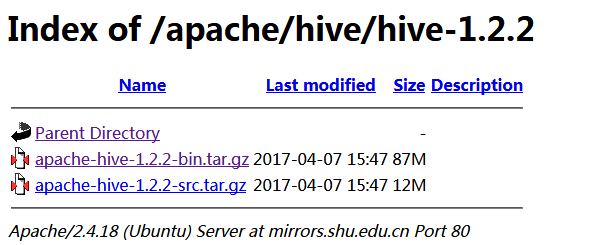
http://mirrors.shu.edu.cn/apache/hive/hive-1.2.2/,红框中的不需要编译。
由于hive是默认将元数据保存在本地内嵌的 Derby 数据库中,但是这种做法缺点也很明显,Derby不支持多会话连接,因此本文将选择mysql作为元数据存储。
安装mysql
yum安装mysql

  wget -i -c http://dev.mysql.com/get/mysql57-community-release-el7-10.noarch.rpm

 yum -y install mysql57-community-release-el7-.noarch.rpm

 yum -y install mysql-community-server

启动MySQL

systemctl start  mysqld.service

查看MySQL运行状态

systemctl status mysqld.service

mysql -uroot -p     # 回车后会提示输入密码

此时MySQL已经开始正常运行,不过要想进入MySQL还得先找出此时root用户的密码,通过如下命令可以在日志文件中找出密码:

ALTER USER 'root'@'localhost' IDENTIFIED BY 'new password';

12345

具体请参考

https://www.cnblogs.com/brianzhu/p/8575243.html
tar -zxvf apache-hive-1.2.3-bin.tar.gz 后的内容如下,进入到conf

cp hive-default.xml.template hive-site.xml
编辑文件hive-site.xml
<?xml version="1.0" encoding="utf-8"?>
<?xml-stylesheet type="text/xsl" href="configuration.xsl"?> <!--
Licensed to the Apache Software Foundation (ASF) under one or more
contributor license agreements. See the NOTICE file distributed with
this work for additional information regarding copyright ownership.
The ASF licenses this file to You under the Apache License, Version 2.0
(the "License"); you may not use this file except in compliance with
the License. You may obtain a copy of the License at http://www.apache.org/licenses/LICENSE-2.0 Unless required by applicable law or agreed to in writing, software
distributed under the License is distributed on an "AS IS" BASIS,
WITHOUT WARRANTIES OR CONDITIONS OF ANY KIND, either express or implied.
See the License for the specific language governing permissions and
limitations under the License.
-->
<configuration>
<property>
<name>javax.jdo.option.ConnectionUserName</name>
<value>xxxx</value>
</property>
<property>
<name>javax.jdo.option.ConnectionPassword</name>
<value>xxxx</value>
</property>
<property>
<name>javax.jdo.option.ConnectionURL</name>mysql
<value>jdbc:mysql://hostIP:3306/hive?createDatabaseIfNotExist=true&useSSL=false&nullNamePatternMatchesAll=true</value>
</property>
<property>
<name>javax.jdo.option.ConnectionDriverName</name>
<value>com.mysql.jdbc.Driver</value>
</property>
</configuration>
复制mysql的驱动程序到hive/lib下面
2 hive启动方式
运行hive之前首先要确保meta store服务已经启动,

nohup hive --service metastore > metastore.log >& &

如果需要用到远程客户端(比如 Tableau)连接到hive数据库,还需要启动hive service

nohup hive --service hiveserver2 > hiveserver2.log >& &

[sms@gc64 conf]$ hive --help
Usage ./hive <parameters> --service serviceName <service parameters>
Service List: beeline cli help hiveburninclient hiveserver2 hiveserver hwi jar lineage metastore metatool orcfiledump rcfilecat schemaTool version
Parameters parsed:
  --auxpath : Auxillary jars
  --config : Hive configuration directory
  --service : Starts specific service/component. cli is default
Parameters used:
  HADOOP_HOME or HADOOP_PREFIX : Hadoop install directory
  HIVE_OPT : Hive options
For help on a particular service:
  ./hive --service serviceName --help
Debug help:  ./hive --debug --help
hive2.0一下没有web查看
[sms@gc64 ~]$ hive

Logging initialized using configuration in jar:file:/home/sms/app/apache-hive-1.2.-bin/lib/hive-common-1.2..jar!/hive-log4j.properties

Loading class `com.mysql.jdbc.Driver'. This is deprecated. The new driver class is `com.mysql.cj.jdbc.Driver'. The driver is automatically registered via the SPI and manual loading of the driver class is generally unnecessary.

hive>

    >

    >

    > show databases;

OK

default

Time taken: 1.285 seconds, Fetched:  row(s)

hive>

    >

    >

    >

    >

    >

    >

    >

    >

    >
from pyspark.sql import HiveContext,Row

from pyspark import SparkConf, SparkContext

conf = SparkConf().setMaster("local").setAppName("count")

sc = SparkContext(conf=conf)

hiveCtx=HiveContext(sc)

hiveCtx.sql("show tables").show()

hiveCtx.sql("select count(1) from (select msid from raw_data group by msid) a").show()
HIVE学习(待更新)的更多相关文章
- hive学习
大数据的仓库Hive学习 10期-崔晓光 2016-06-20 大数据 hadoop 10原文链接 我们接着之前学习的大数据来学习.之前说到了NoSql的HBase数据库以及Hadoop中 ...
- [转]实现Hive数据同步更新的shell脚本
引言: 上一篇文章<Sqoop1.4.4 实现将 Oracle10g 中的增量数据导入 Hive0.13.1 ,并更新Hive中的主表>http://www.linuxidc.com/Li ...
- hive学习笔记之六:HiveQL基础
欢迎访问我的GitHub https://github.com/zq2599/blog_demos 内容:所有原创文章分类汇总及配套源码,涉及Java.Docker.Kubernetes.DevOPS ...
- Hive学习路线图(转)
Hadoophivehqlroadmap学习路线图 1 Comment Hive学习路线图 Hadoop家族系列文章,主要介绍Hadoop家族产品,常用的项目包括Hadoop, Hive, Pig ...
- 【转】Hive学习路线图
原文博客出自于:http://blog.fens.me/hadoop-hive-roadmap/ 感谢! Hive学习路线图 Hadoop家族系列文章,主要介绍Hadoop家族产品,常用的项目包括Ha ...
- Hive学习之六 《Hive进阶— —hive jdbc》 详解
接Hive学习五 http://www.cnblogs.com/invban/p/5331159.html 一.配置环境变量 hive jdbc的开发,在开发环境中,配置Java环境变量 修改/etc ...
- Hive学习路线图--张丹老师
前言 Hive是Hadoop家族中一款数据仓库产品,Hive最大的特点就是提供了类SQL的语法,封装了底层的MapReduce过程,让有SQL基础的业务人员,也可以直接利用Hadoop进行大数据的操作 ...
- Hive学习 系列博客
原 Hive作业优化 原 Hive学习六:HIVE日志分析(用户画像) 原 Hive学习五--日志案例分析 原 Hive学习三 原 Hive学习二 原 Hive学习一 博客来源,https://blo ...
- hive学习路线
hive学习路线图:
- Hive学习之修改表、分区、列
Hive学习之修改表.分区.列 https://blog.csdn.net/skywalker_only/article/details/30224309 https://www.cnblogs.co ...
随机推荐
- MySQL协议分析(1)
MySQL协议分析 此阶段的协议分析是在未压缩未加密情况下的协议分析 思路: 结合Oracle官网和自己用wireshark抓的网络数据包进行协议分析 官网说明 mysql包共分为4段,格式如下: 第 ...
- Linux的日志管理
Linux日志的管理 日志:记录了你几乎所有的操作记录,用于系统的审核,故障的排除.日志文件永久存放在日志目录中,系统日志保存在/var/log中 rsyslog 按照日志类型分类,把所有日志记录到/ ...
- IOS自动化定位方式
原文地址http://blog.csdn.net/wuyepiaoxue789/article/details/77885136 元素属性的介绍 type:元素类型,与className作用一致,如: ...
- Selenium的PageFactory & PageObject 在大型项目中的应用
因为最近遇到的技术问题一直没找到可行的解决办法,一直在翻看selenium的源代码,之前写测试代码的时候就是拿来即用,写什么功能啊,就按手动的操作步骤去转换,近日看到一个文章,又去wiki上查了查,觉 ...
- 实现:左边为菜单导航,当一个菜单中包含多个Tabs,并且不同的Tab要根据权限的不同显示。
1.前台代码 //当点击左侧菜单时,将访问Controller中的Home方法,这样就会根据用户权限的不同,通过后台的判断来决定显示的页面<li class="@(ViewBag.Se ...
- Spring自动装配Bean的五种方式
在Spring中,支持 5 自动装配模式. no – 缺省情况下,自动配置是通过“ref”属性手动设定,在项目中最常用byName – 根据属性名称自动装配.如果一个bean的名称和其他bean属性的 ...
- 『NiFi 节点本地流与集群流不一致导致集群加入失败』问题解决
一.概述 在某些极端情况下,某些 NiFi 节点信息会由于用户强行 disconnect from cluster ,而出现 local flow 与 cluster 的 flow 不同步的问题. 此 ...
- 粗略介绍Java AQS的实现原理
本文转自 http://www.importnew.com/24006.html 感谢作者 对我很有帮助 ①引言 AQS是JDK1.5提供的一个基于FIFO等待队列一个同步器的基础框架,java中的同 ...
- 关于URL和http协议,http消息格式
转自:http://crystal2012.iteye.com/blog/1447845 在WWW(全球资讯网)中想要连结到某个网页,便需要给浏览器一个位址,而URL在此的功能就是告知浏览器某个资源在 ...
- 关于Android RenderScript 的详细说明和一些实用文档
http://www.cnblogs.com/TerryBlog/archive/2012/03/02/2377251.html RenderScript 是一种低级的高性能编程语言,用于3D渲染和处 ...