
vue codemirror sql编辑器功能 可自定义提醒(关键字,库名,表名),高亮,主题
工作中再一次需要开发sql编辑器,优化上篇文章内容 https://www.cnblogs.com/Lu-Lu/p/14388888.html
本次功能是tab页打开多个sql编辑器,效果图:
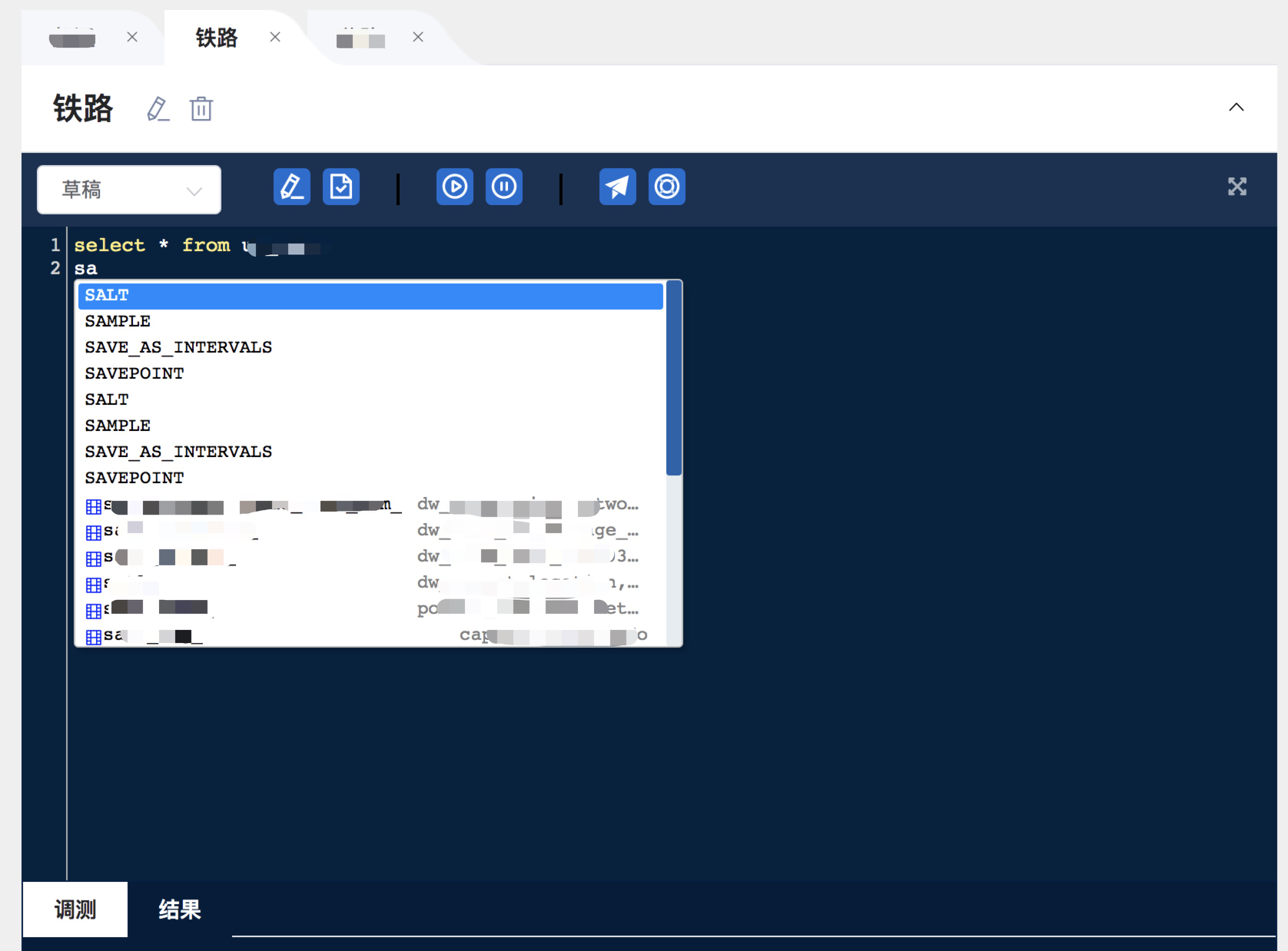
安装:
cnpm i codemirrorHTML:
<textarea

   :id="'mycode'+(index*1+1)"

   :ref="'mycode'+(index*1+1)"

   v-model="item.sqlContent"

   class="CodeMirror-hints"

   :class="'mycode'+(index*1+1)"

   placeholder="按Ctrl键进行代码提示"

/>
JS:
import CodeMirror from 'codemirror'

import 'codemirror/lib/codemirror.css'

import 'codemirror/theme/solarized.css'

import 'codemirror/addon/edit/closebrackets.js'

import 'codemirror/mode/sql/sql.js'

import 'codemirror/addon/display/autorefresh'

import 'codemirror/addon/hint/show-hint.js'

import 'codemirror/addon/hint/show-hint.css'

import 'codemirror/addon/hint/sql-hint.js'
init (ind, sqlId) {
const _this = this
let code = 'mycode'+ind
this.$nextTick(() => {
// 实例初始化
this.editor = CodeMirror.fromTextArea(this.$refs[code][0], {
tabSize: 4,
mode: 'text/x-mysql', //语言sql
theme: 'solarized', // 主题
autoCloseBrackets: true, // 在键入时自动关闭括号和引号
autoRefresh: true,
styleActiveLine: true,
lineNumbers: true,
line: true,
lineWrapping: true,
readOnly: "nocursor", //默认只读,无光标,如果是true好像有bug
hintOptions: { //自定义提示内容
completeSingle: false,
hint: this.handleShowHint2,
},
// extraKeys: {
// 'Ctrl-Space': editor => {
// editor.showHint()
// }
// }
})
// 下方代码基本不用改动
this.editor.on('keypress', editor => {
const __Cursor = editor.getDoc().getCursor()
const __Token = editor.getTokenAt(__Cursor)
// console.log(__Cursor)
// console.log(__Token)
if (
__Token.type &&
__Token.type !== 'string' &&
__Token.type !== 'punctuation' &&
__Token.string.indexOf('.') === -1
) {
// 把输入的关键字统一变成大写字母
editor.replaceRange(
__Token.string.toUpperCase(),
{
line: __Cursor.line,
ch: __Token.start
},
{
line: __Cursor.line,
ch: __Token.end
},
__Token.string
)
}
if (this.timeout) {
clearTimeout(this.timeout)
}
// this.timeout = setTimeout(() => {
// console.log('调用接口')
// }, 500)
editor.showHint()
})
// 用户实时输入监听
this.editor.on('cursorActivity', function (editor) {
const __Cursor = editor.getDoc().getCursor()
const __Token = editor.getTokenAt(__Cursor)
const { string } = __Token
// console.log(__Cursor, __Token, string)
// console.log(string)
_this.formatHint(string)
if (string.charAt(string.length - 1) === '.') {
const curIndex = __Token.start
const curLine = _this.editor.getLine(__Cursor.line)
const key = curLine.slice(curLine.slice(0, curIndex).lastIndexOf(' ') + 1, curIndex) // 点前的关键字
console.log('keykeykeykeykey', key)
}
})
console.log('让编辑器每次在调用的时候进行自动刷新', this.editor)
this.editor.on('change', editor => {
this.editableTabs[ind-1].sql = editor.getValue()
if (this.$emit) {
this.$emit('input', this.editableTabs[ind-1].sql)
}
})
// 将所有codemirror存放对象中
this.codeMirrorObj[sqlId] = this.editor
console.log(this.codeMirrorObj)
})
},
// 获取关键词/库名/表名接口
getKeyWordList(data) {
this.hintOp = []
api.getKeyWordList(data.datasourceId).then((req) => {
if(req.data.state) {
req.data.value.forEach((item) => {
let obj = {
text: item.wordname,
displayText: item.wordname,
displayInfo: item.wordfrom,
type: item.wordtype,
render: this.hintRender,
}
this.hintOp.push(obj)
})
}
this.hintOpAll = this.hintOp
})
},
// 过滤hintOption
formatHint(val) {
this.hintOp = []
this.hintOpAll.forEach((item) => {
//统一变成大写去匹配,否则无法匹配大小写
if(item.displayText.toUpperCase().indexOf(val.toUpperCase()) == 0) {
this.hintOp.push(item)
}
})
},
handleShowHint2(cmInstance, hintOptions) {
let cursor = cmInstance.getCursor();
let cursorLine = cmInstance.getLine(cursor.line);
let end = cursor.ch;
let start = end;
let token = cmInstance.getTokenAt(cursor)
// console.log(cmInstance, cursor, cursorLine, end, token)
return {
list: this.hintOp,
// [{
// text: "abcd",
// displayText: "abcd",
// displayInfo: "提示信息1",
// render: this.hintRender
// }, {
// text: "qwer",
// displayText: "qwer",
// displayInfo: "提示信息2",
// render: this.hintRender
// }],
from: {
ch: token.start, line: cursor.line
},
to: {
ch: token.end, line: cursor.line
}
}
},
// 提示框显示及样式
hintRender(element, self, data) {
let div = document.createElement("div");
div.setAttribute("class", "autocomplete-div");
// 添加弹出框表/字段图标
let divIcon = ''
if(data.type == 'table') {
divIcon = document.createElement("i");
divIcon.setAttribute("class", "el-icon-date");
divIcon.style.color = 'blue'
} else if(data.type == 'field') {
divIcon = document.createElement("i");
divIcon.setAttribute("class", "el-icon-film");
divIcon.style.color = 'blue'
} else {
divIcon = document.createElement("i");
}
let divText = document.createElement("span");
divText.setAttribute("class", "autocomplete-name");
divText.innerText = data.displayText;
divText.style.display = 'inline-block'
divText.style.overflow = 'hidden'
divText.style.whiteSpace = 'nowrap'
divText.style.textOverflow = 'ellipsis'
divText.style.marginRight = '10px'
let divInfo = document.createElement("span");
divInfo.setAttribute("class", "autocomplete-hint");
divInfo.innerText = data.displayInfo;
divInfo.style.display = 'inline-block'
divInfo.style.float = 'right'
divInfo.style.color = 'gray'
divInfo.style.maxWidth = '150px'
divInfo.style.overflow = 'hidden'
divInfo.style.whiteSpace = 'nowrap'
divInfo.style.textOverflow = 'ellipsis'
div.appendChild(divIcon);
div.appendChild(divText);
div.appendChild(divInfo);
element.appendChild(div);
},文章禁止转载或请注明出处!
vue codemirror sql编辑器功能 可自定义提醒(关键字,库名,表名),高亮,主题的更多相关文章
- 为了让开发者写MaxCompute SQL更爽,DataWorks 增强SQL 编辑器功能
众所周知,数据开发和分析的同学每天都要花大量时间写MaxCompute SQL:Dataworks作为数据开发的IDE直接影响着大家的开发效率,这次新上线的Dataworks我们在编辑体验上做了很多工 ...
- SQL保留关键字不能用作表名
com.microsoft.sqlserver.jdbc.SQLServerException: 关键字 'User' 附近有语法错误. 一看就是SQL语句错误,发现控制台console上打印出来的S ...
- 小白日记41:kali渗透测试之Web渗透-SQL手工注入(三)-猜测列名、表名、库名、字段内容,数据库写入
SQL手工注入 靶机:metasploitable(低) 1.当无权读取infomation_schema库[MySQL最重要的源数据库,必须有root权限]/拒绝union.order by语句 ...
- SQL Server 在数据库中查找字符串(不知道表名的情况下 查找字符串)
declare @key varchar(30)set @key = '广州' --替换为要查找的字符串DECLARE @tabName VARCHAR(40),@colName VARCHAR(40 ...
- java连接sqlserver2008报错 java.sql.SQLException: 对象名 '表名' 无效.
注意:c3p0的数据库配置方式为: <named-config name="sqlsvr"> <property name="driverClass&q ...
- 【转】Sql Server查看所有数据库名,表名,字段名(SQL语句)
-- 获取所有数据库名 select * from master..SysDatabases; -- 获取hotline数据库中所有表名 select name from hotline..SysOb ...
- 使用自定义验证组件库扩展 Windows 窗体
使用自定义验证组件库扩展 Windows 窗体 1(共 1)对本文的评价是有帮助 - 评价此主题 发布日期 : 8/24/20 ...
- SQL语句表名或者字段名和保留字冲突解决方法
最近开发遇到一个很奇葩的问题,简单做一下笔记 select * from Add ... 以上SQL语句会报错. 原因Add是表名,SQL语句保留字中又有Add 解决方法: select * from ...
- 在vue项目中使用codemirror插件实现代码编辑器功能(代码高亮显示及自动提示
在vue项目中使用codemirror插件实现代码编辑器功能(代码高亮显示及自动提示) 1.使用npm安装依赖 npm install --save codemirror; 2.在页面中放入如下代码 ...
- 【Unity】自定义编辑器窗口——拓展编辑器功能
最近学习了Unity自定义编辑器窗口,下面简单总结,方便用到时回顾. 新建一个脚本: using UnityEngine; using System.Collections; using UnityE ...
随机推荐
- WPF在ListView中绑定Command命令的写法
假定:ViewModel中有一个数据源叫Persons,有一个命令叫DoCommand,通过System.Windows.Interactivity触发器绑定鼠标MouseUp事件,当UI端绑定了Da ...
- 莫烦tensorflow学习记录 (7)循环神经网络 RNN & LSTM
莫凡大佬的原文章https://mofanpy.com/tutorials/machine-learning/tensorflow/intro-RNN/ RNN 的用途 可以读取数据中的顺序,获取顺序 ...
- kubernetes pod升级与回滚扩容与缩容
运行一个容器: apiVersion: apps/v1 kind: Deployment metadata: annotations: deployment.kubernetes.io/revisio ...
- zabbix笔记_006 zabbix web监控
web监控 web监控是对http网站服务进行监控,模拟用户访问网站,对特定的结果进行告警,通知管理员网站状态. web监控是运维必备知识点,通过实验能够熟悉配置和了解zabbix是如何监控web站点 ...
- 绘图与可视化--matplotlib API入门
matplotlib API函数都位于matplotlib.pyplot模块中. 本节代码中引入的约定为:import matplotlib.pyplot as plt 另外,numpy库也会用到,约 ...
- Python BeautifulSoup定位取值
-*-*-*-*-*-*-*-*-*-*-*-*-*-*-*-*-*-*-*-*-*-*-*-*-*-*-*-*-*-*-*-*-*-*-*-*-*-*-*-*-*-*-*-*-*-*-*-*-*-* ...
- Scrapy框架(一)--初识
scrapy初识什么是框架? 所谓的框架简单通用解释就是就是一个具有很强通用性并且集成了很多功能的项目模板,该模板可被应用在不同的项目需求中. 也可被视为是一个项目的半成品. 如何学习框架? 对于刚接 ...
- invalid comparison: java.util.ArrayList and java.lang.String 异常分析及解决方法
nvalid comparison: java.util.ArrayList and java.lang.String 异常解决方法异常原因首先我们可以确定是在mybatis的xml中的 list 操 ...
- shiro有哪些组件?
a.Authentication:身份认证/登录,验证用户是不是拥有相应的身份: b.Authorization:授权,即权限验证,验证某个已认证的用户是否拥有某个权限:即判断用户是否能做事情,常见的 ...
- http请求方式-HttpClient 微信退款的接口,需要证书请求 https请求
http请求方式-HttpClient import com.alibaba.fastjson.JSON; import com.alibaba.fastjson.JSONObject; import ...