
signalr 应用于微信小程序(二)
前言
本节基于一,为2017年写的脚本库。
正文
我们连接的是websocket那么我们需要看的是ws:
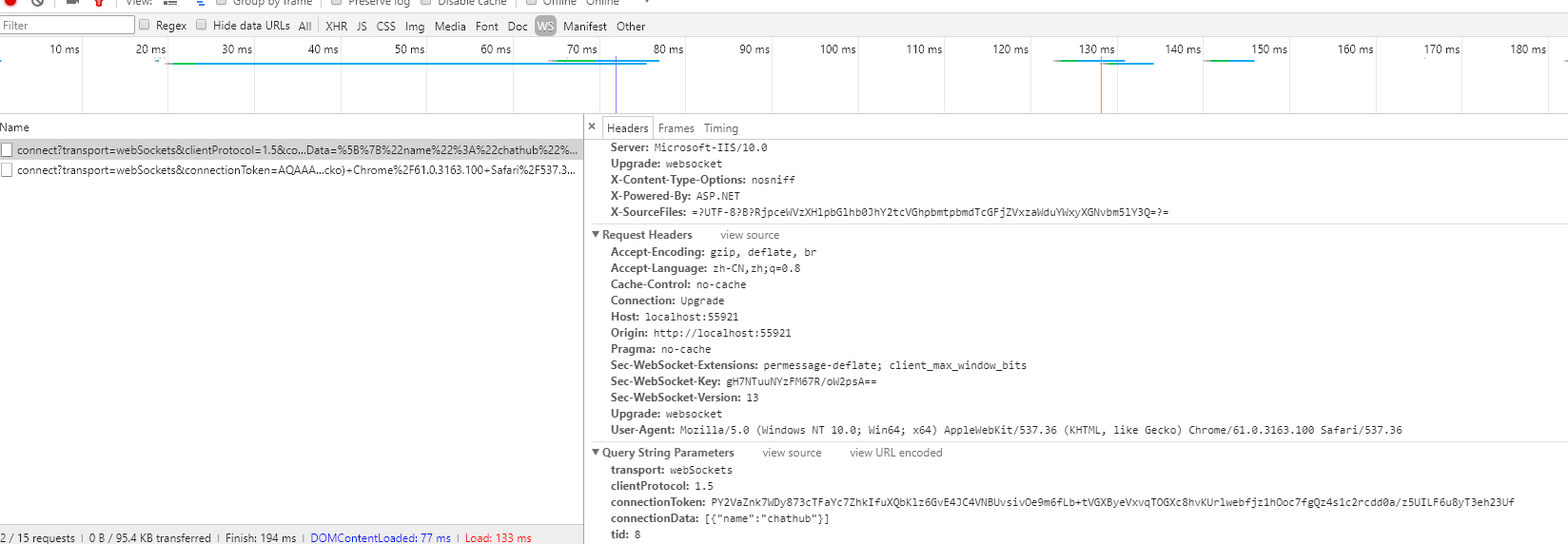
这里看到需要的参数其实只要connecttoken我们是没有的,那么如果得到的呢?
是网络请求还是本地生成的?网络请求的可能性比较大。
经过我查看源码是ajax得到的,那么我们应该看xhr了。
找到如何得到token的。

上图所示这样就可以看到token如何获取。
经过上诉分析后,只要收发包一致,那么就可以搞定。
代码如下:
2017年写的,代码很差,见谅。
const protocal = {

  protocol: "json",

  version: 1

};

const MessageType = {

  /** Indicates the message is an Invocation message and implements the {@link InvocationMessage} interface. */

  Invocation: 1,

  /** Indicates the message is a StreamItem message and implements the {@link StreamItemMessage} interface. */

  StreamItem: 2,

  /** Indicates the message is a Completion message and implements the {@link CompletionMessage} interface. */

  Completion: 3,

  /** Indicates the message is a Stream Invocation message and implements the {@link StreamInvocationMessage} interface. */

  StreamInvocation: 4,

  /** Indicates the message is a Cancel Invocation message and implements the {@link CancelInvocationMessage} interface. */

  CancelInvocation: 5,

  /** Indicates the message is a Ping message and implements the {@link PingMessage} interface. */

  Ping: 6,

  /** Indicates the message is a Close message and implements the {@link CloseMessage} interface. */

  Close: 7,

}

export class HubConnection {

  constructor() {

    this.openStatus = false;

    this.methods = {};

    this.negotiateResponse = {};

    this.connection = {};

    this.url = "";

    this.invocationId = 0;

    this.callbacks = {};

  }

  start(url, queryString) {

    var negotiateUrl = url + "/negotiate";

    if (queryString) {

      for(var query in queryString){

        negotiateUrl += (negotiateUrl.indexOf("?") < 0 ? "?" : "&") + (`${query}=` + encodeURIComponent(queryString[query]));

      }

    }

    var timestamp = (new Date()).valueOf()/1000;

    wx.request({

      url: negotiateUrl +'&_='+timestamp+'',

      method: "get",

      async: false,

      success: res => {

        console.log(res.data);

        this.negotiateResponse = res.data;

        this.startSocket(negotiateUrl.replace("/negotiate",""));

      },

      fail: res => {

        console.error(`requrst ${url} error : ${res}`);

        return;

      }

    });

  }

  startSocket(url) {

    var token =this.negotiateResponse.ConnectionToken;

    token= token.replace(' ','+');

    console.log(token);

    var tid = Math.floor(Math.random() * 11);

    url += (url.indexOf("?") < 0 ? "?" : "&") + ('connectionToken=' + encodeURIComponent(token) + '&transport=webSockets&clientProtocol=' + 1.5 + '&tid=' + tid);

    url = url.replace(/^http/, "ws");

    this.url = url;

    if (this.connection != null && this.openStatus) {

      return;

    }

    this.connection = wx.connectSocket({

      url: url,

      method: "get"

    })

    this.connection.onOpen(res => {

      console.log(`websocket connectioned to ${this.url}`);

      this.sendData(protocal);

      this.openStatus = true;

      this.onOpen(res);

    });

    this.connection.onClose(res => {

      console.log(`websocket disconnection`);

      this.connection = null;

      this.openStatus = false;

      this.onClose(res);

    });

    this.connection.onError(res => {

      console.error(`websocket error msg: ${msg}`);

      this.close({

        reason: msg

      });

      this.onError(res)

    });

    this.connection.onMessage(res => this.receive(res));

  }

  on(method, fun) {

    if (this.methods[method]) {

      this.methods[method].push(fun);

      console.log("方法" + method+"进入");

    } else {

      console.log("方法" + method + "进入");

      this.methods[method] = [fun];

    }

  }

  onOpen(data) {}

  onClose(msg) {

  }

  onError(msg) {

  }

  close(data) {

    if (data) {

      this.connection.close(data);

    } else {

      this.connection.close();

    }

    this.openStatus = false;

  }

  sendData(data, success, fail, complete) {

    console.log(data,"数据调用");

    this.connection.send({

      data: JSON.stringify(data), //

      success: success,

      fail: fail,

      complete: complete

    });

    console.log(this.connection,'test');

  }

  receive(data) {

    // if(data.data.length>3){

    //   data.data = data.data.replace('{}', "")

    // }

   // console.log(data,"数据接收");

    var message =JSON.parse(data.data);

    var messageDetail = message.M;

    //console.log(messageDetail,"收到的数据");

    var message = JSON.parse(data.data.replace(new RegExp("", "gm"),""));

    //console.warn(typeof (messageDetail),"typeof (messageDetail)");

    if (typeof (messageDetail) != 'undefined' && typeof (messageDetail[0]) !='undefined')

    {

      var invokemessage=messageDetail[0];

      this.invokeClientMethod(message);

    }

    //留用数据类型

    // switch (message.type) {

    //   case MessageType.Invocation:

    //     this.invokeClientMethod(message);

    //     break;

    //   case MessageType.StreamItem:

    //     break;

    //   case MessageType.Completion:

    //     var callback = this.callbacks[message.invocationId];

    //     if (callback != null) {

    //       delete this.callbacks[message.invocationId];

    //       callback(message);

    //     }

    //     break;

    //   case MessageType.Ping:

    //     // Don't care about pings

    //     break;

    //   case MessageType.Close:

    //     console.log("Close message received from server.");

    //     this.close({

    //       reason: "Server returned an error on close"

    //     });

    //     break;

    //   default:

    //     this.invokeClientMethod(message);

    //     //console.warn("Invalid message type: " + message.type);

    // }

  }

  send(functionName) {

    var args = [];

    for (var _i = 1; _i < arguments.length; _i++) {

      args[_i - 1] = arguments[_i];

    }

    this.sendData({

      M: functionName,

      A: args,

      H: "chathub",

      type: MessageType.Invocation,

      I: this.invocationId

    });

    this.invocationId++;

  }

  invoke(functionName) {

    var args = [];

    for (var _i = 1; _i < arguments.length; _i++) {

      args[_i - 1] = arguments[_i];

    }

    var _this = this;

    var id = this.invocationId;

    var p = new Promise(function (resolve, reject) {

      _this.callbacks[id] = function (message) {

        if (message.error) {

          reject(new Error(message.error));

        } else {

          resolve(message.result);

        }

      }

      _this.sendData({

        M: functionName,

        A: args,

        H: "chathub",

        type: MessageType.Invocation,

        I: _this.invocationId

      }, null, function (e) {

        reject(e);

      });

    });

    this.invocationId++;

    return p;

  }

  invokeClientMethod(message) {

    console.log(message,"message");

    //得到启用的方法

    var methods = this.methods[message.M[0].M.toLowerCase()];

    //console.log(this.methods,"methods方法");

    //console.log(message.M[0].M.toLowerCase(),"methods数据");

    if (methods) {

      methods.forEach(m => m.apply(this, message.M[0].A));

      if (message.invocationId) {

        // This is not supported in v1. So we return an error to avoid blocking the server waiting for the response.

        var errormsg = "Server requested a response, which is not supported in this version of the client.";

        console.error(errormsg);

        this.close({

          reason: errormsg

        });

      }

    } else {

      console.warn(`No client method with the name '${message.target}' found.`);

    }

  }

}
signalr 应用于微信小程序(二)的更多相关文章
- 图片的URL上传至阿里云OSS操作(微信小程序二维码返回的二进制上传到OSS)
当我们从网络中获取一个URL的图片我们要存储到本地或者是私有的云时,我们可以这样操作 把url中的图片文件下载到本地(或者上传到私有云中) public String uploadUrlToOss ...
- Java 获取微信小程序二维码(可以指定小程序页面 与 动态参数)
一.准备工作 微信公众平台接口调试工具 小程序的唯一标识(appid) 小程序的密钥(secret) 二.获取access_token 打开微信公众平台接口调试工具,在参数列表中输入小程序的appid ...
- 微信小程序(二十)-UI组件(Vant Weapp)-01按装配置
1.官网 https://vant-contrib.gitee.io/vant-weapp/#/intro https://gitee.com/vant-contrib/vant-weapp 2.按装 ...
- 微信小程序二维码推广统计
微信小程序可以通过生成带参数的二维码,那么这个参数是可以通过APP的页面进行监控的 这样就可以统计每个二维码的推广效果. 今天由好推二维码推出的小程序统计工具HotApp小程序统计也推出了带参数二维码 ...
- 微信小程序二维码是无法识别二维码跳转到小程序
今天测试了一下,微信小程序圆形二维码是不能直接识别跳转到小程序: 但h5页面的那种微信公众号二维码是可以直接识别
- 微信小程序-二维码汇总
小程序二维码在生活中的应用场景很多,比如营销类一物一码,扫码开门,扫码付款等...小程序二维码分两种? 1.普通链接二维码 即跟普通的网站链接生成的二维码是一个意思,这种二维码的局限性如下: 对于普通 ...
- php生成微信小程序二维码源码
目前有3个接口可以生成小程序码,开发者可以根据自己的需要选择合适的接口.第一步:获取 access_token public function getWxAccessToken(){ $appid ...
- 微信小程序(二)-语法学习
语法学习 一 模板语法 https://developers.weixin.qq.com/miniprogram/dev/framework/view/wxml/ 1.数据代码 // pages/bl ...
- 基于vs2015 SignalR开发的微信小程序使用websocket实现聊天功能
一)前言 在微信小程上实现聊天功能,大致有三种方式:1)小程序云开发 2)购买第三方IM服务 3)使用自己的服务器自己开发. 这里重要讲使用自己的服务器自己开发,并且是基于vs的开发. 网上提供的解决 ...
- 微信小程序二维码识别
目前市场上二维码识别的软件或者网站越来越多,可是真正方便,无广告的却少之很少. 于是,自己突发奇想做了一个微信二维码识别的小程序. 包含功能: 1.识别二维码 ①普通二维码 ②条形码 ③只是复制解析出 ...
随机推荐
- .NET Conf China 2023济南站社区活动
2024年3月3日,在这个春暖花开的日子里,由微软MVP项目.山东财经大学管理科学与工程学院.胶东开发者社区.济南.NET俱乐部联合举办了[.NET Conf China 2023 JiNan Wa ...
- vite 子项目 热部署 通过nginx,和父项目端口号不同,导致热更新的websocket报错的解决方案
vite 子项目 热部署 通过nginx,和父项目端口号不同,导致热更新的websocket报错的解决方案 我的父项目端口号是8888 子项目端口号是 8013 这里报错的原因就是,热更新的webso ...
- reciterdoc 资料库 支持中文搜索了。 vuepress-plugin-fulltext-search(用一半)
http://pengchenggang.gitee.io/reciterdoc/ 支持中文搜索了,可是不容易了 通过插件 vuepress-plugin-fulltext-search 实现全文搜索 ...
- k8s中port-forward 、service的nodeport与ingress区别
在Kubernetes中,port-forward.Service的NodePort和Ingress都是用于将外部流量引入集群内部的方法,但它们在使用场景.实现方式和功能上有所不同. port-for ...
- 基于python下opuslib的下opus编解码实例解析
一 opuslib 这个是纯粹的opus封装,要比ogg的那个更底层,ogg的那个封装的太严了.很多业务不方便开展. 二 实例解析: import opuslib import opuslib.api ...
- 超低功耗mcu芯片AMA3B 开发备忘之初串口打印
一 前言 对于软件工程师来说,没什么比看到一个hello world的打印更让人感觉兴奋了.调试芯片,很多人都知道,hello world这个打印意味着什么. 二 软硬件准备 1 一个AM ...
- c 的头文件标准格式
前记: C语言的头文件是嵌入式系统中常用的,也是很多人没有注意的,但是写的很差的,这里给出一个经典的模板,仅供参考. 正文: 经典的格式: /***************************** ...
- websocket服务器的创建
就这上篇文章的代码,我们会继续实现以下websocket的协议. 为什么要使用websocket呢? 它的最大特点就是,服务器可以主动向客户端推送信息,客户端也可以主动向服务器发送信息,是真正的双向平 ...
- Java8的核心功能就是Lambda和Streaming API
Java8的核心功能就是Lambda和Streaming API
- 3DCAT携手华为,打造XR虚拟仿真实训实时云渲染解决方案
2023年5月8日-9日,以 ''因聚而生 众志有为'' 为主题的 ''华为中国合作伙伴大会2023'' 在深圳国际会展中心隆重举行.本次大会汇聚了ICT产业界的广大新老伙伴朋友,共同探讨数字化转型的 ...