
MySQLDemo2
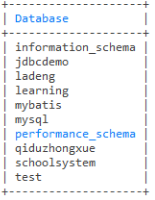
-- 查询所有数据库

show databases
-- 删除数据库

drop database a

-- use `数据库名称`; 表示使用此数据库

use mybatis

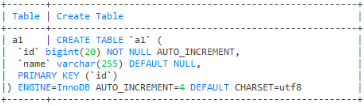
-- 查看表结构

show create table a1
-- 删除表

drop table a

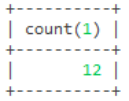
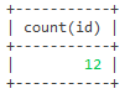
-- 查询表总共有多少条数据

select count(1) from user
select count(id) from user
-- 添加一条数据

insert into user (name,age) values ('蓝凤凰',19)

-- 添加多条数据

insert into user (name,age) values ('蓝凤凰',19),('蓝孔雀',20)

-- 这两个一起运行

insert into user (name,age) values ('曼联',21);

insert into user (name,age) values ('张倩',19);

-- 更新一条数据

update user set name = '阿紫',age =18 where id = 8

-- 更新多条数据

-- 这两个一起运行

update user set name = '小张',age = 19 where id = 9;

update user set name = '张三',age = 20 where id = 10;

-- 删除一条数据

delete from user where id = 1

-- 删除多条数据

delete from user where id in (2,3)

-- 这两个一起运行

delete from user where id = 5;

delete from user where id = 6;

-- 查询年龄在18到20之间

select * from user where age between 18 and 20
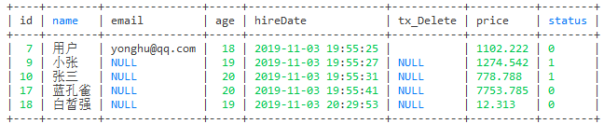
-- 查询年龄>= 18并且年龄<=20数据

select * from user where age >=18 and age <=20
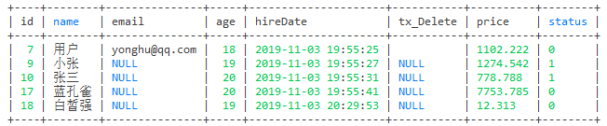
-- 从id=10开始算总条数

select count(8) from user where id > 9
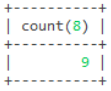
-- 查询age的总数

select sum(age) from user
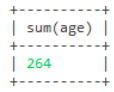
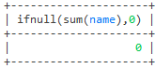
-- 这里查询名字没有总数就返回0

select ifnull(sum(name),0) from user
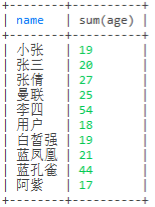
-- 这里是按照name分组去重,名字相同的就把age的值加起来

select name, sum(age) from user group by name;
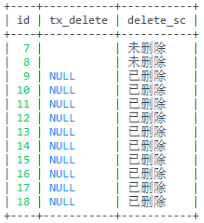
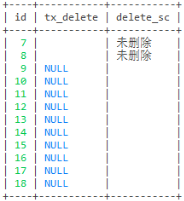
-- 查询tx_delete判断是否删除

-- 第一种写法

select id,tx_delete,

case

when tx_delete = 0 then '未删除'

else '已删除'

end as delete_sc

from user
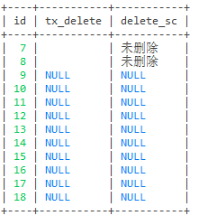
select id,tx_delete,

case

when tx_delete = 0 then '未删除'

when tx_delete = 1 then '已删除'

end as delete_sc

from user
select id,tx_delete,

case

when tx_delete = 0 then '未删除'

when tx_delete = 1 then '已删除'

else '' end as delete_sc

from user
-- 第二种写法

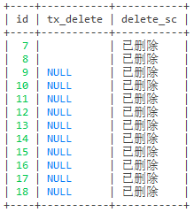
-- 这个随便怎么样都是已删除

select id,tx_delete,

case

when 0 then '未删除'

when 1 then '已删除'

end as delete_sc

from user
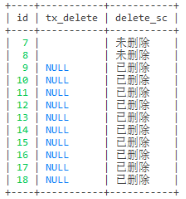
-- 这个添加过数据的就是未删除

select id,tx_delete,

case tx_delete

when 0 then '未删除'

else '已删除'

end as delete_sc

from user
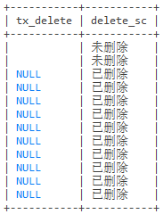
-- 第三种写法

select tx_delete, if(tx_delete = 0, '未删除', '已删除') as delete_sc from user
-- 左连接

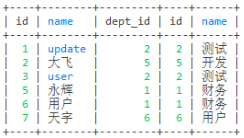
select * from employee e left join dept d on e.dept_id = d.id
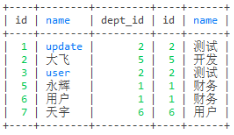
-- 右连接

select * from employee e right join dept d on e.dept_id = d.id
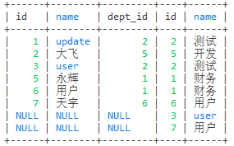
-- 内连接

select * from employee e join dept d on e.dept_id = d.id
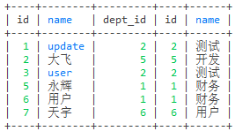
select * from employee e inner join dept d on e.dept_id = d.id
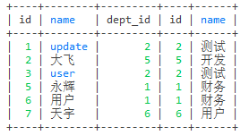
-- where连接

select * from employee e, dept d where e.dept_id = d.id
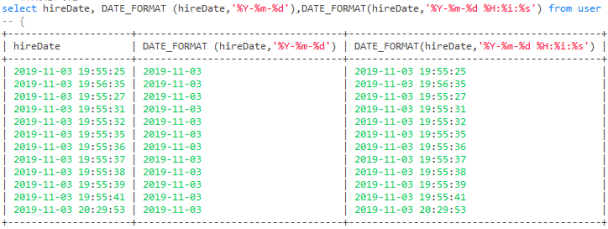
-- 日期格式化
| 格式 | 描述 |
|---|---|
| %a | 缩写星期名 |
| %b | 缩写月名 |
| %c | 月,数值 |
| %D | 带有英文前缀的月中的天 |
| %d | 月的天,数值(00-31) |
| %e | 月的天,数值(0-31) |
| %f | 微秒 |
| %H | 小时 (00-23) |
| %h | 小时 (01-12) |
| %I | 小时 (01-12) |
| %i | 分钟,数值(00-59) |
| %j | 年的天 (001-366) |
| %k | 小时 (0-23) |
| %l | 小时 (1-12) |
| %M | 月名 |
| %m | 月,数值(00-12) |
| %p | AM 或 PM |
| %r | 时间,12-小时(hh:mm:ss AM 或 PM) |
| %S | 秒(00-59) |
| %s | 秒(00-59) |
| %T | 时间, 24-小时 (hh:mm:ss) |
| %U | 周 (00-53) 星期日是一周的第一天 |
| %u | 周 (00-53) 星期一是一周的第一天 |
| %V | 周 (01-53) 星期日是一周的第一天,与 %X 使用 |
| %v | 周 (01-53) 星期一是一周的第一天,与 %x 使用 |
| %W | 星期名 |
| %w | 周的天 (0=星期日, 6=星期六) |
| %X | 年,其中的星期日是周的第一天,4 位,与 %V 使用 |
| %x | 年,其中的星期一是周的第一天,4 位,与 %v 使用 |
| %Y | 年,4 位 |
| %y | 年,2 位 |
-- 拼接字符串

-- concat_ws用法

-- 这个拼接的 '-' 都是在中间

select name,age, concat_ws ('-',name,age) from user
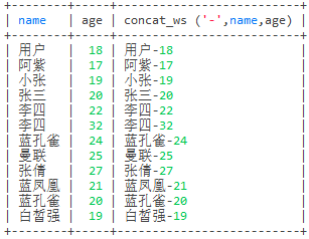
select name,age, concat_ws ('-',name,age,'%','=') from user
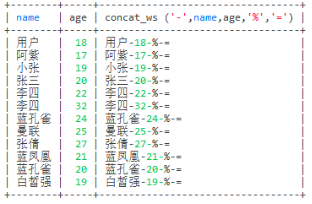
-- concat用法

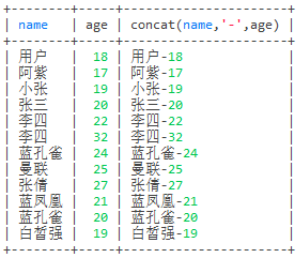
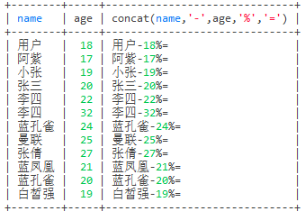
-- 这个拼接的 '-' 这个符号放在哪个位置就在哪里

select name,age, concat(name,'-',age) from user
select name,age, concat(name,'-',age,'%','=') from user
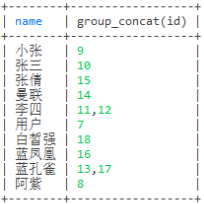
-- 查询name相同的合并成一个name,id也查询出来

select name,group_concat(id) from user group by name
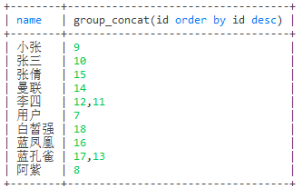
select name,group_concat(id order by id desc) from user group by name
-- 分割

select name,group_concat(id separator '-') from user group by name
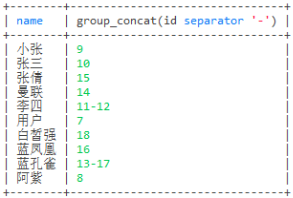
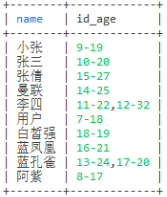
-- 查询name,id,age,id和age用 '-' 分割

select name,group_concat(concat_ws('-',id,age)) as id_age from user group by name
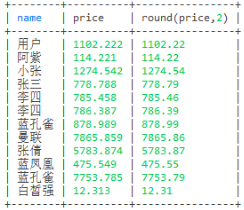
-- 保留两位小数

select name,price,round(price,2) from user
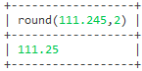
select round(111.245,2)
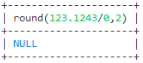
select round(123.1243/0,2)
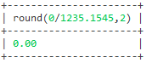
select round(0/1235.1545,2)
-- 去重

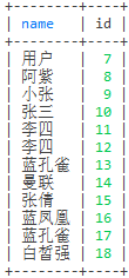
select distinct name,id from user
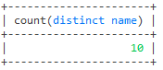
-- 去重来查询总数

select count(distinct name) from user
-- 模糊查询

select id,name from user where name like '蓝%'
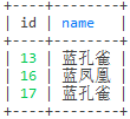
select id,name from user where name like '%孔%'
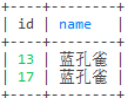
select id,name from user where name like '%雀'
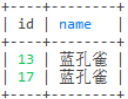
-- 不查询id为7和8的信息

select id,name from user where not id in (7,8)
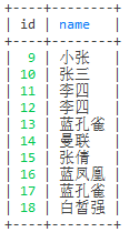
-- 只查询id为7和8的信息

select id,name from user where id in (7,8)
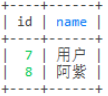
--这几个的优先级: where > group by > having > order by > limit

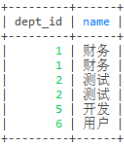
select e.dept_id,d.name from employee e left join dept d on e.dept_id = d.id
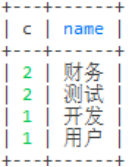
select count(1) c,d.name from employee e left join dept d on e.dept_id = d.id group by dept_id
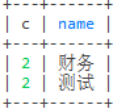
select count(1) c,d.name from employee e left join

dept d on e.dept_id = d.id

group by dept_id having c > 1 order by c desc
select count(1) c,d.name from employee e left join

dept d on e.dept_id = d.id where e.name!='天宇'

group by dept_id having c > 1 order by c desc limit 1
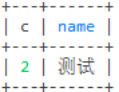
-- 根据status和age来统计 成年人已删除,成年人未删除,未成年人已删除,未成年人未删除的总数

select

    ifNull(sum(case when status = 0 and age >= 18 then 1 else 0 end), 0) as '成年人未删除总数'

  , ifNull(sum(case when status = 0 and age < 18 then 1 else 0 end), 0) as '未成年人未删除总数'

  , ifNull(sum(case when status = 1 and age >= 18 then 1 else 0 end), 0) as '成年人已删除总数'

  , ifNull(sum(case when status = 1 and age < 18 then 1 else 0 end), 0) as '未成年人已删除总数'

from user

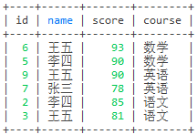
-- 查询科目前二的分数

select u1.* from user1 u1 where

(select count(1) from user1 u2 where u1.course = u2.course and u1.score < u2.score) < 2

order by u1.course, u1.score desc;
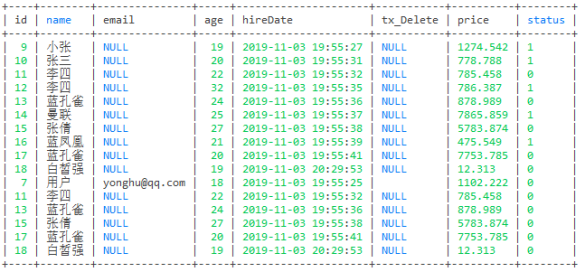
-- 这句代码的意思是不会去重

select * from user where age > 18 union all

select * from user where status = 0;
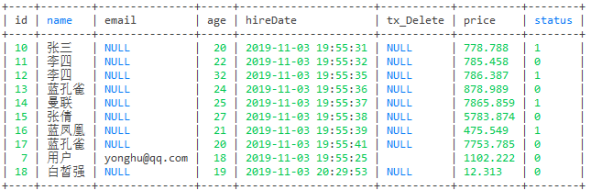
-- 这句代码的意思是会去重

select * from user where age > 19 union

select * from user where status = 0;
-- 这句代码的意思是可以把u1表中的数据拷贝多次去u2表中

insert into u2(name,age) select name,age from u1

-- 这句代码的意思是不可以把t1表中的数据拷贝多次去t2表中,拷贝多次会报错,只能拷贝一次

insert into t2 select * from t1

-- 这句代码的意思是把t1表的结构复制一份再创建一个表数据会过去,但是id自动递增不会设置

create table tt3 select * from t1;

-- 查询a1表设置进b1表中的数据

select * from a1

where exists (select 1 from b1 where a1.id = b1.aid)
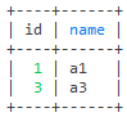
-- 查询a1表没有设置进b1表中的数据

select * from a1

where not exists (select 1 from b1 where a1.id = b1.aid)
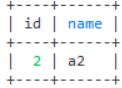
-- 查询a1表id为2的数据

select * from a1

where exists (select 1 from b1 where a1.id = 2)
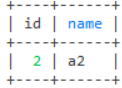
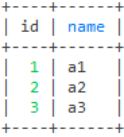
-- 查询b1表连接a1表中的数据

select * from a1

where exists (select 1 from b1 where b1.aid = 1)
MySQLDemo2的更多相关文章
随机推荐
- 记录一次dubbo不能正常抛出特定异常
BUG场景 今天同事的代码中出现一个问题,让我帮忙排查一下.原代码大致如下 dubbo服务消费者: @Resource private IPayWayService payWayService; @R ...
- natapp出现Invalid Host header
前端是vue 3.x 项目,需要更改vue的配置文件 vue.config.js,在module.exports中添加devServer:{disableHostCheck:true}
- C#多线程实现方法——线程池(Thread Pool)
ThreadPool使用 同步机制 ThreadPool使用 需要定义waitcallback委托形式如 public delegate void WaitCallback(object stat ...
- iOS开发自定义转场动画
1.转场动画 iOS7之后开发者可以自定义界面切换的转场动画,就是在模态弹出(present.dismiss),Navigation的(push.pop),TabBar的系统切换效果之外自定义切换动画 ...
- Java 使用JDBC连接MySQL
// 这学期本来不打算深入学习Java的,课上的小项目也就随便写了一个简单计算器和扫雷游戏就糊弄过去.可是我们的Eliza老师偏偏什么都讲了,考虑到期末也会涉及到JDBC的内容,前些天试着学习一番. ...
- spring容器创建bean对象的方式
xml文件中有bean的配置,而且这个bean所对应的java类中存在一个无参构造器 那么这个时候spring容器就可以使用反射调用无参构造器来创建实例了(常规的方式) 通过工厂类获得实例(工厂类实现 ...
- GitHub for Visual Studio使用讲解
从VS2015起(应该是吧?),微软已经在VS中集成了GitHub,方便开发者对项目进行版本控制. 扩展包下载地址:https://aka.ms/ghfvs 其实VS2015的安装包中已经自带了这个扩 ...
- /etc/sysctl.conf配置文件
# vi /etc/sysctl.conf # add by digoal.zhou fs.aio-max-nr = fs. kernel.core_pattern= /data01/corefile ...
- JZOJ5967 常数国
题目 像素有点低啊~ 算了凑合一下就好啦~ 题目大意 给你一个首尾相接的数列,每次对一个区间进行操作: 顺时针操作,如果当前值比vvv大,就交换.输出最后的vvv. 比赛思路 首先这题的时限这么仁慈, ...
- Django项目:CRM(客户关系管理系统)--69--59PerfectCRM实现king_admin行内编辑
#base_admin.py # ————————24PerfectCRM实现King_admin自定义操作数据———————— from django.shortcuts import render ...