
MySQLDemo2
-- 查询所有数据库

show databases
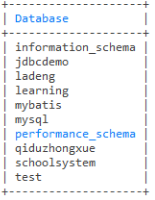
-- 删除数据库

drop database a

-- use `数据库名称`; 表示使用此数据库

use mybatis

-- 查看表结构

show create table a1
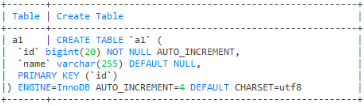
-- 删除表

drop table a

-- 查询表总共有多少条数据

select count(1) from user
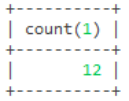
select count(id) from user
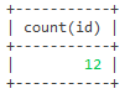
-- 添加一条数据

insert into user (name,age) values ('蓝凤凰',19)

-- 添加多条数据

insert into user (name,age) values ('蓝凤凰',19),('蓝孔雀',20)

-- 这两个一起运行

insert into user (name,age) values ('曼联',21);

insert into user (name,age) values ('张倩',19);

-- 更新一条数据

update user set name = '阿紫',age =18 where id = 8

-- 更新多条数据

-- 这两个一起运行

update user set name = '小张',age = 19 where id = 9;

update user set name = '张三',age = 20 where id = 10;

-- 删除一条数据

delete from user where id = 1

-- 删除多条数据

delete from user where id in (2,3)

-- 这两个一起运行

delete from user where id = 5;

delete from user where id = 6;

-- 查询年龄在18到20之间

select * from user where age between 18 and 20
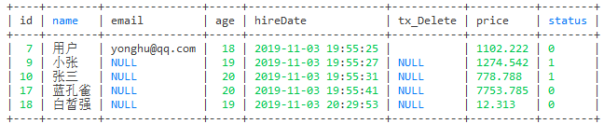
-- 查询年龄>= 18并且年龄<=20数据

select * from user where age >=18 and age <=20
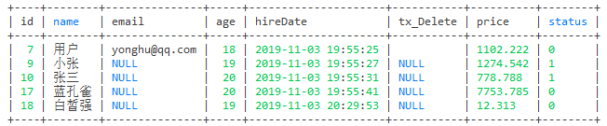
-- 从id=10开始算总条数

select count(8) from user where id > 9
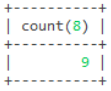
-- 查询age的总数

select sum(age) from user
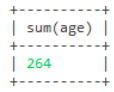
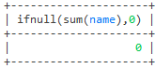
-- 这里查询名字没有总数就返回0

select ifnull(sum(name),0) from user
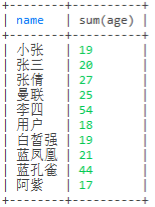
-- 这里是按照name分组去重,名字相同的就把age的值加起来

select name, sum(age) from user group by name;
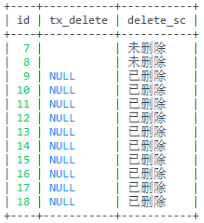
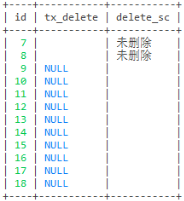
-- 查询tx_delete判断是否删除

-- 第一种写法

select id,tx_delete,

case

when tx_delete = 0 then '未删除'

else '已删除'

end as delete_sc

from user
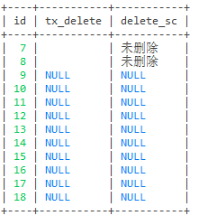
select id,tx_delete,

case

when tx_delete = 0 then '未删除'

when tx_delete = 1 then '已删除'

end as delete_sc

from user
select id,tx_delete,

case

when tx_delete = 0 then '未删除'

when tx_delete = 1 then '已删除'

else '' end as delete_sc

from user
-- 第二种写法

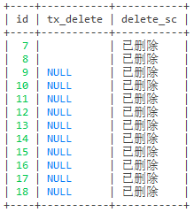
-- 这个随便怎么样都是已删除

select id,tx_delete,

case

when 0 then '未删除'

when 1 then '已删除'

end as delete_sc

from user
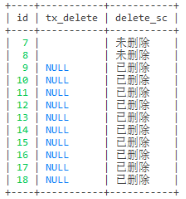
-- 这个添加过数据的就是未删除

select id,tx_delete,

case tx_delete

when 0 then '未删除'

else '已删除'

end as delete_sc

from user
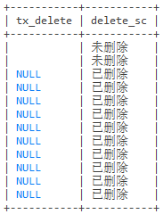
-- 第三种写法

select tx_delete, if(tx_delete = 0, '未删除', '已删除') as delete_sc from user
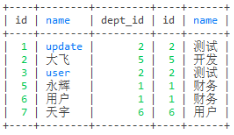
-- 左连接

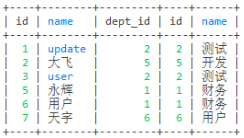
select * from employee e left join dept d on e.dept_id = d.id
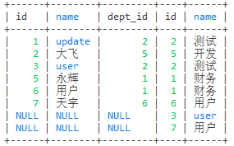
-- 右连接

select * from employee e right join dept d on e.dept_id = d.id
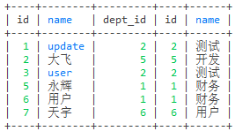
-- 内连接

select * from employee e join dept d on e.dept_id = d.id
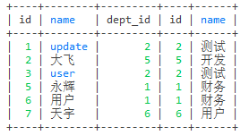
select * from employee e inner join dept d on e.dept_id = d.id
-- where连接

select * from employee e, dept d where e.dept_id = d.id
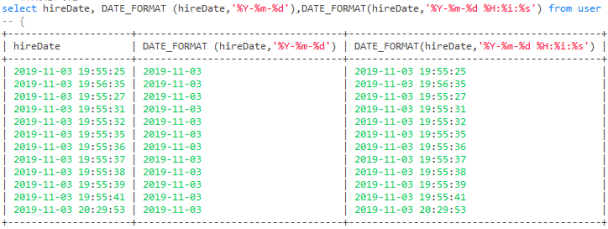
-- 日期格式化
| 格式 | 描述 |
|---|---|
| %a | 缩写星期名 |
| %b | 缩写月名 |
| %c | 月,数值 |
| %D | 带有英文前缀的月中的天 |
| %d | 月的天,数值(00-31) |
| %e | 月的天,数值(0-31) |
| %f | 微秒 |
| %H | 小时 (00-23) |
| %h | 小时 (01-12) |
| %I | 小时 (01-12) |
| %i | 分钟,数值(00-59) |
| %j | 年的天 (001-366) |
| %k | 小时 (0-23) |
| %l | 小时 (1-12) |
| %M | 月名 |
| %m | 月,数值(00-12) |
| %p | AM 或 PM |
| %r | 时间,12-小时(hh:mm:ss AM 或 PM) |
| %S | 秒(00-59) |
| %s | 秒(00-59) |
| %T | 时间, 24-小时 (hh:mm:ss) |
| %U | 周 (00-53) 星期日是一周的第一天 |
| %u | 周 (00-53) 星期一是一周的第一天 |
| %V | 周 (01-53) 星期日是一周的第一天,与 %X 使用 |
| %v | 周 (01-53) 星期一是一周的第一天,与 %x 使用 |
| %W | 星期名 |
| %w | 周的天 (0=星期日, 6=星期六) |
| %X | 年,其中的星期日是周的第一天,4 位,与 %V 使用 |
| %x | 年,其中的星期一是周的第一天,4 位,与 %v 使用 |
| %Y | 年,4 位 |
| %y | 年,2 位 |
-- 拼接字符串

-- concat_ws用法

-- 这个拼接的 '-' 都是在中间

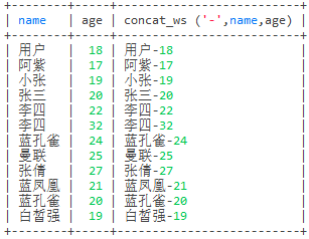
select name,age, concat_ws ('-',name,age) from user
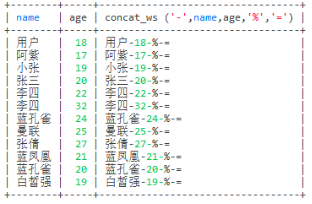
select name,age, concat_ws ('-',name,age,'%','=') from user
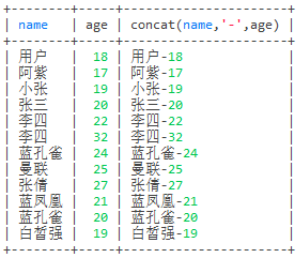
-- concat用法

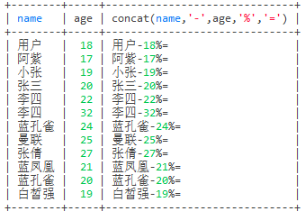
-- 这个拼接的 '-' 这个符号放在哪个位置就在哪里

select name,age, concat(name,'-',age) from user
select name,age, concat(name,'-',age,'%','=') from user
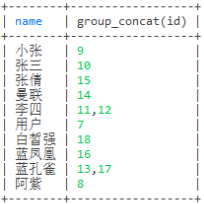
-- 查询name相同的合并成一个name,id也查询出来

select name,group_concat(id) from user group by name
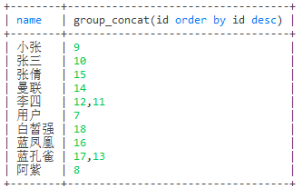
select name,group_concat(id order by id desc) from user group by name
-- 分割

select name,group_concat(id separator '-') from user group by name
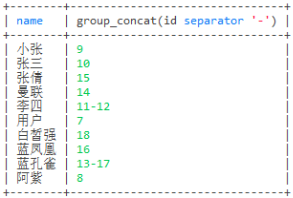
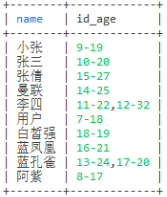
-- 查询name,id,age,id和age用 '-' 分割

select name,group_concat(concat_ws('-',id,age)) as id_age from user group by name
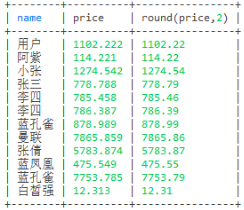
-- 保留两位小数

select name,price,round(price,2) from user
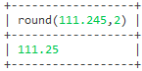
select round(111.245,2)
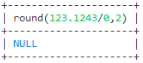
select round(123.1243/0,2)
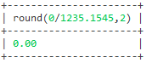
select round(0/1235.1545,2)
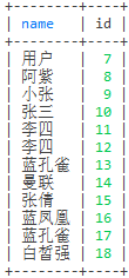
-- 去重

select distinct name,id from user
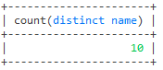
-- 去重来查询总数

select count(distinct name) from user
-- 模糊查询

select id,name from user where name like '蓝%'
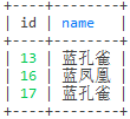
select id,name from user where name like '%孔%'
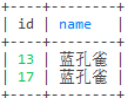
select id,name from user where name like '%雀'
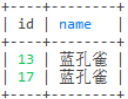
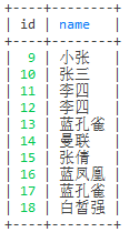
-- 不查询id为7和8的信息

select id,name from user where not id in (7,8)
-- 只查询id为7和8的信息

select id,name from user where id in (7,8)
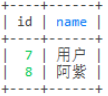
--这几个的优先级: where > group by > having > order by > limit

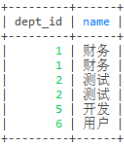
select e.dept_id,d.name from employee e left join dept d on e.dept_id = d.id
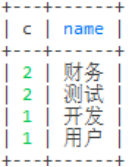
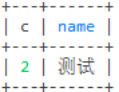
select count(1) c,d.name from employee e left join dept d on e.dept_id = d.id group by dept_id
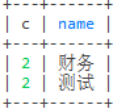
select count(1) c,d.name from employee e left join

dept d on e.dept_id = d.id

group by dept_id having c > 1 order by c desc
select count(1) c,d.name from employee e left join

dept d on e.dept_id = d.id where e.name!='天宇'

group by dept_id having c > 1 order by c desc limit 1
-- 根据status和age来统计 成年人已删除,成年人未删除,未成年人已删除,未成年人未删除的总数

select

    ifNull(sum(case when status = 0 and age >= 18 then 1 else 0 end), 0) as '成年人未删除总数'

  , ifNull(sum(case when status = 0 and age < 18 then 1 else 0 end), 0) as '未成年人未删除总数'

  , ifNull(sum(case when status = 1 and age >= 18 then 1 else 0 end), 0) as '成年人已删除总数'

  , ifNull(sum(case when status = 1 and age < 18 then 1 else 0 end), 0) as '未成年人已删除总数'

from user

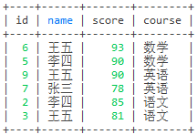
-- 查询科目前二的分数

select u1.* from user1 u1 where

(select count(1) from user1 u2 where u1.course = u2.course and u1.score < u2.score) < 2

order by u1.course, u1.score desc;
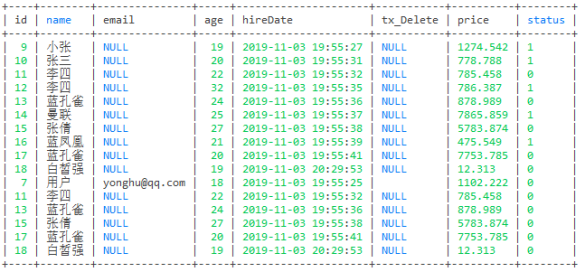
-- 这句代码的意思是不会去重

select * from user where age > 18 union all

select * from user where status = 0;
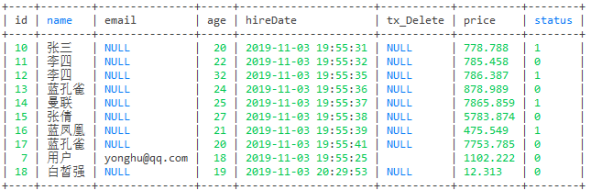
-- 这句代码的意思是会去重

select * from user where age > 19 union

select * from user where status = 0;
-- 这句代码的意思是可以把u1表中的数据拷贝多次去u2表中

insert into u2(name,age) select name,age from u1

-- 这句代码的意思是不可以把t1表中的数据拷贝多次去t2表中,拷贝多次会报错,只能拷贝一次

insert into t2 select * from t1

-- 这句代码的意思是把t1表的结构复制一份再创建一个表数据会过去,但是id自动递增不会设置

create table tt3 select * from t1;

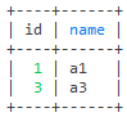
-- 查询a1表设置进b1表中的数据

select * from a1

where exists (select 1 from b1 where a1.id = b1.aid)
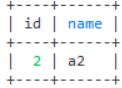
-- 查询a1表没有设置进b1表中的数据

select * from a1

where not exists (select 1 from b1 where a1.id = b1.aid)
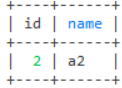
-- 查询a1表id为2的数据

select * from a1

where exists (select 1 from b1 where a1.id = 2)
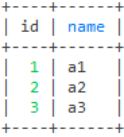
-- 查询b1表连接a1表中的数据

select * from a1

where exists (select 1 from b1 where b1.aid = 1)
MySQLDemo2的更多相关文章
随机推荐
- ActiveMQ 知识点
消息队列高可用 持久化,事务,签收,zookeeper+replicated-leveldb-store的主从集群 异步发送 同步发送: 明确指定同步发送 未使用事务的前提下,发送持久化消息(会使用同 ...
- vue爬坑之input组件
本篇写给第一次用VUE写输入框组件的朋友们 正常情况我们vue2.0是怎么样取到input框的值的呢? 很简单只需要给input框设置v-model="val" 我们就能从data ...
- WCF进阶:扩展bindingElementExtensions支持对称加密传输
前面两篇文章WCF进阶:将编码后的字节流压缩传输和WCF 进阶: 对称加密传输都是实现了自定义编码,那两个例子中托管服务或者客户端调用都采用的代码实现,WCF更友好的方式是在app.config或 ...
- MySQL Server Logs
日志记录存储方式 #日志记录存储方式 mysql> show variables like 'log_output'; mysql> set global log_output='FILE ...
- Python爬取b站任意up主所有视频弹幕
爬取b站弹幕并不困难.要得到up主所有视频弹幕,我们首先进入up主视频页面,即https://space.bilibili.com/id号/video这个页面.按F12打开开发者菜单,刷新一下,在ne ...
- 嘴巴题5 「BZOJ1864」[ZJOI2006] 三色二叉树
1864: [Zjoi2006]三色二叉树 Time Limit: 1 Sec Memory Limit: 64 MB Submit: 1195 Solved: 882 [Submit][Status ...
- Innodb_buffer_pool_read
> show status like 'Innodb_buffer_pool_read_%'; +---------------------------------------+-------- ...
- 全栈之路-微信小程序-架构总览
第一阶段是用来学习小程序开发的,这个就相当于PC端的网站吧,只不过现在依靠微信强大的流量来将业务搬移到小程序中,对于企业来说,这是一种很好的发展方向,既减少了开发成本,又减少了推广成本,小程序是很被人 ...
- Java实现数字大写转换
需求如下:用json读取后台工时信息,比如23.5小时,需要通过编码将其转换为贰拾叁点伍 比如23.23之前有对Stringl类型强转为Double在转为整型,发生了精度丢失,后来想想对小数点进行分割 ...
- utils02_使用github创建一个远程仓库
1.注册github账号 https://github.com/ 2.第一次登陆需要创建一个仓库 3.在本地生成密钥和公钥 ssh-keygen -t rsa 会在当前用户下生成2个文件就是公钥和密钥 ...