
50 ubuntu下pcl编译以及用 VSCode配置pcl / opencv开发环境
0 引言
最近在VSCode下搞开发,于是将pcl库迁移到这个环境下,用来跑一些依赖pcl的开源的代码以及自己做一些快速开发等。
1 pcl编译
主要参考了这篇博客,链接如下。
https://blog.csdn.net/e_small/article/details/79581484
我编译时遇到的主要问题也是在这篇博客的留言下解决的。我安装了Anaconda,结果编译出错,我还一直找不着错哪儿了。。。解决方式记录如下。
$ sudo gedit ~/.bashrc   # 打开环境变量文件 将Anaconda的环境变量给注销掉

$ source /etc/profile       # 使环境变量生效

$ python                         # 测试目前系统默认的python是不是改正了
然后再重新编译。
另外,在编译时,我改变了CMakeList.txt中的配置,采用的方式是
$ mkdir build

$ cd  build

$ cmake-gui ..     # 打开cmake界面,把一些不需要编译的东西去掉(比如我为了提高编译成功率,去掉了cuda选项),客户端点击configuration-》 generation 即可完成cmake,再回到终端继续make

$ make -j8         # 采用8个线程同时进行编译,有时候可以极大提高编译速度

$ sudo make install   # 安装,该命令将pcl库的头文件、动态链接库文件、静态链接库文件和其他文件拷贝到/usr 的各个子目录下
2 opencv 编译
参考如下链接。
https://www.cnblogs.com/darkknightzh/p/5638117.html
3 VSCode下pcl配置文件编写
直接把自己的配置文件贴出来给大家看好了。
lauch.json
{

    // 使用 IntelliSense 了解相关属性。

    // 悬停以查看现有属性的描述。

    // 欲了解更多信息,请访问: https://go.microsoft.com/fwlink/?linkid=830387

    "version": "0.2.0",

    "configurations": [

        {

            "name": "(gdb) Launch",

            "type": "cppdbg",

            "request": "launch",

            "program": "${workspaceFolder}/${fileBasenameNoExtension}.out",

            "miDebuggerPath": "/usr/bin/gdb",

            "preLaunchTask":"build",

            "args": [],

            "stopAtEntry": false,

            "cwd": "${workspaceFolder}",

            "environment": [],

            "externalConsole": true,

            "MIMode": "gdb",

            "setupCommands": [

                {

                    "description": "Enable pretty-printing for gdb",

                    "text": "-enable-pretty-printing",

                    "ignoreFailures": true

                }

            ]

        }

    ]

}
tasks.json
{

    // See https://go.microsoft.com/fwlink/?LinkId=733558

    // for the documentation about the tasks.json format

    "version": "2.0.0",

    "tasks":[  // 可以有多个参数

        {

            "label": "build",       // 编译任务名

            "type": "shell",        // 编译任务的类型,通常为shell/process类型

            "command": "g++",       // 编译命令

            "args":[

                "-g",

                "${workspaceFolder}/${fileBasename}",   // include path指令

                "-I", "/usr/local/include/pcl-1.8",

                "-I", "/usr/include/eigen3",

                "-I", "/usr/include/vtk-5.10",

                "-I", "/usr/include/qhull",

                "-I", "/usr/include/flann",

                "-I", "/usr/include/boost",

                // lib 库文件地址

                "-L", "/usr/local/lib",

                "-l", "pcl_io",

                "-l", "pcl_visualization",

                "-l", "pcl_common",

                "-l", "vtkFiltering",

                "-l", "vtkCommon",

                "-l", "vtkRendering",

                "-l", "vtkGraphics",

                "-L", "/usr/include/x86_64-linux-gnu",

                "-l", "boost_system",

                "-o",                                    // 生成指定名称的可执行文件

                "${workspaceFolder}/${fileBasenameNoExtension}.out"

            ],

            "group": {

                "kind": "build",

                "isDefault": true

            }

        },

        {

            "label": "cmakebuild",

            "type": "shell",

            "command": "cd build && cmake ../ && make",

            "args": []

        }

    ]

}
其中,采用cmake方式进行编译时的CMakeLists.txt文件是这样写的。
cmake_minimum_required(VERSION 2.8 FATAL_ERROR)

project(myPCLProject)

find_package(PCL 1.2 REQUIRED)

include_directories(${PCL_INCLUDE_DIRS})

link_directories(${PCL_LIBRARY_DIRS})

add_definitions(${PCL_DEFINITIONS})

add_executable (cloud_viewer cloud_viewer.cpp)

target_link_libraries (cloud_viewer ${PCL_LIBRARIES})
c_cpp_properties.json,主要是给intelliSense看的,避免写代码时,intelliSense瞎比划红线报错。
{

    "configurations": [

        {

            "name": "Linux",

            "includePath": [

                "${workspaceFolder}/**",

                "${workspaceFolder}",

                "/usr/local/include/pcl-1.8",

                "/usr/include",

                "/usr/include/vtk-5.10",

                "/usr/include/qhull",

                "/usr/include/flann",

                "/usr/include/boost",

                "/usr/include/eigen3",

                "/usr/include/eigen3/Eigen/",

                "/usr/include/x86_64-linux-gnu/sys"

            ],

            "defines": [],

            "browse":{

                "path":[

                    "/usr/include",

                    "/usr/local/include/pcl-1.8"

                ]

            },

            "compilerPath": "/usr/bin/gcc",

            "cStandard": "c11",

            "cppStandard": "c++17",

            "intelliSenseMode": "gcc-x64"

        }

    ],

    "version":

}
3 测试代码
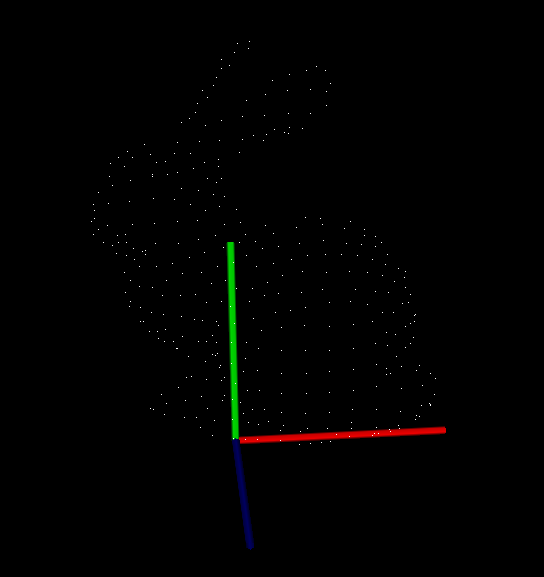
是官网的一段可视化代码,展示如下。
#include <iostream>

#include <pcl/io/io.h>

#include <pcl/io/pcd_io.h>

#include <pcl/visualization/cloud_viewer.h>

int user_data;

void

viewerOneOff (pcl::visualization::PCLVisualizer& viewer)

{

    viewer.setBackgroundColor (0.0, 0.0, 0.0);

    pcl::PointXYZ o;

    o.x = 1.0;

    o.y = ;

    o.z = ;

    viewer.addSphere (o, 0.25, "sphere", );

    std::cout << "i only run once" << std::endl;

}

void

viewerPsycho (pcl::visualization::PCLVisualizer& viewer)

{

    static unsigned count = ;

    std::stringstream ss;

    ss << "Once per viewer loop: " << count++;

    viewer.removeShape ("text", );

    viewer.addText (ss.str(), , , "text", );

    //FIXME: possible race condition here:

    user_data++;

}

int

main ()

{

    //pcl::PointCloud<pcl::PointXYZRGBA>::Ptr cloud (new pcl::PointCloud<pcl::PointXYZRGBA>);

    pcl::PointCloud<pcl::PointXYZ>::Ptr cloud (new pcl::PointCloud<pcl::PointXYZ>);

    pcl::io::loadPCDFile ("bun4.pcd", *cloud);

    pcl::visualization::CloudViewer viewer("Cloud Viewer");

    //blocks until the cloud is actually rendered

    viewer.showCloud(cloud);

    //use the following functions to get access to the underlying more advanced/powerful

    //PCLVisualizer

    //This will only get called once

    viewer.runOnVisualizationThreadOnce (viewerOneOff);

    //This will get called once per visualization iteration

    viewer.runOnVisualizationThread (viewerPsycho);

    while (!viewer.wasStopped ())

    {

    //you can also do cool processing here

    //FIXME: Note that this is running in a separate thread from viewerPsycho

    //and you should guard against race conditions yourself...

    user_data++;

    }

    return ;

}
4 效果图
50 ubuntu下pcl编译以及用 VSCode配置pcl / opencv开发环境的更多相关文章
- Mac上利用VScode配置c/c++开发环境
Mac上利用VScode配置c/c++开发环境 哭辽,Typora里面最好不要插入表情,不然保存会闪退 首先你要有一个vscode 在扩展里面下载c/c++ 第一步 ⬆+com+p 打开命令模式:选择 ...
- 在windows下用eclipse + pydev插件来配置python的开发环境
在windows下用eclipse + pydev插件来配置python的开发环境 一.安装 python 可以到网上下个Windows版的python,官网为:https://www.python. ...
- VsCode配置C/C++开发环境
Visual Studio Code(VS Code)是基于 Electron 开发,支持 Windows.Linux 和 macOS 操作系统.内置了对JavaScript,TypeScript和N ...
- Mac OS中使用VScode配置C语言开发环境
个人博客 chinazt.cc 闲话少叙,直奔主题 下载VSCode https://code.visualstudio.com/download 安装C/C++插件 需要两个插件: 1. cppto ...
- vscode配置java+gradle开发环境
1.安装扩展包Java Extension Pack,里面包含java开发所必须的扩展 2.安装java jdk,8版本就是1.8版本,根据需要安装不同的版本 3.下载gradle,将bin文件夹添加 ...
- ubuntu下boost编译安装
ubuntu下boost编译安装 boost 安装 1.依赖安装 apt-get install mpi-default-dev libicu-dev python-dev python3-dev l ...
- ubuntu下如何编译C语言
ubuntu下如何编译C语言 如果没有gcc编译器的话,使用以下命令获取 ~# sudo apt-get install gcc同时要下载辅助工具 ~# sudo apt-get instal ...
- Ubuntu下配置C/C++开发环境
在 Ubuntu 下配置 C/C++ 开发环境 转自:白巴的临时空间 Submitted by 白巴 on 2009-04-27 19:52:12. 学习笔记 虽然 Ubuntu 的版本已经是9.04 ...
- ubuntu下整合eclipse和javah生成jni头文件开发android的native程序
0:前言: 这两天一直在研究用android的jni调用第三方库,上网搜方法,但是都是泛泛而谈,没有demo,经过我几番折磨,写了n多的helloword工程,总是不成功,工程名字也就由helloow ...
随机推荐
- codeforces round 433 D. Jury Meeting
题目大意: 输入n,m,k,分别代表城市的数量,城市编号1~n,航班的数量以及会议必须所有人员到会一起商议的天数,然后及时输入m行航班的信息,每一行输入d,f,t,c分别表示航班到站和始发的那一天(始 ...
- leetcode-161周赛-1250-检查好数组
题目描述: 唯一的结论是如果数组中所有数的最大公约数为 1,则存在解,否则不存在.所以只需要计算所有数最大公约数即可,时间复杂度O(nlog(m)),其中 m 为数字大小. class Solutio ...
- Final 可重入锁 安全发布
无状态对象(既不包含任何域,也不包含任何其他类中域的引用)一定是线程安全的. Final fianl域是不能修改的(但如果final域所引用的对象是可变的,那么这些被引用的对象是可变的) 除非需要可变 ...
- delphi 设备函数GetDeviceCaps函数
{说明:以下内容来源于网络,修改多处错误所得 2019.10.04 } GetDeviceCaps 函数功能:该函数检索指定设备的设备指定信息.该函数经常用在操作打印机等设备中.函数原型:int Ge ...
- Java——main()方法
3.1 main()方法 由于java虚拟机需要调用类的main()方法,所以该方法的访问权限必须是public,又因为java虚拟机在执行main()方法时不必创建对象,所以该方法必须是static ...
- PHP ftp_exec() 函数
定义和用法 ftp_exec() 函数请求在 FTP 服务器上执行一个程序或命令. 如果成功,该函数返回 TRUE.如果失败,则返回 FALSE. 语法 ftp_exec(ftp_connection ...
- python实现语音录入识别
一.介绍 1.第一步录音存入本地 2.调用百度语音识别sdk 注意点:百度语音识别对声音源有要求,比特率必须是256kbps 二.代码 #安装必要库 pip install baidu-aip #百度 ...
- hdu2089数位DP
旁听途说这个名字很久了,了解了一下. 改题目的意思是给你若干区间,让你找寻区间内不含62或4的数. 首先暴力必然T...那么实际上就是说,想办法做一种预处理,在每次输入的时候取值运算就可以了. 既然是 ...
- debian 8 安装 codeblocks
CodeBlocks优点: 1.所占资源少,对电脑硬件的要求低 2.开源软件,可以查看源代码,虽然我不会修改,但是如果我做一个IDE的话,我一定会参考这个伟大的软件的. 3.最重要的是,它完全跨了三大 ...
- CSS:CSS 图像拼合技术
ylbtech-CSS:CSS 图像拼合技术 1.返回顶部 1. CSS 图像拼合技术 图像拼合 图像拼合就是单个图像的集合. 有许多图像的网页可能需要很长的时间来加载和生成多个服务器的请求. 使用图 ...