
Android中使用Apache common ftp进行下载文件
版权声明:本文为博主原创文章,未经博主同意不得转载。 https://blog.csdn.net/birdsaction/article/details/36379201
在Android使用ftp下载资源 能够使用ftp4j组件,还能够用apache common net里面的ftp组件,这2个组件我都用过。
个人感觉Apache common net里面的组件比較好用一些,以下是一个实例。
项目中对ftp的使用进行了封装,加入了回调函数已经断点续传的方法。
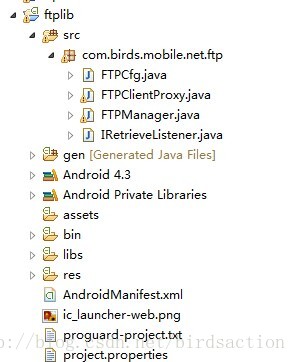
FTPCfg 用来存储ftp地址。password等信息的.
FTPClientProxy 仅仅是个代理而已,里面主要封装了common ftp api
IRetrieveListener做回调用的。比方用于是否下载完毕,是否有错误等 能够通知到UI层
FTPManager 调用主入口
/**

 * bufferSize default is 1024*4

 *

 * @author gaofeng

 * 2014-6-18

 */

public class FTPCfg {

	public FTPCfg() {

	}

	public int port;

	public int bufferSize = 1024 * 4;

	public String address;

	public String user;

	public String pass;

}
/**

 *

 */

package com.birds.mobile.net.ftp;

import java.io.IOException;

import java.io.InputStream;

import java.net.SocketException;

import org.apache.commons.net.ftp.FTP;

import org.apache.commons.net.ftp.FTPClient;

import org.apache.commons.net.ftp.FTPClientConfig;

import org.apache.commons.net.ftp.FTPFile;

import org.apache.commons.net.ftp.FTPReply;

import android.util.Log;

/**

 * @author gaofeng 2014-6-18

 */

public class FTPClientProxy {

	FTPClient ftpClient = new FTPClient();

	FTPCfg config;

	protected FTPClientProxy(FTPCfg cfg) {

		this.config = cfg;

	}

	public FTPCfg getConfig() {

		return config;

	}

	public boolean connect() {

		try {

			FTPClientConfig ftpClientConfig = new FTPClientConfig(FTPClientConfig.SYST_UNIX);

			ftpClientConfig.setLenientFutureDates(true);

			ftpClient.configure(ftpClientConfig);

			ftpClient.connect(config.address, config.port);

			int reply = this.ftpClient.getReplyCode();

			if (!FTPReply.isPositiveCompletion(reply)) {

				return false;

			}

			return true;

		} catch (SocketException e) {

			e.printStackTrace();

		} catch (IOException e) {

			e.printStackTrace();

		}

		return false;

	}

	public boolean login() {

		if (!ftpClient.isConnected()) {

			return false;

		}

		try {

			boolean b = ftpClient.login(config.user, config.pass);

			if (!b) {

				return false;

			}

			ftpClient.setFileType(FTPClient.FILE_STRUCTURE);

			ftpClient.enterLocalPassiveMode(); // very important

//			ftpClient.enterLocalActiveMode();

//			ftpClient.enterRemotePassiveMode();

//			ftpClient.enterRemoteActiveMode(InetAddress.getByName(config.address), config.port);

			ftpClient.setFileType(FTP.BINARY_FILE_TYPE);

			return b;

		} catch (IOException e) {

			e.printStackTrace();

		}

		return false;

	}

	public FTPFile[] getFTPFiles(String remoteDir) {

		try {

			return ftpClient.listFiles(remoteDir);

		} catch (IOException e) {

			e.printStackTrace();

		}

		return null;

	}

	public FTPFile getFTPFile(String remotePath) {

		try {

			Log.d("","getFTPFile.........." + remotePath);

			FTPFile f = ftpClient.mlistFile(remotePath);

			return f;

		} catch (IOException e) {

			e.printStackTrace();

		}

		Log.d("","getFTPFile null..........");

		return null;

	}

	public InputStream getRemoteFileStream(String remotePath) {

		InputStream ios;

		try {

			ios = ftpClient.retrieveFileStream(remotePath);

			return ios;

		} catch (IOException e) {

			e.printStackTrace();

		}

		return null;

	}

	public void close() {

		if (ftpClient.isConnected()) {

			try {

				ftpClient.logout();

			} catch (IOException e) {

				e.printStackTrace();

			}

		}

		try {

			ftpClient.disconnect();

		} catch (IOException e) {

			e.printStackTrace();

		}

	}

	public void setRestartOffset(long len) {

		ftpClient.setRestartOffset(len);//断点续传的position

	}

	public boolean isDone() {

		try {

			return ftpClient.completePendingCommand();

		} catch (IOException e) {

			e.printStackTrace();

		}

		return false;

	}

}
ftp有各种模式。这地方easy出错,导致无法获取到FTP上面的资源。
LocalPassiveMode。LocalActiveMode
就是主动模式和被动模式
要依据FTP所在server的网络来设置,须要自己測试一下。
/**

 *

 */

package com.birds.mobile.net.ftp;

import java.io.File;

import java.io.FileNotFoundException;

import java.io.FileOutputStream;

import java.io.IOException;

import java.io.InputStream;

import java.io.OutputStream;

import org.apache.commons.net.ftp.FTPFile;

import android.util.Log;

/**

 * @author gaofeng 2014-6-18

 */

public class FTPManager {

	FTPClientProxy ftpProxy;

	IRetrieveListener listener;

	volatile boolean isLogin = false;

	volatile boolean stopDownload = false;

	protected FTPManager(){

	}

	public FTPManager(FTPCfg cfg) {

		ftpProxy = new FTPClientProxy(cfg);

	}

	/**

	 * track listener for FTP downloading

	 * @param listener

	 */

	public void setListener(IRetrieveListener listener) {

		this.listener = listener;

	}

	/**

	 * stop download task if you set true

	 * @param stopDownload

	 */

	public void setStopDownload(boolean stopDownload) {

		this.stopDownload = stopDownload;

	}

	public FTPFile[] showListFile(String remoteDir) {

		return ftpProxy.getFTPFiles(remoteDir);

	}

	public boolean connectLogin() {

		boolean ok = false;

		if (ftpProxy.connect()) {

			ok = ftpProxy.login();

		}

		isLogin = ok;

		return ok;

	}

	/**

	 *

	 * @param remoteDir of FTP

	 * @param name of file name under FTP Server's remote DIR.

	 * @return FTPFile

	 */

	public FTPFile getFileByName(String remoteDir, String name) {

		FTPFile[] files = showListFile(remoteDir);

		if (files != null) {

			for (FTPFile f : files) {

				if (name.equalsIgnoreCase(f.getName())) {

					return f;

				}

			}

		}

		return null;

	}

	public void download(String remotePath, String localPath, long offset) {

		listener.onStart();

		File f = new File(localPath);

		byte[] buffer = new byte[ftpProxy.getConfig().bufferSize];

		int len = -1;

		long now = -1;

		boolean append = false;

		InputStream ins = null;

		OutputStream ous = null;

		try {

			if (offset > 0) { //用于续传

				ftpProxy.setRestartOffset(offset);

				now = offset;

				append = true;

			}

			Log.d("", "downloadFile:" + now + ";" + remotePath);

			ins = ftpProxy.getRemoteFileStream(remotePath);

			ous = new FileOutputStream(f, append);

			Log.d("", "downloadFileRenew:" + ins);

			while ((len = ins.read(buffer)) != -1) {

				if (stopDownload) {

					break;

				}

				ous.write(buffer, 0, len);

				now = now + len;

				listener.onTrack(now);//监控当前下载了多少字节。可用于显示到UI进度条中

			}

			if (stopDownload) {

				listener.onCancel("");

			} else {

				if (ftpProxy.isDone()) {

					listener.onDone();

				} else {

					listener.onError("File Download Error", ERROR.FILE_DOWNLOAD_ERROR);

				}

			}

		} catch (IOException e) {

			e.printStackTrace();

			listener.onError("File Download Error:" + e, ERROR.FILE_DOWNLOAD_ERROR);

		} finally {

			try {

				ous.close();

				ins.close();

			} catch (Exception e2) {

			}

		}

	}

	public void download(String remotePath, String localPath) {

		download(remotePath, localPath, -1);

	}

	public void close() {

		ftpProxy.close();

	}

	public static class ERROR { //自定义的一些错误代码

		public static final int FILE_NO_FOUNT = 9001;

		public static final int FILE_DOWNLOAD_ERROR = 9002;

		public static final int LOGIN_ERROR = 9003;

		public static final int CONNECT_ERROR = 9004;

	}

}
回调函数
public interface IRetrieveListener {

	public void onStart();

	public void onTrack(long nowOffset);

	public void onError(Object obj, int type);

	public void onCancel(Object obj);

	public void onDone();

}
library用的是apache common net 3.3
測试代码放在附件里面。不是非常完好,但基本能够用。
http://download.csdn.net/detail/birdsaction/7580539
Android中使用Apache common ftp进行下载文件的更多相关文章
- 【FTP】C# System.Net.FtpClient库连接ftp服务器(下载文件)
如果自己单枪匹马写一个连接ftp服务器代码那是相当恐怖的(socket通信),有一个评价较高的dll库可以供我们使用. 那就是System.Net.FtpClient,链接地址:https://net ...
- (4)FTP服务器下载文件
上一篇中,我们提到了怎么从FTP服务器下载文件.现在来具体讲述一下. 首先是路径配置.. 所以此处我们需要一个app.config来设置路径. <?xml version="1.0&q ...
- C#- FTP递归下载文件
c# ftp递归下载文件,找来找去这个最好.(打断点,一小处foreach要改成for) /// <summary> /// ftp文件上传.下载操作类 /// </summary& ...
- Python之FTP多线程下载文件之分块多线程文件合并
Python之FTP多线程下载文件之分块多线程文件合并 欢迎大家阅读Python之FTP多线程下载系列之二:Python之FTP多线程下载文件之分块多线程文件合并,本系列的第一篇:Python之FTP ...
- Python之FTP多线程下载文件之多线程分块下载文件
Python之FTP多线程下载文件之多线程分块下载文件 Python中的ftplib模块用于对FTP的相关操作,常见的如下载,上传等.使用python从FTP下载较大的文件时,往往比较耗时,如何提高从 ...
- 如何在Linux中使用sFTP上传或下载文件与文件夹
如何在Linux中使用sFTP上传或下载文件与文件夹 sFTP(安全文件传输程序)是一种安全的交互式文件传输程序,其工作方式与 FTP(文件传输协议)类似. 然而,sFTP 比 FTP 更安全;它通过 ...
- 通过cmd命令到ftp上下载文件
通过cmd命令到ftp上下载文件 点击"开始"菜单.然后输入"cmd"点"enter"键,出现cmd命令执行框 2 输入"ftp& ...
- 访问FTP站点下载文件,提示“当前的安全设置不允许从该位置下载文件”的解决方案
访问FTP站点下载文件,提示“当前的安全设置不允许从该位置下载文件”的解决方案: 打开客戶端浏览器--工具---internet-安全-自定义级别-选择到低到中低. 然后点受信任站点,把你要访问的站点 ...
- 26、android上跑apache的ftp服务
一.为啥 在android设备跑ftp服务,在现场方便查看日志,目前就是这么用的. 二.前提: 从apache的官网下载依赖包:http://mina.apache.org/ftpserver-pro ...
随机推荐
- spring源码学习之默认标签的解析(一)
继续spring源码的学习之路,现在越来越觉得这个真的很枯燥的,而且我觉得要是自己来看源码,真的看不下去,不是没有耐心,而是真的没有头绪,我觉得结合着书来看,还是很有必要的,最起码大致的流程是能够捋清 ...
- 利用InformationSchema与阿里云交易和账单管理API实现MaxCompute费用对账分摊统计
利用MaxCompute InformationSchema与阿里云交易和账单管理API 实现MaxCompute费用对账分摊统计 一.需求场景分析 很多的企业用户选择MaxCompute按量付费模式 ...
- 荷畔微风 - 在函数计算FunctionCompute中使用WebAssembly
WebAssembly 是一种新的W3C规范,无需插件可以在所有现代浏览器中实现近乎原生代码的性能.同时由于 WebAssembly 运行在轻量级的沙箱虚拟机上,在安全.可移植性上比原生进程更加具备优 ...
- LUOGU P2827 蚯蚓 (noip 2016)
传送门 解题思路 第一眼以为是一个二叉堆,直接上优先队列60分...后来听ztz11说有单调性,新加入的蚯蚓一定比原先在的蚯蚓长度长,开三个队列,分别放原先的长度,切掉后大的那一半,切掉后小的那一半. ...
- IP地址与,域名,DNS服务器,端口号的联系与概念
一,什么是IP地址? 每一个联入到Internet的计算机都需要一个世界上独一无二的IP地址,相当于人们的身份证号码! IP地址有A类,B类,C类,D类和E类之分,目前D类和E类都暂时作为保留地址! ...
- Codeforces 451D
题目链接 D. Count Good Substrings time limit per test 2 seconds memory limit per test 256 megabytes inpu ...
- Poj 2796 单调栈
关于单调栈的性质,和单调队列基本相同,只不过单调栈只使用数组的尾部, 类似于栈. Accepted Code: /******************************************* ...
- LintCode 合并二维数组
合并两个排序的整数数组A和B变成一个新的数组. 样例 给出A=[1,2,3,4],B=[2,4,5,6],返回 [1,2,2,3,4,4,5,6] 之前想的是用剑指offer里替换空格那种方法 但是把 ...
- 【心有猛虎】react-pxq
这是一个比较完整的简单的react移动端项目,说起来页面少,其实,构思若是精巧,也并不容易做 先放源码:https://github.com/bailicangdu/react-pxq 接下来我们简单 ...
- window10下载安装jieba
下载安装jieba的过程如下: 1 下载jieba 2 将其解压到E:\python2,如图所示: 3 在桌面左下角搜索框中输入"运行",之后输入"cmd".再 ...