
AntDesign(React)学习-9 Dva model reducer实践
今天肺炎增长数字依然吓人,感觉穿越到丧失片里了。
本节开始学习dva model使用,官网的讲解太文档化,对新手实践不太友好,自己简化了一个最简单的演示代码。
1、在src,models文件夹下创建user.ts,初始化username为张三1
const UserModel = {

    namespace: 'User',

    state:{

        UserInfo:{

            username:"张三1"

        }

    },

    reducers:{

        updateUserState(state,action)

        {

            let currentUser=state.UserInfo;

            console.log("CurrentUser:"+currentUser);

            console.log(currentUser);

            console.log("CurrentUserPayload:")

            console.log(action.payload.UserInfo);

            state=action.payload;

            return state;

        }

    }

};

export default UserModel;
注意:
红色部分如果写成
2、修改user.tsx如下
import React from 'react';

import { Button,Input} from 'antd';

import {connect} from 'dva';

class User extends React.Component {

  render() {

    console.log("render:");

    console.log(this.props);

    return (

      <div>用户管理

        <div>姓名:{this.props.UserInfo.username}</div>

        <Button type="primary" style={{marginTop:10,width:300}} onClick={this.handleClick}>修改</Button>

      </div>

    );

  }

  handleClick = e => {

    const userInfo={

      UserInfo:{

        username:"张三2"

    }

    }

    this.props.dispatch({

      type:"User/updateUserState",

      payload:userInfo

    })

    console.log('click: ', e);

  };

}

const getUserInfoFromState=(state)=>{

  console.log(state);

  return {UserInfo:state.User.UserInfo}

}

export default connect(getUserInfoFromState)(User) ;
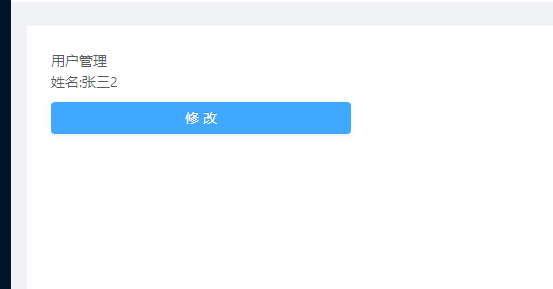
3、运行效果如下
4、点击修改后
5、console日志如下
AntDesign(React)学习-9 Dva model reducer实践的更多相关文章
- AntDesign(React)学习-10 Dva 与后台数据交互
明天正式在线办公没时间学习了,今天晚上再更新一篇, 代码提交一次:https://github.com/zhaogaojian/jgdemo 1.src下创建services目录 创建文件userSr ...
- AntDesign(React)学习-1 创建环境
目录: AntDesign(React)学习-15 组件定义.connect.interface AntDesign(React)学习-14 使用UMI提供的antd模板 AntDesign(Reac ...
- AntDesign(React)学习-3 React基础
前面项目已经建起来了,但是没有React基础怎么办,从头学习,这个项目使用的是基于React16.X版本的几种技术集成,那么我们就从网上找一些相关的资料进行研究,我的习惯是用到哪学到哪. 一.先看一些 ...
- AntDesign(React)学习-14 使用UMI提供的antd模板
1.UMI提供了可视化antd模板,可以直接添加到项目中修改用 比如将个人中心添加到项目中 2.选择个人中心,确定 3.成功 4.打开项目 5.Route文件也自动添加 根路由有exact:true后 ...
- AntDesign(React)学习-5 路由及使用Layout布局
前言:学习目标实现点击登录按钮,直接进入后台布局页面,类似下面antd官网文档展示效果 ant.design访问 https://ant-design.gitee.io/components/menu ...
- AntDesign(React)学习-2 第一个页面
1.前面创建了第一个项目jgdemo,结构如下,使用TypeScript. 2.yarn start启动项目 3.点击GettingStarted是umi的官方网站 https://umijs.org ...
- AntDesign(React)学习-15 组件定义、connect、interface
虽然常用的编码用一种即可,但是看别人文档或者示例时,有的写法不熟悉的话看着很不习惯,整理几种实现同一功能的不同写法 1.Dva Connect与@Connect import React, { Pro ...
- AntDesign(React)学习-13 Warning XX should not be prefixed with namespace XXX
有篇UMI入门简易教程可以看看:https://www.yuque.com/umijs/umi/hello 程序在点击操作时报了一个Warning: [sagaEffects.put] User/up ...
- AntDesign(React)学习-12 使用Table
AntDesign(Vue)版的Table中使用图片https://www.cnblogs.com/zhaogaojian/p/11119762.html 之前在使用VUE版Table时,使用大图片时 ...
随机推荐
- The server cannot be started because one or more of the ports are invalid. Open the server editor and correct the invalid ports.
在eclipse里运行jsp文件最初迟迟没有反应,重启报了这个错误,tomcat的端口设置有问题.需要打开服务器设置一下端口号. 点击Servers,如果没有这一项,按照Window-Show Vie ...
- 反射机制(reflection)
一.反射: 1.反射指可以在运行时加载.探知.使用编译期间完全未知的类. 2.程序在运行状态中,可以动态加载一个只有名称的类,对于任意一个已加载的类,都能够知道这个类的所有属性和方法: 对于任意一个对 ...
- [Contract] Solidity 变量类型的默认值
变量的默认值一般都代表 “零值”. 比如 bool 就是 false,uint.int 就是 0,string 就是空字符串. 其它组合的参考 Solidity 判断 mapping 值的存在 Ref ...
- 安装npm install时,长时间停留在fetchMetadata的解决方法
安装npm install时,长时间停留在fetchMetadata: sill mapToRegistry uri http://registry.npmjs.org/whatwg-fetch处, ...
- PHP0013:PHP操作文件案例 遍历phpdamin目录
- 1.python数据类型详解
python数据类型分类 1).数值型:整数型(int).浮点型(float).布尔型(bool 取值:True.False) 2).容器类型 : 字符串型(str).列表(list).元祖(tupl ...
- python文件操作汇总day7
Python处理文件 文件操作分为读.写.修改,我们先从读开始学习 读文件 示例1: f = open(file='D:/工作日常/兼职白领学生空姐模特护士联系方式.txt',mode='r',enc ...
- 离散对数及其拓展 大步小步算法 BSGS
离散对数及其拓展 离散对数是在群Zp∗Z_{p}^{*}Zp∗而言的,其中ppp是素数.即在在群Zp∗Z_{p}^{*}Zp∗内,aaa是生成元,求关于xxx的方程ax=ba^x=bax=b的解, ...
- 图片中添加箭头【使用PPT实现】
手头上可以使用的方案 QQ截图 分辨率会改变 画图 网上的教程一般是画一根线再加一个三角来画箭头,有点麻烦,改起来不好改. PS 对我来说,软件安装本身就是个问题, 插入图片,加入箭头,组合,另存为, ...
- 安装MongoDB到Ubuntu(APT)
运行环境 系统版本:Ubuntu 16.04.5 LTS 软件版本:mongodb-org-4.0.8 硬件要求:无 安装过程 1.配置APT-Mongodb存储库 ATP-Mongodb存储库由Mo ...