
windows编译caffe2遇到的问题
首先介绍下window编译caffe2整体流程:
说明:如果不需要python支持只需3、4即可,而且编译亦不会出现问题。
1. 安装python2.7,。
我使用的是anaconda python2.7环境,要将python路径添加到系统路径(PYTH)。
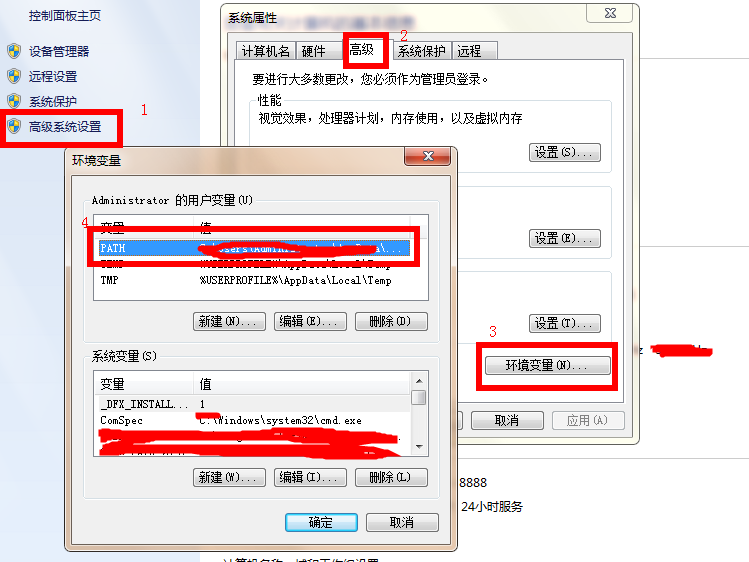
2.python一些必要库的安装,如numpy、pybind11(是否必须未验证??)
具体其他依赖库参见网址:
https://caffe2.ai/docs/getting-started.html?platform=windows&configuration=compile
我安装的库:
pip install future hypothesis numpy protobuf six
pip install flask glog graphviz jupyter matplotlib pydot python-nvd3 pyyaml requests scikit-image scipy setuptools tornado
pip install pybind11
3. 运行找到下载好的caffe2\scripts\build_host_protoc.sh
4.运行caffe2\scripts\build_windows.bat
此时要注意:
如果需要python支持需要将“-DBUILD_PYTHON=OFF^”设置为“-DBUILD_PYTHON=ON^”
如果为OFF大家可以放心编译,设置为ON后会遇到下面描述的问题。
遇到问题及解决方法:
1. 问题找不到numpy,确定python中已经安装
类似:Could NOT find NumPy (missing: NUMPY_INCLUDE_DIR NUMPY_VERSION) 错误。
解决方法:
这时将以前的numpy删除,重新安装numpy即可解决问题。
删除: pip uninstall numpy
安装:pip install nump
2.问题:
CMake summary output
I am installing caffe2 on win10 and it takes me almost a whole day. There are many missing argvs and errors in build_windows.bat. I doubt that the script has not been tested before.
Now I have another problem afer executing build_windows.bat:
ERROR Failed to remove indentation from:
"""
  from distutils import sysconfig

  print(sysconfig.get_python_lib(prefix=''))
"""
Python dedent failed with error code: 系统找不到指定的文件。(system can not find specified file)
CMake Error at cmake/Utils.cmake:177 (message):
Python dedent failed with error code: 系统找不到指定的文件。(system can not find specified file)
Call Stack (most recent call first):
cmake/Utils.cmake:200 (dedent)
caffe2/CMakeLists.txt:145 (pycmd)
解决方法:
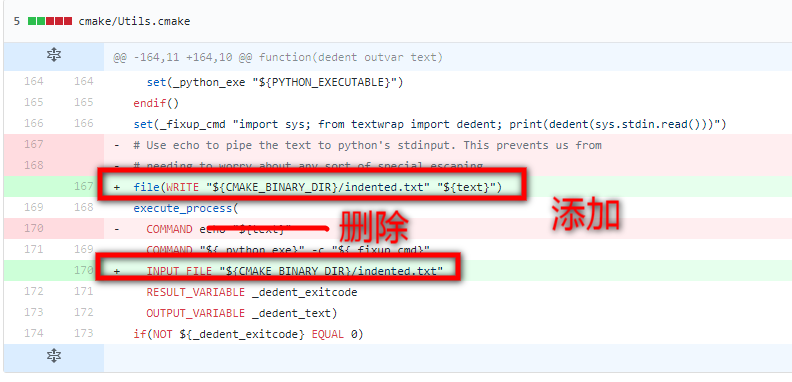
修改cmake/Utils.cmake文件,这个问题估计再更新的caffe2就会没有了。
参见网址:https://github.com/pytorch/pytorch/pull/6296/commits/88ae3f4c4feb50532b64b2f5d1110a7c2e81ceb6
3. 问题无法连接python27.lib
“X:\caffe2\build\ALL_BUILD.vcxproj”(默认目标) (1) ->
“X:\caffe2\build\caffe2\caffe2_pybind11_state.vcxproj”(默认目标) (8) ->
(Link 目标) ->
LINK : fatal error LNK1104: cannot open “python27.lib” [X:\caffe2\build\caffe2\caffe2_pybind11_state.vcxproj]
解决方法:打开Caffe2.sln,然后安装图中操作:
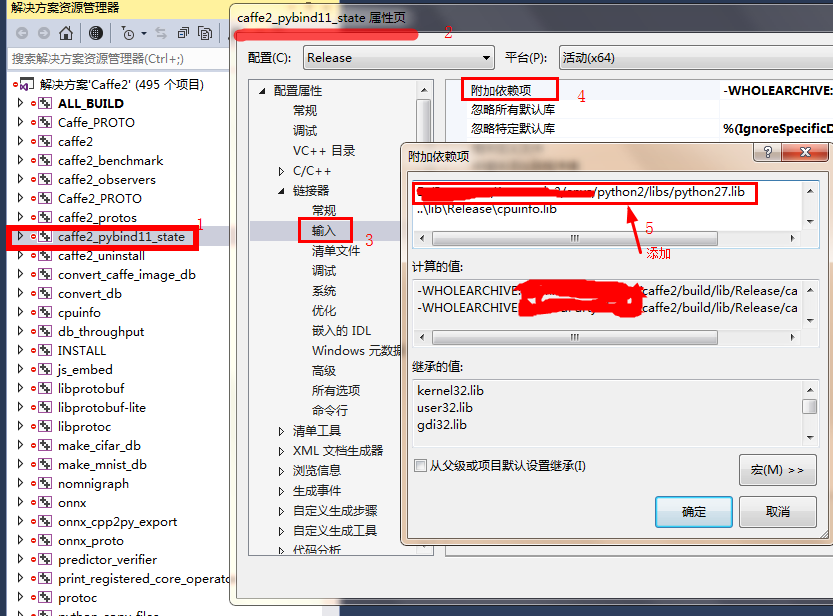 然后就可以通过VS编译一下Caffe2,至此Caffe2编译完成。
编译完后将
然后就可以通过VS编译一下Caffe2,至此Caffe2编译完成。
编译完后将caffe2_pybind11_state.pyd拷贝都python的DLLs目录例如:XXX\Anaconda2\DLLs
4. python使用:import caffe2。但是会报no module的错。>>> import caffe2
Traceback (most recent call last):
File "<stdin>", line 1, in <module>
ImportError: No module named caffe2
解决方案(1):
>>> import sys
>>> sys.path.append("X:/XXXX/caffe2/build")
>>> import caffe2
>>> import caffe2.python
解决方案(2):
参考网址:https://www.cnblogs.com/shanql/articles/5477483.html
windows下:找到python安装环境中的site-packages文件夹:
新建mypkpath.pth(注:必须以.pth为后缀),然后在文件中将X:/XXXX/caffe2/build写入保存即可。
这样的做法目的应该是类似C、C++将头文件告诉python,运行时python再找对应的dll。
windows编译caffe2遇到的问题的更多相关文章
- OGRE 2.1 Windows 编译
版权所有,转载请注明链接 OGRE 2.1 Windows 编译 环境: Windows 7 64Bit Visual Studio 2012 OGRE 2.1 CMake 2.8.12.1 OGRE ...
- Windows编译ejabberd
Windows编译ejabberd(金庆的专栏)安装 erlang OTP. 添加路径到 PATH, 使 erl 可以运行.git clone ejabberd安装 rebar:git clone g ...
- 【转载】OGRE 2.1 Windows 编译
OGRE 2.1 Windows 编译 环境: Windows 7 64Bit Visual Studio 2012 OGRE 2.1 CMake 2.8.12.1 OGRE: OGRE官方推出了最新 ...
- CEF3.2623使用记录:windows编译
CEF3.2623使用记录:windows编译 1:cef3.2623下载地址 2623是cef3最后一个支持xp系统的版本,且可以支持html的audio标签,可以用作对html音频的处理下载地址为 ...
- Windows 编译安装 nginx 服务器 + rtmp 模块
有关博客: <Windows 编译安装 nginx 服务器 + rtmp 模块>.<Ubuntu 编译安装 nginx>.<Arm-Linux 移植 Nginx> ...
- php beast windows编译教程
git clone https://github.com/Microsoft/php-sdk-binary-tools.git c:\php-sdk cd c:\php-sdk git checkou ...
- Win10上使用VS2015编译Caffe2
Caffe2的官网:https://caffe2.ai/ 1.下载.安装及相关准备 在Caffe2的官网点击"Get Started",即进入安装说明页面.官方还未提供编译好的bi ...
- Windows编译Nginx源码
Windows下的Nginx战役,人不作就不会死!就像是拿着麦当劳的优惠券去买肯德基一样,别扭啊 Nginx是一款轻量级的Web 服务器.反向代理服务器.邮件服务器等等集一大串荣誉于一身的大牌人物!他 ...
- 在windows编译MariaDB
OS: Windows XP sp3 IDE: VS2010 MariaDB: V5.5 (到目前为止2016.5,中文域(.cn)只有清华大学 TUNA 镜像源可用) (.tar.gz为源码:.zi ...
随机推荐
- JS放在body与head中的不同
放在body和head其实差不多的,只不过是文档解析的时间不同.浏览器解析html是从上到下的.如果把javascript放在head里的话,则先被解析,但这时候body还没有解析,所以$(#btn) ...
- oracle-ORA-01567错误
删除日志4时将在线索1中保留少于两个日志文件
- iOS 多个精致动画
iOS 多个精致动画 http://www.cocoachina.com/bbs/read.php?tid=301262 iOS 零碎小知识 http://www.cocoachina.co ...
- javascript中字符的一些常规操作
1,获取第一个字符 var str = "hello word"; console.log(str[0]); // h 2,获取最后一个字符 var str = "hel ...
- 罗列Python标准模块
文本 1. string:通用字符串操作 2. re:正则表达式操作 3. difflib:差异计算工具 4. textwrap:文本填充 5. unicodedata:Unicode字符数据库 6. ...
- android 数据存储----android短信发送器之文件的读写(手机+SD卡)
本文实践知识点有有三: 1.布局文件,android布局有相对布局,线性布局,绝对布局,表格布局,标签布局等.各个布局能够嵌套的.本文的布局文件就是线性布局的嵌套 <LinearLayout x ...
- XML内部DTD约束 Day24
<?xml version="1.0" encoding="UTF-8"?> <!-- 内部DTD --> <!-- XML:ex ...
- sql.date
package com.sxt.utils.date1; import java.sql.Date; /* * sql.date:没有时,分,秒 */ public class TestDate2 { ...
- SDUT-3441_数据结构实验之二叉树二:遍历二叉树
数据结构实验之二叉树二:遍历二叉树 Time Limit: 1000 ms Memory Limit: 65536 KiB Problem Description 已知二叉树的一个按先序遍历输入的字符 ...
- python---异常处理与反射
一.异常处理 1.异常基础 在编程过程中为了增加友好性,在程序出现bug时一般不会将错误信息显示给用户,而是现实一个提示的页面,通俗来说就是不让用户看见大黄页!!! try: pass except ...